 revset
To automate Facebook lead follow-up, connect the relevant Lead Ads form to your CRM, map its answers, and trigger a workflow for that form. The workflow should check messaging eligibility, send an appropriate response, assign an owner, and record the next step. Verify a test submission from the original form through to the customer response; a connected-account badge alone is not proof that follow-up works.
Why this matters in a real business
Downloading a CSV makes the next action depend on when somebody opens the export. But importing every lead automatically is only the first improvement. Your team also needs the request, the source, a suitable contact channel, and responsibility for what happens next. This guide covers Facebook Lead Ads Instant Form submissions. Website forms and ads that open a chat need their own triggers and should not be treated as the same event.
What should move from the form into the CRM?
Use a mapping specification your sales team can read. The names below are illustrative fields, not mandatory API names. Keep contact identity, the particular inquiry, and permission records distinct.
- Source lead ID
- A stable reference for reconciliation and duplicate-event protection.
- Submission and receipt times
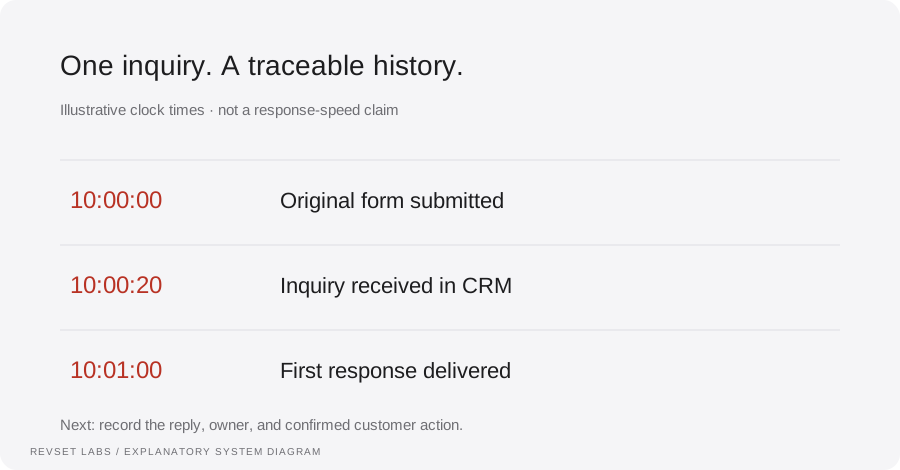
- Two timestamps: when the person submitted and when your system received the inquiry.
- Name and contact details
- Map email and phone into the correct fields. Validate format without inventing missing values.
- Service, ZIP code, timing
- Preserve answers that determine coverage, qualification, and routing.
- Page, form, campaign context
- Retain available source metadata so the response matches the offer.
- Contact permissions
- Record the relevant disclosure, choice, and evidence needed for the selected channel.
- Owner and next action
- Make the open work visible, with a due time and a backup if the owner is unavailable.
A field called “interested” does not explain which service the person wants. Prefer answers that let the next team member continue the conversation. See how to structure the customer record.
Three first-reply templates for Facebook leads
These original drafts assume the selected channel is appropriate and approved for the contact. Replace all placeholders and include the identification and opt-out elements required for that channel.
Estimate request by email
Subject: Your [project] inquiry with [business]
Hi [name], we received your request about [service] in [location]. You mentioned [timing]. Before we arrange the estimating call, [one missing routing question]? You can reply directly to this email.
Use only verified form answers. If the timing field is empty, omit the sentence rather than filling it with a guess.
Requested resource by email
Subject: The [guide] you requested
Hi [name], here is [resource link]. The section on [relevant topic] may help with your question. If you would like to discuss your own project, reply with what you are considering.
Deliver the promised resource first. Downloading a guide should not automatically be recorded as readiness for a sales appointment.
Estimate request by SMS
[Business]: we received your request for [service]. Is the work at a property you own or one you are buying? Reply here. Reply STOP to unsubscribe.
Only ask the ownership question when it matters to the service and has not already been answered. Check consent and suppression before sending. Twilio’s messaging policy explains its requirements; a form submission alone does not establish permission for every kind of message.
From form answer to a useful sales conversation
This fictional walkthrough shows what the customer sees alongside the record the team needs. It is a design example, not a live integration or a customer result.
EXAMPLE EMAIL · HARBOR HOME SERVICES
Your kitchen renovation inquiry
Hi Jamie, we received your kitchen-remodel request for ZIP 27609. You mentioned next spring. Is this a property you own or are purchasing?
JAMIE REPLIES
We own it. We are still deciding whether to change the layout.
WHAT THE COORDINATOR RECEIVES
- Project: kitchen remodel; layout undecided.
- Property: owned; ZIP 27609.
- Timing: next spring; construction availability unconfirmed.
- Next action: offer an appropriate estimating consultation.
The coordinator can now have a relevant conversation. The record should still say “consultation needed” until a booking is actually confirmed. For a customer who asks about price or an unsupported start date, route the question to a person rather than letting the agent invent an answer.
A HighLevel setup example
In the sub-account, open Settings → Integrations and connect the Facebook–Instagram integration with the required access. Choose the Page and whether to sync historical or only new leads, then map the form answers. HighLevel documents these controls in its Facebook integration guide.
In Automation → Workflows, add the Facebook Lead Form Submitted trigger and filter it to the intended Page and form. HighLevel’s trigger documentation explains these filters and actions such as assignment, opportunities, email, and internal notifications. Add your eligibility, duplicate-handling, and routing decisions around those actions.
Test an actual form submission through the full path. The integration guide identifies Meta’s Lead Ads Testing Tool as one test option. A preview of an email does not test the connection, mapping, or owner assignment. Keep customer-facing actions limited to controlled recipients during validation.
What if leads do not arrive?
Compare the source submission with the expected Page, form filter, connection access, sync selection, and mapped record. Inspect errors before reconnecting everything. Use HighLevel’s troubleshooting guide for platform-specific checks. Document what failed and how you will recover any missing submissions without duplicate contact.
Common questions about Facebook lead follow-up
Do I need GoHighLevel?
No. This article uses it as one documented implementation example. Evaluate your existing CRM’s supported lead connector, workflow capabilities, permissions, and recovery tools before changing platforms. Middleware or custom integration can be appropriate when a native connection does not cover the requirement.
How quickly will the reply go out?
Measure the actual path. Connector delivery, workflow scheduling, provider acceptance, and message delivery are separate events. Avoid buying on a universal “instant” promise. Set a response target, then inspect normal cases and delayed cases using timestamps from your own implementation.
Should every lead receive a calendar link?
Only when self-booking fits the offer and your availability is current. A complex project may need a qualifying answer first. Sending a link is not the same as booking; use the confirmed calendar event to start reminders.
What should happen if the lead does not reply?
Use a short, approved follow-up plan tied to the original request, with clear stop conditions. Before each message, check whether the person replied, booked, opted out, or is already speaking to someone. Review contact permissions and timing for the channel. There is no single sequence that is appropriate for every offer.
Does AI decide which leads are worth calling?
It can help interpret answers, but the criteria should come from the business and remain inspectable. Missing information should trigger a question or review, not an unsupported low-quality label. Start with the qualification guide before building scores.
Test the handoff before adding more forms
Download the field-mapping and launch worksheet ↓. Record the source, destination fields, owner, permitted actions, and expected outcome for one complete inquiry.
In the Auspak International project, RevSet connected lead intake, contextual qualification, and human callbacks. That case demonstrates related operating work; its advertising platform and software stack are not identified in the published account.
If your leads are still waiting in exports or an unassigned inbox, book a consultation about your lead follow-up. Bring the form questions, CRM, approved contact process, and the point where the handoff stops.
For additional product-specific context, LeadSync explains its email autoresponder setup. This guide’s examples and operating worksheet are original; vendor availability and account requirements should be checked directly.
Inspect the technical workflow
How the workflow works
- 01
Choose one form and its intended outcome
Write down the Page, form, offer, and action the customer expects after submitting. An estimate request, brochure download, and application inquiry should not all launch the same sales sequence. Start with one form so you can trace every test before adding more sources.
- 02
Connect intake and preserve source history
Use a supported CRM connector or an integration service appropriate to your stack. Store the source lead identifier where available, form identity, original submission time, and CRM receipt time. Keep campaign information when it is supplied; do not invent missing attribution. Replayed delivery of the same source event should not create a second opening message.
- 03
Map answers to fields the team can use
Define the destination for contact details and each custom answer. Preserve the original answer when you normalize it for routing. An unknown service area should remain unknown until checked. Avoid a default value that makes incomplete records appear qualified. Keep a separate opportunity when an existing contact asks about a genuinely different job.
- 04
Select the permitted response channel
Choose the channel supported by the lead’s request, recorded permissions, and provider requirements. An email address or phone number in a form is not a reason to start every available channel at once. If the intended channel fails, create an exception for review or use an explicitly permitted fallback.
- 05
Ask only for missing qualification context
Use the request already supplied. If the form contains the ZIP code and service, do not ask for both again. Ask the next question needed for routing, then store the answer and the reason for the next action. Let a person review unusual scope, conflicting answers, or a requested exception.
- 06
Assign the next action and reconcile the intake
Give each open request an owner and due time. Confirm a callback only after its slot is reserved. Check for a customer reply, opt-out, booking, or human takeover before another scheduled message. Reconcile source submissions with CRM intake and investigate missing records instead of assuming that low replies mean poor advertising.
WORKED EXAMPLE / ILLUSTRATIVE
An estimate request arrives with useful context
Walk through the situation, the design decision, and the checks that belong in a real implementation.
An estimate request arrives with useful context
Illustrative business: Harbor Home Services runs a kitchen-renovation estimate form. Jamie submits “kitchen remodel,” ZIP 27609, and a preferred project period of next spring. The form requests contact about this estimate, and the email follow-up path has been approved for this example.
Read the example against your own process. The same event can require a different action when your business rules differ.
Create the inquiry with its source identifier and original answers. Confirm the service area, then ask whether the property is owned or under contract because that affects the estimating team’s next step. Assign the request to the estimating coordinator; do not infer budget or promise construction availability.
- Context: identify the starting event
- Authority: define permitted actions
- Ownership: name the responsible person
Jamie’s reply is attached to the existing inquiry. When a suitable consultation slot is selected and confirmed, the record changes to callback scheduled. A coordinator sees the project, timing, location, reply, and next action without reopening an ad export.
A historical import looks like a new request
Keep initial backfills outside the live-response workflow until reviewed. Someone who submitted weeks ago should not receive a message claiming they just asked for an estimate. Preserve the original timestamp and use a separate, approved process for older inquiries.
A workflow is incomplete until the team knows how to recognize and recover from an exception.
Version your mapping when a question or answer option changes. Test the new form before connecting it to the live workflow. Empty, unexpected, or conflicting answers should create visible review work, not silently take a default sales route.
- Inspect: the latest customer state
- Preserve: the original event and history
- Escalate: unresolved exceptions
Run a complete submission, missing optional field, invalid contact detail, out-of-area request, repeated event, historical import, changed answer option, delivery failure, booked appointment, and human takeover. Inspect the source record, mapped fields, owner, customer-facing message, and outcome for each. Use test data and controlled recipients. Do not expand to every form until the first form passes and someone owns recovery.
Test the behavior. Keep the evidence.
Run a complete submission, missing optional field, invalid contact detail, out-of-area request, repeated event, historical import, changed answer option, delivery failure, booked appointment, and human takeover. Inspect the source record, mapped fields, owner, customer-facing message, and outcome for each. Use test data and controlled recipients. Do not expand to every form until the first form passes and someone owns recovery.
An example explains an intended design. Acceptance evidence shows whether your particular implementation behaves that way.
Jamie’s reply is attached to the existing inquiry. When a suitable consultation slot is selected and confirmed, the record changes to callback scheduled. A coordinator sees the project, timing, location, reply, and next action without reopening an ad export.
- Expected: the agreed behavior
- Observed: the actual record and response
- Reviewed: a named acceptance owner
Separate source submissions, CRM inquiries, eligible first-contact attempts, delivered responses, replies, qualified inquiries, scheduled callbacks, and connected callbacks. Example only: if one form records 25 unique submissions and the CRM contains 23 matching source identifiers for that period, intake coverage is 23/25 = 92%; investigate the other two. If 18 of 20 attempted emails are delivered, delivery rate is 90%, not a 90% booking rate. Keep source submission, CRM receipt, and meaningful-response timestamps so integration lag is distinguishable from team delay. Do not attribute changes in sales to automation without accounting for campaign mix and the measurement period.
Example 1 of 3
Illustrative examples. No messages are sent, records changed, or appointments booked.
Where it can go wrong
A historical import looks like a new request
Keep initial backfills outside the live-response workflow until reviewed. Someone who submitted weeks ago should not receive a message claiming they just asked for an estimate. Preserve the original timestamp and use a separate, approved process for older inquiries.
One changed form breaks the mapping
Version your mapping when a question or answer option changes. Test the new form before connecting it to the live workflow. Empty, unexpected, or conflicting answers should create visible review work, not silently take a default sales route.
Two connectors send two introductions
Inventory native integrations, middleware automations, and legacy autoresponders. Choose which path owns intake and which owns messaging. Replay a test event to check duplicate protection; receiving one event twice should not produce two greetings.
Qualified becomes a label without evidence
Store the answers and criteria used to route the lead. A positive-sounding reply is not proof of budget, decision authority, or project readiness. If an AI system summarizes the conversation, preserve the source answers for the person who will call.
The team cannot see a delivery gap
An integration can stop while ads continue collecting submissions. Reconcile the same forms and time window, check permission or connection errors, and assign recovery work. When recovering missing leads, prevent re-sending to records already contacted.
What to measure
Separate source submissions, CRM inquiries, eligible first-contact attempts, delivered responses, replies, qualified inquiries, scheduled callbacks, and connected callbacks. Example only: if one form records 25 unique submissions and the CRM contains 23 matching source identifiers for that period, intake coverage is 23/25 = 92%; investigate the other two. If 18 of 20 attempted emails are delivered, delivery rate is 90%, not a 90% booking rate. Keep source submission, CRM receipt, and meaningful-response timestamps so integration lag is distinguishable from team delay. Do not attribute changes in sales to automation without accounting for campaign mix and the measurement period.
How to test the implementation
Run a complete submission, missing optional field, invalid contact detail, out-of-area request, repeated event, historical import, changed answer option, delivery failure, booked appointment, and human takeover. Inspect the source record, mapped fields, owner, customer-facing message, and outcome for each. Use test data and controlled recipients. Do not expand to every form until the first form passes and someone owns recovery.
For each sample journey, record the expected response, CRM state, next action, and accountable owner. Inspect what actually happened before calling the workflow complete.
Can one form submission reach an accountable sales owner?
Prepare these decisions
- Choose the first Page, form, and expected customer next step.
- Map source identifiers, contact permissions, and qualification answers.
- Assign recovery work and verify contact stop rules.
A useful test to walk through
Submit a test form, replay its event, and reply before a scheduled follow-up. Confirm one inquiry, one owner, and no stale message.
See what RevSet implements ↗Platform documentation
This guide describes RevSet’s design approach. Check the vendor’s current documentation for platform-specific behavior and availability.
HighLevel: Facebook integration and form mapping ↗HighLevel: Facebook Lead Form Submitted workflow trigger ↗HighLevel: integration troubleshooting ↗