 revset
Speed to lead is the elapsed time between an inquiry arriving and a defined response event. The response event must be specified: a delivery acknowledgement, an automated reply, or a meaningful answer are different measurements.
Why this matters in a real business
A fast generic message can acknowledge receipt without helping someone progress. The operating goal is to give an inquiry a useful next step while interest is active. Set different expectations for different channels and define what a human should pick up.
Inspect the technical workflow
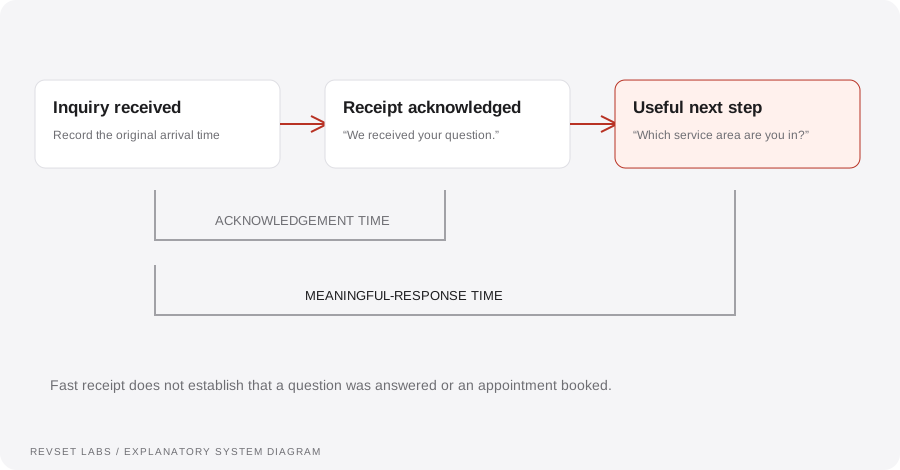
How the workflow works
- 01
Start the clock
Use the time your system receives the inquiry. If source events arrive late, preserve both the original event time and receipt time so integration delay remains visible.
- 02
Choose the right response
Use a channel that is appropriate for the interaction and the contact’s permissions. Confirm the request or ask the smallest useful question.
- 03
Add context
Include the service, location, or appointment detail already supplied. Do not make the person repeat information the system can reliably access.
- 04
Route the exception
A pricing exception, complaint, or unsupported question needs an owner. Tell the person what will happen next instead of improvising a promise.
- 05
Observe the outcome
Record attempted delivery separately from successful delivery, a reply, and a booking. Each event answers a different operational question.
WORKED EXAMPLE / ILLUSTRATIVE
A late-evening consultation inquiry
Walk through the situation, the design decision, and the checks that belong in a real implementation.
A late-evening consultation inquiry
A prospect asks whether a service is available in their area after the team has finished work.
Read the example against your own process. The same event can require a different action when your business rules differ.
The example workflow acknowledges the question, asks for the missing service area, and checks an approved coverage list. It offers booking only if the information and calendar are available.
- Context: identify the starting event
- Authority: define permitted actions
- Ownership: name the responsible person
The prospect gets a relevant next step. If the request is outside the approved rules, the team receives a handoff with the collected details.
Calling an acknowledgement a resolution
“We received your message” is useful, but it does not mean the request has been answered.
A workflow is incomplete until the team knows how to recognize and recover from an exception.
Several simultaneous messages can create confusion. Establish a preferred path and clear fallback behavior.
- Inspect: the latest customer state
- Preserve: the original event and history
- Escalate: unresolved exceptions
Test an inquiry during business hours, after hours, with missing information, and when the messaging provider is unavailable. Verify the next action and the accountable person.
Test the behavior. Keep the evidence.
Test an inquiry during business hours, after hours, with missing information, and when the messaging provider is unavailable. Verify the next action and the accountable person.
An example explains an intended design. Acceptance evidence shows whether your particular implementation behaves that way.
The prospect gets a relevant next step. If the request is outside the approved rules, the team receives a handoff with the collected details.
- Expected: the agreed behavior
- Observed: the actual record and response
- Reviewed: a named acceptance owner
Track acknowledgement time and meaningful-response time separately. Review the median, slower responses, delivery failures, and the share of inquiries still without an owner.
Example 1 of 3
Illustrative examples. No messages are sent, records changed, or appointments booked.
Where it can go wrong
Calling an acknowledgement a resolution
“We received your message” is useful, but it does not mean the request has been answered.
Sending across every channel
Several simultaneous messages can create confusion. Establish a preferred path and clear fallback behavior.
Promising an unstaffed callback
A response should reflect actual team coverage and an agreed escalation process.
What to measure
Track acknowledgement time and meaningful-response time separately. Review the median, slower responses, delivery failures, and the share of inquiries still without an owner.
How to test the implementation
Test an inquiry during business hours, after hours, with missing information, and when the messaging provider is unavailable. Verify the next action and the accountable person.
For each sample journey, record the expected response, CRM state, next action, and accountable owner. Inspect what actually happened before calling the workflow complete.
Does a fast response create a useful next step?
Prepare these decisions
- Separate the time of inquiry, acknowledgement, and first useful response.
- Approve the first message and the question that should follow it.
- Define what happens outside staffed hours and when a person must take over.
A useful test to walk through
Submit an ordinary inquiry outside working hours and one with an unsupported question. Compare the response, the information collected, and the owner assigned. Do not count a receipt message as a completed sales conversation.
See what RevSet implements ↗