INTRODUCING REVSET REVENUE OS

Your business.
In full flow.

Your lead response, booking, CRM, and quote follow-up.
Designed, connected, and tested in your business’s tools.

For service businesses that sell through appointments and proposals. Start with one agreed workflow; your team keeps advice, pricing, and commercial decisions.

ONE CUSTOMER. EVERY NEXT STEP.

From the first hello.
To the deposit paid.

Watch Emma’s inquiry become an appointment, a proposal,
and a project ready to begin. The conversation stays connected.

Wed 23 Sep · 6:42 PM

The inquiry arrives. The conversation starts.

Emma asks about her kitchen. The assistant responds, collects the right context, and gives the inquiry a home.

WHAT YOUR CUSTOMER SEES
9:41
N
NorthsideDesign studio · AI assistant
Wed 23 Sep · 6:42 PM
Hi, I’m looking for help redesigning my kitchen. Do you work in Northside?Emma
Hi Emma. Yes, we work in Northside. Are you looking for a design consultation or a full renovation?Northside · Assistant
A design consultation first. I’d like to get started next month.Emma
Message
Emma Wilson · One continuous conversation
WHAT YOUR BUSINESS SEES
Northside / Revenue workspaceDEMO
RevOS / New inquiryAI assistant · initial response
INQUIRIES

A new project. Already in context.

The useful details arrive with the conversation.

EW
Emma WilsonKitchen design consultation · Northside
EW-1042
ProjectKitchen design
LocationNorthside
WhenNext month
Next stepArrange a consultation
✓
Ready for the next conversation

Emma’s inquiry is captured once. Her context travels with her.

Project and location capturedKitchen design · Northside · Next month
EMMA WILSON · SALES PIPELINENew inquiry
New lead
EWEmma WilsonKitchen design
Booked
Attended
Proposal
Won
Invoiced
Deposit paid
01 / 07 · Inquiry
One inquiry. A clear next step.

Illustrative journey, fictional business, and example pricing. Messages, calendar events, documents, and payments are simulated. AI handles approved routine work; people own attendance, scope, and pricing.

Want this around your business? Book a consultation ↗

MEET REVENUE OS

Less chasing.
More continuity.

Five connected workflows.
One system built around you.

THE CONNECTED EXPERIENCE

One customer.
Nothing lost between steps.

Meet Emma. She asks about a service, chooses a time, and discusses a proposal. Choose a step to see her experience and the next action for your team.

01 / 05

The interest arrives.

A prospect asks about your service. The inquiry is recorded with its source, contact details, and an accountable owner.

Illustrative example. No messages are sent or appointments booked.
Emma WilsonExample customer journey
THE CUSTOMER ASKS

“Hi, do you offer consultations in my area?”

WHAT YOUR TEAM SEESInquiry received

Record the source. Assign the next step.

02 / 05

A useful conversation begins.

Approved questions collect the missing details. The workflow checks your service criteria and routes anything uncertain to a person.

Illustrative example. No messages are sent or appointments booked.
Emma WilsonExample customer journey
YOUR BUSINESS RESPONDS

“Yes, that area is covered. What would you like help with?”

WHAT YOUR TEAM SEESService fit checked

Keep the answers with the customer record.

03 / 05

Interest becomes a time.

Current availability becomes a confirmed calendar event. The customer gets the details, and your team gets the context.

Illustrative example. No messages are sent or appointments booked.
Emma WilsonExample customer journey
YOUR BUSINESS RESPONDS

“Thursday at 10:30 AM is confirmed. Here are the details.”

WHAT YOUR TEAM SEESAppointment confirmed

Link the event. Schedule the agreed reminder.

04 / 05

The quote has a next step.

Your team prepares and approves the quote. An eligible, open opportunity receives follow-up according to the rules you agreed.

Illustrative example. No messages are sent or appointments booked.
Emma WilsonExample customer journey
YOUR BUSINESS RESPONDS

“Have you had a chance to review the proposal?”

WHAT YOUR TEAM SEESNext action scheduled

Check replies and status before another message.

05 / 05

Your judgment takes the lead.

A request to change the scope pauses automated reminders and reaches the person responsible for the proposal.

Illustrative example. No messages are sent or appointments booked.
Emma WilsonExample customer journey
THE CUSTOMER ASKS

“Could we adjust the scope before we go ahead?”

WHAT YOUR TEAM SEESAlex owns the conversation

Pause the sequence. Share the complete history.

Keep following Emma’s story.
Explore the consultation, approved proposal, recorded decision, and delivery handover.
Follow the complete seven-moment journey ↗

REVOS / TRY THE NEXT DECISION

Change the plan.
See the consequence.

Use the controls to change an appointment, ask a scope question, or interrupt follow-up. Watch the customer context and business record respond to the action you chose.

AT THE BOOKING STAGE

Change the appointment

Choose a new time. See the calendar, record, and reminder stay together.

YOUR ACTION

Choose an action to inspect its effect.

Emma WilsonEW-1042 · illustrative record
SIMULATION

Appointment confirmed

CONVERSATION / CURRENT CONTEXT

Your consultation with Alex is confirmed for Thursday at 10:30 AM.

Appointment
Thursday · 10:30 AM
Booking reference
B-1042-1
Active reminder
One · Thursday · 10:30 AM
Cancelled old reminders
0
Next owner
Alex · consultation preparation
WHAT CHANGED
  1. The sample is ready. No action has run.
AFTER AN APPROVED QUOTE

Ask a scope question

Send a customer reply. Then act as the human quote owner.

YOUR ACTION

Choose an action to inspect its effect.

Emma WilsonEW-1042 · illustrative record
SIMULATION

Awaiting a decision

CONVERSATION / CURRENT CONTEXT

Quote Q-1042, version 1, is approved and sent. The follow-up date has not arrived.

Approved quote
Q-1042 · version 1
Scope
Phase one + phase two
Follow-up
Scheduled; not yet due
Commercial owner
Alex
Messages sent by automation
0
WHAT CHANGED
  1. The sample is ready. No action has run.
WHEN FOLLOW-UP IS DUE

Interrupt follow-up

Change the customer state before a due check-in runs.

YOUR ACTION

Choose an action to inspect its effect.

Emma WilsonEW-1042 · illustrative record
SIMULATION

Ready for eligibility check

CONVERSATION / CURRENT CONTEXT

A check-in for the open quote is due. It has not been sent.

Quote
Q-1042 · version 1
Decision
Open
Send eligibility
Ready to check
Check-ins sent
0
Next owner
Alex
WHAT CHANGED
  1. The sample is ready. No action has run.

Three independent exercises, each starting at the relevant point in Emma’s journey. Switching exercises preserves your changes until you reset or reload. This browser simulation does not operate a CRM, send messages, or book appointments.

Read the example outcomes

Appointment changes

A confirmed move to Friday at 11:00 updates the booking reference and active reminder. The old reminder is cancelled. Asking for the unavailable Friday 4:00 slot preserves the existing appointment and reminder. Selecting the same current time creates no duplicate.

A scope question

Emma’s request pauses reminders and reaches Alex without changing version 1. Only the human approval action creates version 2 for phase one. Follow-up stays paused until Alex resumes the revised-quote process. No message is sent merely by resuming it.

An interrupted follow-up

A due check-in sends once when eligible. Repeating the same event cannot send a duplicate. A prior reply, opt-out, or owner pause suppresses the send. Alex can resume a manual pause; an opt-out or unresolved reply cannot be overridden with that control.

01 / RESPONSIVE BY DESIGN

The first reply.
The right impression.

Someone is interested in your business. Give them a relevant next step, using the information and rules your team has approved.

EMMA · NEW INQUIRY

I’d like to book a consultation. Do you cover the north side?

YOUR BUSINESS · APPROVED INFORMATION

We do. What service are you interested in, and when would you like to get started?

A question answered. Useful context collected.

More than
“message received.”

Collect the details that move the conversation forward. Keep them in the customer record. Bring in a person when a question goes beyond the approved answers.

Explore lead response

Context comes with it.

Use the service and contact details already provided.

Your rules set the limits.

Define the questions, service areas, and escalation paths.

Delivery stays visible.

Separate attempted messages from confirmed delivery.

02 / FROM INTEREST TO APPOINTMENT

The back-and-forth.
Beautifully handled.

A booking is more than an available slot. Connect the right calendar, the confirmed time, the reminder, and the customer record.

YOUR TEAM’S CALENDAR

A good week ahead.

Mon15
Tue16
Wed17
Thu18
Fri19
09:00
10:30
Emma · Consultation10:30–11:00 · Alex
12:00
14:00
Example schedule · Times shown in the customer’s agreed time zone
YOU’RE ALL SET

It’s in
the calendar.

Thursday, 10:30 AM
Your consultation with Alex


Calendar event confirmedCustomer record updatedReminder scheduledIllustrative confirmation

The right availability.

Match the service, duration, time zone, and calendar owner.

A change stays connected.

Reschedules update the record and replace the old reminder.

Your team is ready.

The conversation and collected details arrive with the appointment.

03 / THOUGHTFUL FOLLOW-THROUGH

The quote is out.
Keep it moving.

A good quote deserves a clear next step. Keep open opportunities moving with agreed timing, relevant messages, and a check before every action.

Explore quote follow-up
An illustrative business owner listening attentively to a customer on the phone.
The next conversation is yours.AI-generated illustrative scene · Image details
01

YOUR TEAM

The proposal goes out.

Your team approves the scope and sends the quote.

Service proposalApproved and sent · Example
02

THE WORKFLOW

A considered check-in.

Still open? No reply? Contact eligible? The next message follows your agreed rules.

03

THE CUSTOMER

“Can we adjust the scope?”

A reply changes the next action. Automated reminders pause and the proposal owner takes over.

Conversation assigned to Alex

THE POINT OF ALL THIS

Be there for
the human part.

The advice. The listening. The conversation that earns someone’s trust. Give your team a process that supports the work only they can do.

An illustrative business owner and colleague reviewing the next steps for their customers.
Less uncertainty.
A shared next step.
AI-generated illustrative scene · Image details

04 / ONE CONNECTED RECORD

Every opportunity.
A place. A person. A plan.

Bring the useful parts of your sales process together, so the next person does not have to reconstruct the story.

THE CUSTOMER JOURNEY

Emma Wilson

Service consultation · Example record

Inquiry received

Website · Service and location captured

Conversation qualified

Criteria checked · Answers recorded

Consultation confirmed

Calendar event linked · Reminder scheduled

Quote awaiting a decision

Owner assigned · Next action visible

CLEAR OWNERSHIP

Someone owns
what happens next.

AlexProposal owner
Assigned

Questions, exceptions, and next actions reach an accountable person.

See outcomes.
Not just activity.

Keep messages sent, appointments attended, and sales recorded as distinct measures.

Understand the measurement

INTELLIGENCE WITH BOUNDARIES

Flexible conversation.
Firm operating rules.

AI can help interpret a question. Your business defines what may happen next. Revenue OS combines conversational flexibility with explicit permissions and human ownership.

UNDERSTAND

What does the
customer need?

Interpret the request. Collect missing context. Use approved knowledge.

YOUR RULES

Permission.
Current state.
Action limits.

ACT OR ESCALATE

What is the
permitted next step?

Execute an allowed action. Or pause and give a person the context.

Advice, pricing, negotiation, and commercial commitments stay with your team.

Understand automation and AI agents

DESIGNED FOR THE REAL WORLD

Plans change.
The system should notice.

A reliable process needs more than a happy path. Explore the response we design for three common exceptions.

EXAMPLE EXCEPTION / A CUSTOMER REPLIES

Pause further reminders.

The active conversation takes priority. Pending follow-up stops and the reply reaches the opportunity owner.

Reminder suppressedAssigned to Alex
Simulated behavior. Your implementation is tested against its agreed rules.
EXAMPLE EXCEPTION / A CONTACT OPTS OUT

Respect the changed preference.

Update the suppression state and exclude the contact from future messages covered by that preference.

Contact excludedPreference recorded
Simulated behavior. Your implementation is tested against its agreed rules.
EXAMPLE EXCEPTION / A CONNECTION FAILS

Make the failure visible.

Record the unresolved action, check the outcome before retrying, and give recovery an accountable owner.

Action needs reviewRecovery owner notified
Simulated behavior. Your implementation is tested against its agreed rules.
A RELEVANT REASON TO RECONNECT
Relationship reviewed Contact preferences checked Message approved

05 / RELATIONSHIPS WORTH REVISITING

A past conversation.
A possible next chapter.

Past customers and previous inquiries can have a relevant reason to hear from you again. Review the relationship, check eligibility, and reconnect with purpose.

Active conversations, suppression flags, or unclear contact preferences keep a record out of the sequence until resolved.

Explore customer reactivation

BUILT AROUND YOUR BUSINESS

Your tools.
Working in concert.

Revenue OS is a done-for-you implementation in your software environment. We assess the access, data, and integrations before agreeing the build.

Your inbox holds the conversation. Your calendar confirms the appointment. Your CRM keeps the context. Revenue OS connects the approved next action between them.

When a customer changes their plans, the appointment, record, and reminders should reflect the same decision.

Look inside the connected system
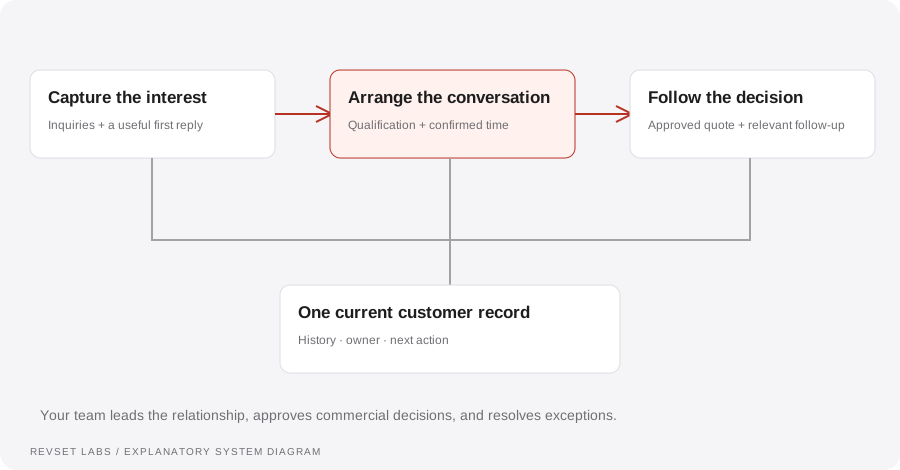
RevSet connects the inquiry, the customer conversation, and the next action. A shared record supports all three. Your team owns advice, proposals, and exceptions throughout the journey.
The system around your sales conversation. RevSet connects the inquiry, the customer conversation, and the next action. A shared record supports all three. Your team owns advice, proposals, and exceptions throughout the journey. Open full-size diagram ↗ Download SVG ↓

DESIGNED. CONNECTED. HANDED OVER.

Made for your process.
Ready for your people.

You are buying a scoped implementation: process design, configuration, testing, documentation, and the agreed handover.

01

Map the journey.

We trace the customer journey, find the gap, and define the owner at each step.

WHAT YOU RECEIVE

A current-state map and a proposed first release.

02

Agree the build.

We specify workflows, access, dependencies, boundaries, and acceptance criteria.

WHAT YOU RECEIVE

A clear scope, commercial proposal, and responsibilities.

03

Prove the behavior.

We test ordinary journeys, repeated events, changed decisions, and unavailable services.

WHAT YOU RECEIVE

A test record showing what passed and what needs resolution.

04

Make it yours.

We document the process and confirm who can monitor, pause, recover, and change it.

WHAT YOU RECEIVE

Operating instructions, ownership, and agreed support.

Start with one observable problem. Expand after the first release has been tested and reviewed.

See how we work

A FEW THINGS TO KNOW

Big picture.
Clear details.

Is Revenue OS a software subscription?

Revenue OS is RevSet’s name for a done-for-you implementation approach. We design, configure, test, and document the agreed workflows in your software environment. The interface illustrations on this page explain the experience; your delivered interface depends on the platforms in scope.

Do I need all five workflows?

No. Start with the workflow that addresses a specific, observable problem. We assess whether connecting additional steps makes sense before including them in the proposal.

Can we keep our current tools?

We review your CRM, calendars, communication channels, data, and integration access. Your proposal identifies what can connect, any limitations, and whether migration or new software is needed.

What still needs a person?

Your team owns advice, pricing, negotiation, commercial decisions, and exceptions outside the approved rules. The implementation defines when automation pauses and who receives the context.

How are cost and ongoing support decided?

Scope depends on workflows, tools, channels, data preparation, and exceptions. Implementation, software subscriptions or usage, and support are specified separately. Monitoring coverage and response commitments depend on the agreement.

How do we know it is working?

Agree the acceptance criteria before building. Test customer journeys and failure cases, then review defined measures such as unassigned inquiries, confirmed bookings, unresolved actions, and recorded outcomes. Activity alone is not evidence of revenue growth.

YOUR NEXT CHAPTER

Let’s put your
business in flow.

Show us how you sell.
We’ll help map the system around it.

Book a consultationDiscuss your process, your tools, and a useful first workflow.

Find your next answer.

Start with a topic or question.

You can also browse all field guides or the workflows.

REVSET LABS · INTRO CALL

Find a time to talk.

Scheduling is provided by Calendly. Open in a new tab ↗

Loading available times…