 revset
Workflow reliability is the ability to execute the intended business action consistently, observe failures, and recover without losing context or creating unintended duplicate actions.
Why this matters in a real business
A visual workflow can look complete while depending on several separate systems. Each boundary can fail independently. Good design makes the difference between requested, attempted, confirmed, and failed actions visible.
Inspect the technical workflow
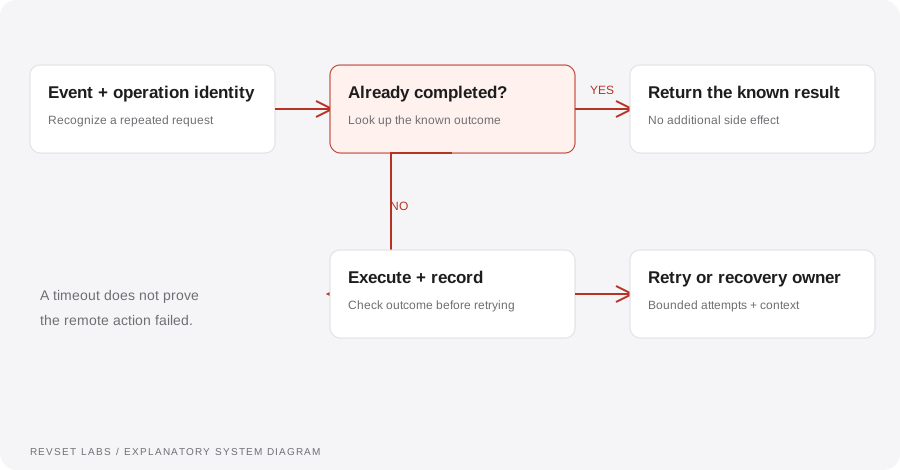
How the workflow works
- 01
Identify the event
Retain an event identifier and enough context to recognize a repeat. Define the operation that should happen once, such as creating a specific appointment.
- 02
Validate input and authority
Check required data and verify the origin of incoming requests using the provider’s supported mechanism. Do not treat arbitrary incoming payloads as trusted instructions.
- 03
Execute with a record
Track the attempted action and the external identifier returned on success. An external timeout may require checking state before repeating the action.
- 04
Retry selectively
Use bounded retries for appropriate temporary failures. Do not repeatedly retry invalid data or a prohibited action. Preserve ordering where later actions depend on earlier success.
- 05
Recover visibly
Place unresolved failures in a reviewable queue with an owner and context. Provide a way to repair or replay the operation without creating another duplicate.
WORKED EXAMPLE / ILLUSTRATIVE
The same event arrives twice
Walk through the situation, the design decision, and the checks that belong in a real implementation.
The same event arrives twice
An integration delivers an identical appointment request again after a network interruption.
Read the example against your own process. The same event can require a different action when your business rules differ.
Use the stable event or operation identifier to check whether the booking already succeeded. If it did, reuse the known result instead of creating a second event.
- Context: identify the starting event
- Authority: define permitted actions
- Ownership: name the responsible person
The system handles repeated delivery while preserving one intended booking. This is an idempotent operation at the relevant business boundary.
Retrying every error forever
Persistent failures can create noise, costs, or repeated side effects.
A workflow is incomplete until the team knows how to recognize and recover from an exception.
The remote system may have completed the action before the response was lost. Check state when feasible.
- Inspect: the latest customer state
- Preserve: the original event and history
- Escalate: unresolved exceptions
Simulate a timeout, a repeated event, an invalid field, a revoked credential, and an out-of-order update. Confirm both recovery and the absence of duplicate customer-facing actions.
Test the behavior. Keep the evidence.
Simulate a timeout, a repeated event, an invalid field, a revoked credential, and an out-of-order update. Confirm both recovery and the absence of duplicate customer-facing actions.
An example explains an intended design. Acceptance evidence shows whether your particular implementation behaves that way.
The system handles repeated delivery while preserving one intended booking. This is an idempotent operation at the relevant business boundary.
- Expected: the agreed behavior
- Observed: the actual record and response
- Reviewed: a named acceptance owner
Track successful operations, retries, permanent failures, time to recovery, duplicated side effects, and the age of unresolved failures.
Example 1 of 3
Illustrative examples. No messages are sent, records changed, or appointments booked.
Where it can go wrong
Retrying every error forever
Persistent failures can create noise, costs, or repeated side effects.
Treating timeout as definite failure
The remote system may have completed the action before the response was lost. Check state when feasible.
Logs with no owner
A failure record is useful only if someone can find, interpret, and resolve it.
What to measure
Track successful operations, retries, permanent failures, time to recovery, duplicated side effects, and the age of unresolved failures.
How to test the implementation
Simulate a timeout, a repeated event, an invalid field, a revoked credential, and an out-of-order update. Confirm both recovery and the absence of duplicate customer-facing actions.
For each sample journey, record the expected response, CRM state, next action, and accountable owner. Inspect what actually happened before calling the workflow complete.
Can you recover without doing the work twice?
Prepare these decisions
- Identify actions with customer-facing effects, such as sends and bookings.
- Define the event or operation identifier used to detect repeated work.
- Specify the unresolved-actions view, retry rules, and recovery owner.
A useful test to walk through
Simulate an external action succeeding while its confirmation is lost. Before retrying, inspect whether the action already happened. Recovery should reconcile the state rather than blindly repeat the side effect.
See what RevSet implements ↗Platform documentation
This guide describes RevSet’s design approach. Check the vendor’s current documentation for platform-specific behavior and availability.
Twilio: messaging webhooks ↗