 revset
CRM architecture is the structure of records, relationships, fields, stages, and rules used to represent customer activity. It determines what the system knows, how work is assigned, and what reports can reliably answer.
Why this matters in a real business
A person, a sales opportunity, and an appointment are different things. Collapsing them into one status field creates confusion when a past customer starts a new job or one contact has two open opportunities.
Inspect the technical workflow
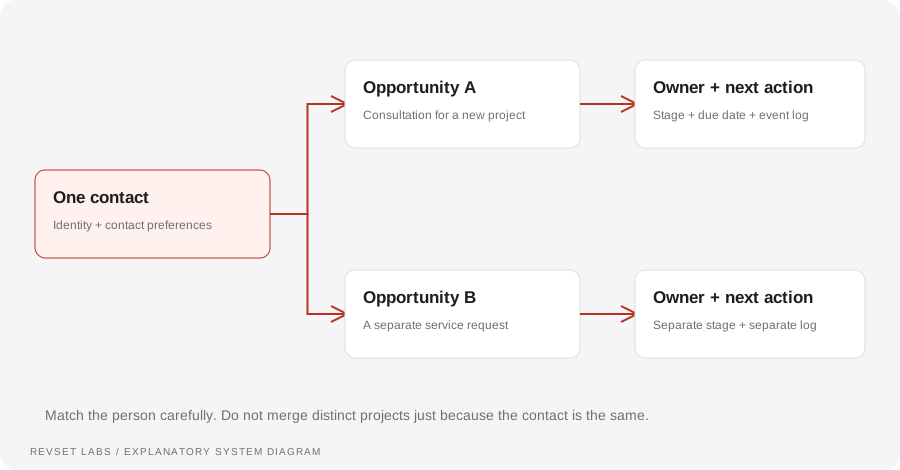
How the workflow works
- 01
Separate the objects
Define what a contact represents, what an opportunity represents, and how appointments and conversations relate to them. Use native platform objects where appropriate.
- 02
Write entry and exit criteria
Each stage needs a clear meaning. Specify the evidence that moves an opportunity into the stage and the actions required to leave it.
- 03
Assign responsibility
Choose who owns the relationship and who owns each active opportunity. Define what happens when someone is unavailable or leaves the team.
- 04
Design useful fields
Collect data for an actual decision or report. Distinguish original source from recent source, qualification from outcome, and customer identity from job-specific details.
- 05
Control changes
Decide which systems may update each field. Document conflict resolution and review unexpected stage movement before adding more automation.
WORKED EXAMPLE / ILLUSTRATIVE
An existing customer starts a second project
Walk through the situation, the design decision, and the checks that belong in a real implementation.
An existing customer starts a second project
A customer who completed a consultation last month sends a request for a different service.
Read the example against your own process. The same event can require a different action when your business rules differ.
Reuse the verified contact record and create a distinct opportunity for the new project. Preserve the original closed outcome and its revenue attribution.
- Context: identify the starting event
- Authority: define permitted actions
- Ownership: name the responsible person
The customer history remains connected while the new sales process gets its own owner, stage, and next action.
Stages that describe activity instead of status
“Called once” may be useful as an activity record but does not necessarily describe the opportunity’s current business state.
A workflow is incomplete until the team knows how to recognize and recover from an exception.
“Qualified” should not mean both “meets criteria” and “appointment booked.” Separate the concepts when they drive different actions.
- Inspect: the latest customer state
- Preserve: the original event and history
- Escalate: unresolved exceptions
Walk through a new prospect, a returning customer, two simultaneous projects, a reassignment, and a lost opportunity reopened for a valid reason.
Test the behavior. Keep the evidence.
Walk through a new prospect, a returning customer, two simultaneous projects, a reassignment, and a lost opportunity reopened for a valid reason.
An example explains an intended design. Acceptance evidence shows whether your particular implementation behaves that way.
The customer history remains connected while the new sales process gets its own owner, stage, and next action.
- Expected: the agreed behavior
- Observed: the actual record and response
- Reviewed: a named acceptance owner
Audit missing owners, stage aging, stale next actions, duplicate contacts, conflicting fields, and unexplained changes. Compare a sample of records with the actual conversations.
Example 1 of 3
Illustrative examples. No messages are sent, records changed, or appointments booked.
Where it can go wrong
Stages that describe activity instead of status
“Called once” may be useful as an activity record but does not necessarily describe the opportunity’s current business state.
One field with multiple meanings
“Qualified” should not mean both “meets criteria” and “appointment booked.” Separate the concepts when they drive different actions.
Unowned synchronization
Two integrations writing the same field can repeatedly undo each other’s updates.
What to measure
Audit missing owners, stage aging, stale next actions, duplicate contacts, conflicting fields, and unexplained changes. Compare a sample of records with the actual conversations.
How to test the implementation
Walk through a new prospect, a returning customer, two simultaneous projects, a reassignment, and a lost opportunity reopened for a valid reason.
For each sample journey, record the expected response, CRM state, next action, and accountable owner. Inspect what actually happened before calling the workflow complete.
Can your team trust the stage and next action?
Prepare these decisions
- Separate a person, a company, and a commercial opportunity where the process needs it.
- Write stage entry and exit rules using observable customer events.
- Specify the owner, authoritative data source, and next-action requirement.
A useful test to walk through
Follow a customer with two separate service requests. Confirm that contact history is shared appropriately while the opportunities keep distinct stages, values, and owners.
See what RevSet implements ↗