 revset
Lead capture is the process of turning an inbound interaction into a usable business record. A useful captured inquiry has a contact identity, an inquiry source, a time of arrival, enough context to act, and a responsible owner.
Why this matters in a real business
A form submission is not the same as an assigned opportunity. A confirmation page can appear even while a CRM integration fails. Treat capture as a sequence you can verify: receipt, validation, identity matching, record creation or update, and routing.
Inspect the technical workflow
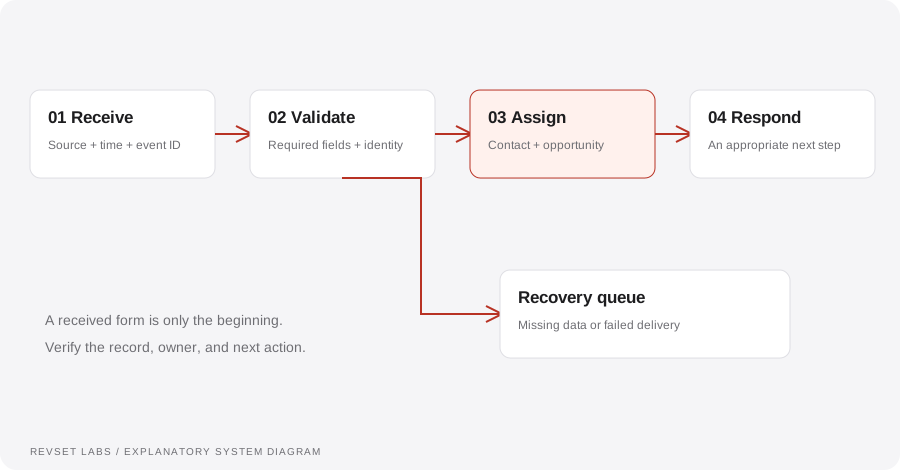
How the workflow works
- 01
Receive
Collect the original event, its timestamp, source, and a stable event identifier where available. Preserve the original channel so a later report does not overwrite how the inquiry arrived.
- 02
Validate
Check the fields required for the next action. A missing phone number should not prevent a valid email inquiry from being routed. Distinguish an invalid field from a field that simply was not requested.
- 03
Resolve identity
Search using agreed identifiers before creating another contact. A shared household email or business switchboard is a reason to review a possible match, not proof that two people are the same.
- 04
Assign
Create or associate the relevant opportunity and identify its owner. Make ownership explicit even when an automated response is the next step.
- 05
Confirm
Record whether each downstream action succeeded. If an integration fails, preserve the inquiry and surface it to someone who can recover it.
WORKED EXAMPLE / ILLUSTRATIVE
One person, two inquiries
Walk through the situation, the design decision, and the checks that belong in a real implementation.
One person, two inquiries
An illustrative home-service prospect submits a website form, then calls ten minutes later.
Read the example against your own process. The same event can require a different action when your business rules differ.
Match the phone number to an existing record where the evidence is sufficient. Add the call as a new interaction rather than silently deleting one event. Review whether the second inquiry concerns the same job.
- Context: identify the starting event
- Authority: define permitted actions
- Ownership: name the responsible person
One contact can retain two interactions and one or more legitimate opportunities. The team sees the history without treating every touch as a new customer.
Over-aggressive deduplication
Automatically merging on a weak identifier can join unrelated people and erase useful context.
A workflow is incomplete until the team knows how to recognize and recover from an exception.
The website can say “sent” while the CRM never receives the inquiry. Record and review delivery outcomes.
- Inspect: the latest customer state
- Preserve: the original event and history
- Escalate: unresolved exceptions
Submit a complete inquiry, a partial inquiry, a repeated event, and a second inquiry from the same person. Confirm the resulting contact, opportunity, owner, and source history for each.
Test the behavior. Keep the evidence.
Submit a complete inquiry, a partial inquiry, a repeated event, and a second inquiry from the same person. Confirm the resulting contact, opportunity, owner, and source history for each.
An example explains an intended design. Acceptance evidence shows whether your particular implementation behaves that way.
One contact can retain two interactions and one or more legitimate opportunities. The team sees the history without treating every touch as a new customer.
- Expected: the agreed behavior
- Observed: the actual record and response
- Reviewed: a named acceptance owner
Track received events, usable records, assignment completion, duplicates requiring review, and failures awaiting recovery. Reconcile these counts over the same reporting period.
Example 1 of 3
Illustrative examples. No messages are sent, records changed, or appointments booked.
Where it can go wrong
Over-aggressive deduplication
Automatically merging on a weak identifier can join unrelated people and erase useful context.
A silent integration failure
The website can say “sent” while the CRM never receives the inquiry. Record and review delivery outcomes.
Source replacement
A later campaign touch should not automatically replace the original source. Store distinct source fields for distinct questions.
What to measure
Track received events, usable records, assignment completion, duplicates requiring review, and failures awaiting recovery. Reconcile these counts over the same reporting period.
How to test the implementation
Submit a complete inquiry, a partial inquiry, a repeated event, and a second inquiry from the same person. Confirm the resulting contact, opportunity, owner, and source history for each.
For each sample journey, record the expected response, CRM state, next action, and accountable owner. Inspect what actually happened before calling the workflow complete.
Can one inquiry reach one accountable owner?
Prepare these decisions
- List the actual form, phone, inbox, and message sources the business uses.
- Choose the fields required at capture and the record that owns them.
- Agree what counts as a repeat inquiry, a new opportunity, or an ambiguous match.
A useful test to walk through
Send the same sample inquiry through two sources. Trace the source history, contact match, owner assignment, and next action. A clean-looking form is not enough if the resulting opportunity is unassigned.
See what RevSet implements ↗