 revset
A useful contractor estimate follow-up names the project, addresses the customer’s current question, and asks for one clear next step. First check that the estimate is current, contact is permitted, and nobody is already handling a reply. Use an unanswered-quote reminder only while the estimate remains unanswered; a price objection, scope change, acceptance, or postponement needs a different response.
Why this matters in a real business
The expensive part has often already happened: you found the lead, discussed the work, visited the property, and prepared an estimate. Another generic reminder cannot tell you whether the customer is comparing scope, waiting for funds, or no longer interested. These original templates help start a useful conversation and leave your team with an explicit next action. They are suggested operating examples, not messages proven to increase conversion by a particular percentage.
Seven contractor estimate follow-up templates
Choose one message that fits the situation. Replace every bracketed field with verified details. These drafts assume the customer requested the estimate and the chosen contact channel is permitted. Add your normal sender details and required channel-specific disclosures. Having a phone number alone does not establish SMS permission; Twilio’s policy sets consent, identification, and opt-out requirements for its services.
Download all seven templates and the operating checklist ↓
1. The estimate went unanswered
Use when: The estimate was delivered, the agreed response date has passed, and there is no open customer question.
Subject: One question about your [project] estimate
Hi [name], I’m reviewing the estimate we sent for [specific work] on [date]. Is there a part of the scope you would like us to explain before you decide? Reply here and [owner] will help with that detail. — [sender], [business]
Text-message version
[Business]: regarding your [project] estimate, is there one detail you would like us to explain? Reply here. Reply STOP to unsubscribe.
Team action: Keep the estimate awaiting a decision. A reply creates a task for its owner and stops unanswered-quote reminders.
2. The customer cannot find the estimate
Use when: The customer says the attachment or quote link is missing or inaccessible.
Subject: Your [project] estimate — replacement link
Hi [name], here is the estimate again: [current quote link]. This is version [number], dated [date], for [scope summary]. If the link still does not open, tell me which format would be easier and I’ll arrange it. — [sender], [business]
Text-message version
[Business]: here is the current [project] estimate you requested: [link]. If it will not open, reply and we will help. Reply STOP to unsubscribe.
Team action: Verify the link points to the right customer and current version. Record the delivery problem rather than labeling the customer uninterested.
3. The price is higher than expected
Use when: The customer has raised a budget concern. This is a response to an objection, not another automated reminder.
Subject: Reviewing the scope of your [project]
Hi [name], thanks for telling me the estimate is above what you expected. Which part of the project is essential for you? [Estimator] can review whether a different scope is practical and explain what would change. We’ll confirm any revised scope and price in writing before you decide. — [sender], [business]
Text-message version
[Business]: thanks for the budget feedback. Which part of [project] is most important to keep? Our estimator can review the options. Reply STOP to unsubscribe.
Team action: Assign the estimator and pause the sequence. Do not let an agent approve a discount, remove required work, or promise phased work before review.
4. The customer wants to change the work
Use when: The original estimate no longer describes the requested job.
Subject: Confirming your changes before we revise the estimate
Hi [name], I have noted your request to [customer-requested change]. Before [estimator] updates the estimate, could you confirm [one missing scope detail]? We’ll send a new version for your review. The existing version does not yet include this change. — [sender], [business]
Text-message version
[Business]: we’ve noted [requested change]. Can you confirm [missing detail] so our estimator can review it? Reply STOP to unsubscribe.
Team action: Record revision requested. Keep the old version in history and suppress approval reminders for it. Restart only after the revised estimate is approved internally and sent.
5. The project is for later
Use when: The customer explicitly asks to postpone the decision.
Subject: Your preferred timing for [project]
Hi [name], I’ve noted that you are considering [project] for [customer’s stated period]. Would you like us to contact you on [proposed date], or would you prefer to get back in touch yourself? We’ll recheck pricing and availability when you are ready. — [sender], [business]
Text-message version
[Business]: for your [project], would a check-in on [date] help, or would you prefer to contact us when ready? Reply STOP to unsubscribe.
Team action: Pause the current sequence. Store an agreed next-contact date if the customer chooses one. A postponed project is not automatically lost.
6. The current price needs rechecking
Use when: The actual estimate validity period has ended. Do not manufacture an expiry date.
Subject: Rechecking the estimate for [project]
Hi [name], the pricing validity date shown on estimate [reference] has passed. If you still want to consider the work, [estimator] can check the scope and current pricing before you approve anything. Would you like us to do that? — [sender], [business]
Text-message version
[Business]: estimate [reference] has passed its stated validity date. Would you like us to review current pricing for [project]? Reply STOP to unsubscribe.
Team action: Route to review. Do not send a payment request for an expired estimate or imply that the former price remains available.
7. Close the unanswered sequence politely
Use when: Your approved follow-up limit is reached, the customer has not replied, and contact is still permitted.
Subject: Pausing our follow-up on [project]
Hi [name], we have not heard back about estimate [reference], so I’m pausing our follow-up. If you decide to revisit the project, reply to this email and we can check the scope, price, and availability then. Thank you for considering [business]. — [sender]
Text-message version
[Business]: we are pausing reminders about your [project] estimate. Reply if you would like to revisit it later. Reply STOP to unsubscribe.
Team action: Stop the sequence. Record no response, not “lost on price.” Do not add a further “last reminder” after promising to stop.
When should you follow up on a contractor estimate?
Start with the customer’s agreed decision or contact date. When no date was agreed, the following is a sample starting schedule for a non-urgent residential estimate. It is an operating proposal, not a proven best cadence for every trade.
- On delivery: send the estimate with the scope, actual validity terms, owner, and approval process. This is delivery, not a second reminder.
- Two business days later: if still unanswered and eligible, ask whether one scope detail needs explaining. Check delivery problems first.
- Around one week after delivery: if appropriate, offer a useful clarification tied to that project. Skip this touch when there is nothing useful to add.
- At the agreed limit, such as two weeks: send the closing message if still appropriate, then stop the unanswered sequence.
A customer saying “contact me next month” overrides that schedule. An open question deserves an answer, not a wait until day seven. A service request needing immediate attention belongs in the business’s approved service process, not this non-urgent quote sequence.
Jobber’s quote-follow-up guide also discusses matching communication to customer preferences. Use your own replies, opt-outs, and job outcomes to evaluate timing rather than assuming that a universal number of touches will win the work.
See the journey from estimate to recorded outcome
This fictional painting project demonstrates how the messages and team actions fit together. It is not a client result or a live CRM.
- Estimate sent
Q-104, version 1: two bedrooms and a hallway. The customer receives the current scope and an approval link.
- Customer replies
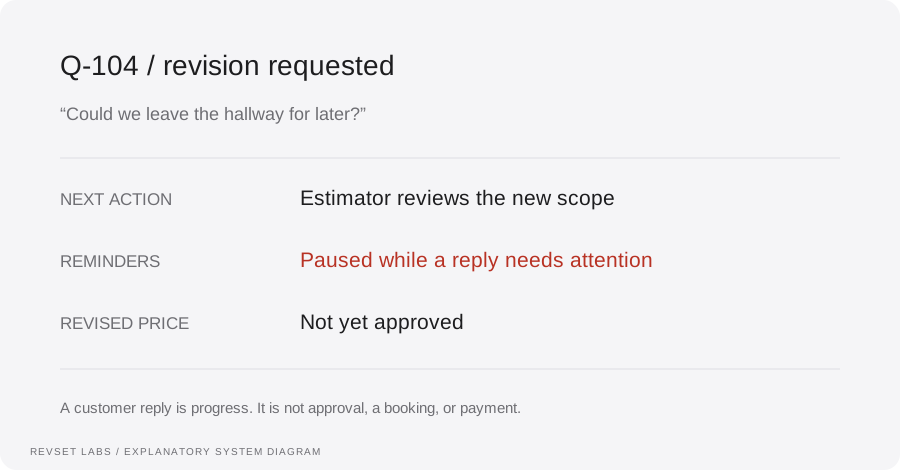
“Could we leave the hallway for later?” The system pauses reminders and assigns the estimator.
- Estimator reviews
The estimator confirms the revised scope and issues version 2. The assistant does not choose a new price.
- Customer accepts
Acceptance of version 2 is recorded. The scheduling owner checks capacity before confirming a start date.
- Payment and job status
If a deposit is part of the agreed process, the approved invoice is sent. Payment is recorded only after the payment system confirms it.
Every stage has evidence and an owner. This is the practical meaning of a connected revenue system: the next action changes when the customer’s situation changes. Explore the interactive customer journey or the published stop-rule simulation and its limits.
What should you automate—and what needs a person?
Automate repeatable record checks, approved reminders, task creation, and routing. Keep scope revisions, discounts, unusual terms, and unverified availability with the people responsible for them. AI can help interpret a reply, but it should preserve the original message and uncertainty rather than turn a suggestion into a commercial commitment.
Start by reviewing your existing platform. Jobber documents automatic quote follow-ups, subject to the relevant account features. A native reminder may cover a simple need. More complex handoffs need explicit ownership of replies, revisions, stop conditions, and recovery. Verify your account’s behavior with sample journeys before adding another automation tool.
The record your estimator should receive
- Current estimate ID, version, scope, and validity date.
- Latest customer message and the specific unresolved question.
- Contact preference and any agreed next-contact date.
- Current stage, responsible person, and task due time.
- Which reminders are paused and what may restart them.
Use our follow-up workflow guide for the implementation rules. The templates on this page solve the writing problem; the workflow must also keep the record current.
Common questions about estimate follow-up
Should I call, email, or text?
Use the customer’s permitted, preferred channel and the amount of detail needed. Email can carry a revised scope; a scheduled call may resolve a complex comparison. Do not send the same reminder on three channels just because the CRM can.
Should I offer a discount to get a response?
First learn what is preventing the decision. A question about scope, timing, or payment terms may not need a discount. Any change to price or terms should come from an authorized person and appear in the correct estimate version.
What if the homeowner says they chose another contractor?
Acknowledge the decision courteously and stop quote follow-ups. Record the reason they actually gave, if any. Do not infer that your price, team, or response time caused the loss.
Can I revive estimates from months ago?
Review them separately. The need, contact eligibility, scope, and price may have changed. Do not import old estimates into a sequence that says they were just sent. See the customer reactivation guide.
How do I know the sequence is helping?
Follow a defined estimate cohort through replies, approvals, scheduled work, and recorded payments. Review the conversations and unresolved records. Message volume or pipeline value alone does not show earned revenue.
Put ten open estimates through this checklist
Download the template pack and ten-estimate review worksheet ↓. Choose ten consecutive open estimates, record the latest customer situation, and assign one appropriate next action to each. Do not cherry-pick only customers likely to say yes.
When to bring RevSet into the process
If quotes live in one tool, replies in another, and the next action in someone’s memory, start with the handoff. RevSet’s quote-follow-up implementation service connects approved messages, current records, and responsible owners.
Our Auspak case study documents related intake, qualification, and callback work in education consulting. It is not evidence that these contractor templates produce a particular sales result.
Review your quote follow-up with RevSet ↗
Bring your quoting tool, a redacted unanswered estimate, and a reply that your current process struggled to handle. We can use those to discuss which workflow needs attention first.
Inspect the technical workflow
How the workflow works
- 01
Identify the estimate and owner
Use the current quote identifier, version, delivery date, validity period, related job, and responsible estimator. A contact may have more than one open project. Do not attach a reply to the wrong estimate just because the phone number matches.
- 02
Choose the message from the current situation
Check the latest inbound message and owner notes. Unanswered, clarification needed, revision requested, postponed, accepted, and declined are different situations. The customer’s current question decides the message; the timer alone does not.
- 03
Check eligibility immediately before sending
Confirm the permitted channel, preferred timing, suppression state, quote status, and whether a person is already responding. Prevent a repeated job from sending the same reminder twice. If the state cannot be checked, hold the message for review.
- 04
Hand the reply to someone who can act
Preserve the customer’s wording and highlight the unresolved decision. The estimator owns scope and price; the scheduling team owns availability. Give the task a due time and a backup route if the primary owner is away.
- 05
Record the business outcome separately
A reply is not an approval, and an approval is not payment. Update the next action from verified quote, scheduling, and payment records. Stop quote-chasing once the decision has moved to the next stage.
WORKED EXAMPLE / ILLUSTRATIVE
A painting estimate turns into a scope conversation
Walk through the situation, the design decision, and the checks that belong in a real implementation.
A painting estimate turns into a scope conversation
Fictional example: Cedar Coast Painting sends estimate Q-104 for two bedrooms and a hallway. Taylor replies to a follow-up asking whether the hallway can be removed. No revised price has been approved.
Read the example against your own process. The same event can require a different action when your business rules differ.
Pause the unanswered-estimate sequence. Assign the estimator a scope-review task that includes Q-104, its version, the requested removal, and Taylor’s original message. The assistant acknowledges the request without inventing a saving.
- Context: identify the starting event
- Authority: define permitted actions
- Ownership: name the responsible person
After the estimator issues a reviewed revision, Taylor can decide on that version. An actual acceptance moves the record to scheduling review. Only a reserved service date and recorded payment create those later outcomes; the reply itself is not a won job.
Every silent quote is labeled too expensive
Silence does not establish the reason for a lost job. Keep no response separate from a stated price objection so reports do not push you toward unnecessary discounting.
A workflow is incomplete until the team knows how to recognize and recover from an exception.
A message that promises next Tuesday or ten percent off creates a commitment. Use current, approved information, and route commercial exceptions to the owner.
- Inspect: the latest customer state
- Preserve: the original event and history
- Escalate: unresolved exceptions
Use fictional customers and controlled recipients to test no reply, a scope question, a price objection, an agreed later date, an expired estimate, acceptance, rejection, opt-out, a duplicate send job, and a reply arriving just before the reminder. For each, inspect the message, quote version, state, owner, and next task. A passing template preview does not validate the integration.
Test the behavior. Keep the evidence.
Use fictional customers and controlled recipients to test no reply, a scope question, a price objection, an agreed later date, an expired estimate, acceptance, rejection, opt-out, a duplicate send job, and a reply arriving just before the reminder. For each, inspect the message, quote version, state, owner, and next task. A passing template preview does not validate the integration.
An example explains an intended design. Acceptance evidence shows whether your particular implementation behaves that way.
After the estimator issues a reviewed revision, Taylor can decide on that version. An actual acceptance moves the record to scheduling review. Only a reserved service date and recorded payment create those later outcomes; the reply itself is not a won job.
- Expected: the agreed behavior
- Observed: the actual record and response
- Reviewed: a named acceptance owner
Select estimates first delivered in a defined period and count unique estimates rather than messages. Record delivered estimates, customer replies, clarification or revision requests, approved estimates, confirmed jobs, and payments received separately. For example only: among 40 estimates delivered in one month, 12 receive replies after follow-up and 6 are later approved. The reply rate is 12/40 = 30%; the observed approval rate is 6/40 = 15%. Those counts do not prove follow-up caused six approvals. Keep unresolved estimates visible and account for changes in service mix, pricing, lead sources, and observation time before comparing periods.
Example 1 of 3
Illustrative examples. No messages are sent, records changed, or appointments booked.
Where it can go wrong
Every silent quote is labeled too expensive
Silence does not establish the reason for a lost job. Keep no response separate from a stated price objection so reports do not push you toward unnecessary discounting.
The agent invents a slot or discount
A message that promises next Tuesday or ten percent off creates a commitment. Use current, approved information, and route commercial exceptions to the owner.
Two systems chase the same customer
A field-service platform and CRM may both have follow-ups enabled. Identify one owner of quote reminders and inspect both systems before launching another sequence.
An old version keeps circulating
A scope revision should pause reminders for the earlier version. Verify that customer links, approval actions, and internal notes refer to the intended estimate.
The reply arrives just before the reminder
Re-check immediately before the send, not only when the task is scheduled. Document any integration delay and recovery behavior. Once a provider has accepted a message, your system may not be able to recall it.
What to measure
Select estimates first delivered in a defined period and count unique estimates rather than messages. Record delivered estimates, customer replies, clarification or revision requests, approved estimates, confirmed jobs, and payments received separately. For example only: among 40 estimates delivered in one month, 12 receive replies after follow-up and 6 are later approved. The reply rate is 12/40 = 30%; the observed approval rate is 6/40 = 15%. Those counts do not prove follow-up caused six approvals. Keep unresolved estimates visible and account for changes in service mix, pricing, lead sources, and observation time before comparing periods.
How to test the implementation
Use fictional customers and controlled recipients to test no reply, a scope question, a price objection, an agreed later date, an expired estimate, acceptance, rejection, opt-out, a duplicate send job, and a reply arriving just before the reminder. For each, inspect the message, quote version, state, owner, and next task. A passing template preview does not validate the integration.
For each sample journey, record the expected response, CRM state, next action, and accountable owner. Inspect what actually happened before calling the workflow complete.
Who owns the next action on each open estimate?
Prepare these decisions
- Identify the current estimate and customer reply.
- Choose approved messages and a follow-up limit.
- Assign price and scope questions to the estimator.
A useful test to walk through
Reply with a scope change just before a reminder is due. Confirm the old message stops and an estimator receives the current quote version and question.
See what RevSet implements ↗Platform documentation
This guide describes RevSet’s design approach. Check the vendor’s current documentation for platform-specific behavior and availability.
Jobber: quote follow-up automation documentation ↗Twilio: messaging consent and opt-out policy ↗