 revset
Appointment booking automation coordinates the steps from a request for a meeting to a confirmed calendar event and its follow-through. It includes eligibility, availability, event creation, confirmation, reminders, cancellation, and rescheduling rules.
Why this matters in a real business
A booking link solves one step. A complete process also has to know which calendar fits the inquiry, whether an event was actually created, who owns it, and which reminders should change when the appointment changes.
Inspect the technical workflow
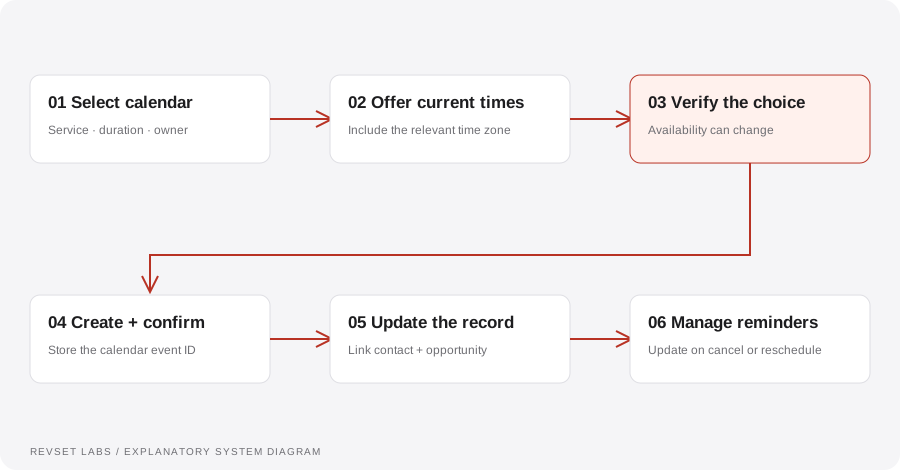
How the workflow works
- 01
Determine the meeting
Choose the appropriate service, duration, owner, and location. Separate a discovery call from a service appointment when their requirements differ.
- 02
Check current availability
Use the calendar as the authority for a slot. A time mentioned earlier in a conversation may no longer be available when the person confirms.
- 03
Create and verify
Create the event once, retain its identifier, and confirm success before telling the person the booking is complete. Handle conflicts by offering current alternatives.
- 04
Synchronize
Link the contact and opportunity to the appointment. Update the pipeline only when the relevant booking event is confirmed.
- 05
Manage changes
Cancel or update scheduled reminders when the appointment changes. Define recovery for a failed update and a route for a prospect who needs help.
WORKED EXAMPLE / ILLUSTRATIVE
Two prospects choose the same time
Walk through the situation, the design decision, and the checks that belong in a real implementation.
Two prospects choose the same time
The illustrative system offers Thursday at 2:30 PM to two people in separate conversations.
Read the example against your own process. The same event can require a different action when your business rules differ.
Before confirming each booking, check current availability. If the first event occupies the slot, the second conversation receives another available time.
- Context: identify the starting event
- Authority: define permitted actions
- Ownership: name the responsible person
The workflow treats a suggested time as an offer, not a reservation. A confirmed calendar event is the source for the final confirmation.
A successful message with a failed event
Sending “you’re booked” before verifying event creation makes the messaging system and calendar disagree.
A workflow is incomplete until the team knows how to recognize and recover from an exception.
A moved appointment can generate two sets of reminders unless scheduled work is updated or cancelled.
- Inspect: the latest customer state
- Preserve: the original event and history
- Escalate: unresolved exceptions
Test a normal booking, concurrent requests, no availability, cancellation, rescheduling, and a time-zone change. Confirm that the CRM and reminder schedule match the calendar.
Test the behavior. Keep the evidence.
Test a normal booking, concurrent requests, no availability, cancellation, rescheduling, and a time-zone change. Confirm that the CRM and reminder schedule match the calendar.
An example explains an intended design. Acceptance evidence shows whether your particular implementation behaves that way.
The workflow treats a suggested time as an offer, not a reservation. A confirmed calendar event is the source for the final confirmation.
- Expected: the agreed behavior
- Observed: the actual record and response
- Reviewed: a named acceptance owner
Track offered appointments, confirmed bookings, cancellations, reschedules, attendance, and booking failures. Define whether the booking rate uses all inquiries or qualified inquiries as its denominator.
Example 1 of 3
Illustrative examples. No messages are sent, records changed, or appointments booked.
Where it can go wrong
A successful message with a failed event
Sending “you’re booked” before verifying event creation makes the messaging system and calendar disagree.
Old reminders survive rescheduling
A moved appointment can generate two sets of reminders unless scheduled work is updated or cancelled.
Time-zone ambiguity
Display the relevant time zone and preserve the event’s actual timestamp. Test daylight-saving transitions where relevant.
What to measure
Track offered appointments, confirmed bookings, cancellations, reschedules, attendance, and booking failures. Define whether the booking rate uses all inquiries or qualified inquiries as its denominator.
How to test the implementation
Test a normal booking, concurrent requests, no availability, cancellation, rescheduling, and a time-zone change. Confirm that the CRM and reminder schedule match the calendar.
For each sample journey, record the expected response, CRM state, next action, and accountable owner. Inspect what actually happened before calling the workflow complete.
Which event actually confirms an appointment?
Prepare these decisions
- Identify the authoritative calendar, service duration, and timezone rules.
- Specify what the customer should see if a slot becomes unavailable.
- List the reminders that must change after cancellation or rescheduling.
A useful test to walk through
Try a booking, a simultaneous request for the same slot, and a later cancellation. Inspect the calendar identifiers and pending reminders. Only the confirmed external result should move the opportunity to booked.
See what RevSet implements ↗