 revset
Lead follow-up automation schedules communication and tasks after an inquiry or sales interaction. A well-defined sequence responds to the current opportunity state and stops or changes when the prospect replies, books, opts out, or becomes ineligible.
Why this matters in a real business
A sequence should exist to help resolve an open next step. The appropriate message after an unanswered service question is different from the message after a detailed quote. Context, timing, ownership, and stopping conditions are part of the design.
Inspect the technical workflow
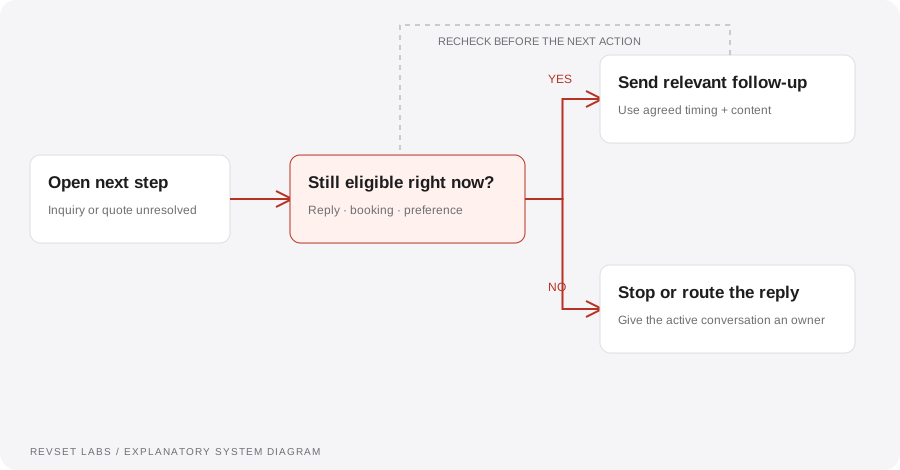
How the workflow works
- 01
Define the open question
Identify what the sequence is trying to resolve: a missing detail, an unbooked consultation, or a quote awaiting a decision.
- 02
Choose eligibility
Check channel permissions, current opportunity state, assigned owner, and any active conversations. Prevent conflicting sequences from enrolling the same opportunity.
- 03
Schedule with context
Use an agreed cadence and relevant message content. Decide what happens outside operating hours and when a human is already working the opportunity.
- 04
Recheck before sending
Evaluate the current state at execution time. A message scheduled yesterday may be inappropriate after a reply or booking today.
- 05
Exit deliberately
Stop or reroute on reply, booking, opt-out, invalid contact information, or opportunity closure. Preserve the reason and notify the owner where needed.
WORKED EXAMPLE / ILLUSTRATIVE
A quote gets a reply before the next reminder
Walk through the situation, the design decision, and the checks that belong in a real implementation.
A quote gets a reply before the next reminder
An illustrative prospect receives a quote on Monday. A reminder is queued, but the prospect replies first with a question.
Read the example against your own process. The same event can require a different action when your business rules differ.
The workflow detects the active conversation, pauses the generic reminder, and assigns the question to the quote owner.
- Context: identify the starting event
- Authority: define permitted actions
- Ownership: name the responsible person
The prospect receives help with the real objection rather than an automated message asking whether they saw the quote.
Every workflow sends independently
A CRM can host several automations that do not know about one another. Establish contact-level and opportunity-level coordination.
A workflow is incomplete until the team knows how to recognize and recover from an exception.
Eligibility can change between scheduling and delivery. A current-state check prevents stale actions.
- Inspect: the latest customer state
- Preserve: the original event and history
- Escalate: unresolved exceptions
Reply, book, opt out, change the owner, and close the opportunity between two scheduled steps. Verify that each event changes or stops the correct sequence.
Test the behavior. Keep the evidence.
Reply, book, opt out, change the owner, and close the opportunity between two scheduled steps. Verify that each event changes or stops the correct sequence.
An example explains an intended design. Acceptance evidence shows whether your particular implementation behaves that way.
The prospect receives help with the real objection rather than an automated message asking whether they saw the quote.
- Expected: the agreed behavior
- Observed: the actual record and response
- Reviewed: a named acceptance owner
Track replies, bookings, opportunities resolved, sequence exits, duplicate enrollments, and opt-outs. Evaluate message quality using sampled conversations as well as aggregate rates.
Example 1 of 3
Illustrative examples. No messages are sent, records changed, or appointments booked.
Where it can go wrong
Every workflow sends independently
A CRM can host several automations that do not know about one another. Establish contact-level and opportunity-level coordination.
Scheduled equals entitled to send
Eligibility can change between scheduling and delivery. A current-state check prevents stale actions.
Re-enrollment without a reason
A record should not repeatedly restart a sequence just because a field is edited. Define which new event makes another run legitimate.
What to measure
Track replies, bookings, opportunities resolved, sequence exits, duplicate enrollments, and opt-outs. Evaluate message quality using sampled conversations as well as aggregate rates.
How to test the implementation
Reply, book, opt out, change the owner, and close the opportunity between two scheduled steps. Verify that each event changes or stops the correct sequence.
For each sample journey, record the expected response, CRM state, next action, and accountable owner. Inspect what actually happened before calling the workflow complete.
What makes the next message appropriate?
Prepare these decisions
- Separate an unanswered inquiry from an open quote awaiting a decision.
- Define message eligibility, timing, maximum attempts, and an owner.
- List replies, opt-outs, bookings, and decisions that must stop or change the sequence.
A useful test to walk through
Place a reply immediately before the scheduled send. The workflow should re-check the current conversation state, suppress the stale reminder, and route the new question to its owner.
See what RevSet implements ↗Platform documentation
This guide describes RevSet’s design approach. Check the vendor’s current documentation for platform-specific behavior and availability.
HubSpot: workflow enrollment and re-enrollment ↗