 revset
Customer reactivation is a planned effort to restart appropriate conversations with inactive customers or past prospects. It begins by deciding who is eligible, why the message is relevant, and what should happen if someone responds.
Why this matters in a real business
A database contains different relationships. A customer due for a recurring service, an inquiry that never qualified, and a person who opted out should not receive the same treatment. Segment based on the relationship and the reason for contact.
Inspect the technical workflow
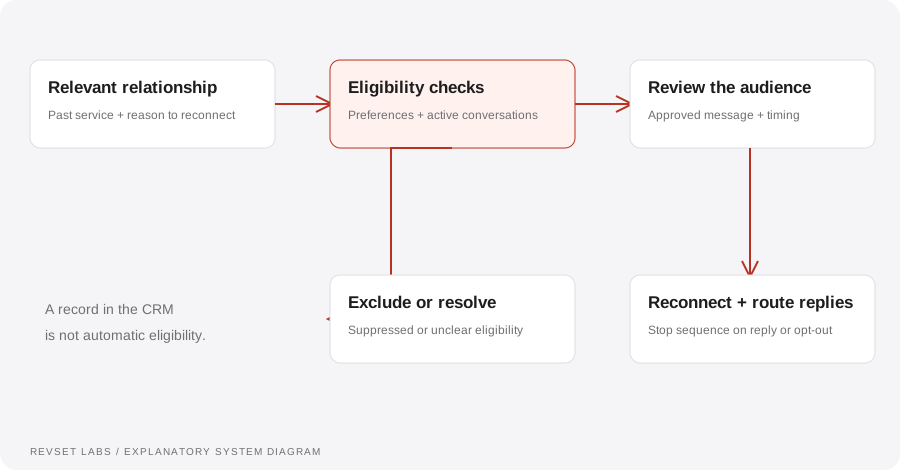
How the workflow works
- 01
Review the data
Identify contact quality, permission information, previous outcomes, and current customer status. Exclude records that cannot support an appropriate outreach decision.
- 02
Choose a relevant segment
Start with a group that has a coherent reason to hear from you, such as an agreed service review or a previously requested update.
- 03
Define the message
Explain the reason for reaching out in terms the recipient recognizes. Use an accurate offer and a clear way to respond or stop further messages.
- 04
Prepare for replies
Decide who handles questions, how new appointments are created, and how outcomes update the CRM. A campaign needs an operating process behind it.
- 05
Learn before expanding
Review a bounded initial run. Inspect responses, contact errors, opt-outs, and the team’s ability to handle renewed demand.
WORKED EXAMPLE / ILLUSTRATIVE
A service review that makes sense
Walk through the situation, the design decision, and the checks that belong in a real implementation.
A service review that makes sense
An illustrative business has a group of previous customers who requested a future check-in about a recurring service.
Read the example against your own process. The same event can require a different action when your business rules differ.
Review eligibility, send a relevant reminder tied to that request, and route positive replies into the correct booking process. Exclude contacts with conflicting preferences.
- Context: identify the starting event
- Authority: define permitted actions
- Ownership: name the responsible person
Reactivation starts a context-aware conversation with an owner. It does not assume that every old record represents consent or current demand.
A stale list presented as ready demand
Old records may be inaccurate, ineligible, or no longer relevant. Review them before treating the list as an opportunity pool.
A workflow is incomplete until the team knows how to recognize and recover from an exception.
Campaign capacity, appointment capacity, and delivery capacity need to agree.
- Inspect: the latest customer state
- Preserve: the original event and history
- Escalate: unresolved exceptions
Test a positive reply, a preference change, an invalid number, an already-active customer, and a recipient asking why they were contacted.
Test the behavior. Keep the evidence.
Test a positive reply, a preference change, an invalid number, an already-active customer, and a recipient asking why they were contacted.
An example explains an intended design. Acceptance evidence shows whether your particular implementation behaves that way.
Reactivation starts a context-aware conversation with an owner. It does not assume that every old record represents consent or current demand.
- Expected: the agreed behavior
- Observed: the actual record and response
- Reviewed: a named acceptance owner
Track eligible records, delivery, positive replies, negative replies, opt-outs, appointments, and completed outcomes. Use the eligible population as the campaign denominator.
Example 1 of 3
Illustrative examples. No messages are sent, records changed, or appointments booked.
Where it can go wrong
A stale list presented as ready demand
Old records may be inaccurate, ineligible, or no longer relevant. Review them before treating the list as an opportunity pool.
An offer the team cannot fulfill
Campaign capacity, appointment capacity, and delivery capacity need to agree.
Counting every reply as success
A complaint, an opt-out, and a qualified request are different outcomes. Report them separately.
What to measure
Track eligible records, delivery, positive replies, negative replies, opt-outs, appointments, and completed outcomes. Use the eligible population as the campaign denominator.
How to test the implementation
Test a positive reply, a preference change, an invalid number, an already-active customer, and a recipient asking why they were contacted.
For each sample journey, record the expected response, CRM state, next action, and accountable owner. Inspect what actually happened before calling the workflow complete.
Why should this person hear from you now?
Prepare these decisions
- Define the relationship and service reason that make a check-in relevant.
- Agree the contact eligibility, suppression, and frequency rules.
- Route replies into current conversations with a named owner.
A useful test to walk through
Review an eligible customer, an active sales conversation, and a suppressed contact in the same source segment. Confirm that only the eligible record enters and that a later opt-out stops queued follow-up.
See what RevSet implements ↗Platform documentation
This guide describes RevSet’s design approach. Check the vendor’s current documentation for platform-specific behavior and availability.
Twilio: Messaging Services and opt-out handling ↗