 revset
A human handoff transfers an interaction from automated processing to an accountable person. It includes the reason for escalation, the relevant context, a clear owner, and a defined state for any pending automation.
Why this matters in a real business
An alert is not the same as accepted ownership. If every exception goes to a shared inbox without a response process, the system has moved the bottleneck rather than resolved it.
Inspect the technical workflow
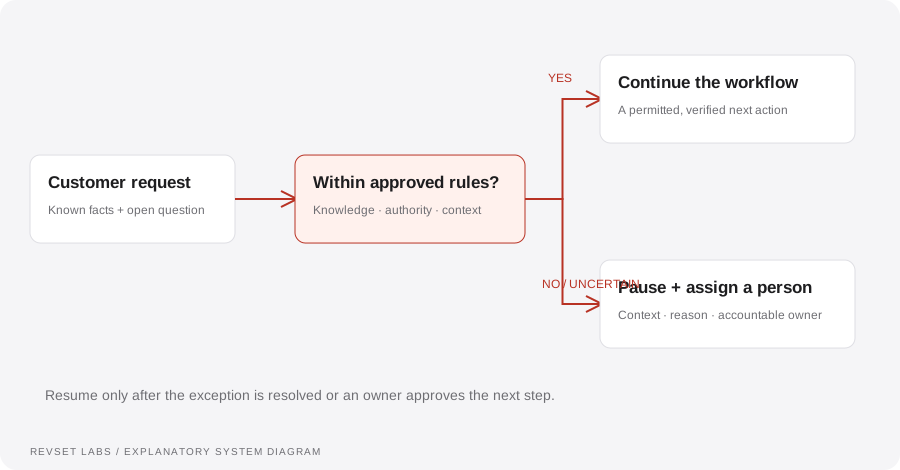
How the workflow works
- 01
Recognize the boundary
Define escalation conditions: a request for a person, unsupported questions, conflicting details, a complaint, a commercial exception, or a failed integration.
- 02
Pause conflicting actions
Stop or defer automation that could contradict the human conversation. State whether this applies to one opportunity or the entire contact.
- 03
Package the context
Include the original request, collected facts, attempted actions, unresolved question, and relevant record links. Keep inferred details distinct from confirmed facts.
- 04
Assign and acknowledge
Route to a named role or owner. Provide an acceptance or coverage mechanism and a fallback if the owner is unavailable.
- 05
Resume intentionally
Allow automation to resume only after a meaningful resolution event or an explicit owner action. Preserve the audit trail.
WORKED EXAMPLE / ILLUSTRATIVE
The prospect asks for a custom price
Walk through the situation, the design decision, and the checks that belong in a real implementation.
The prospect asks for a custom price
The system has approved standard service information but the person requests a discount and a nonstandard scope.
Read the example against your own process. The same event can require a different action when your business rules differ.
Acknowledge the request, collect the necessary context, and route it to the commercial owner. Pause unrelated sales reminders while the conversation is active.
- Context: identify the starting event
- Authority: define permitted actions
- Ownership: name the responsible person
The business keeps control of the commitment. The next person receives the question and history rather than asking the prospect to start again.
Escalating with no context
A generic notification creates another research task for the team.
A workflow is incomplete until the team knows how to recognize and recover from an exception.
Parallel automated messages can contradict a human who has already taken responsibility.
- Inspect: the latest customer state
- Preserve: the original event and history
- Escalate: unresolved exceptions
Trigger a human request, an unavailable owner, an unsupported question, and a resolved exception. Verify pause, assignment, acceptance, and controlled resumption.
Test the behavior. Keep the evidence.
Trigger a human request, an unavailable owner, an unsupported question, and a resolved exception. Verify pause, assignment, acceptance, and controlled resumption.
An example explains an intended design. Acceptance evidence shows whether your particular implementation behaves that way.
The business keeps control of the commitment. The next person receives the question and history rather than asking the prospect to start again.
- Expected: the agreed behavior
- Observed: the actual record and response
- Reviewed: a named acceptance owner
Track escalation reasons, acceptance time, unresolved handoffs, repeat escalations, and whether the subsequent customer interaction had the required context.
Example 1 of 3
Illustrative examples. No messages are sent, records changed, or appointments booked.
Where it can go wrong
Escalating with no context
A generic notification creates another research task for the team.
Automation continues talking
Parallel automated messages can contradict a human who has already taken responsibility.
No recovery from an ignored alert
A handoff needs a coverage policy and visibility into unresolved ownership.
What to measure
Track escalation reasons, acceptance time, unresolved handoffs, repeat escalations, and whether the subsequent customer interaction had the required context.
How to test the implementation
Trigger a human request, an unavailable owner, an unsupported question, and a resolved exception. Verify pause, assignment, acceptance, and controlled resumption.
For each sample journey, record the expected response, CRM state, next action, and accountable owner. Inspect what actually happened before calling the workflow complete.
Who has the next move when automation stops?
Prepare these decisions
- List the questions and decisions the system cannot answer or approve.
- Define a primary owner, backup route, and what happens if neither responds.
- Package the conversation, reason for handoff, and required decision together.
A useful test to walk through
Ask for a price exception, then make the primary owner unavailable. The important result is an assigned next action and useful context, not merely an internal notification being sent.
See what RevSet implements ↗