 revset
Automated lead routing assigns an incoming inquiry to an eligible location or person using approved business rules. For a home-service company, those rules usually include service area, requested trade, existing ownership, staffed hours, and capacity. A complete handoff also records whether the person accepted responsibility and what happens if they do not.
Why this matters in a real business
A lead in the CRM can still be nobody’s job. A ZIP match identifies a territory; it does not prove that a qualified, available person will respond. Design the assignment and the recovery path together so the office can distinguish new requests, offers awaiting acceptance, accepted work, and exceptions needing attention. This guide covers your own inbound sales inquiries, not the sale of leads to unrelated contractors or vehicle route optimization.
In what order should you route home-service leads?
Write the rules in an order your dispatcher can explain. Use the same order in test cases, routing records, and operating instructions. Here is a starting specification to adapt with your team.
- Existing work: is this the same request with an active owner? Preserve continuity unless an approved reassignment rule applies.
- Service: does the team handle this type of work? A replacement estimate and an urgent repair may belong to different teams.
- Territory: which approved location covers the property? Resolve overlaps with a documented priority rule.
- Coverage now: who is staffed and eligible for this type of inquiry at the current local time?
- Capacity: who can accept more work under the agreed limit?
- Distribution: choose among the remaining candidates and record the reason.
- Acceptance: wait for the defined ownership event, then escalate when necessary.
Keep the original answer alongside normalized fields. If AI interprets “replace the upstairs unit” as an HVAC replacement, an ambiguous interpretation should reach review rather than become an unexplained rejection. Use the home-service qualification question bank to collect only the missing information that changes routing.
Explore the same inquiry under three conditions
Open each scenario to inspect the owner, customer message, and next action. This is a readable demonstration using fictional data. It does not send messages, access a CRM, or check real availability.
SAMPLE INQUIRY R-104 · PLANNED HVAC REPLACEMENT · ZIP 27609
“We’re comparing options for replacing the upstairs system. Can someone talk through the next step?”
1. The assigned coordinator accepts
- 10:00 · Inquiry received. The North team covers this ZIP and service in the sample rulebook.
- 10:00 · Offered to Maya. Maya is eligible and within capacity; acceptance is due at 10:02.
- 10:01 · Maya accepts. The offer becomes confirmed ownership. The acceptance timer ends.
- Current owner
- Maya · accepted
- Customer message
- “Maya will help with your replacement inquiry. What time would suit a call?”
- Next action
- Agree a callback using actual availability. No site visit is booked yet.
2. Nobody accepts the first offer
- 10:00 · Offered to Maya. The same sample eligibility checks pass.
- 10:02 · Acceptance deadline passes. Confirm Maya has not accepted; retire offer version 1. Luis is still eligible and receives version 2.
- 10:03 · Luis accepts. Luis owns the inquiry. Maya’s later click on version 1 is refused and shows the current owner.
- Current owner
- Luis · accepted after escalation
- Customer message
- “Luis will help with your replacement inquiry. What time would suit a call?”
- Next action
- Luis reviews the original request and arranges the next conversation. The team retains the missed-acceptance history.
3. Both coordinators are unavailable
- 10:00 · No eligible recipient. Maya and Luis are unavailable; the system does not offer work to an off-duty person.
- 10:00 · Review exception created. The named duty manager owns the exception, with a review deadline under the company’s coverage policy.
- When coverage resumes. The manager confirms eligibility and assigns the inquiry, retaining the original receipt time.
- Current owner
- Duty manager · exception review
- Customer message
- “Our estimating team is unavailable right now. We’ve recorded your request for review.” Add a return time only when verified.
- Next action
- Review the unaccepted inquiry. If the duty manager is also offline, the next staffed shift must own the queue; do not imply live monitoring.
The two-minute window is an example, not a response-time benchmark or a RevSet service guarantee. Choose a target the team can staff and measure.
Territory, round robin, or workload: which method fits?
- Territory routing: suitable when branches have defined coverage. It answers which location is eligible, but needs a second rule to select a person.
- Round robin: useful when eligible people have similar responsibilities and capacity. Taking turns does not equal balancing workload when jobs differ substantially.
- Workload routing: useful when a trustworthy count of open work reflects capacity. Define what counts as open and when the count is refreshed.
- Named-owner routing: useful for an ongoing conversation or existing project. Add a backup rule for absence so continuity does not become a reason to leave a customer waiting.
Combine methods deliberately: territory and trade establish eligibility, then round robin chooses among available coordinators. Keep the selection reason in the record. This is an implementation design choice, not a claim that any one CRM supports every combination.
How to handle overlapping ZIP codes and unassigned leads
Two branches cover the same ZIP
Set an approved priority or tie-break rule before launch. If coverage depends on a street boundary, ask for the necessary location detail and use the approved territory source. Do not let the last workflow to run decide ownership by accident.
The service is unclear or not supported
An unclear request goes to review with the original wording. A clearly unsupported service follows the business’s approved response. Do not silently redirect customer information to an outside business; external referral arrangements require their own approved process.
The same person submits again
Match the inquiry, not just the phone number. A repeated source event is normally the same event; a homeowner asking about a separate project may need another opportunity. Preserve a current accepted owner when the same conversation receives new information.
The alert fails
Keep delivery failure separate from non-acceptance. Make it visible to the responsible coordinator and use an approved fallback notification. Retrying an alert should not create another lead or reset the original response clock.
The customer asks for urgent help
Use the business’s approved urgent-request handling. A sales router should not diagnose a hazard or promise emergency attendance. Staff availability and a customer’s desired arrival time are different facts.
Can your existing CRM do this?
Start with native assignment features. HubSpot’s owner-rotation documentation describes plan and seat requirements, distribution options that depend on record type, and availability settings. It also documents situations where all eligible users being away leaves records unassigned. Check the exact object and account configuration rather than assuming a rotation action completes the entire handoff.
Assess four capabilities in your own system: receive the source event, read eligibility data, record one current owner, and observe acceptance or timeout. If native rules cover them, configuration may be enough. If data lives in separate tools, map the events and failure paths before agreeing custom integration work. Confirm supported access and test with controlled records.
RevSet’s CRM and lead-routing implementation service covers the process, fields, routing rules, acceptance checks, and handover agreed in the proposal. We do not assume a platform migration is needed.
Questions to answer before buying lead-routing automation
Is lead routing the same as dispatch scheduling?
No. Routing decides who owns an inquiry. Dispatch schedules and assigns service work, often with travel, skills, equipment, and duration constraints. A sales owner accepting a request does not reserve a technician.
Do we need AI to assign leads?
Explicit ZIP, service, and staffing rules can use ordinary automation. AI may help interpret a free-text request or summarize the handoff. Keep the rule that authorizes assignment inspectable and preserve uncertain answers for review.
Will this work for a franchise?
The design can accommodate multiple locations, but territory ownership, overlapping coverage, access boundaries, and headquarters exceptions must be agreed. Each branch should see the information it needs; shared intake does not imply unrestricted access to every customer record.
What will RevSet need to scope a build?
Source and CRM names, approved coverage, supported services, staffed hours, current assignment rules, and a few anonymized examples of failed handoffs. Software access and a responsible operating owner are assessed before delivery milestones are committed.
Build a routing rulebook your team can review
Download the routing rules and acceptance worksheet ↓. Use it to define one source, one service, and one territory first. Review a consecutive sample of inquiries to find errors before extending the workflow.
Our Auspak International project account describes related qualification and chosen-time callback handoffs in education consulting. Its figures are first-party reports, and subsequent sales were not measured. It is not a home-service routing result.
If leads already arrive but ownership keeps breaking, bring that handoff to a RevSet consultation. We can review the gap, the existing tools, and a first implementation scope. See the deliverables and responsibilities ↗
Inspect the technical workflow
How the workflow works
- 01
Preserve the original inquiry
Store a source event identifier, receipt time, service request, and customer-provided location. Check whether the same inquiry already exists. A repeat delivery of a form event should not create a second assignment; a different project from an existing customer may need a new opportunity.
- 02
Find the eligible team
Apply approved service and territory rules before distributing work. Keep ZIP codes as text so leading zeros survive. When a territory splits a ZIP, obtain the detail needed to resolve the boundary rather than pretending ZIP alone is exact.
- 03
Check actual coverage and capacity
Use the team’s staffed hours, timezone, holiday exceptions, and agreed workload limit. Being listed as a CRM user does not establish availability. If reliable capacity data is unavailable, expose that limitation and use a coordinator review.
- 04
Offer ownership and confirm it
Record who receives the assignment, why they qualified, when it was offered, and the acceptance deadline. Decide what event counts as acceptance. A notification delivered to a phone is not proof that its recipient took responsibility.
- 05
Escalate without creating competing owners
On timeout, check the current owner and acceptance state again. Offer to an eligible backup or transfer to the named review coordinator. Retire the old offer, preserve its history, and prevent a late acceptance from silently overwriting the current owner.
WORKED EXAMPLE / ILLUSTRATIVE
A replacement inquiry reaches an accountable coordinator
Walk through the situation, the design decision, and the checks that belong in a real implementation.
A replacement inquiry reaches an accountable coordinator
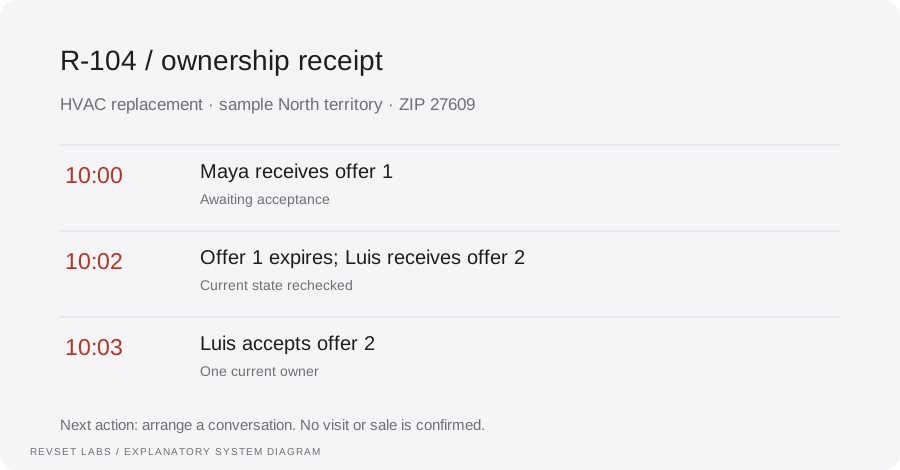
Fictional Cedar Home Services receives a planned HVAC replacement inquiry for ZIP 27609 at 10:00 AM Eastern during its sample staffed hours. The service and ZIP match its North team. These names, territories, times, and deadlines are illustrative.
Read the example against your own process. The same event can require a different action when your business rules differ.
The system offers the inquiry to Maya, who is marked available. Its sample two-minute acceptance window expires without acceptance. It checks the current state, retires Maya’s offer, and offers the same inquiry to eligible backup Luis. Luis accepts at 10:03 AM.
- Context: identify the starting event
- Authority: define permitted actions
- Ownership: name the responsible person
Luis becomes the current owner and receives the original request, routing reason, and next action. Maya’s old acceptance link cannot take the inquiry back. No appointment, site visit, sale, or payment has been recorded merely because Luis accepted the handoff.
Round robin runs before eligibility
Rotating across the entire staff can assign a roofing request to someone who handles only HVAC. First filter by service, territory, availability, and the agreed ownership policy; then choose among eligible people.
A workflow is incomplete until the team knows how to recognize and recover from an exception.
A shared alert can help supervisors observe work, but it needs a single current owner or an explicit acceptance process. Otherwise two people may contact the customer while each assumes the other updated the CRM.
- Inspect: the latest customer state
- Preserve: the original event and history
- Escalate: unresolved exceptions
Test an ordinary inquiry, overlapping territory, split ZIP, unsupported trade, missing location, full capacity, all users away, holiday arrival, repeated source event, a second project for the same contact, failed notification, and late acceptance after reassignment. Include two simultaneous acceptance attempts. Record expected owner, observed owner, customer message, and unresolved work for each. Verify your actual integrations; the example below is not an integration test.
Test the behavior. Keep the evidence.
Test an ordinary inquiry, overlapping territory, split ZIP, unsupported trade, missing location, full capacity, all users away, holiday arrival, repeated source event, a second project for the same contact, failed notification, and late acceptance after reassignment. Include two simultaneous acceptance attempts. Record expected owner, observed owner, customer message, and unresolved work for each. Verify your actual integrations; the example below is not an integration test.
An example explains an intended design. Acceptance evidence shows whether your particular implementation behaves that way.
Luis becomes the current owner and receives the original request, routing reason, and next action. Maya’s old acceptance link cannot take the inquiry back. No appointment, site visit, sale, or payment has been recorded merely because Luis accepted the handoff.
- Expected: the agreed behavior
- Observed: the actual record and response
- Reviewed: a named acceptance owner
Measure unique eligible inquiries for a defined period. Track assignment latency, acceptance latency, unaccepted inquiries at the review deadline, reassignments, routing errors, and confirmed customer contact separately. Illustrative arithmetic: if 50 eligible inquiries arrive and 40 are accepted within the agreed window, acceptance within target is 80%. The remaining ten still need an outcome; they are not automatically lost leads. Assignment success does not establish booked appointments or additional revenue.
Example 1 of 3
Illustrative examples. No messages are sent, records changed, or appointments booked.
Where it can go wrong
Round robin runs before eligibility
Rotating across the entire staff can assign a roofing request to someone who handles only HVAC. First filter by service, territory, availability, and the agreed ownership policy; then choose among eligible people.
Everyone is notified, so nobody owns it
A shared alert can help supervisors observe work, but it needs a single current owner or an explicit acceptance process. Otherwise two people may contact the customer while each assumes the other updated the CRM.
A late click steals the lead back
A stale assignment link should not override an accepted reassignment. Compare the assignment version and current state before recording acceptance. If two actions compete, expose the conflict and keep one authoritative owner.
An unavailable team becomes a silent dead end
No eligible owner is an exception with a reason and a review deadline. Keep it visible to a named coordinator. An acknowledgement to the customer should state the actual next staffed period rather than promise an unstaffed callback.
What to measure
Measure unique eligible inquiries for a defined period. Track assignment latency, acceptance latency, unaccepted inquiries at the review deadline, reassignments, routing errors, and confirmed customer contact separately. Illustrative arithmetic: if 50 eligible inquiries arrive and 40 are accepted within the agreed window, acceptance within target is 80%. The remaining ten still need an outcome; they are not automatically lost leads. Assignment success does not establish booked appointments or additional revenue.
How to test the implementation
Test an ordinary inquiry, overlapping territory, split ZIP, unsupported trade, missing location, full capacity, all users away, holiday arrival, repeated source event, a second project for the same contact, failed notification, and late acceptance after reassignment. Include two simultaneous acceptance attempts. Record expected owner, observed owner, customer message, and unresolved work for each. Verify your actual integrations; the example below is not an integration test.
For each sample journey, record the expected response, CRM state, next action, and accountable owner. Inspect what actually happened before calling the workflow complete.
Who accepts responsibility when the first owner does not?
Prepare these decisions
- Approve service and territory eligibility.
- Define staffed hours, acceptance and backup ownership.
- Make unaccepted inquiries visible to a review coordinator.
A useful test to walk through
Let the first offer expire, accept with the eligible backup, then try the original acceptance. Confirm one current owner and a preserved assignment history.
See what RevSet implements ↗Platform documentation
This guide describes RevSet’s design approach. Check the vendor’s current documentation for platform-specific behavior and availability.
HubSpot: assign and rotate record owners, requirements and availability behavior ↗