 revset
After-hours lead response is the process for handling a new inquiry while your sales team is unavailable. A useful response confirms receipt, sets an accurate expectation for human help, and offers a next step your business can actually support. An automatic reply does not mean your team is available around the clock.
Why this matters in a real business
Imagine a homeowner asking about a kitchen renovation at 9:42 PM. A generic receipt leaves their question unanswered. An unapproved promise of a callback in five minutes creates a different problem. Define what the system can answer tonight and who will pick up the unresolved work when the team returns. This guide describes a proposed operating process, not a measured client result.
Inspect the technical workflow
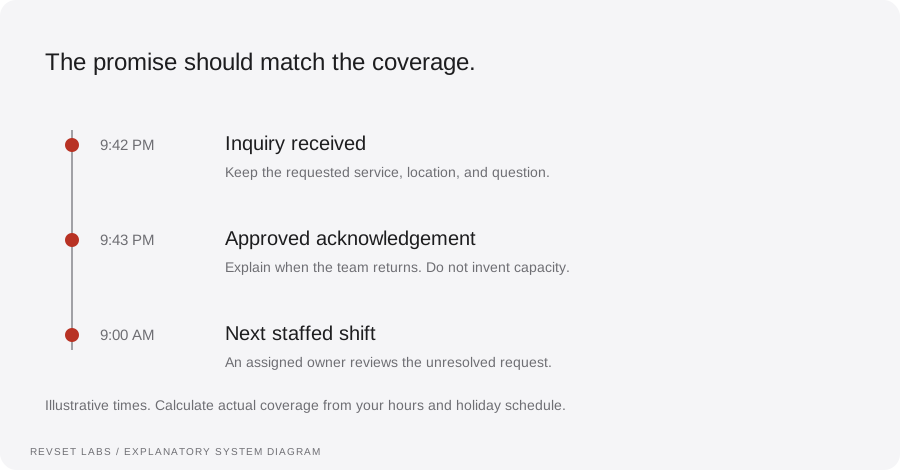
How the workflow works
- 01
Write the coverage rule first
Record the office timezone, staffed hours, holiday exceptions, and the owner of the next opening shift. Treat these as operating data. If tomorrow is a holiday, a template that always promises “tomorrow morning” is wrong. Keep sales inquiries separate from existing-customer support and urgent service requests.
- 02
Send a useful acknowledgement
Illustrative email or chat reply: “Thanks for contacting Oak & Field about your kitchen project. Our team is offline now and returns Monday at 9 AM Eastern. Which ZIP code is the property in? We can check whether it is in our service area.” Replace the sample business, hours, and question with approved information. Ask nothing the customer has already provided.
- 03
Ask the smallest routing question
For this renovation example, service type and ZIP code may be enough to choose the next path. Do not force a long budget questionnaire before answering a basic coverage question. If the address is outside your approved service area, explain that boundary; if the coverage rule is unclear, route the request for review.
- 04
Offer booking only when it fits
If the request meets the agreed criteria and the correct consultation calendar is available, offer the booking path. A calendar link sent is not an appointment booked. Wait for the calendar confirmation before changing the opportunity to booked or scheduling appointment reminders.
- 05
Give unresolved work a morning owner
Create a task containing the original inquiry, known service and location, unanswered question, last message, and responsible person. Set its due time from the next staffed period. If an integration fails, keep a recoverable inquiry in the monitored intake system rather than treating the workflow as complete.
- 06
Check the record before another message
When the morning shift begins, check for a customer reply, confirmed booking, owner response, closed request, or contact preference change. Suppress an obsolete follow-up. Someone who already booked should receive appointment preparation, not a second invitation to arrange a time.
WORKED EXAMPLE / ILLUSTRATIVE
The late-night inquiry that needs a human decision
Walk through the situation, the design decision, and the checks that belong in a real implementation.
The late-night inquiry that needs a human decision
Illustrative situation: Jordan submits a renovation inquiry at 9:42 PM on Sunday with a ZIP code and asks whether work can begin next week. The team returns Monday at 9 AM Eastern. The ZIP code matches the approved service area, but project capacity is not connected to the response system.
Read the example against your own process. The same event can require a different action when your business rules differ.
The workflow reuses the known ZIP code and replies: “Thanks, Jordan. Your property is in our service area. Our project team needs to confirm start dates and returns Monday at 9 AM Eastern. I’ve passed along your question about next week.” It creates a task for the project coordinator and pauses automated booking prompts while the timing question is unresolved.
- Context: identify the starting event
- Authority: define permitted actions
- Ownership: name the responsible person
At opening, the coordinator sees the requested start date, coverage check, and response already sent. They review actual capacity and reply. The CRM records a human review task, not a promised start date, a confirmed booking, or a won project.
Calling every overnight reply “24/7 service”
The system may acknowledge an inquiry while no person is available. Explain that distinction in customer-facing copy and define what happens if the automated channel is unavailable.
A workflow is incomplete until the team knows how to recognize and recover from an exception.
An urgent request does not grant the workflow authority to promise a technician. Use the business’s approved urgent-contact instructions when they exist and make clear that a sales inquiry form is not monitored emergency dispatch.
- Inspect: the latest customer state
- Preserve: the original event and history
- Escalate: unresolved exceptions
Use sample records to test a normal overnight inquiry, a holiday, an existing customer, a repeated form event, an out-of-area ZIP code, an unsupported start-date request, a failed delivery, and a customer who books before the morning shift. For each, record the expected message, owner, due time, booking state, and stop condition. Confirm that replaying an event does not create duplicate acknowledgements and that no unsupported capacity promise reaches the customer.
Test the behavior. Keep the evidence.
Use sample records to test a normal overnight inquiry, a holiday, an existing customer, a repeated form event, an out-of-area ZIP code, an unsupported start-date request, a failed delivery, and a customer who books before the morning shift. For each, record the expected message, owner, due time, booking state, and stop condition. Confirm that replaying an event does not create duplicate acknowledgements and that no unsupported capacity promise reaches the customer.
An example explains an intended design. Acceptance evidence shows whether your particular implementation behaves that way.
At opening, the coordinator sees the requested start date, coverage check, and response already sent. They review actual capacity and reply. The CRM records a human review task, not a promised start date, a confirmed booking, or a won project.
- Expected: the agreed behavior
- Observed: the actual record and response
- Reviewed: a named acceptance owner
Use one cohort: inquiries received outside staffed hours during the reporting period. Count captured inquiries, successful acknowledgements, inquiries with a useful next step, unresolved tasks with an owner, confirmed bookings, and overdue morning tasks. Illustrative arithmetic: if 20 inquiries arrive and 18 acknowledgements are confirmed delivered, acknowledgement coverage is 18 ÷ 20 = 90%. That is not a 90% resolution or booking rate. Review unresolved requests individually and compare meaningful-response times for the same channels before and after changes.
Example 1 of 3
Illustrative examples. No messages are sent, records changed, or appointments booked.
Where it can go wrong
Calling every overnight reply “24/7 service”
The system may acknowledge an inquiry while no person is available. Explain that distinction in customer-facing copy and define what happens if the automated channel is unavailable.
Turning a sales bot into emergency dispatch
An urgent request does not grant the workflow authority to promise a technician. Use the business’s approved urgent-contact instructions when they exist and make clear that a sales inquiry form is not monitored emergency dispatch.
Starting several conversations at once
An email inquiry should not automatically trigger messages on every stored channel. Choose an appropriate response path, respect recorded contact preferences, and define fallback behavior before launch.
Leaving the opening shift to search the inbox
A notification without an owner can still be ignored. Assign the task, define its due time, and make overdue work visible to the person responsible for coverage.
Treating delivery as a solved customer problem
A send attempt, delivery confirmation, customer reply, qualified inquiry, and booking are different events. Preserve their timestamps instead of using the first automatic message as evidence that every inquiry was resolved.
What to measure
Use one cohort: inquiries received outside staffed hours during the reporting period. Count captured inquiries, successful acknowledgements, inquiries with a useful next step, unresolved tasks with an owner, confirmed bookings, and overdue morning tasks. Illustrative arithmetic: if 20 inquiries arrive and 18 acknowledgements are confirmed delivered, acknowledgement coverage is 18 ÷ 20 = 90%. That is not a 90% resolution or booking rate. Review unresolved requests individually and compare meaningful-response times for the same channels before and after changes.
How to test the implementation
Use sample records to test a normal overnight inquiry, a holiday, an existing customer, a repeated form event, an out-of-area ZIP code, an unsupported start-date request, a failed delivery, and a customer who books before the morning shift. For each, record the expected message, owner, due time, booking state, and stop condition. Confirm that replaying an event does not create duplicate acknowledgements and that no unsupported capacity promise reaches the customer.
For each sample journey, record the expected response, CRM state, next action, and accountable owner. Inspect what actually happened before calling the workflow complete.
What should a prospect hear while your team is offline?
Prepare these decisions
- Confirm staffed hours, timezone, holidays, and the next-shift owner.
- Approve the acknowledgement and the smallest useful qualification question.
- Define which requests may book and which need a person.
A useful test to walk through
Submit a sample inquiry on a holiday, then book before the next staffed period. Verify that the return-time message is accurate and the opening-shift task reflects the confirmed booking.
See what RevSet implements ↗