
Automatic calls and voicemail drops in GoHighLevel let you follow up with leads at scale without manually dialing every number.

When you combine a well‑designed workflow with clear consent and useful messaging, you can:
- Call new leads the moment they opt in.
- Drop a voicemail that sounds like a 1:1 message—without ringing their phone.
- Recover no‑shows and stalled deals automatically.
- Keep your team focused on real conversations instead of chasing callbacks.
This guide walks through how automatic calls and voicemail drops work in GoHighLevel, when to use each, and a practical, step‑by‑step setup using workflows. You’ll also see proven use cases and best practices so you stay compliant while still moving the needle on booked calls and revenue.
If you don’t have GoHighLevel yet, you can follow along by starting a free GoHighLevel trial and testing this in a sandbox account.
What automatic calls and voicemail drops do in GoHighLevel
In GoHighLevel you can automate two core voice actions inside workflows:
- Automatic calls – The system dials a contact’s phone number using your connected number. A user can be bridged into the call, or you can use it as part of a power‑dial style follow‑up.
- Voicemail drops (ringless voicemail) – A pre‑recorded message is delivered straight to the contact’s voicemail box without ringing their phone first.
Used together, they help you:
- Respond quickly to new leads without overwhelming your team.
- Add a human voice to follow‑up sequences that are otherwise email/SMS only.
- Re‑engage cold or no‑show leads at scale.
Because these are telephony actions, you must treat them with more care than a typical email broadcast—especially around consent and frequency.
When to use automatic calls vs voicemail drops
Think of automatic calls and voicemail drops as different tools for different moments in your funnel.
Automatic calls
Best when:
- A lead has explicitly asked to talk to someone (demo request, consultation, inbound lead form).
- Speed‑to‑lead is critical and every minute counts.
- You have a sales team ready to pick up.
Examples:
- New lead books a strategy call → GoHighLevel triggers an automatic call to your closer to connect them immediately.
- High‑intent form submission ("Talk to Sales") → automatic call attempts within a few minutes during business hours.
Voicemail drops (ringless voicemail)
Best when:
- You want to follow up or re‑engage without interrupting people at random times.
- You’re reinforcing another channel (email/SMS) with a short, personal‑sounding voice touch.
- You’re running at scale and want to stay friendly—not spammy.
Examples:
- Appointment confirmed → voicemail drop that introduces the rep and sets expectations.
- Appointment no‑show → friendly voicemail inviting them to reschedule.
- Cold lead re‑engagement → quick "still interested?" voicemail that pairs with an email/SMS.
A simple rule of thumb:
Use automatic calls when you have clear permission to call right now. Use voicemail drops to nurture and re‑engage without being intrusive.
Prerequisites and compliance checklist
Before you turn any of this on, make sure you have:
- Phone + SMS infrastructure set up in GoHighLevel – including numbers, forwarding, and basic messaging registration. If you haven’t done this yet, see the companion guide: Getting Started: Set Up Email, Phone & SMS in GoHighLevel.
- At least one phone number in the sub‑account that will own these workflows.
- Clear consent from contacts for automated calls and voicemail drops. This usually means explicit opt‑in language in your forms and funnels.
- A short, high‑quality voicemail recording in MP3 or WAV format (64 kbps is a good target) for each use case.
Legal requirements vary by region and are evolving. In general:
- Obtain prior express consent before you use automated dialing or ringless voicemail drops.
- Make it easy for contacts to opt out (and honor those preferences everywhere).
- Avoid high‑frequency campaigns that feel like harassment, even if they’re technically allowed.
If you handle compliance‑sensitive use cases (healthcare, finance, large‑scale outreach), involve legal counsel before scaling voicemail drops.
Step 1 – Map when your calls and voicemail drops should fire
Before touching the workflow builder, sketch the journey you want.
Common patterns:
-
New lead speed‑to‑lead:
- Trigger: Form submitted or pipeline stage → "New Lead".
- Actions: Assign to rep → automatic call attempt → follow‑up voicemail drop if no answer.
-
Appointment confirmation and show‑up boost:
- Trigger: Appointment status changes to Confirmed.
- Actions: Send confirmation email + SMS → voicemail drop outlining what to expect.
-
No‑show recovery:
- Trigger: Appointment status changes to No Show.
- Actions: Voicemail drop acknowledging the miss + link to reschedule → SMS reminder 24 hours later if no response.
-
Cold lead re‑engagement:
- Trigger: Tag added (for example,
cold-lead-reengage) or last activity older than X days. - Actions: Email + SMS sequence → voicemail drop for contacts who click but don’t book.
- Trigger: Tag added (for example,
Write this out in bullet form. This becomes your blueprint in the workflow builder so you’re not improvising step by step.
Step 2 – Build the workflow in GoHighLevel
Once your strategy is clear, you can turn it into an automation.
2.1 Create or open a workflow
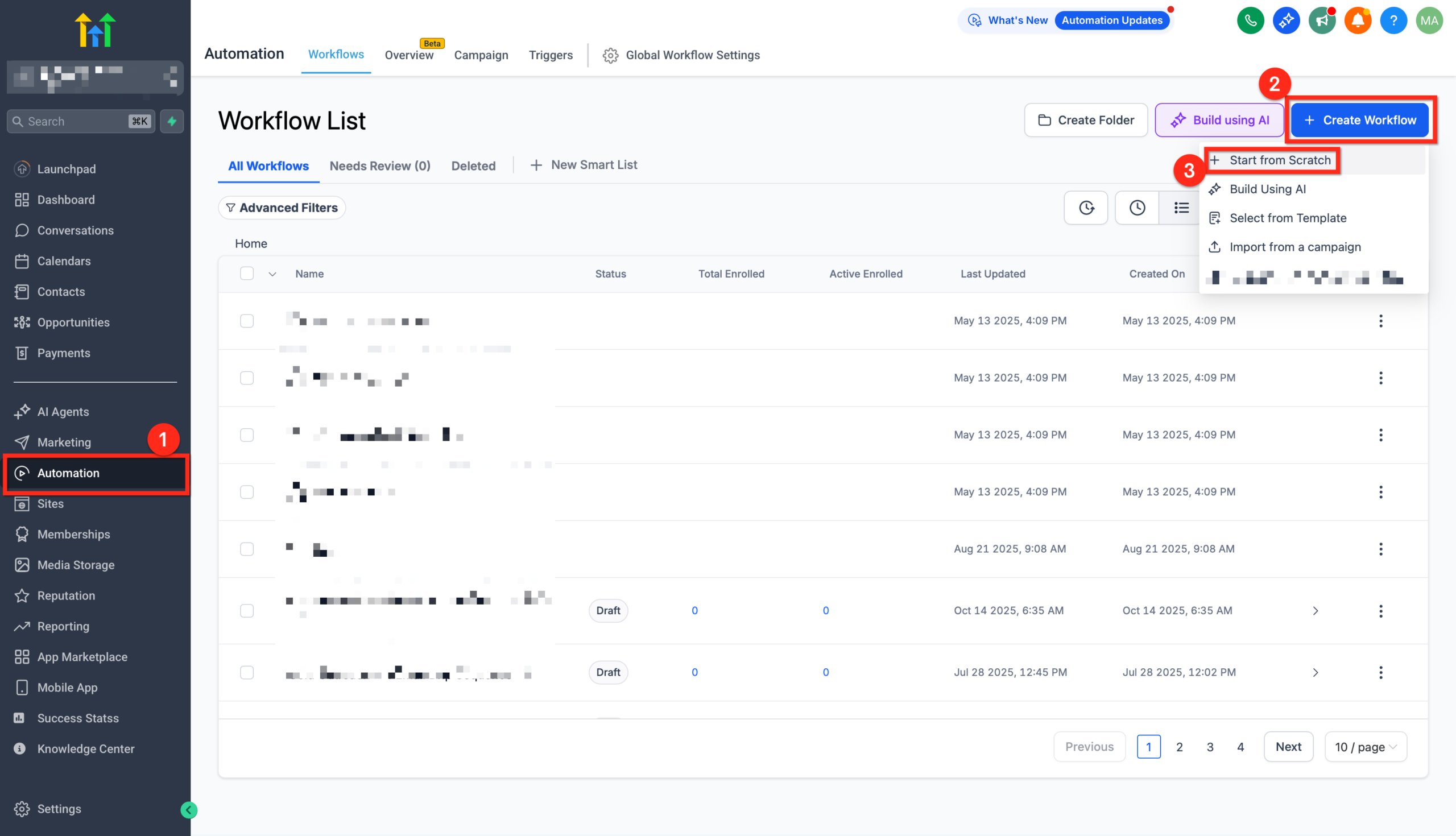
- In your GoHighLevel sub‑account, go to Automation → Workflows.
- Click Create Workflow.
- Choose Start from scratch or a relevant recipe (for example, an appointment reminder recipe if you’re focused on show‑up rates).
Give the workflow a clear name like Automatic Calls & Voicemail Drops – New Lead Follow-Up.
2.2 Add the right trigger
Your trigger should match the journey you mapped.
Examples:
- Form Submitted – when someone opts in from a landing page.
- Contact Changed – when a status or custom field is updated.
- Appointment Status – when a booking is confirmed, rescheduled, or marked as no‑show.
To add a trigger:
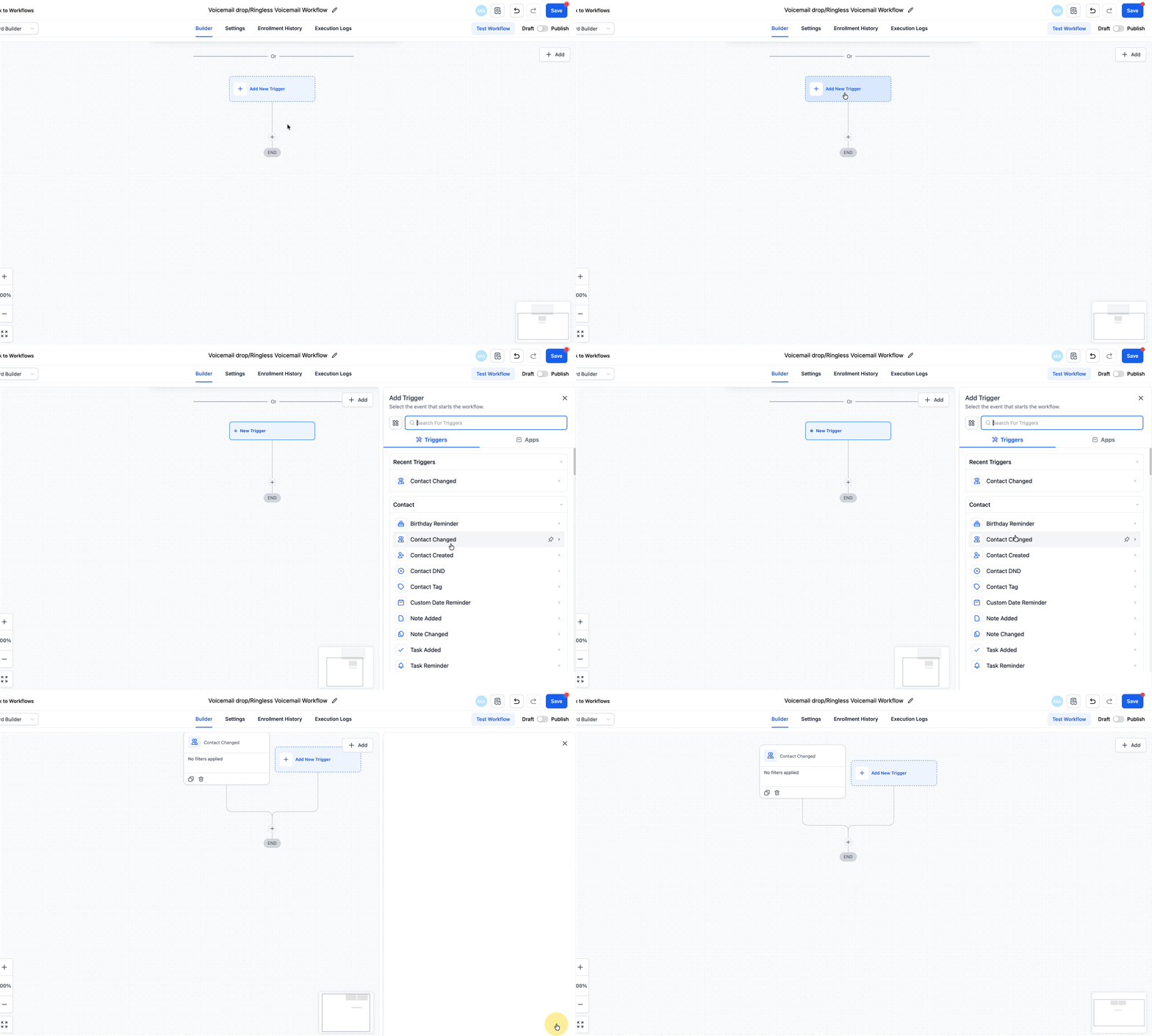
- Click Add New Trigger at the top of the workflow.
- Select your trigger type.
- Add filters (for example, "Form is" → select the specific form; or "Pipeline is" / "Status is").
- Click Save Trigger.
2.3 (Optional) Assign the contact to a user
If you want calls to route from a specific rep or owner:
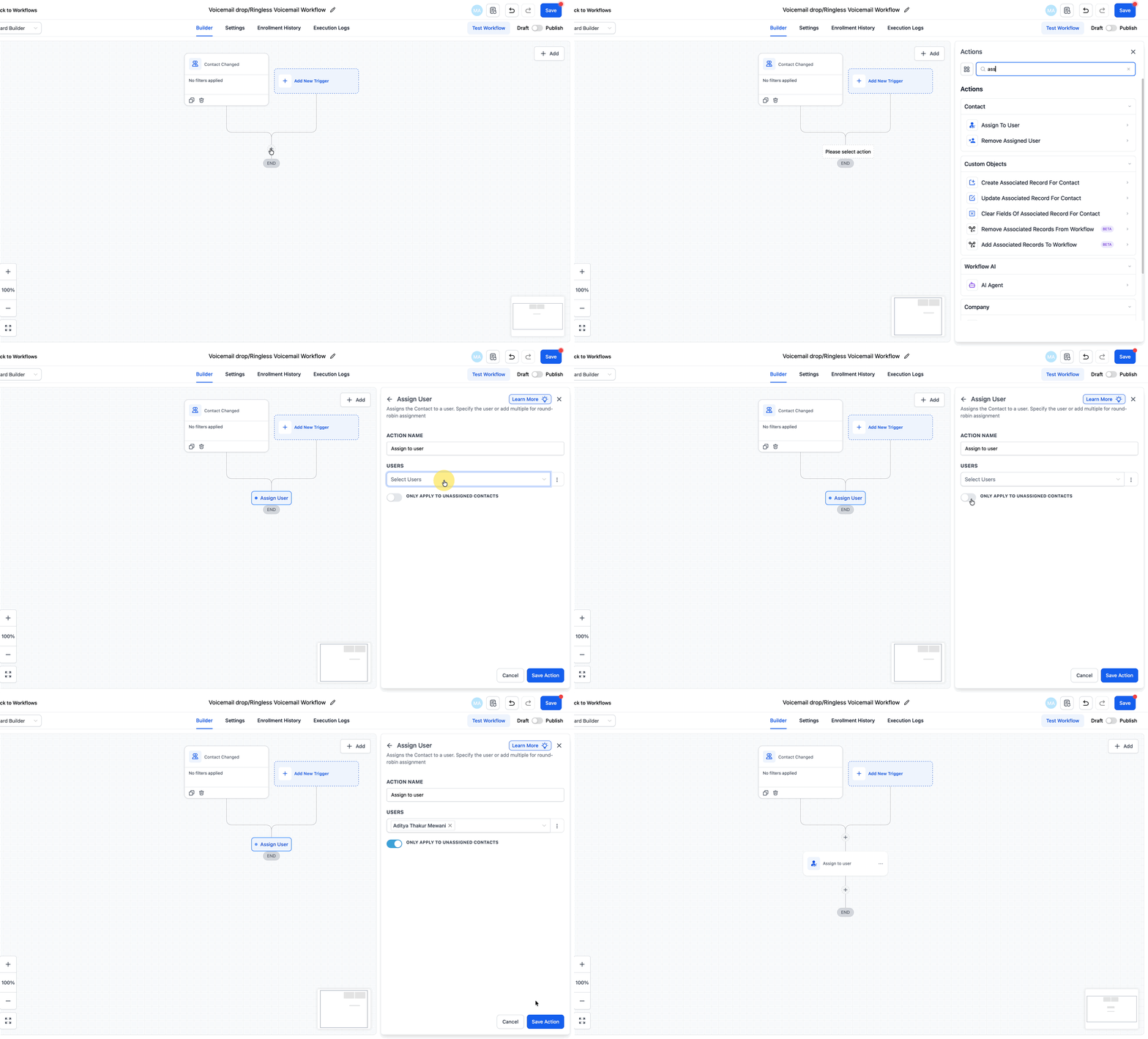
- Under your trigger, click + and choose Assign to User.
- Select the team member or round‑robin group.
This ensures that if someone picks up the call or replies, the right person owns the conversation in your CRM.
2.4 Add the automatic call action
Next, drop in the call step.
- Click + where you want the call to happen.
- Choose Call.
- Configure:
- From Number: Your GoHighLevel number.
- Call Whisper (optional): Short audio message your rep hears before the call connects (for example, "New high‑intent lead from the pricing page – press any key to connect").
- Voicemail detection: Decide whether to leave this on (to avoid leaving a partial message) or off if you’re combining with a separate voicemail drop.
You can add a Wait step before the call to limit it to business hours or to give leads a brief delay after form submission.
2.5 Add the voicemail drop action
Now add the ringless voicemail.
- Click + where you want the voicemail to fire (for example, after a missed call branch or as a standalone touch).
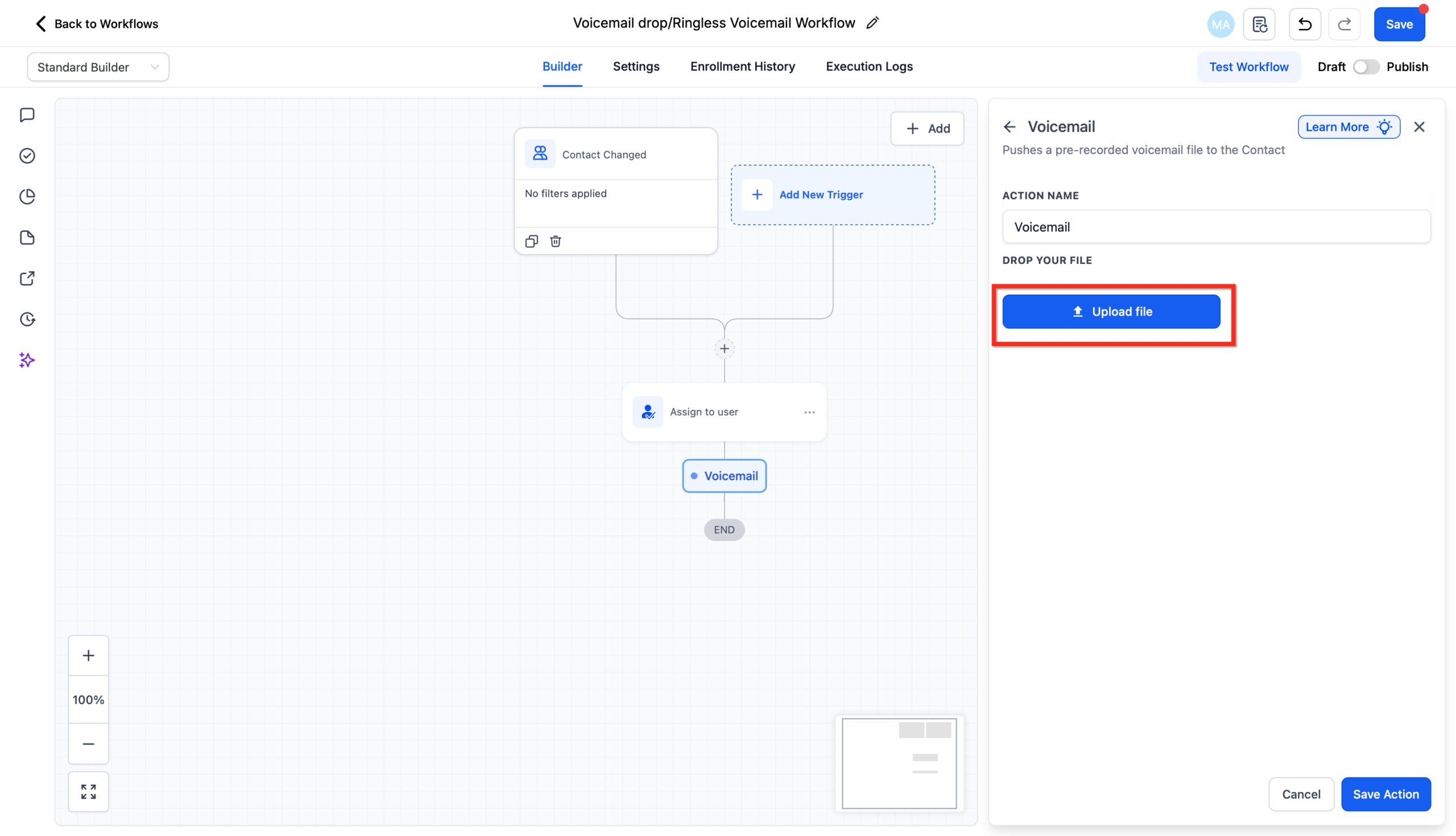
- Choose Voicemail.
- Upload your pre‑recorded audio file in MP3 or WAV format at 64 kbps.
- Save the action.
Best practices for your recording:
- Keep it to 20–40 seconds.
- Sound like a real 1:1 message (no "this is a mass voicemail" vibe).
- Mention who you are, why you’re calling, and 1 clear next step.
Example script:
"Hey {{contact.first_name}}, it’s {{user.name}} from {{location.name}}. You requested some details about {{custom.offer_name}}, so I wanted to leave you a quick message. I’ll also send a text with a link where you can pick a time that works best. Talk soon."
2.6 Branch on outcomes and add follow‑up
Use If/Else steps to branch based on what happened with the call.
Examples:
- If Appointment Booked within 24 hours → stop further voicemail drops and move opportunity to Booked Call.
- If No Show → trigger a voicemail drop + SMS sequence inviting them to reschedule.
- If No Response after X days → add a final voicemail drop and then move them into a lower‑frequency nurture sequence.
Connect these branches into the rest of your communication system:
- Email and SMS nurture sequences: see Getting Started: Automatic Email and SMS Follow-Up in GoHighLevel.
- One‑time campaigns around a specific offer: see Getting Started: Launch an SMS Campaign in GoHighLevel.
2.7 Test your workflow end‑to‑end
Before turning the workflow on for real leads:
- Create a test contact with your own phone number.
- Manually trigger the workflow (for example, submit the form or change the status).
- Confirm that:
- The automatic call rings your phone as expected.
- The voicemail drop lands in your voicemail box with clear audio.
- Follow‑up emails/SMS and opportunity updates behave correctly.
Only enable the workflow for live traffic once you’re confident every branch works.
High‑converting use cases for automatic calls and voicemail drops
Here are practical plays you can launch quickly:
1. Appointment show‑up booster
- Trigger: Appointment status → Confirmed.
- Actions:
- Send confirmation email & SMS with details.
- Drop a voicemail from the assigned rep 24–48 hours before the call reminding them what you’ll cover.
Result: Higher show rates and warmer prospects on the call.
2. No‑show recovery
- Trigger: Appointment status → No Show.
- Actions:
- Immediately drop a voicemail acknowledging the miss and making it easy to reschedule.
- Follow up with an SMS containing your booking link.
Result: You rescue otherwise lost opportunities without your team chasing manually.
3. High‑intent form follow‑up
- Trigger: Form Submitted on a pricing, consultation, or "work with us" page.
- Actions:
- Automatic call to connect the lead with your closer during business hours.
- If no answer, send an SMS and drop a voicemail with a direct link to book.
Result: Faster conversations with people who are already leaning in.
4. Cold lead re‑engagement
- Trigger: Tag added (for example,
reengage-2026-q1) or last activity older than 90 days. - Actions:
- Email + SMS re‑engagement sequence.
- Voicemail drop for contacts who click but don’t book or reply.
Result: More pipeline from leads you already paid to acquire.
Deliverability limits and best practices for voicemail drops
Most providers ramp up voicemail drop limits over time to protect their infrastructure and your deliverability. Typical patterns look like:
- Day 1–2: lower daily caps while they monitor performance.
- After a week of healthy sending: significantly higher limits.
To stay on the safe side:
- Start with smaller audiences and watch failure rates.
- Avoid repeated voicemail drops to the same contact in a short window.
- Keep your recordings tight, friendly, and clearly tied to a request or relationship.
If you see a high volume of failures or carrier errors, pause and troubleshoot rather than pushing harder.
Compliance and respecting your leads
Automated calls and voicemail drops are powerful—and easy to overdo.
Keep these principles front and center:
- Consent first. Make sure your forms and funnels explicitly mention phone and voicemail contact where required.
- Honor opt‑outs everywhere. When someone asks to stop calls or voicemail, update their preferences in GoHighLevel and any external systems.
- Respect quiet hours. Use time‑based conditions and schedule settings so you’re not dropping messages at 6am or 11pm in the contact’s time zone.
- Keep messaging honest and clear. Don’t pretend a fully automated voicemail came from a real missed call if that’s not the case.
If you operate in stricter regions or industries, pair this guide with legal advice specific to your jurisdiction.
How Revset Labs can help you implement this in GoHighLevel
Designing a smart voicemail and call strategy is less about the button clicks and more about where these touches fit in your funnel.
Revset Labs is an AI Automation and Marketing Agency that helps GoHighLevel users:
- Map out complete follow‑up systems combining email, SMS, calls, and voicemail.
- Implement best‑practice workflows for speed‑to‑lead, show‑up, and re‑engagement.
- Layer in AI to score leads, summarize call outcomes, and route tasks.
- Build dashboards so you can see which sequences are actually driving booked calls and revenue.
If you’d rather not wrangle telephony settings, compliance questions, and workflow edge cases yourself, you can start by launching a GoHighLevel trial and then bring Revset Labs in to architect the full system.
Next steps: plug voice into your broader follow‑up engine
Automatic calls and voicemail drops are most effective when they’re just one part of a coordinated follow‑up strategy.
From here, consider:
- Building out your automatic email and SMS follow‑up in GoHighLevel so every lead hears from you on the channels they check most.
- Launching targeted SMS campaigns for promotions and re‑engagement using the playbook in Getting Started: Launch an SMS Campaign in GoHighLevel.
- Tightening your sales process with clear pipelines and stages via Getting Started: Set Up Pipelines and Opportunities in GoHighLevel.
Together, these pieces turn GoHighLevel into a follow‑up engine where no lead is left behind, and every call and voicemail fits neatly into a measurable, revenue‑driven system.