
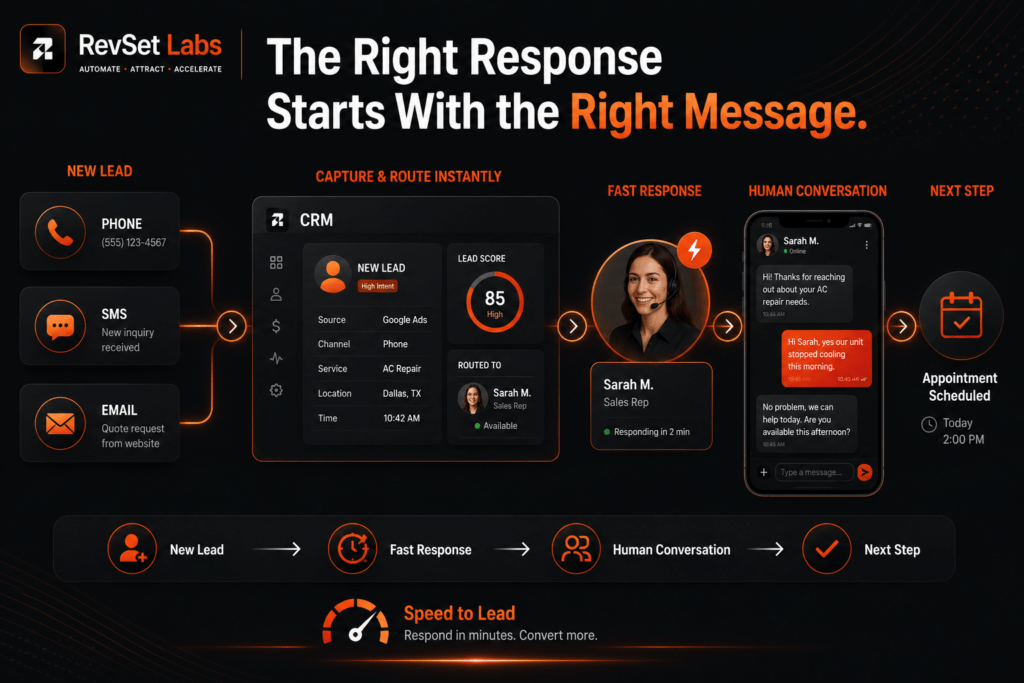
Lead Response Templates for Phone, SMS, and Email
A fresh lead should never have to wonder whether their inquiry was seen. But it happens every day.
Someone submits a quote request and waits for an email. A salesperson means to call back later, after seeing the message. A call goes to voicemail and doesn’t get picked up until the afternoon. A form lands in a shared inbox where no one is sure who owns it.
It’s rarely a lack of effort. Usually, the business just hasn’t decided what should happen next.
That’s where lead response templates come in.
A solid template gives a sales team a dependable starting point for the first phone call, text, or email without turning every customer interaction into a robotic script. It makes it easier to respond while a prospect’s interest is still fresh, cuts down on the time spent deciding what to say, and builds consistency across the whole team.
But templates alone won’t solve lead response problems. They work best as part of a larger system that includes speed to lead, CRM routing, follow-up cadence, personalization, and clear ownership. RevSet Labs treats templates as one piece of that operating system not a standalone folder of messages.
This article organizes practical lead response templates by lead source and urgency, with guidance on when to use each one and how to personalize it without slowing your team down.
What Is a Lead Response Template?
A lead response template is a reusable communication framework used when a new prospect contacts a business. It can be designed for phone calls, voicemails, SMS, email, website form submissions, paid advertising leads, referral leads, missed calls, appointment requests, quote requests, and high-intent inquiries.
The goal isn’t a message every prospect receives word-for-word it’s removing unnecessary decision-making from the first response.
A strong template should tell the representative:
- Who to contact
- Why the prospect is being contacted
- What information should be referenced
- What next step should be offered
- What should happen if the prospect doesn’t respond
That creates a repeatable process while still leaving room for human judgment.
Why Lead Response Templates Matter
Speed matters, but a fast response that isn’t relevant can still create a bad customer experience.
When a prospect submits a detailed inquiry, they shouldn’t get: “Hi, we got your message. How can we help?” they already told you how you can help.
The response should show that the inquiry was actually read:
“Hello [First Name], I appreciate you contacting me regarding [Service]. I saw that you’re trying to find [Specific Need]. I have a few available appointment times and can help with the next step.”
The difference on the page looks small. Operationally, it isn’t the second message acknowledges the customer’s actual situation and gives them a clear next step.
Harvard Business Review research has highlighted how quickly companies typically respond to online sales inquiries, and why response speed deserves to be treated as an operational priority rather than just a sales preference.
RevSet Labs has found that the best first-response template isn’t the shortest one it’s the one that confirms the lead reached the right person, gives context for their request, and makes the next step obvious.
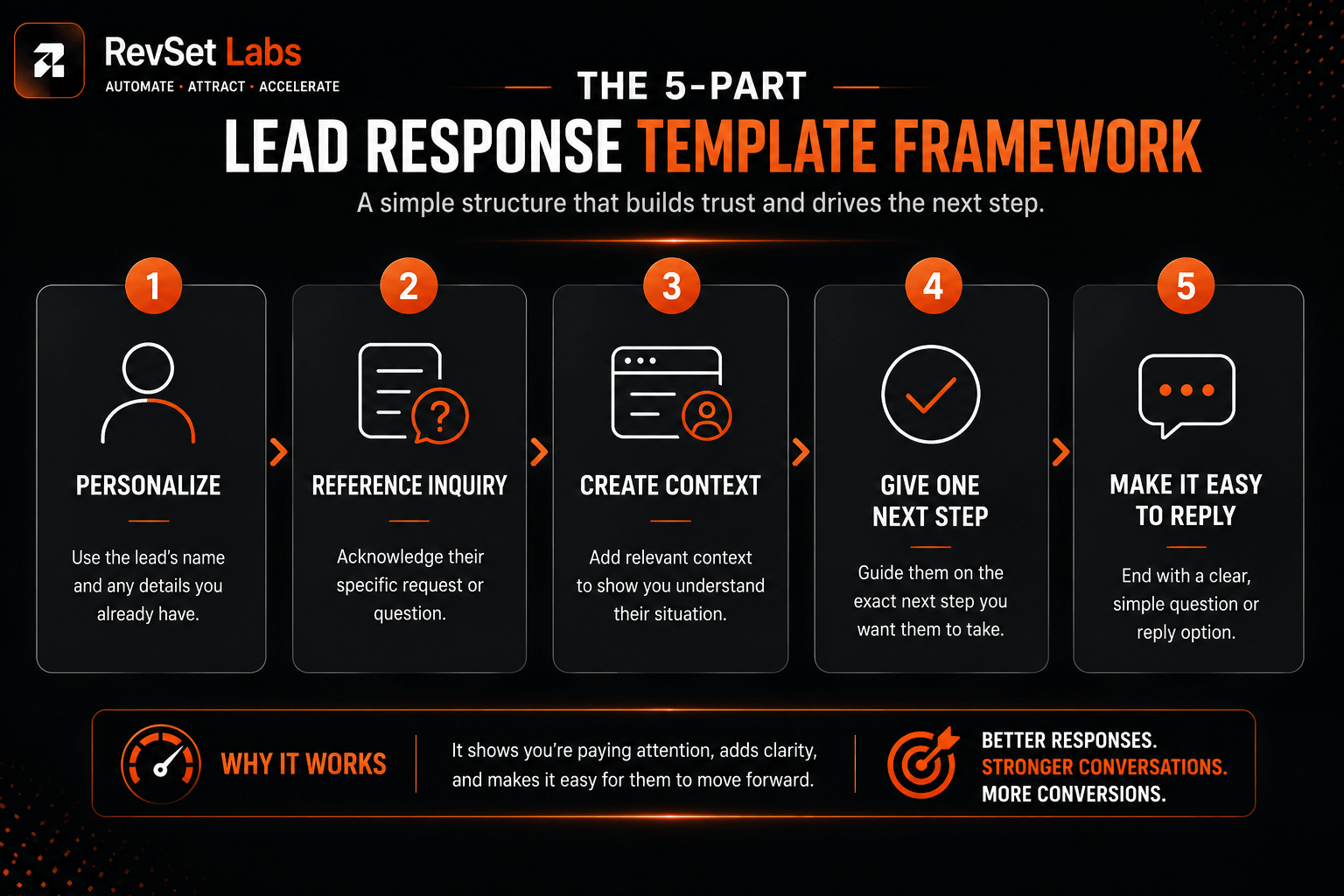
The 5-Part Structure of a Strong First Response
Before building out dozens of CRM templates, establish one basic structure your team can use across every channel.
Personalize the opening. Use the prospect’s name whenever possible [First Name]. It’s one of the simplest ways to make an automated or templated message feel less generic.
Reference the inquiry. Mention the actual service, product, problem, or request [Service] or [Specific Request]. This reassures the prospect the message is actually connected to what they asked for.
Create context. Briefly explain why you’re reaching out: “I saw your request for a quote,” or “I’m following up on the appointment request you submitted earlier.”
Give one clear next step. Don’t hand the prospect five things to do offer one obvious action: reply to this message, call, choose an appointment time, confirm availability, or send the requested information.
Make the message easy to continue. The first response shouldn’t try to close the sale its job is to start a conversation. That matters even more for higher-value or more complex services.
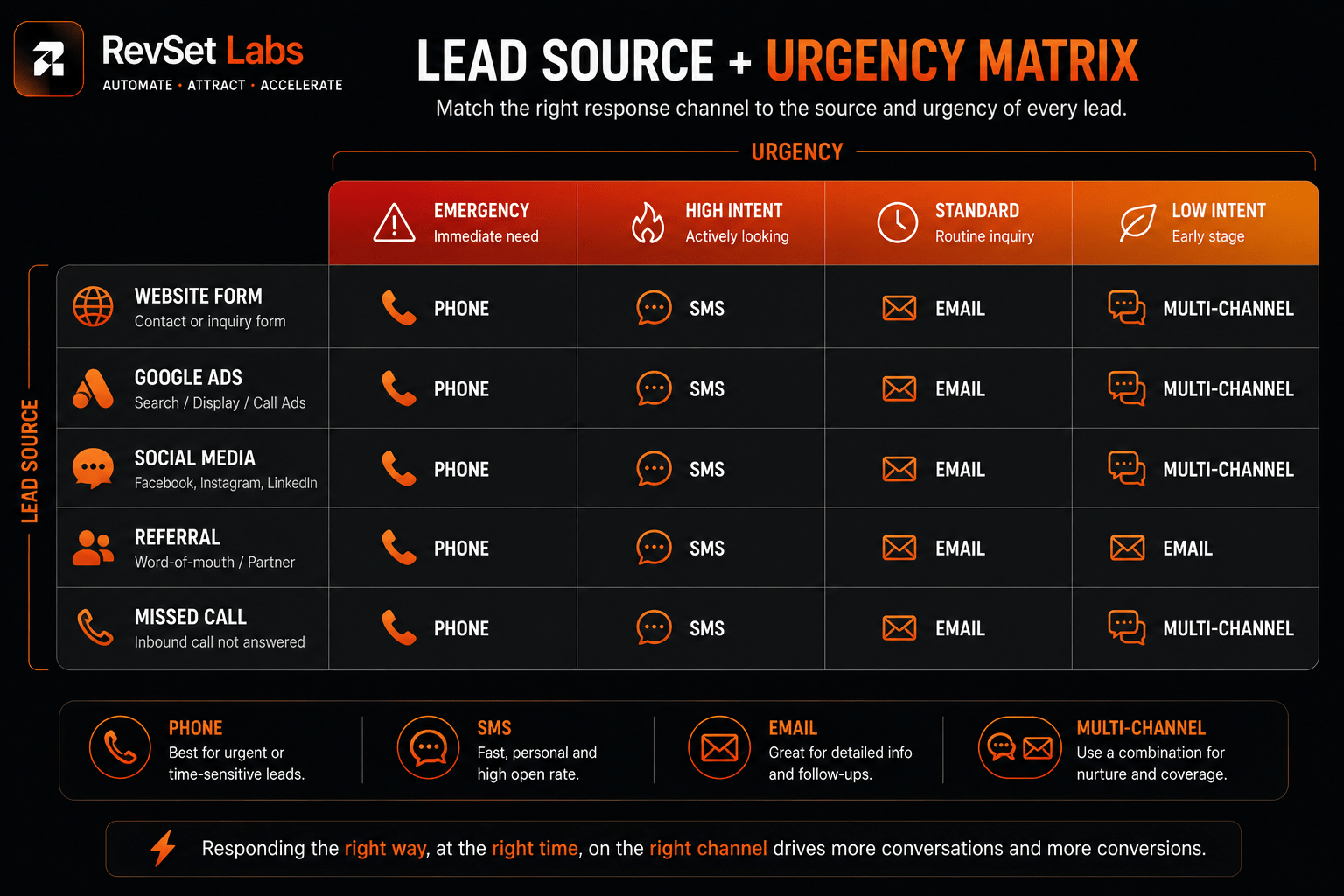
Lead Response Templates by Lead Source and Urgency
Copy these into an internal response library, sales enablement system, or CRM. Fill in the bracketed fields with your own data or CRM merge tags.
High-Intent Website Form Lead
RevSet Labs targets a response within 5 minutes during business hours for these.
SMS Template
Hi [First Name], this is [Rep Name] from [Company]. I just received your request about [Service]. I can help with the next step. Are you available for a quick call now, or would [Time Option 1] / [Time Option 2] work better?
Email Template
Subject: Regarding Your Request for [Service]
Hello, [First Name]
We appreciate you contacting [Company] regarding [Service].
I wanted to respond while the information is still current, since I noticed you’re searching for [Specific Need].
I can help answer your questions and guide you to the next step. Would [Time Option 1] or [Time Option 2] work for a brief call?
Best, [Rep Name] [Business] [Phone Number]
Phone Script
“Hello [First Name], I’m [Rep Name] from [Company]. I wanted to respond to your recent inquiry regarding [Service]. I saw that you’re trying to find [Specific Need]. I can help with the next step do you have a moment?”
If they say yes: “Great could I ask a few quick questions about [Relevant Detail] before I suggest the next step?”
This response acknowledges the original inquiry rather than making the prospect repeat themselves.
Google Search or Paid Search Lead
Search-driven leads often carry strong commercial intent, particularly when the inquiry follows a service-specific search.
SMS Template
Hi [First Name], [Rep Name] from [Company] here. I saw your request for [Service]. We help customers with [Short Value Proposition]. Are you looking to get this taken care of [Today/This Week]?
Email Template
Subject: Your [Service] Inquiry
Hi [First Name],
Thanks for contacting [Company] about [Service].
I wanted to reach out directly to understand what you need and see how quickly we can help.
If this is urgent, reply here or call me at [Phone Number]. Otherwise, I’m happy to help you schedule a time that works for you.
Best, [Rep Name]
Phone Script
“Hi [First Name], this is [Rep Name] with [Company]. You reached out about [Service], and I’m calling to understand what you’re looking for and how we can help. Is now a good time?”
Facebook or Social Media Lead
Social leads usually call for a more conversational tone avoid making the message sound like a formal sales email.
SMS Template
Hi [First Name], this is [Rep Name] from [Company]. Thanks for reaching out through [Facebook/Instagram]. I saw you’re interested in [Service]. Happy to answer any questions what would you like to know first?
Email Template
Subject: Thanks for reaching out
Hi [First Name],
Thanks for connecting with [Company].
I saw your interest in [Service], and I’m happy to answer any questions or help you figure out whether it’s the right fit.
What are you mainly looking to solve?
Best, [Rep Name]
RevSet Labs recommends not treating social leads as automatically low-intent. Someone can discover your company on social media and still have an urgent business need let the inquiry itself establish urgency, rather than assuming the platform does.
Referral Lead
Referral leads deserve extra context, since trust may already exist before the first conversation.
SMS Template
Hi [First Name], this is [Rep Name] from [Company]. [Referral Name] suggested you reach out to us about [Service]. I wanted to introduce myself and see how I can help. Would you prefer a quick call, or continuing by text?
Email Template
Subject: [Referral Name] Suggested We Connect
Hi [First Name],
[Referral Name] mentioned you may be looking for help with [Service], so I wanted to introduce myself.
I’d love to learn more about what you’re looking for and explain how we can help. Would [Time Option] work for a quick conversation?
Best, [Rep Name]
Missed-Call Lead
A missed call is different from a form submission the customer already tried to speak with you. The response should reflect that.
SMS Template
Hi [First Name], this is [Rep Name] from [Company]. Sorry we missed your call I wanted to get back to you quickly. What can I help you with?
Voicemail Script
“Hi [First Name], this is [Rep Name] from [Company], returning your call. Sorry we missed you you can reach me at [Phone Number], or reply to the text we just sent. Again, this is [Rep Name] at [Company].”
Email Template
Subject: Sorry We Missed Your Call
Hi [First Name],
I saw that you tried to reach [Company], and I’m sorry we missed your call.
I’m available to help with [Service/Reason for Call]. You can reach me directly at [Phone Number], or simply reply to this email with a convenient time.
Best, [Rep Name]
Emergency or High-Urgency Lead
Urgent inquiries emergency plumbing, electrical problems, HVAC failures, water damage, urgent legal matters, time-sensitive service requests shouldn’t enter the same workflow as routine requests.
SMS Template
Hi [First Name], this is [Rep Name] from [Company]. I received your request about [Urgent Issue]. I’m available to help now please reply here or call me at [Phone Number] so we can figure out next steps.
Phone Script
“Hi [First Name], this is [Rep Name] from [Company]. I received your request about [Issue] and wanted to reach you right away. Can you tell me what’s happening?”
In urgent situations, skip the long introduction. Acknowledge → Clarify → Act.
After-Hours Lead
After-hours inquiries need a different approach confirm receipt immediately, without implying someone is available when they aren’t.
SMS Template
Hi [First Name], thanks for contacting [Company]. We’ve received your request about [Service]. Our team is currently unavailable, but we’ll follow up by [Specific Time/Business Opening]. If this is an emergency, [Emergency Instruction].
Email Template
Subject: We Received Your [Service] Request
Hi [First Name],
Thanks for contacting [Company].
We’ve received your request regarding [Service]. We’re currently outside normal business hours, but someone will follow up by [Time/Day].
If you’d like, feel free to reply with any additional details that would help us prepare for the conversation.
Best, [Company]
RevSet Labs’ rule of thumb: never say “we’ll get back to you soon” when you can give a specific expectation instead. A specific timeframe reduces uncertainty far more than a vague promise.
Cold Lead Follow-Up
Not every lead that stops responding is permanently lost the mistake is treating every dormant lead the same way. Follow-up should introduce a reason to continue the conversation, not just repeat “just checking in.”
SMS Template
Hi [First Name], it’s [Rep Name] from [Company]. I wanted to circle back on [Service]. Is this still something you’re considering, or has your timeline changed?
Email Template
Subject: Still considering [Service]?
Hi [First Name],
I wanted to circle back regarding [Service].
If you’re still considering it, I’m happy to answer any questions or help with the next step. If your timing has changed, that’s completely fine too just let me know and I can follow up later.
Best, [Rep Name]
This gives the prospect permission to give an honest status update instead of feeling pressured.
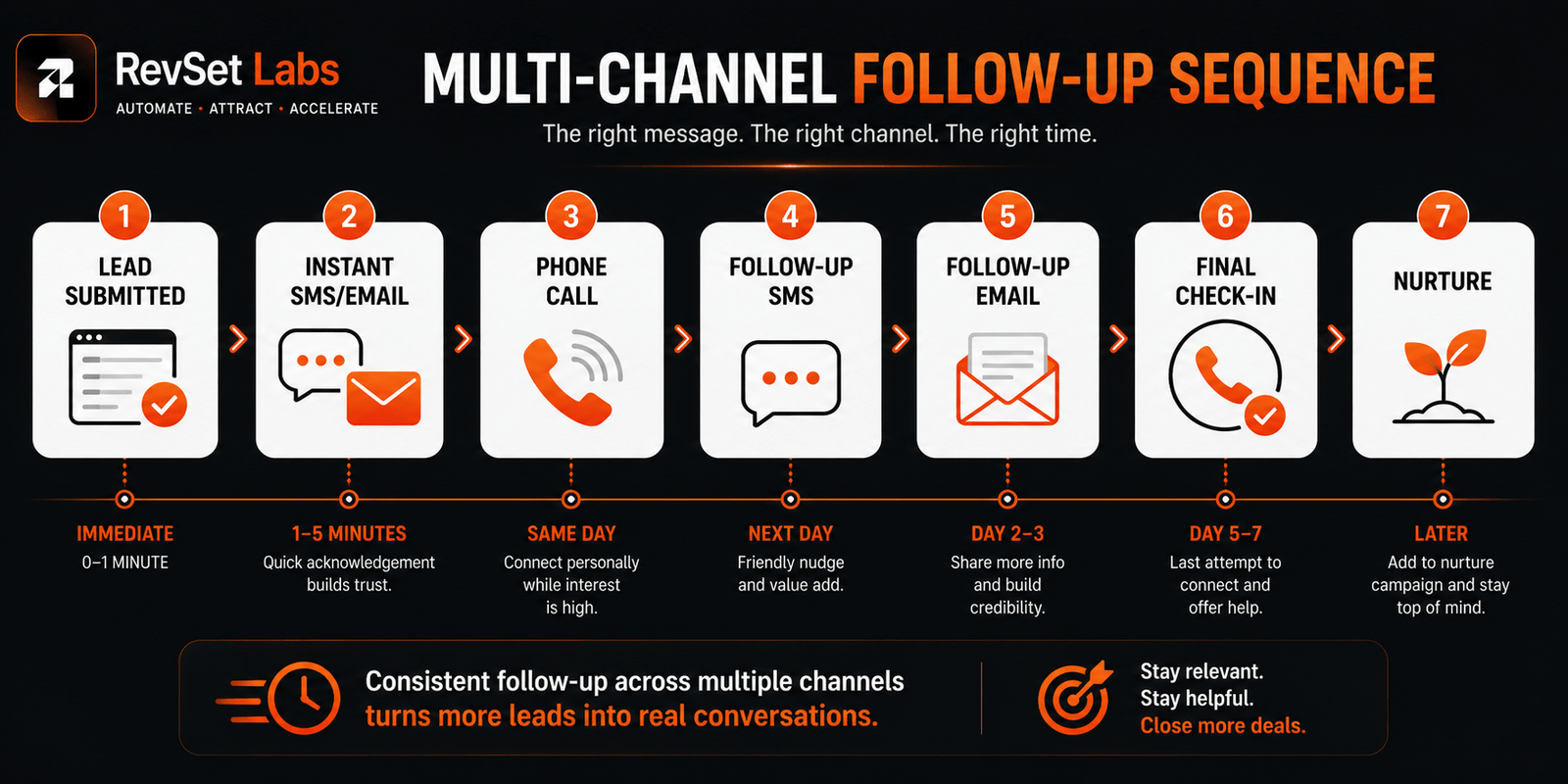
Multi-Channel Lead Follow-Up Template
The strongest response process rarely depends on a single channel. A RevSet Labs multi-channel sequence looks like this:
| Timing | Channel | Objective |
|---|---|---|
| Immediately | SMS/Email | Confirm inquiry and establish contact |
| 1–5 minutes | Phone | Begin meaningful conversation |
| Later same day | SMS/Email | Follow up if no contact |
| Next business day | Phone | Second contact attempt |
| Day 2–3 | SMS/Email | Provide a useful next step |
| Day 5–7 | SMS/Email | Final active follow-up — confirm whether timing has changed |
| Later | Nurture — re-engage when relevant |
(Corrected from the original draft the Channel and Objective columns were scrambled in the last two rows.)
The right timing depends on urgency, lead source, customer expectations, and your own historical response and conversion data.
Common Lead Response Template Mistakes
Even well-designed templates can fail when they’re implemented poorly:
- Writing too much in the first message instead of focusing on the customer’s request and the next step
- Asking too many questions and turning SMS into a second intake form
- Sounding overly promotional instead of showing you understand the prospect’s situation
- Using the same template for every lead, regardless of urgency or intent
- Treating low-intent inquiries (like newsletter signups) the same as high-urgency leads
- Leaving out a clear next step, so the customer isn’t sure what to do
- Failing to guide the conversation, leaving the prospect unsure how to respond
RevSet Labs’ Approach to Lead Response Templates
RevSet Labs doesn’t build a huge template library just for the sake of having more templates. Most businesses need a smaller set of well-designed responses connected to their CRM and lead-routing logic:
Lead Source → Intent → Urgency → Assigned Rep → Response Template → Follow-Up Sequence
That turns a template from a static piece of copy into part of a functioning lead-response system.
A plumbing company might automatically send an emergency SMS and notify the nearest available technician. A dental practice might send an appointment-focused response. A marketing agency might route a qualified inquiry to a salesperson with a discovery-call template.
The message changes because the customer’s context changes that’s the part that matters. Automation should handle the consistency. People should handle the judgment.
Lead Response Template Checklist
Before adding a template to your CRM, ask:
- Does it reference the customer’s actual inquiry?
- Is the message appropriate for the lead source?
- Is the urgency level correct?
- Does it have one clear next step?
- Does it sound natural when read aloud?
- Can the representative personalize it quickly?
- Does it work on mobile?
- Is ownership automatically assigned?
- Is the next follow-up scheduled?
- Can response and conversion performance be measured?
If the answer is yes across the board, the template is far more likely to actually support the sales process instead of becoming unused documentation.
Final Thoughts
A lead response template isn’t meant to make sales feel more automated it’s meant to help reps be more consistent.
When a new inquiry comes in, a representative shouldn’t have to spend several minutes deciding what to write, where to find the lead, who owns it, or what to do if the prospect doesn’t reply. That process should already be obvious.
Speed to lead, practical templates, intelligent routing, personalization, and organized follow-up are all part of one system. Templates supply the communication layer; CRM workflows supply the operational layer behind them.
The smartest template isn’t necessarily the shortest one it’s the one your team can use quickly, personalize naturally, and connect to a measurable follow-up process. The goal is more time spent on conversations that move opportunities forward, and less time spent debating what to do next.
FAQs
What should a lead response template include?
A good template introduces the rep, references the customer’s specific request, acknowledges the inquiry, and offers one clear next step. It should be fast to use and flexible enough for the rep to personalize.
How quickly should I respond to a new lead?
Five minutes during business hours is a practical operational target for many high-intent service inquiries, though there’s no universal standard lead urgency, industry, staffing, customer expectations, and sales complexity all affect the right target.
Should I respond to leads by phone, SMS, or email?
It depends on the lead source and the customer’s situation. Email works well when more context or documentation is needed, SMS is good for fast confirmations and scheduling, and phone is often the right call for urgent or high-value inquiries. Relying on a single channel is usually less effective than combining several.
Can I use the same lead response template for every lead?
The general structure can stay consistent, but the actual message should vary by lead source, urgency, service, and customer information. Someone downloading an educational resource shouldn’t get the same message as someone who just missed an emergency call.
How do I make lead response templates sound more human?
Reference the customer’s actual request instead of generic language, ask one relevant question, mention the specific service they’re interested in, and acknowledge a specific detail they provided. Avoid long openers, overly promotional language, and anything that sounds copy-pasted.
How many follow-up messages should I send if a lead doesn’t respond?
There’s no single right number for every business. A reasonable starting point is combining several phone, SMS, and email attempts over a defined window, then moving genuinely inactive prospects into a longer-term nurture sequence. Let your own response data, customer expectations, and urgency guide the cadence.
Should lead response templates be automated?
Repetitive steps lead routing, follow-up reminders, alerts, scheduling links, and acknowledgment messages — can be automated. Human involvement should stay central whenever a customer needs guidance, qualification, negotiation, or expertise.
How can sales teams measure whether their templates are working?
Don’t rely on response rate alone. Track initial response time, contact rate, reply rate, appointment rate, lead-to-opportunity rate, conversion rate, and follow-up completeness. Comparing these by lead source and template shows which messages and workflows actually move revenue.
RevSet Labs Turns Lead Response Into a Revenue System
If your team is generating leads but response times vary between reps, the problem might not be your salespeople it’s often the system around them.
RevSet Labs helps service businesses build connected lead-response processes that capture inquiries, route them to the right person, trigger the right email or SMS response, and maintain follow-up through the CRM.
The outcome isn’t just faster communication it’s a more reliable process for turning inbound demand into real conversations and appointments.
If you’re not sure where leads are being lost, start with the RevSet Labs Revenue Leak Scorecard to identify response-time gaps, routing problems, follow-up inconsistencies, and other operational bottlenecks.
Your next lead shouldn’t have to wait for your team to figure out what happens next.