
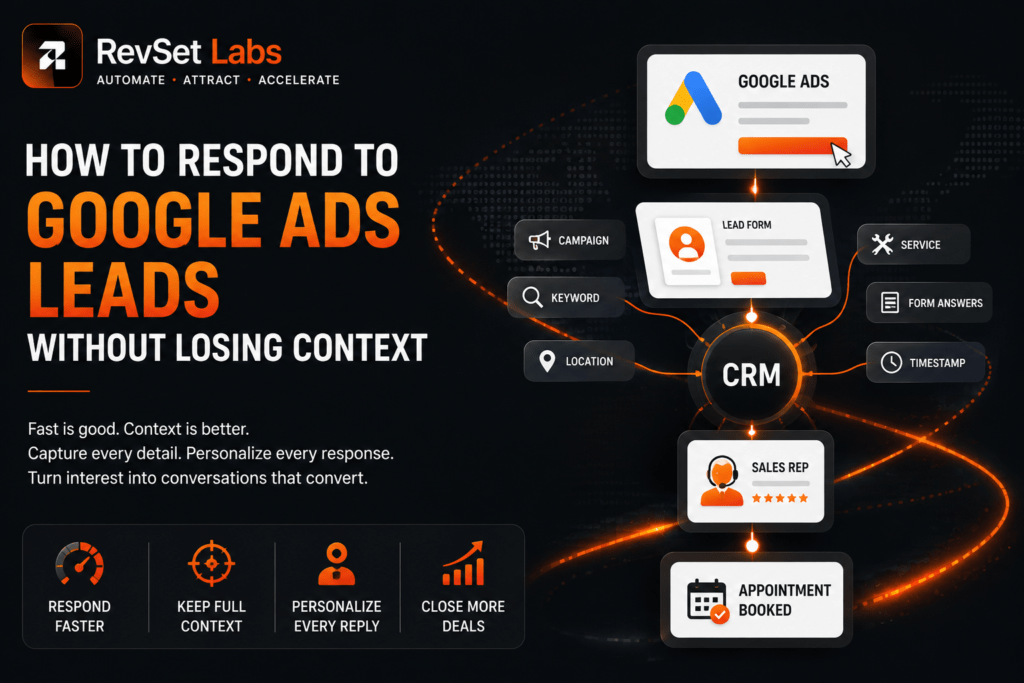
How to Respond to Google Ads Leads Without Losing Context
A Google Ads lead rarely arrives in isolation. Someone has typically looked for a solution, viewed an advertisement, visited a landing page, weighed their options, and determined that your company is worth contacting by the time they fill out a form or give you a call. The context is important. However, here is where a lot of companies cause an unnecessary issue.
The salesperson doesn’t know which campaign prompted the question, what service the lead was interested in, which landing page they viewed, or what information they have already supplied, even tho the lead enters the CRM with their name and phone number.
“Hi, how can I help you?” is how the salesperson begins the interaction.
Customers may perceive it as a sign that the company wasn’t paying attention.
This is more than just a sales communication issue, in RevSet Labs’ opinion. It is an issue with data flow and lead management.
By creating the possibility, Google Ads is fulfilling its purpose. Ensuring the data related to that opportunity survives the transfer from advertising to CRM to sales is the next hurdle.
That is the true goal of successful Google Ads lead follow-up. It’s not just about reacting fast. It’s to react promptly and contextually.
Follow Up on Google Ads Leads
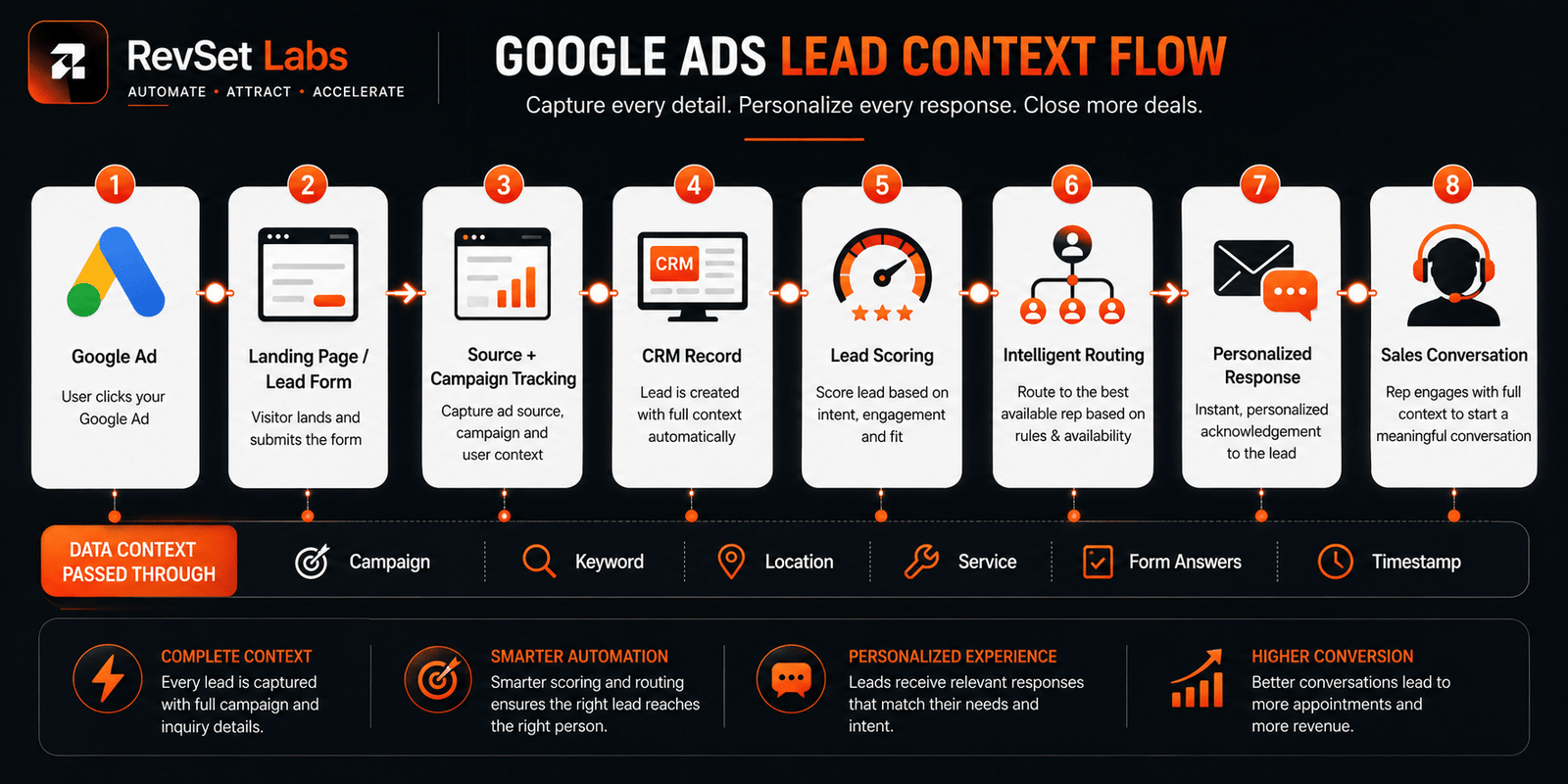
Connecting the first ad interaction to the CRM account, capturing the lead source and pertinent query facts, routing the lead to the appropriate person, and initiating a prompt yet tailored response are the best ways to follow up on a Google Ads lead.
For most high-intent service inquiries, RevSet Labs aims for a first meaningful response within five minutes during business hours, while recognizing that the appropriate target depends on urgency, staffing, lead quality, and sales complexity.
Without context, a quick reaction might nevertheless lead to conflict. Additionally, a contextual answer that comes many hours later can be too late. The operational objective is therefore:
Capture → Track → Route → Respond → Continue the Conversation
Lead forms that may transmit lead data to a CRM via webhooks, the Google Ads API, or third-party integrations are supported by Google Ads. Additionally, Google offers conversion monitoring for calls and website actions, which enables companies to link advertising activity to significant results.
Why Context Matters in Google Ads Lead Follow-Up
Imagine a prospect submits a Google Ads form saying:
“Need AC repair for a 3-bedroom home. Unit stopped cooling.”
Now imagine the salesperson receives only:
Name: John
Phone: 555-000-0000
Email: john@example.com
The salesperson has technically received the lead.
But they have lost the context.
They don’t know:
- What service John requested
- Which campaign generated the lead
- What location he selected
- Whether the request was urgent
- What information he already provided
- Which offer or landing page influenced the inquiry
The salesperson now has to ask questions the prospect may have already answered.
That creates unnecessary friction.
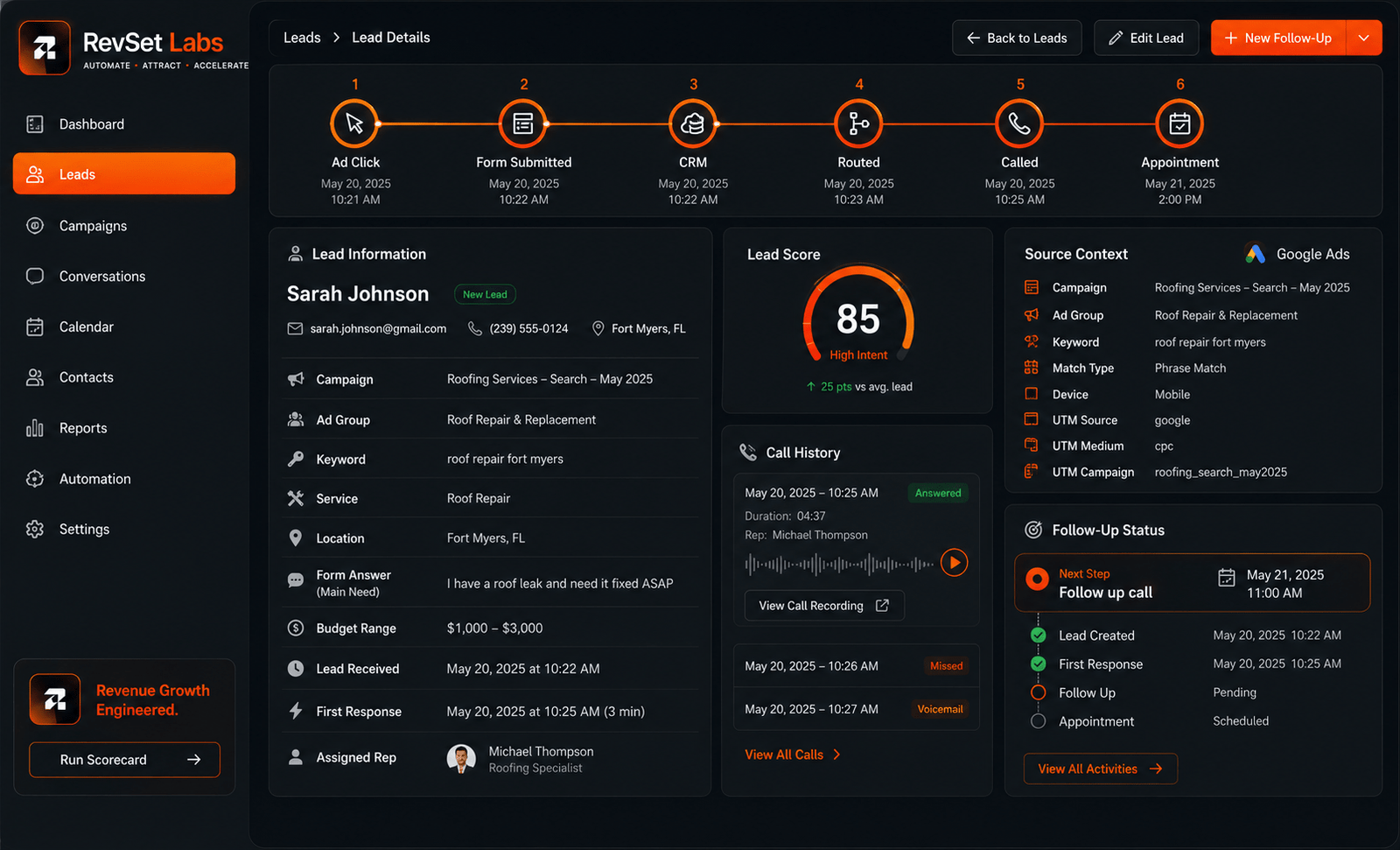
A better CRM record might show:
Source: Google Ads
Campaign: Emergency HVAC
Ad Group: AC Repair
Keyword: AC repair near me
Landing Page: Emergency AC Repair
Inquiry: Unit stopped cooling
Location: Dallas
Lead Score: High intent
Received: 10:42 AM
Assigned Rep: Sarah
Response Target: 5 minutes
Now Sarah doesn’t have to start the conversation cold.
She can say:
“Hi John, Sarah from ABC HVAC. I saw your request about the AC unit that stopped cooling. We can help with emergency repairs in your area. Are you still looking for someone to come out today?”
That’s a completely different customer experience.
The response is faster and more relevant.
How Fast Should You Respond to a Google Ads Lead?
Speed is still important.
When a potential customer fills out a Google Ads form, they are actively expressing interest. That interest is often just following the inquiry in many service firms.
Companies frequently replied far more slowly than the research advised, according to a widely recognized Harvard Business Review Study on internet sales leads, underscoring the significance of prompt follow-up. RevSet views the research as foundational evidence rather than a contemporary global standard because it was released in 2011.
Our guidance is straightforward:
Don’t build your process around the idea that “someone will respond later.”
Build it so the first meaningful response happens automatically or operationally within the target window.
For many high-intent service inquiries, a practical RevSet Labs target is:
| Stage | Target |
| Lead captured | Immediate |
| CRM record created | Seconds |
| Automated acknowledgement | Under 1 minute |
| Lead routed | Seconds |
| Sales notification | Immediate |
| First human response | Under 5 minutes |
| Follow-up if no answer | Structured sequence |
These are RevSet Labs operational targets, not universal industry averages.
Emergency services may require faster response. Complex B2B inquiries may justify a longer human response window.
The important point is that the business should define the target before the lead arrives.
The Google Ads Lead Follow-Up Process
A strong follow-up system doesn’t begin with the salesperson.
It begins with the data.
Step 1: Capture the Lead
Prospects may fill out Google Ads lead forms from within the advertisement. Email, CSV download, webhook interfaces, third-party integrations, and the Google Ads API are just a few of the distribution methods that Google offers. Webhook and CRM connectivity methods for delivering leads straight into a CRM are expressly documented by Google.
Manual CSV downloads shouldn’t be the main process for a genuine lead operation.
Near-real-time transmission into the CRM should be the goal.
That reduces the gap between:
Lead submitted → Lead visible to sales
Step 2: Preserve Source Information
The CRM record should retain enough information to explain where the opportunity came from.
At minimum, track:
- Google Ads
- Campaign
- Ad group
- Keyword or search context where available
- Landing page
- Form
- Lead timestamp
- Service requested
- Location
- Original inquiry
Later on, this information becomes quite important.
Instead of only receiving form submissions, it enables sales managers to determine which initiatives result in qualified discussions.
Additionally, it aids marketing teams in identifying the sources that generate real clients.
Step 3: Route the Lead Automatically
Once the lead enters the CRM, determine who should own it.
Routing can be based on:
- Geographic location
- Service type
- Lead score
- Business hours
- Customer type
- Sales territory
- Representative availability
For example:
Dallas + HVAC → HVAC Team
Houston + Roofing → Roofing Team
Enterprise inquiry → Senior Sales Rep
This eliminates the common situation where a lead sits in a general queue waiting for someone to decide who should handle it.
Step 4: Preserve the Conversation Context
The CRM should show the salesperson enough information to understand the inquiry before contacting the prospect.
A useful lead record might include:
Source: Google Ads
Campaign: Emergency HVAC
Service: AC Repair
Location: Dallas
Form Answer: Unit stopped cooling
Lead Received: 2:14 PM
Assigned: Sarah
First Response: 2:16 PM
Status: Contacted
Now the salesperson can personalize the opening conversation.
That is the difference between CRM data and CRM context.
Data tells you who the customer is.
Context tells you why they’re talking to you.
How to Respond Without Sounding Robotic
Writing a whole distinct message for each lead is not the definition of personalization.
It entails making use of the data that the client has already provided.
A simple Google Ads lead follow-up script could be:
“Hi [Name], this is [Rep] from [Company]. I saw your request about [service/problem]. We can help with that. Are you still looking to get this taken care of [today/this week]?”
For a more complex service:
“Hi [Name], thanks for reaching out about [specific service]. I saw that you’re looking for help with [specific need]. I can answer a few questions and help you figure out the next step. Do you have a few minutes to talk?”
The important part isn’t the exact wording.
It’s the structure:
Identify → Reference → Confirm → Move Forward
Don’t make the customer repeat information they already provided unless clarification is genuinely necessary.
What If the Lead Doesn’t Answer?
A missed call does not equate to a missed chance.
People miss calls.
They could be unable to respond because they are working, driving, or in a meeting.
Because of this, the follow-up procedure should go on without being combative.
A practical sequence could look like:
First Attempt
Call immediately.
Immediate Follow-Up
If there is no answer, send a short text:
“Hi [Name], this is [Rep] from [Company]. I just tried reaching you about your [service] request. Let me know what time works best for a quick call.”
Second Attempt
Follow up later based on your sales process.
Nurture
If the customer isn’t ready, move them into an appropriate nurture sequence rather than repeatedly treating them like a brand-new lead.
This creates continuity.
The customer doesn’t have to start over every time someone contacts them.
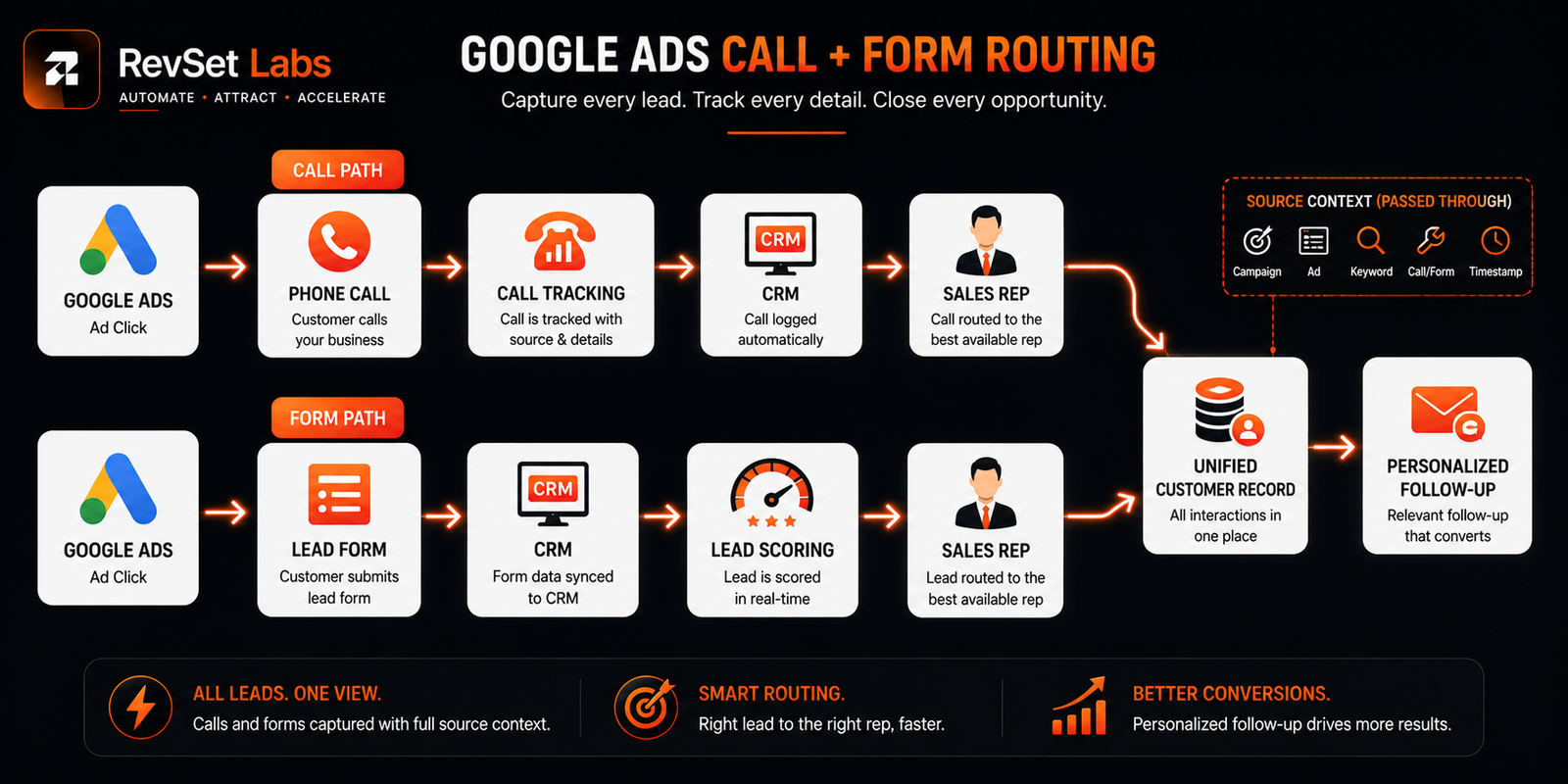
Track Calls and Forms Together
Treating form submissions as the only quantifiable conversion is one of the greatest errors in Google Ads lead management.
The phone is still the main sales channel for a lot of service companies.
Businesses may learn which advertisements, keywords, and campaigns generate phone calls by using Google Ads’ call conversion monitoring feature. Additionally, Google allows businesses to link calls with downstream results like sales by importing call conversions from another system.
This is important because a campaign that generates 30 phone calls is not always superior to one that generates 100 form submissions.
The question is:
Which campaign produces more qualified opportunities and customers?
That’s why RevSet Labs connects both paths to the same CRM and reporting framework.
Source Tracking Should Survive the Entire Funnel
A lead should not lose its marketing history simply because it becomes a sales opportunity.
Track the journey from:
Campaign → Lead → Conversation → Appointment → Customer
A closed-loop perspective of advertising performance is therefore produced.
Google Ads conversion monitoring helps organizations determine whether advertising activity results in value outcomes by measuring important activities like leads, sales, and calls.
Google also offers direct CRM distribution via integrations like webhooks and near-real-time lead retrieval via the API for companies employing Google Ads lead forms.
This indicates the existence of the technological infrastructure.
Creating an operational procedure around it is the difficult part.
RevSet Labs’ Approach to Google Ads Lead Management
RevSet Labs don’t view Google Ads lead follow-up as a single automation.
It’s a chain of operational decisions.
Where did the lead come from?
What did they ask for?
How urgent is the inquiry?
Who should handle it?
How quickly should they respond?
What should the salesperson already know?
What happens if the prospect doesn’t answer?
How does the outcome get reported back to marketing?
Follow-up becomes predictable when such queries have clear responses.
Businesses frequently depend on individual employes to remember what to do next in the absence of them.
That strategy is not scalable.
Therefore, we concentrate on integrating the advertising source, CRM context, lead routing, automation, and human follow-up into a single operating system.
Automating the client connection is not the goal.
It’s to ensure that the human conversation begins with accurate facts.
KPIs to Monitor
| KPI | What It Tells You |
| Lead Response Time | How quickly sales engages new opportunities. |
| Response Coverage | Whether valid leads are actually receiving follow-up. |
| Contact Rate | How many leads become real conversations. |
| Lead-to-Appointment Rate | Whether conversations create measurable progress. |
| Qualified Lead Rate | Whether Google Ads is generating commercially relevant opportunities. |
| Call Conversion Rate | How effectively paid traffic generates valuable calls. |
| Lead-to-Customer Rate | Which campaigns ultimately produce customers. |
| Cost per Qualified Lead | Whether advertising spend is producing worthwhile opportunities. |
The most important shift is moving beyond:
“How many leads did Google Ads generate?”
toward:
“How many qualified customers did Google Ads help us create?”
That distinction changes how marketing budgets are evaluated.
How RevSet Labs Turns Google Ads Leads Into Revenue-Ready Conversations
Google Ads, lead forms, phone calls, CRM data, routing rules, automation, and sales follow-up are just a few of the components that RevSet Labs helps service organizations link.
Our approach is designed around a simple principle:
“Every lead should arrive with context, reach the right person, and receive a timely next step.”
We assist in creating processes that preserve source information, intelligently route leads, initiate prompt answers, and keep the conversation history throughout the customer journey, saving your sales force from having to manually look into the origin of each inquiry.
It’s possible that your advertising isn’t the issue if you’re producing Google Ads leads but don’t know how many are being contacted, qualified, booked, or converted.
It may be what follows the click.
Final Thoughts
The opportunity may be created by Google Ads, but what occurs next is determined by your follow-up procedure.
When a lead gets to sales without its original context, the client is forced to repeat themselves. A lead loses momentum if it is left unassigned for an hour. It becomes challenging to attribute a phone call that isn’t linked to the CRM. It is more difficult to determine which advertising investment is truly effective when a form is submitted without campaign details.
These issues are not unique.
They’re symptoms of a disconnected lead management process.
The most effective Google Ads lead follow-up solutions integrate CRM context, intelligent routing, quick response, and organized follow-up with advertising data.
Speed is important.
However, speed without context results in encounters that are superficial.
Without speed, context comes too late.
The goal is to deliver the right response, to the right lead, at the right time, with the right information already in front of the salesperson.
At that point, paid acquisition transitions from being a lead-generation channel to a revenue mechanism.
FAQs
How fast should you respond to a Google Ads lead?
During business hours, RevSet Labs advises aiming for a first significant response for high-intent service leads within five minutes. The precise goal should be determined by personnel, sales complexity, and lead urgency.
What is the best way to follow up on Google Ads leads?
The optimal strategy integrates intelligent routing, CRM context, quick response, and organized follow-up. Before contacting a lead, salespeople should be aware of their source, service interest, location, and past contacts.
How do you respond to leads without losing context?
Save campaign, form, service, location, and conversation data by connecting Google Ads lead data straight to your CRM. This provides sales teams with the background information they need to send tailored follow-up messages or calls.
Should Google Ads calls and forms use the same CRM?
Indeed. Lead routing, follow-up, and attribution become simpler to handle when calls and form submissions are combined into a single CRM.
What information should be tracked for Google Ads leads?
Monitor the campaign, ad group, landing page, lead source, form responses, timestamp, location, designated representative, and follow-up activities, as well as any keywords or search context that may be accessible. This data facilitates the link between marketing effectiveness and sales results.
Can automation improve Google Ads lead follow-up?
Indeed. Inquiries can be promptly acknowledged, leads can be routed, sales staff can be informed, and follow-up reminders can be set off by lead response automation. Relationship-building, questioning, and qualifying should still be handled by human contact.
What should a Google Ads lead follow-up message include?
A well-written follow-up communication should name the company, mention the particular service or request, and outline the next course of action. Avoiding a repeating sales experience may be achieved by tailoring the message with information that the lead has already provided.
How can businesses improve Google Ads lead conversion rates?
Lead response time, contact rate, qualifying lead rate, appointment rate, and lead-to-customer conversion should all be measured first. Businesses may increase the return on their current advertising investment by enhancing routing, CRM context, response time, and follow-up consistency.
Stop Losing Context After the Click
Your Google Ads budget creates the opportunity.
Your lead management system determines how much of that opportunity becomes revenue.
If leads are being delayed, routed incorrectly, contacted without context, or disappearing between forms and phone calls, it’s time to look beyond campaign performance.
Run the RevSet Labs Revenue Leak Scorecard to identify where your lead process is losing momentum and uncover opportunities to improve response speed, routing, follow-up, and conversion performance.