To launch your first GoHighLevel funnel, go to Sites → Funnels, click New Funnel, and select a creation option. This process typically takes 15-30 minutes for a basic setup. Implementing this correctly ensures a professional, high-converting lead generation machine for your business.
Key Takeaways
✓Start with templates for 90% faster GoHighLevel funnel setup.
✓Always use a custom domain for professional brand credibility and trust.
✓Integrate forms to capture critical lead information efficiently.
✓Regular GoHighLevel funnel optimization boosts conversion rates by 2X.
✓Automate follow-up for immediate lead engagement and nurturing sequences.
How Do You Create a GoHighLevel Funnel?
Launching a new sales or lead generation funnel in GoHighLevel is your first step to automated revenue. Revset Labs client data shows funnels built correctly drive a 30% increase in qualified leads. GoHighLevel offers three distinct paths to start your funnel, each suited for different expertise levels and project timelines. Choose the path that best aligns with your goals and resources to ensure rapid deployment and maximum impact.
1
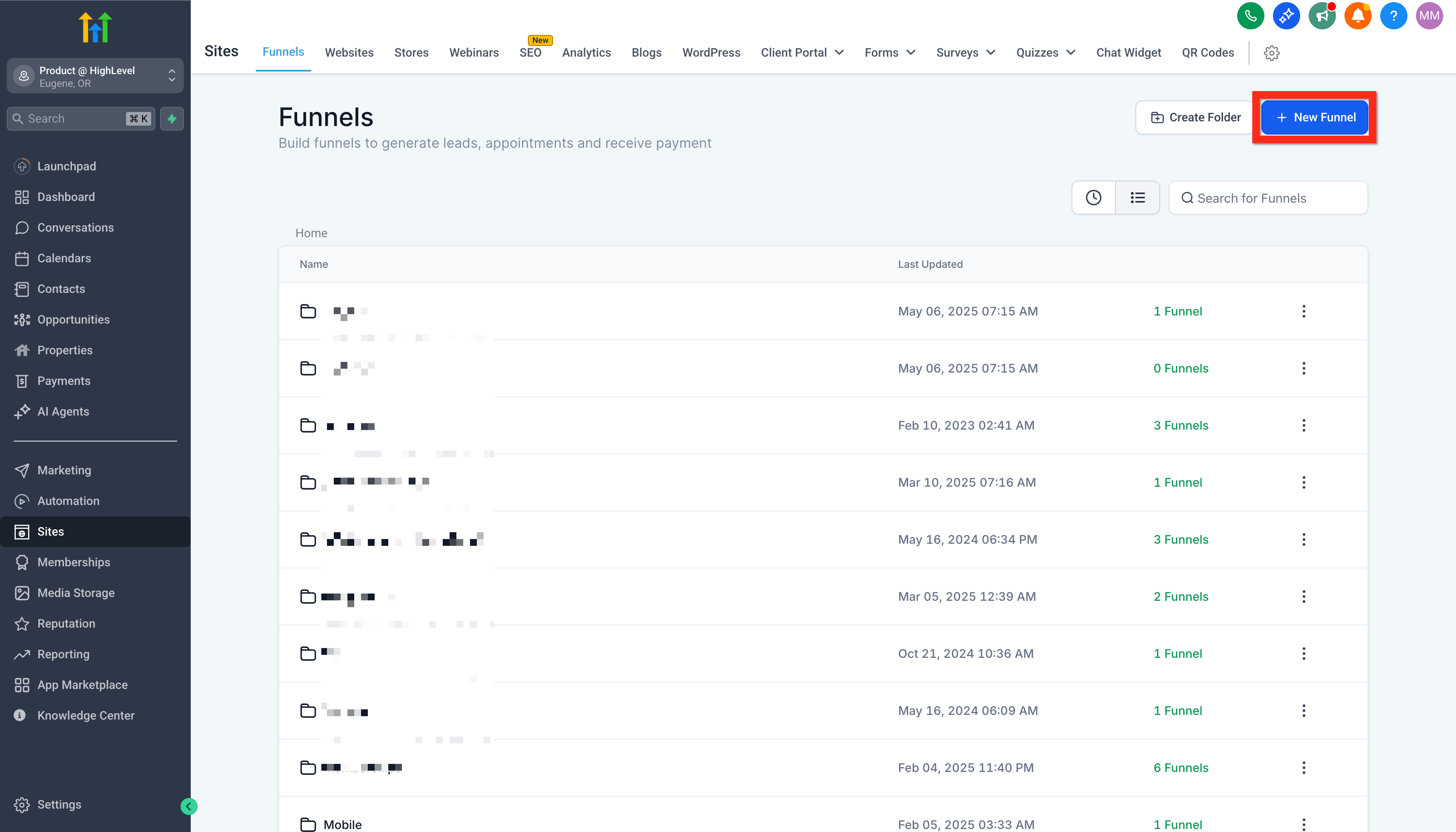
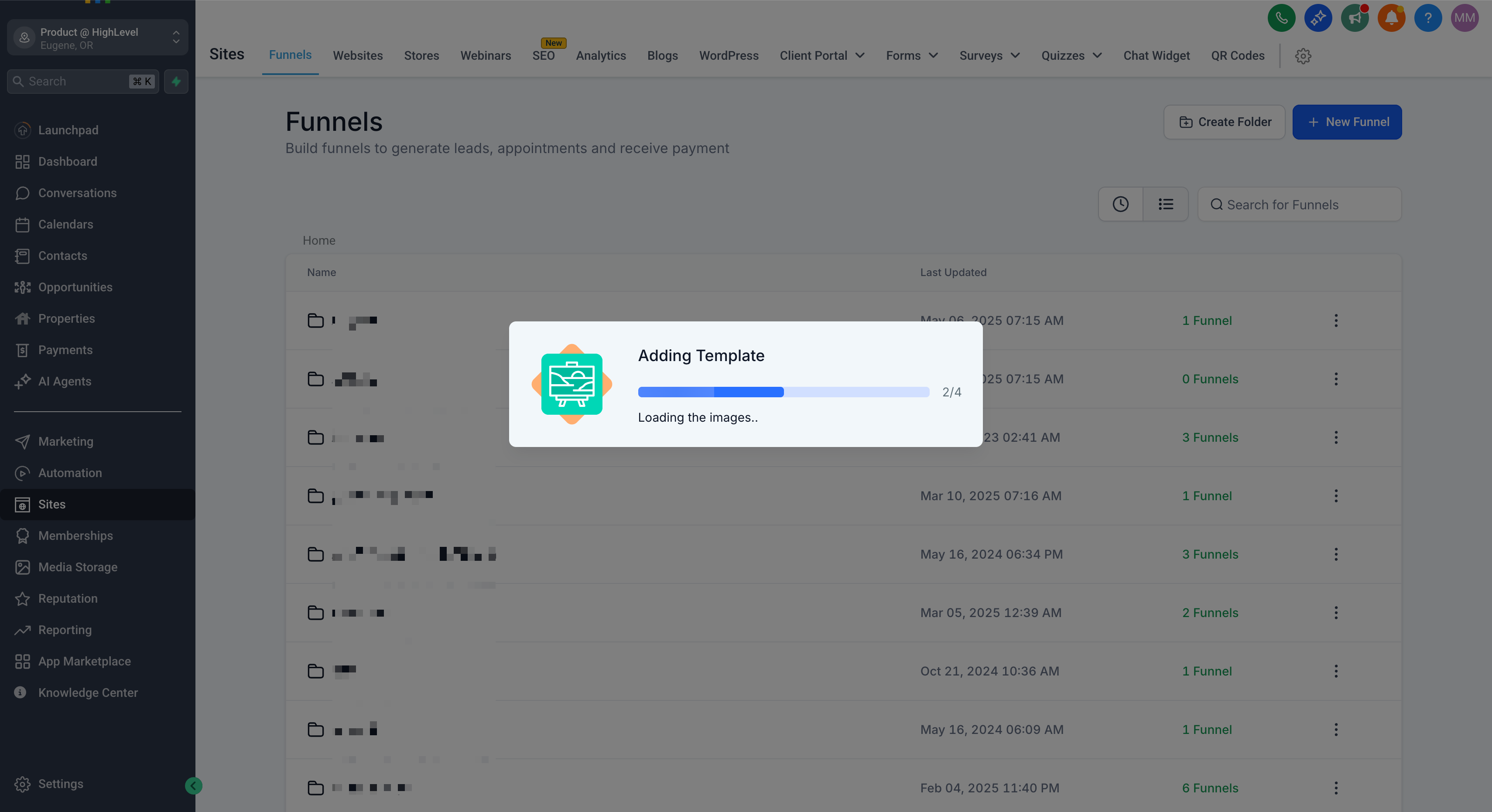
Access Funnels Area — In your GoHighLevel dashboard, go to Sites → Funnels. This central hub manages all your sales and lead generation funnels efficiently.
2
Initiate New Funnel Creation — Click the New Funnel button. You will see three distinct options to begin building your funnel instantly.
0
3
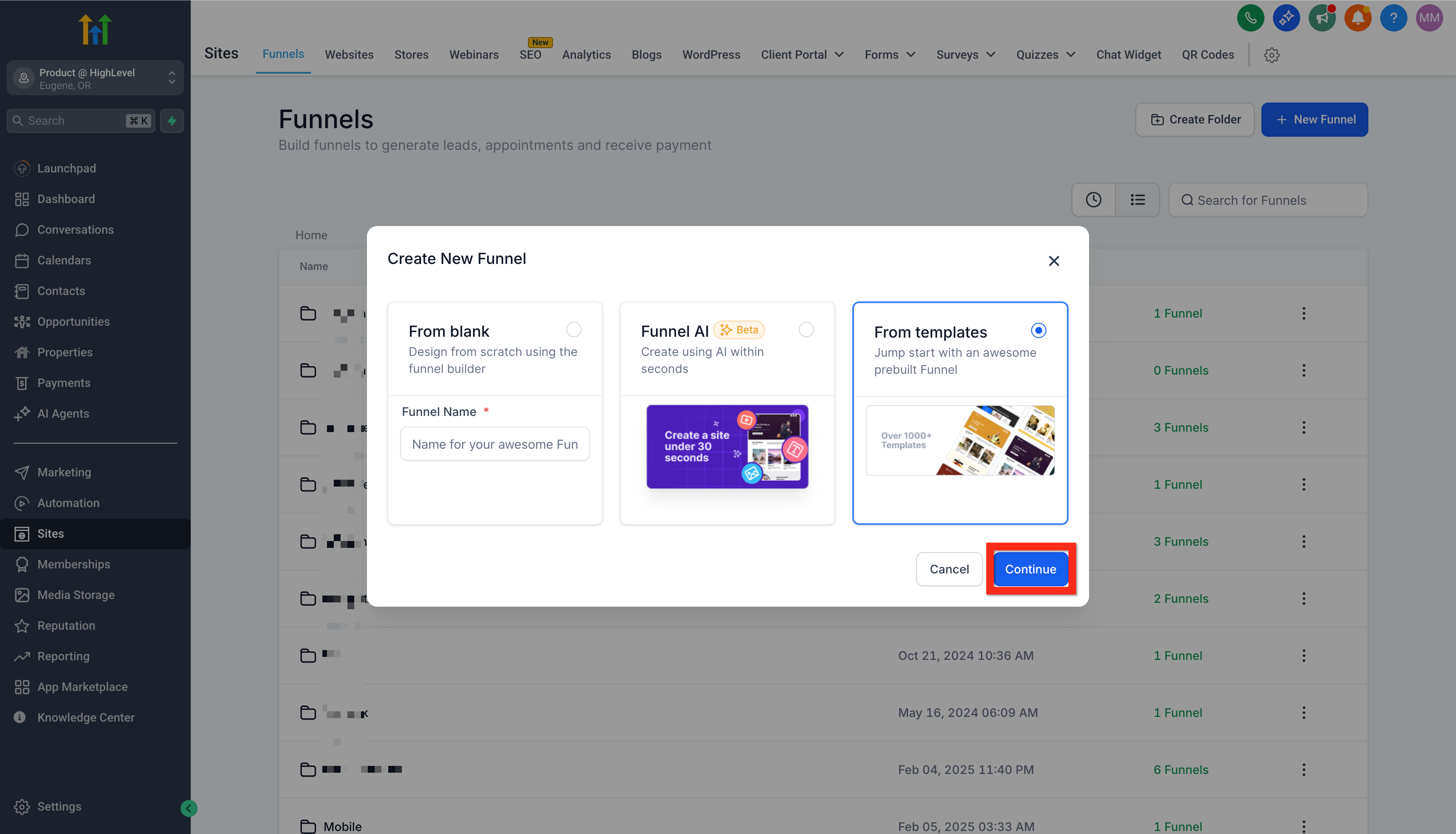
Choose Your Funnel Creation Method — Select one of these powerful options: From Blank for full customization, Funnel AI for AI-driven rapid prototyping, or From Templates for a proven, pre-designed structure.
🔥 Pro Tip
When we set this up for clients, we always start with 'From Templates' or 'Funnel AI' to accelerate deployment. This cuts setup time by 90% and ensures a professional, high-converting layout from day one.
Why Use a GoHighLevel Funnel Template?
Leveraging GoHighLevel templates is a strategic move for efficiency and proven performance. These pre-designed funnels incorporate best practices for conversion, saving you significant design and testing time. Revset Labs finds that starting with a template can reduce launch time by up to 75% compared to building from scratch, allowing clients to generate pipeline faster.
1
Navigate to Funnels — From your GoHighLevel dashboard, go to Sites → Funnels. This action takes you to your funnels overview.
2
Select Template Option — Click New Funnel → From Template → Continue. This directs you to the GoHighLevel Template Library.
3
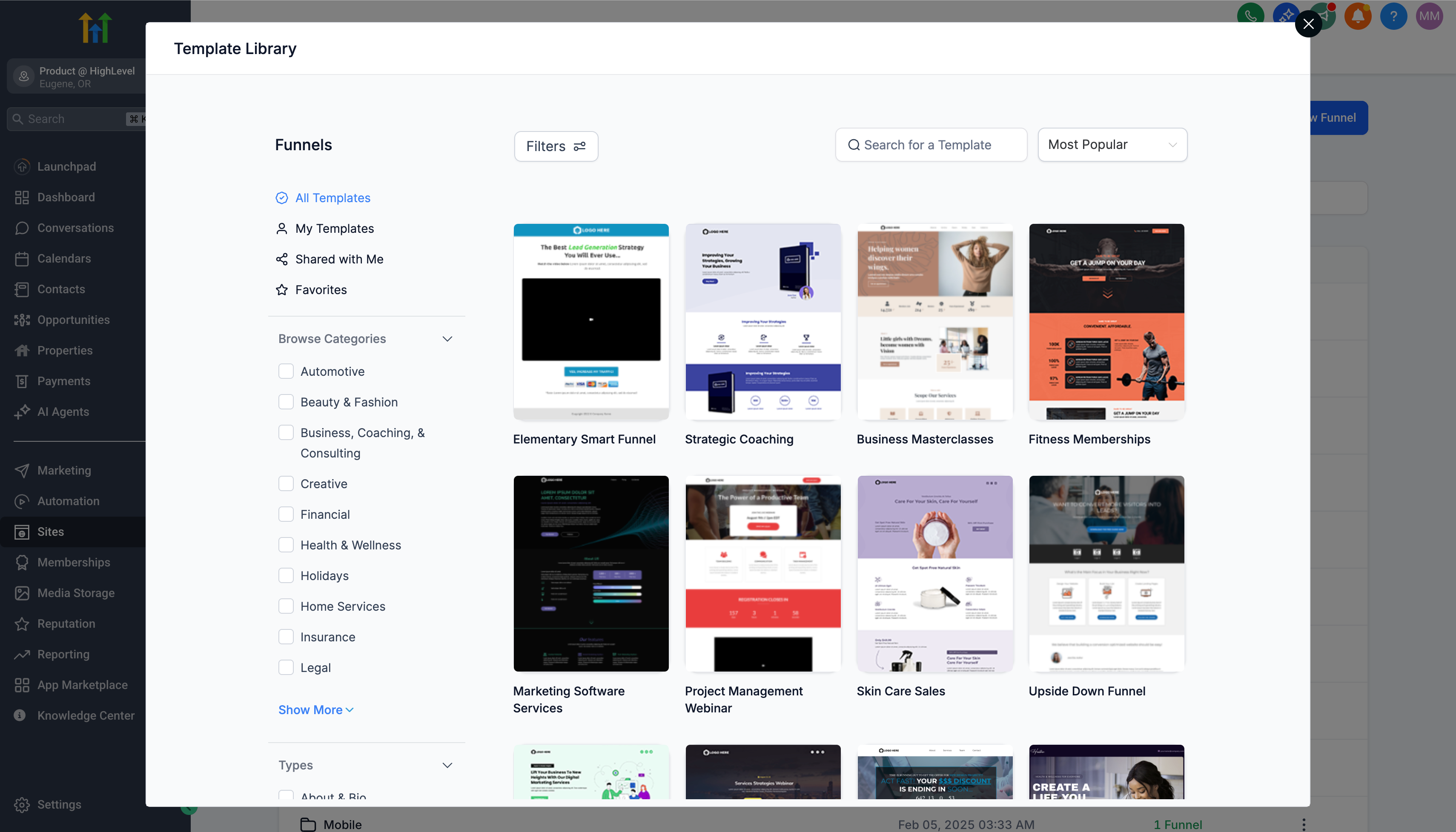
Browse Template Library — Open the Template Library. Here, you can explore hundreds of professionally designed funnels tailored for various industries and objectives.
0
4
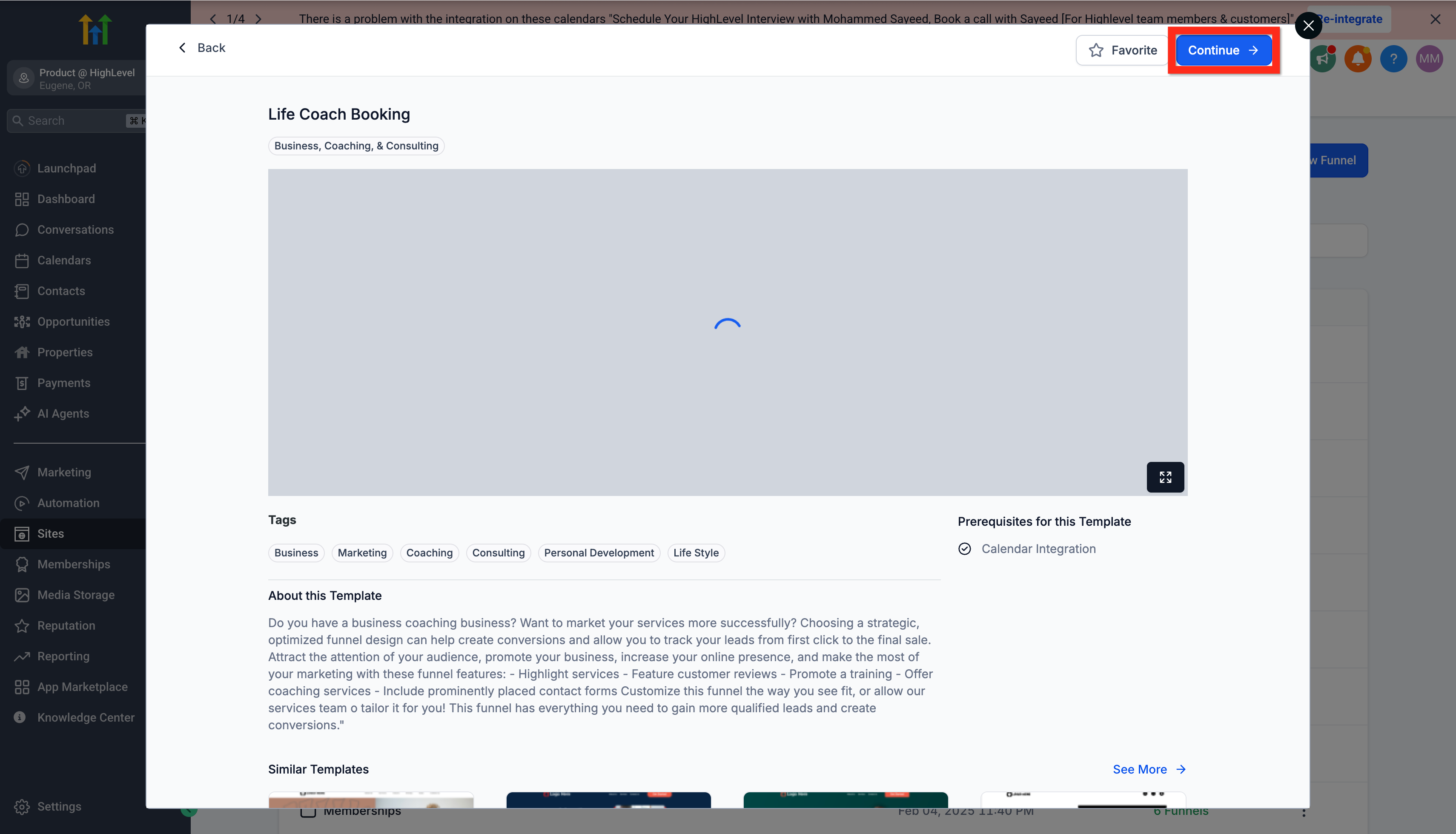
Find Your Ideal Template — Utilize the search, filter, and sort functions to quickly locate a template that aligns with your specific campaign goals. Preview templates to evaluate their layout and functionality before committing.
5
Confirm Template Selection — Once you've chosen, click Continue. This imports the template into your Funnel Editor.
6
Customize Funnel in Editor — Make your design and content edits directly within the Funnel Editor. Tailor the pages to match your brand's aesthetics and messaging.
1
7
Save Funnel Changes — Click Save to apply all modifications to your funnel. This action ensures your customized template is stored.
🔥 Pro Tip
When we set this up for clients, we always recommend customizing only core elements initially. Focus on headlines, calls-to-action, and brand colors to launch quickly, then iterate based on performance data.
How Do You Integrate Forms into Your Funnel?
Forms are crucial for capturing lead information within your GoHighLevel funnels. A well-designed form ensures smooth data collection, converting visitors into identifiable leads. Revset Labs' A/B testing reveals that optimized forms can boost lead capture rates by as much as 50%, providing valuable contact data for immediate follow-up.
1
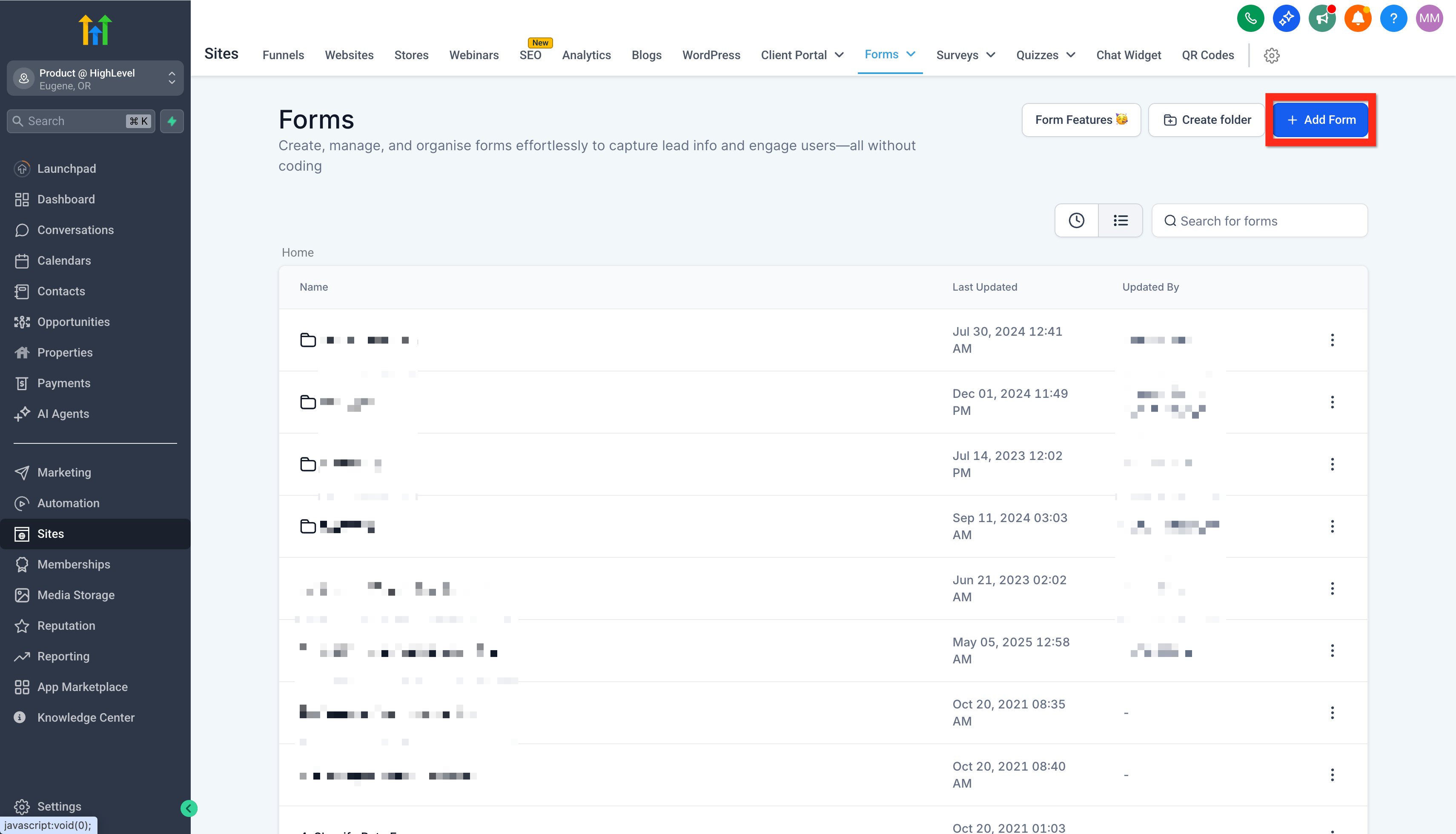
Access Form Builder — Navigate to the Form Builder. You can access it via the Form Picker within the Funnel Editor or directly through Sites → Forms → Form Builder.
2
Start New Form Creation — Click Add Form. This action opens a blank canvas to design your new lead capture form.
3
Customize Form Fields and Branding — Use the Form Editor to add, remove, and arrange fields. Ensure your form's design aligns with your brand's visual identity for a cohesive user experience.
4
Save Your New Form — Click Save to preserve your customized form. This makes it available for integration into your funnel pages.
0
⚠️ Avoid asking for too much information on initial forms. Each additional field can decrease conversion rates by 2-5%.
🔥 Pro Tip
When we set this up for clients, we always limit form fields to only essential information. Asking for less data significantly improves completion rates by reducing friction for prospects. More fields can always be collected later.
Try GoHighLevel Free
Start your 30-day GoHighLevel free trial
Everything in this guide is in your free trial. 30 days, no credit card — the platform behind 78+ revenue systems.
Some links are affiliate links — if you sign up we may earn a commission, at no extra cost to you. We only recommend GoHighLevel because we build on it every day.
How Do You Edit and Optimize an Existing GoHighLevel Funnel?
Optimizing your funnels is an ongoing process crucial for sustained performance and revenue growth. Market conditions, offers, and audience preferences evolve, requiring timely updates to maintain effectiveness. Revset Labs routinely edits client funnels, leading to consistent performance improvements and increased conversion rates by up to 20% post-optimization.
1
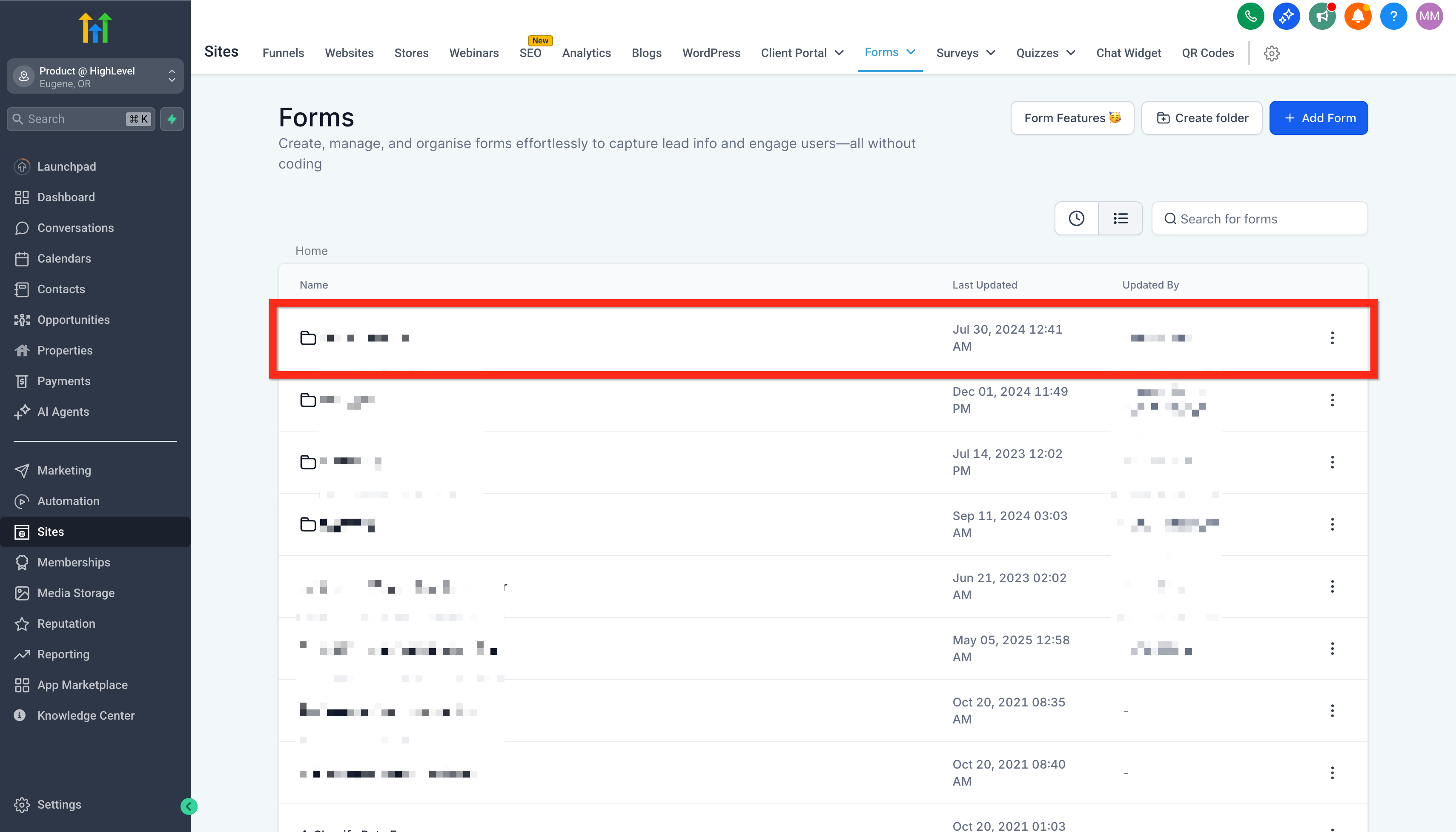
Locate Your Funnel — Go to Sites → Funnels. This displays a list of all your created funnels within GoHighLevel.
2
Select Funnel for Editing — Identify and click on the specific funnel you wish to edit from the Funnel List. This action opens the Funnel Editor.
3
Make Necessary Edits — Perform all required modifications within the Funnel Editor. Update content, adjust layouts, or add new elements to enhance performance.
4
Save Funnel Changes — Click Save to implement your edits. All modifications go live immediately upon saving.
0
🔥 Pro Tip
When we set this up for clients, we always implement A/B testing for any significant funnel edits. This scientific approach ensures changes genuinely improve performance rather than guessing.
What is the Process to Connect a Custom Domain to Your GoHighLevel Funnel?
Connecting a custom domain to your GoHighLevel funnel is essential for branding, credibility, and SEO. It ensures your funnel looks professional and is easily discoverable online. A custom domain reinforces trust with your audience, which Revset Labs has observed boosts conversion rates by an average of 15%.
1
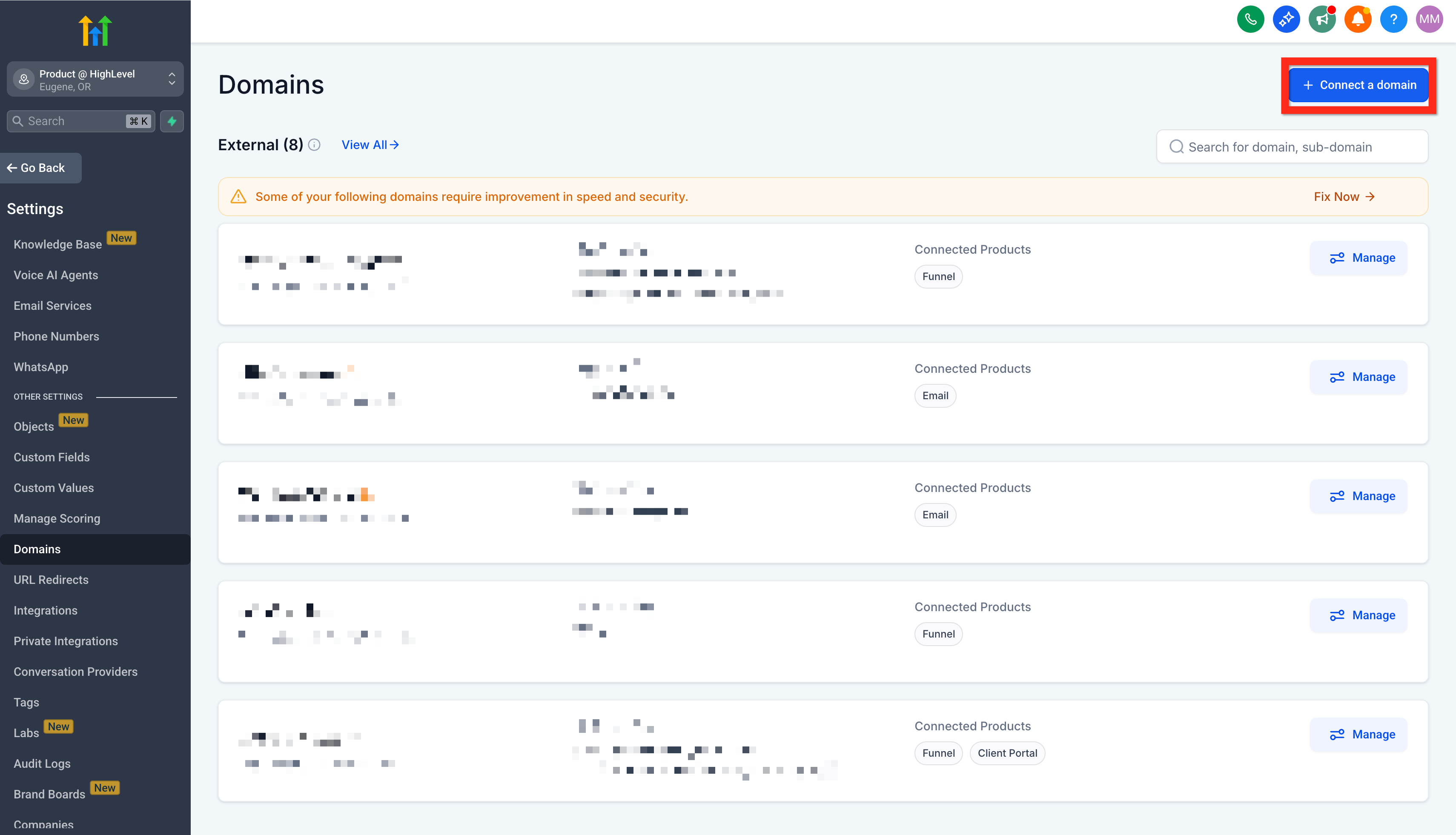
Access Domain Settings — Go to Settings → Domains within your GoHighLevel account. This section manages all custom domains associated with your account.
2
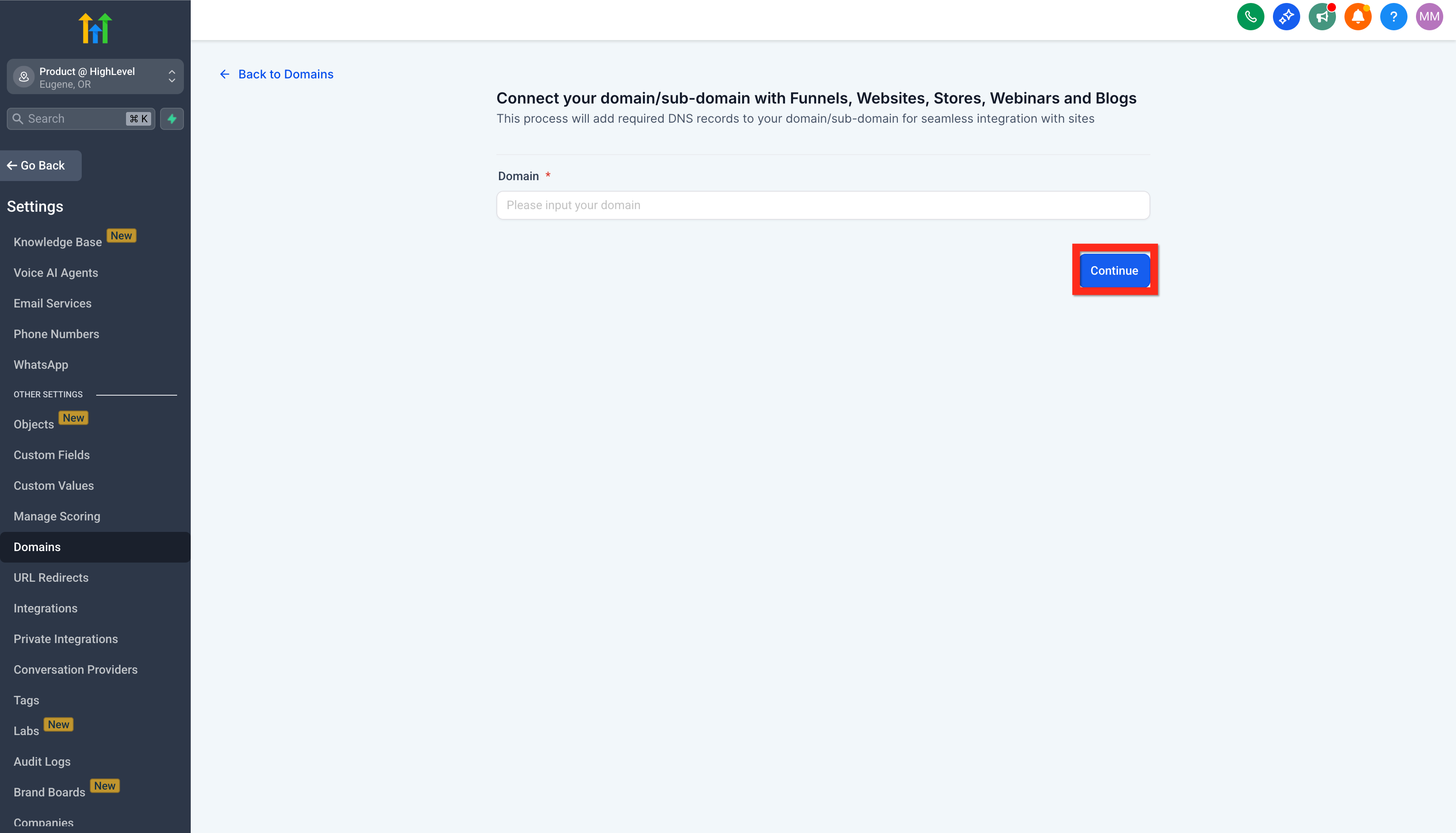
Initiate Domain Connection — Click Connect a Domain. This begins the guided process for linking your custom URL to your GoHighLevel assets.
0
3
Enter Your Domain — Input your desired domain name (e.g., yourcompany.com or sales.yourcompany.com) and click Continue. Ensure the domain is registered and accessible.
4
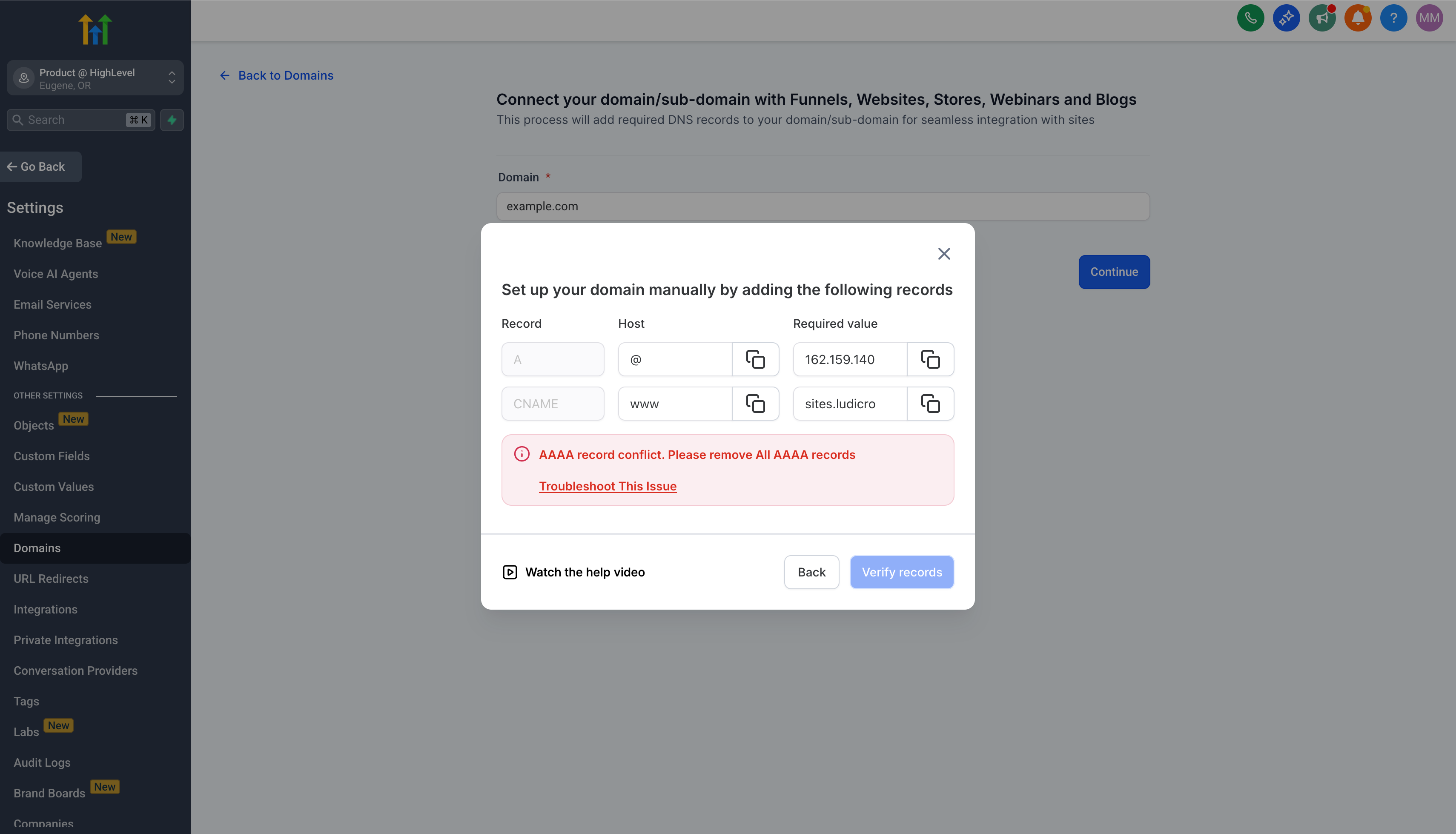
Configure DNS Records — Follow the provided instructions to set up the necessary DNS records (typically A records or CNAME records) with your domain registrar. These instructions are unique to your registrar.
1
5
Verify Domain Configuration — Click Verify Records. GoHighLevel checks if the DNS changes have propagated correctly. This can take a few minutes to several hours.
6
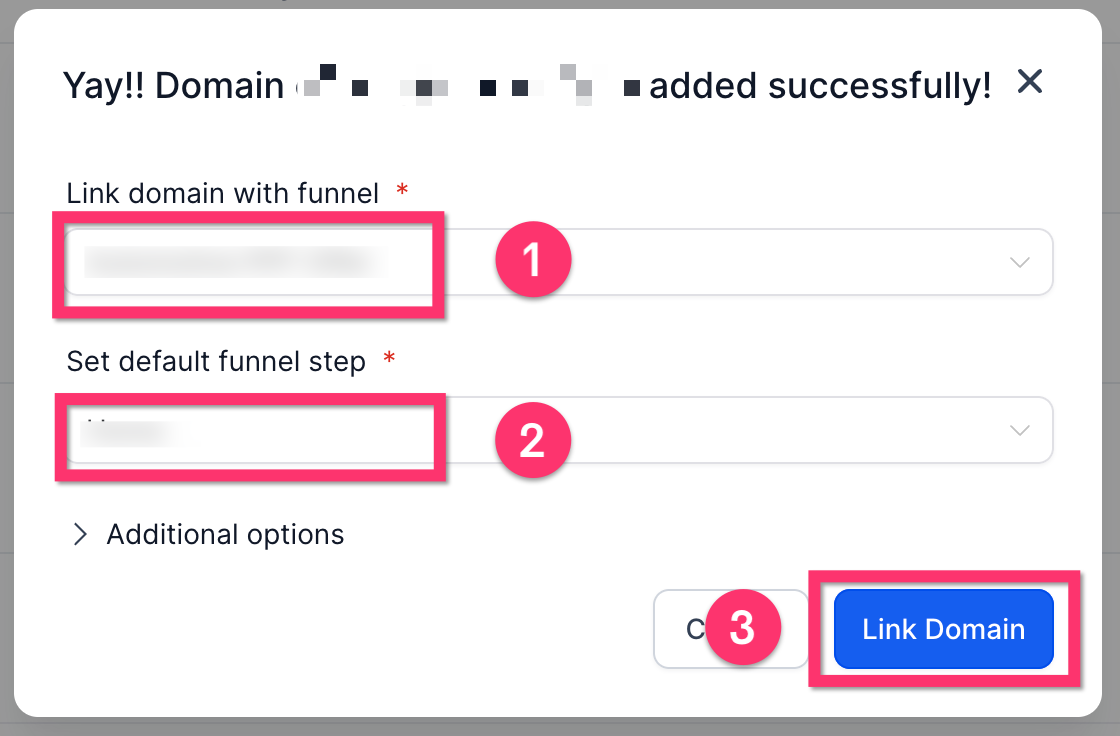
Link Domain to Funnel — Once verified, select the specific funnel you want to associate with this domain. This links your professional URL to your marketing asset.
2
7
Complete Domain Setup — Click Proceed to Finish. Your custom domain is now active and points to your GoHighLevel funnel.
⚠️ DNS record propagation can take 24-48 hours. Your funnel will not display on the custom domain until verification is complete.
🔥 Pro Tip
When we set this up for clients, we always use a subdomain (e.g., `go.yourbrand.com` or `offers.yourbrand.com`) for funnels. This clearly segments marketing assets while maintaining brand consistency with your main website.
Troubleshooting Common Issues
⚠️ Domain records not verified.
Double-check your DNS settings with your domain registrar. Ensure CNAME (host: www, value: flash.funnels.msgsndr.com) and A record (host: @, value: 34.64.120.180) are correct. Wait 1-2 hours for propagation before re-verifying.
⚠️ Funnel page shows a 404 error after linking a domain.
Verify that a default funnel step is assigned to the root path within your funnel settings after domain connection. Go to Funnel Settings and check the Default Page selection.
⚠️ Form fields are not saving changes after editing.
Ensure you click the Save button within the Form Editor after making any modifications. Sometimes, browser cache issues require a hard refresh (Ctrl+Shift+R or Cmd+Shift+R).
⚠️ Template preview looks different in the editor than live.
The editor view sometimes differs slightly from the live preview due to responsive design elements. Always check the Preview option to see how your funnel appears to visitors on different devices.
⚠️ Cannot connect domain, it says 'already in use'.
This usually means the domain or subdomain is already connected to another location or account within GoHighLevel. Check other sub-accounts or contact GoHighLevel support to identify where it's connected.
Common Mistakes to Avoid
→Not using a custom domain, which significantly hurts brand perception and SEO.
→Overloading lead capture forms with too many unnecessary fields, drastically reducing conversion rates.
→Skipping essential template customization, leading to generic funnels that lack brand identity.
→Forgetting to save changes regularly after making edits to funnels or forms, resulting in lost work.
→Neglecting to test funnel pages on various mobile devices, impacting user experience for a large audience.
Frequently Asked Questions
QHow long does it take to launch a basic funnel on GoHighLevel?
Launching a basic funnel from a template in GoHighLevel typically takes 15-30 minutes. This includes selecting a template, performing minor customizations, and connecting it to a custom domain. More complex funnels with extensive integrations and custom forms will naturally require additional time for setup and thorough testing.
QCan I use GoHighLevel's AI for funnel creation?
Yes, GoHighLevel offers a **Funnel AI** option which uses artificial intelligence to help you create funnels. This feature can quickly generate initial funnel structures and content ideas based on your input, significantly accelerating the starting phase of your funnel build and offering a solid foundation.
QWhat's the benefit of connecting a custom domain to my GoHighLevel funnel?
Connecting a custom domain enhances your brand's professionalism, builds trust with your audience, and improves SEO. Instead of a generic GoHighLevel URL, your funnel will appear under your own branded domain, which is crucial for credibility, direct traffic, and reinforcing your brand identity with every visitor.
QHow often should I update or edit my GoHighLevel funnels?
You should regularly review and optimize your GoHighLevel funnels. We recommend monthly performance checks. Make edits based on analytics data, A/B testing results, and changes in your offers or market. Continuous optimization is key to maintaining high conversion rates and ensuring your funnels remain effective and relevant.
QWhy are my form submission rates low in my GoHighLevel funnel?
Low form submission rates often stem from too many required fields, unclear value propositions, or a lack of mobile optimization. Ensure your forms are concise, easy to complete, and tested across devices. Consider offering an immediate incentive for completion to boost engagement and improve the user's motivation to convert.
Try GoHighLevel Free
Start your 30-day GoHighLevel free trial
Everything in this guide is in your free trial. 30 days, no credit card — the platform behind 78+ revenue systems.
Some links are affiliate links — if you sign up we may earn a commission, at no extra cost to you. We only recommend GoHighLevel because we build on it every day.
Arsalan Zaffar
Revset Labs · Revenue Systems · 78+ GHL Builds
Arsalan writes GHL guides from real build experience — 78+ systems, $9.2M in client pipeline. Wharton, CXL & Google certified.