
Install GoHighLevel's Chat Widget: A Step-by-Step Guide
👉 Start your 30-day GoHighLevel free trial.
Start 30-Day Free Trial →To install the GoHighLevel chat widget, go to Sites → Chat Widget to configure its settings and copy the embed code. Then, paste this code into your website's or funnel's custom CSS/HTML header section. This process typically takes 5-10 minutes to complete.
- ✓Always ensure you have an A2P registered phone number for SMS replies to function correctly.
- ✓Customize your chat widget's appearance and messaging to match your brand and engage visitors effectively.
- ✓For GoHighLevel funnels/websites, paste the chat widget code into the 'Custom CSS/HTML' section in **Settings**.
- ✓For WordPress sites, use a plugin like 'Insert Headers and Footers' or your theme's customizer to embed the code.
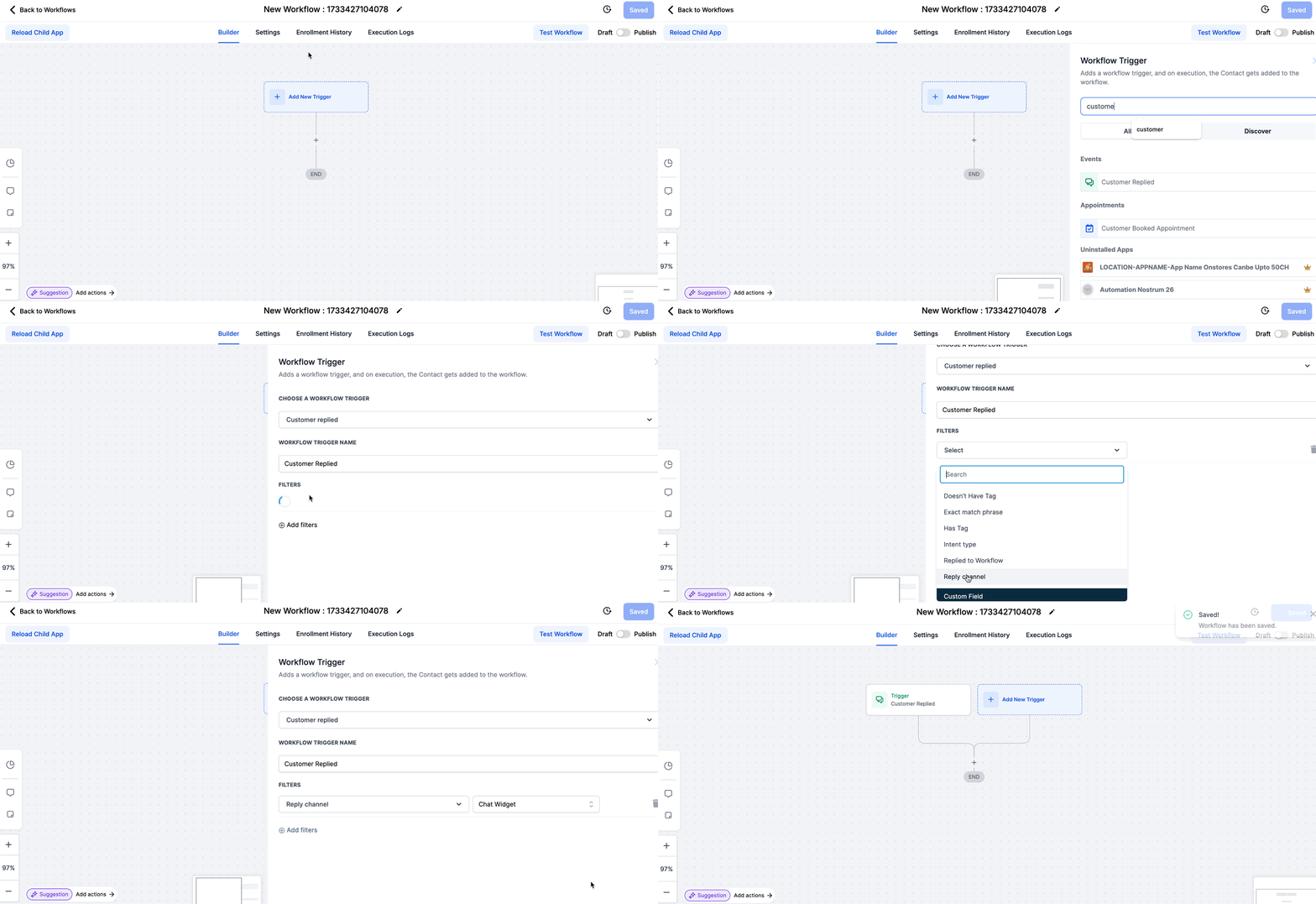
- ✓Set up a 'Customer Replied' workflow trigger with the 'Chat Widget' filter to receive timely notifications.
How to Configure Your Chat Widget Settings in GoHighLevel
Before you can install the chat widget on your website, you need to customize its appearance, messages, and behavior within GoHighLevel. This ensures the widget reflects your brand and provides a seamless experience for your visitors.
✅ Ensure you have purchased a phone number and completed the required A2P registration in the sub-account. This is crucial for SMS replies to be sent from the chat widget. Without A2P registration, SMS functionality will not work.
Use a clear, action-oriented welcome message like 'Hi there! How can we help you today?' to encourage engagement. Test different messages to see what performs best.
How to Install the Chat Widget on a GoHighLevel Funnel or Website
Once your chat widget is configured, you need to embed its code into your GoHighLevel funnels or websites. This makes the widget appear and function on your live pages, allowing visitors to start conversations directly.
⚠️ Always paste the chat widget code into the 'Head Tracking Code' or 'Body Tracking Code' section, not directly into an HTML element on the page. Incorrect placement can prevent the widget from loading correctly.
Start your 30-day GoHighLevel free trial
Everything in this guide is in your free trial. 30 days, no credit card — the platform behind 78+ revenue systems.
Some links are affiliate links — if you sign up we may earn a commission, at no extra cost to you. We only recommend GoHighLevel because we build on it every day.
How to Install the Chat Widget on a WordPress Site
Integrating the GoHighLevel chat widget into a WordPress site requires adding the embed code to your theme's files or using a plugin. This ensures the widget loads on every page of your WordPress site.
⚠️ Directly editing your theme's `header.php` file can break your site if done incorrectly. Always back up your site before making manual code changes. Using a plugin is generally safer for beginners.
For WordPress, using a dedicated plugin like 'Insert Headers and Footers' is safer and easier than directly editing theme files. It prevents your code from being overwritten during theme updates.
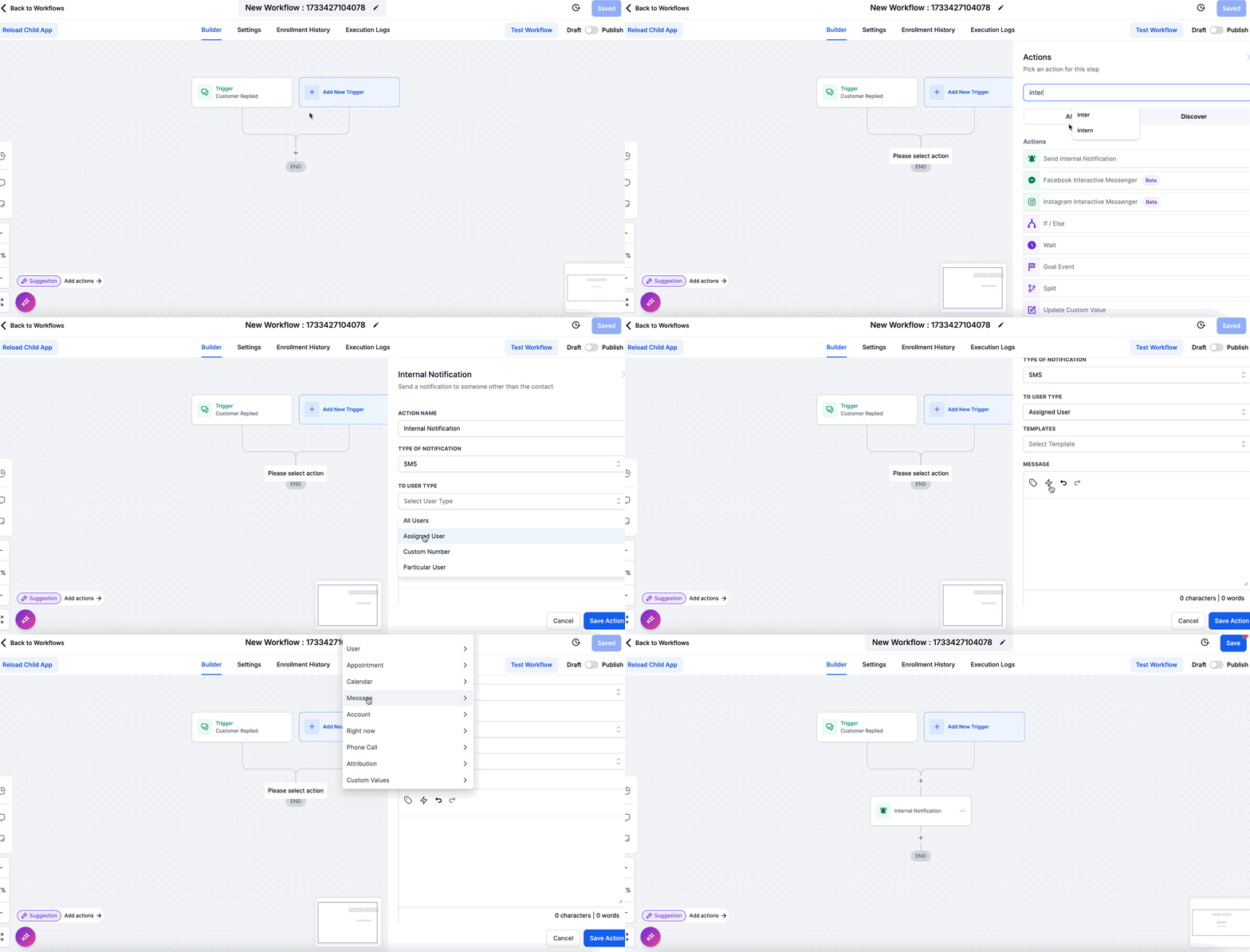
How to Set Up Workflow Notifications for Chat Widget Replies
Once your chat widget is live, you need a system to notify your team when a new conversation starts. GoHighLevel workflows automate this, ensuring you never miss a lead or support request.
✅ Each 'Reply channel' (e.g., Chat Widget, Google Messages, Facebook Messenger) requires its own respective workflow trigger. If you want to receive notifications from multiple channels, you must create separate triggers or workflows for each specific event.
Troubleshooting Common Issues
Common Mistakes to Avoid
- →Forgetting to save chat widget settings after customization.
- →Pasting the embed code into the wrong section of a website or funnel.
- →Not setting up a workflow for chat widget notifications, leading to missed leads.
- →Skipping A2P registration for the phone number, which disables SMS replies.
- →Placing the WordPress embed code in a way that gets overwritten by theme updates.
Frequently Asked Questions
Start your 30-day GoHighLevel free trial
Everything in this guide is in your free trial. 30 days, no credit card — the platform behind 78+ revenue systems.
Some links are affiliate links — if you sign up we may earn a commission, at no extra cost to you. We only recommend GoHighLevel because we build on it every day.

Arsalan writes GHL guides from real build experience — 78+ systems, $9.2M in client pipeline. Wharton, CXL & Google certified.
Connect on LinkedIn