
Create Perfect Voicemail & Voicemail Drop Audio for GoHighLevel
👉 Start your 30-day GoHighLevel free trial.
Start 30-Day Free Trial →To create an audio file for GoHighLevel voicemail and drops, record your message using an online tool, then convert it to a low-bitrate WAV (U-Law) format for maximum carrier compatibility. This entire process typically takes 10-15 minutes.
- ✓Always record your voicemail message in a quiet environment for professional sound quality.
- ✓Use online audio recorders for convenience, or Audacity for more control over your recording.
- ✓Convert your audio file to WAV format with U-Law (or mu-law) encoding and an 8000 Hz project rate for universal carrier compatibility.
- ✓Lowering the audio quality to 64 kbps or 8000 Hz is crucial for voicemail drops to function correctly.
- ✓Always test your finalized audio file before deploying it in GoHighLevel to ensure clarity and proper playback.
Why Specific Audio Settings Matter for GoHighLevel
Creating an effective voicemail or voicemail drop in GoHighLevel requires more than just a good message. The technical specifications of your audio file are critical. Standard phone networks use older, lower-bandwidth audio codecs. If your audio file is too high quality, too large, or in an incompatible format, carriers may reject it, leading to garbled messages or failed drops. By following these steps, you ensure your message reaches every contact clearly and reliably.
Step 1: Record Your Voicemail Message
The first step is to record your clear, concise voicemail message. You can use various online tools for this, ensuring you have a digital audio file to work with. Focus on a professional tone and a quiet recording environment.
⚠️ Avoid recording directly on your phone or using low-quality headset microphones. These often introduce background noise or poor sound fidelity that will worsen during optimization.
Write a script for your voicemail beforehand. This ensures your message is concise, impactful, and recorded efficiently without needing multiple takes.
Start your 30-day GoHighLevel free trial
Everything in this guide is in your free trial. 30 days, no credit card — the platform behind 78+ revenue systems.
Some links are affiliate links — if you sign up we may earn a commission, at no extra cost to you. We only recommend GoHighLevel because we build on it every day.
Step 2: Optimize Audio Quality for Carrier Compatibility
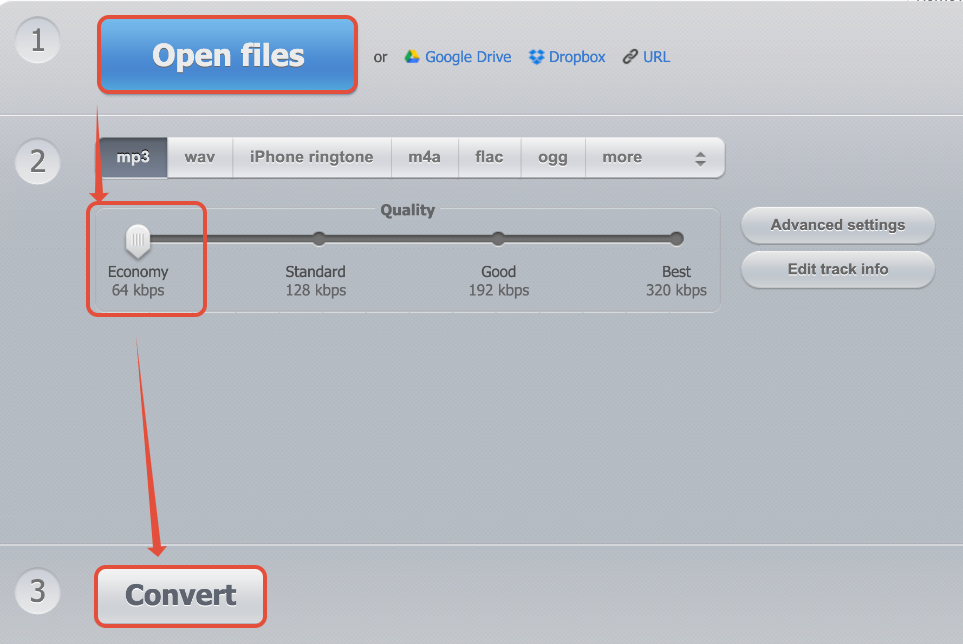
Once recorded, your audio file needs specific adjustments to ensure it works across all phone carriers for GoHighLevel voicemail drops. This involves converting it to a specific format with reduced quality, which is standard for telecommunication systems.
✅ U-Law (or mu-law) encoding is a legacy audio compression standard used by telephone networks. Using this specific encoding guarantees the widest compatibility for your voicemail drops across all phone carriers.
Keep the optimized file name clear, like 'MyVoicemail_ULaw_Final.wav'. This helps you easily identify it when uploading to GoHighLevel.
Alternative: Optimize Audio Using Audacity
For greater control or if you prefer desktop software, Audacity is a free, open-source audio editor that can precisely optimize your audio file. This method offers more granular control over the conversion process.
⚠️ Ensure you click 'OK' through all export dialogues in Audacity to apply the U-Law encoding. Forgetting this step will result in an incompatible file.
Audacity allows you to trim silence from the beginning and end of your recording. Select the silent parts and press the Delete key before exporting for a cleaner message.
Troubleshooting Common Issues
Common Mistakes to Avoid
- →Using high-fidelity (high-quality) audio files: Voicemail systems require low-quality, compressed audio.
- →Forgetting to convert to WAV (U-Law): Other formats or encodings are often incompatible with carrier networks.
- →Recording in a noisy environment: Background noise becomes more prominent and irritating after compression.
- →Not testing the audio after conversion: Always listen to the final, optimized file to ensure it's clear and plays correctly.
- →Making the message too long: Keep voicemail drops concise, ideally under 60 seconds, to maximize effectiveness and avoid truncation.
Frequently Asked Questions
Start your 30-day GoHighLevel free trial
Everything in this guide is in your free trial. 30 days, no credit card — the platform behind 78+ revenue systems.
Some links are affiliate links — if you sign up we may earn a commission, at no extra cost to you. We only recommend GoHighLevel because we build on it every day.

Arsalan writes GHL guides from real build experience — 78+ systems, $9.2M in client pipeline. Wharton, CXL & Google certified.
Connect on LinkedIn