
Troubleshoot SMS Delivery Problems in GoHighLevel Effectively
👉 Start your 30-day GoHighLevel free trial.
Start 30-Day Free Trial →To troubleshoot SMS delivery issues in GoHighLevel, go to Conversations and locate the message with a red error badge. Review the specific error message to identify the problem, then apply the appropriate fix. This process typically takes 5-10 minutes.
- ✓Always check the **Conversations** tab first for immediate error feedback on failed SMS messages.
- ✓Verify phone number formatting, including the correct country code, to prevent 'invalid number' errors.
- ✓Monitor your SMS credit balance regularly to avoid delivery failures due to insufficient funds.
- ✓Craft clear, concise messages and avoid spam triggers to prevent carrier filtering.
- ✓Respect contact opt-out preferences and re-engage only with their explicit consent.
Understanding SMS Delivery in GoHighLevel
When you send an SMS message from GoHighLevel, it embarks on a journey through several critical stages. First, GoHighLevel sends your message to Twilio, its underlying SMS provider. Twilio then routes the message to the recipient's mobile carrier. Finally, the mobile carrier attempts to deliver the message to the end user's device. A failure at any point in this chain can prevent your message from reaching its destination. Understanding this flow helps pinpoint where issues might arise.
Where to Find SMS Delivery Errors in GoHighLevel
GoHighLevel provides immediate feedback on message delivery status directly within the platform. If a message fails to send or deliver, you will see a clear indication in the relevant conversation thread. This is your first stop for troubleshooting any SMS issues.
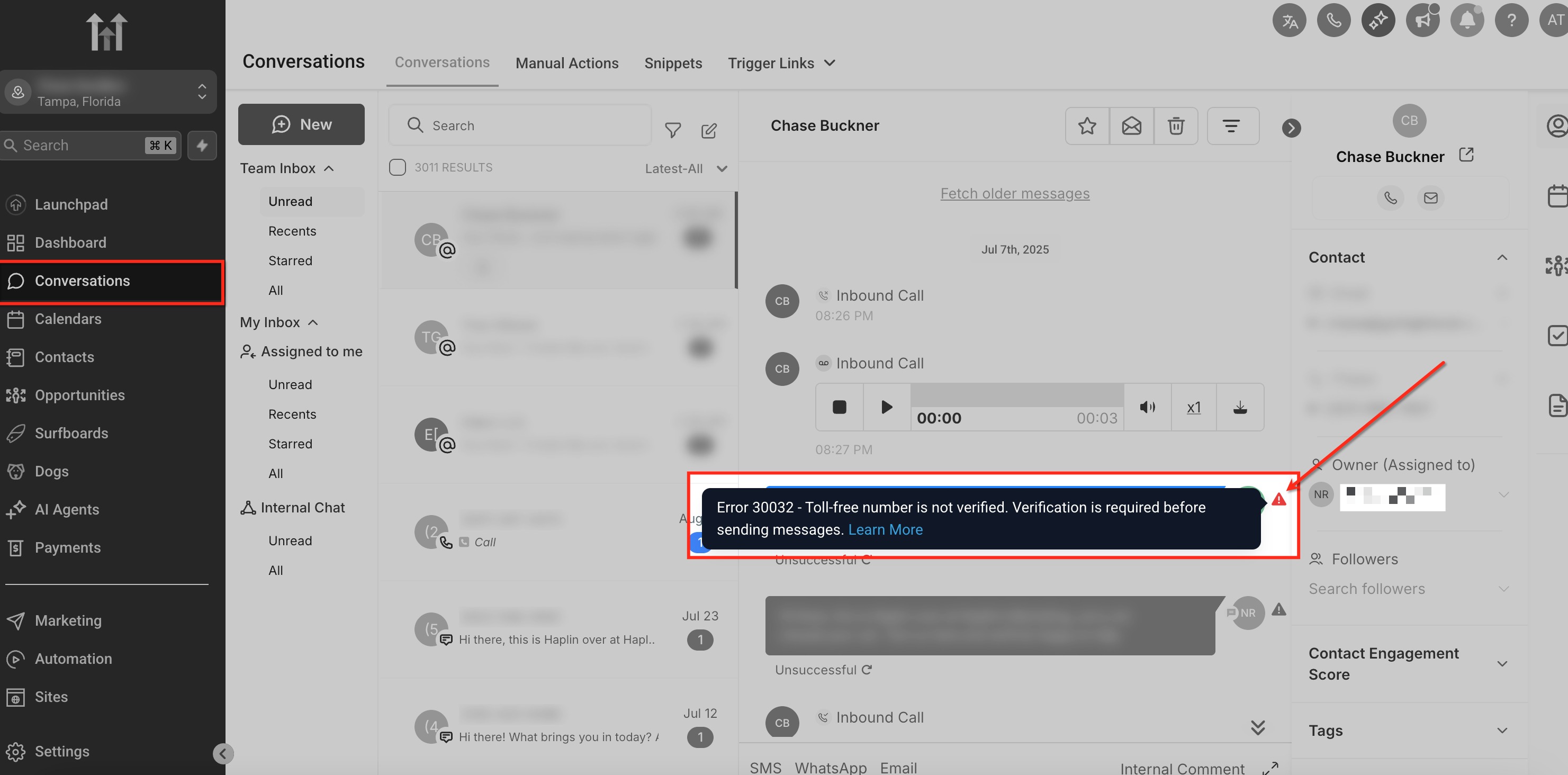
Always check the Conversations tab first. This is the fastest way to get real-time feedback on your message delivery status directly within GoHighLevel.
Common SMS Delivery Errors and How to Fix Them
Most SMS delivery issues stem from a few common problems. By understanding these frequent errors and their specific solutions, you can quickly get your messages back on track. Use the error message found in the Conversations tab to guide your fix.
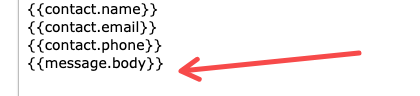
⚠️ Be cautious when resending messages. Repeatedly sending to opted-out contacts or using spammy content can lead to your numbers being flagged or blocked by carriers.
✅ Note: Charges apply once a message is attempted, even if it fails delivery later in the process. This is standard practice across SMS providers.
Proactively validate phone numbers using a third-party service upon contact entry. This prevents 'invalid number' errors before they even occur, saving you time and credits.
Start your 30-day GoHighLevel free trial
Everything in this guide is in your free trial. 30 days, no credit card — the platform behind 78+ revenue systems.
Some links are affiliate links — if you sign up we may earn a commission, at no extra cost to you. We only recommend GoHighLevel because we build on it every day.
Proactive Steps to Prevent SMS Delivery Issues
Prevention is always better than cure. By implementing a few best practices, you can significantly reduce the likelihood of encountering SMS delivery problems in GoHighLevel. These steps help ensure your messages reach your audience consistently.
Maintain a 'clean' contact list by regularly removing invalid or opted-out numbers. This improves deliverability rates and optimizes your SMS credit usage.
When to Contact GoHighLevel Support
While most common SMS delivery issues can be resolved using the steps above, some complex problems require expert assistance. If you've exhausted all troubleshooting steps and are still experiencing widespread or persistent delivery failures, it's time to reach out to GoHighLevel support.
Troubleshooting Common Issues
Common Mistakes to Avoid
- →Not checking the Conversations tab first for immediate error feedback.
- →Ignoring the necessity of including the correct country code in phone numbers.
- →Sending overly promotional or spammy messages that trigger carrier filters.
- →Forgetting to monitor and replenish SMS credit balance, leading to unexpected service interruptions.
- →Failing to confirm a contact's opt-in status before sending marketing or bulk messages.
Frequently Asked Questions
Start your 30-day GoHighLevel free trial
Everything in this guide is in your free trial. 30 days, no credit card — the platform behind 78+ revenue systems.
Some links are affiliate links — if you sign up we may earn a commission, at no extra cost to you. We only recommend GoHighLevel because we build on it every day.

Arsalan writes GHL guides from real build experience — 78+ systems, $9.2M in client pipeline. Wharton, CXL & Google certified.
Connect on LinkedIn