
How to Transfer GoHighLevel Custom Reports Using Snapshots
👉 Resell GoHighLevel as your own SaaS.
Start SaaS Pro Trial →To transfer GoHighLevel Custom Reports, first create a snapshot from your source sub-account by going to Agency View → Account Snapshots. Then, load this snapshot into your destination sub-account via Agency View → Sub-Accounts → Actions → Load Snapshot. This process typically takes under 5 minutes.
- ✓Snapshots only transfer Custom Report templates, not their schedules or recipient lists.
- ✓Ensure your source sub-account has a GoHighLevel plan that includes Custom Reports to enable this feature.
- ✓Always verify and reconnect any necessary data source integrations (like Google Ads) in the destination sub-account after loading reports.
- ✓You must possess Agency-level permissions within GoHighLevel to both create and load snapshots successfully.
- ✓Leverage snapshots to maintain consistent and standardized reporting across all your client sub-accounts, saving significant setup time.
What are GoHighLevel Snapshots and Custom Reports?
GoHighLevel Snapshots provide a powerful way to duplicate entire account configurations, including your valuable Custom Reports, across multiple sub-accounts. This feature is essential for agencies managing numerous clients, as it ensures consistent reporting templates without manual recreation. Custom Reports allow you to build tailored dashboards and reports with specific metrics and layouts. By using snapshots, you can efficiently transfer these pre-configured reporting templates, saving time and reducing errors when onboarding new clients or standardizing analytics across your existing ones. This guide walks you through the exact steps to leverage snapshots for your Custom Reports.
How to Create a Snapshot Including Custom Reports
The first step to transferring your Custom Reports is to create a snapshot from a source sub-account that contains the reports you want to duplicate. This process packages your selected reports into a reusable template.
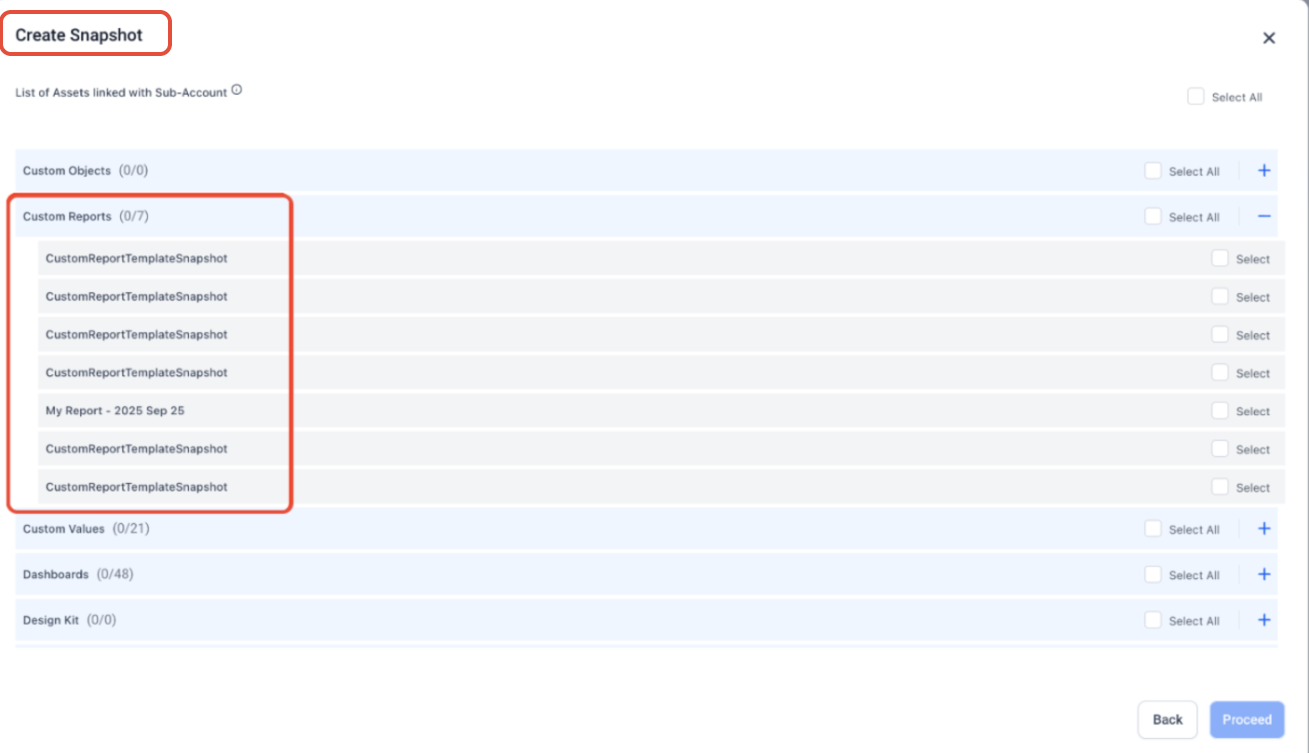
⚠️ Ensure the source sub-account's GoHighLevel plan includes access to Custom Reports. If Custom Reports are not available on the plan, you will not see them as an option to include in the snapshot.
Give your snapshots clear, descriptive names, such as 'Client Onboarding - Standard Reports' or 'Analytics Snapshot - Google Ads Focus'. This makes it much easier to identify and select the correct snapshot later, especially as your library grows.
Resell GoHighLevel as your own SaaS
Launch your own software business on the platform behind 78+ agencies. SaaS Mode, rebilling, unlimited sub-accounts.
Some links are affiliate links — if you sign up we may earn a commission, at no extra cost to you. We only recommend GoHighLevel because we build on it every day.
How to Load Custom Reports into a Sub-Account
Once you have a snapshot containing your Custom Reports, you can load it into any other sub-account. This instantly copies your pre-configured reporting templates, ensuring consistent analytics across all your clients.
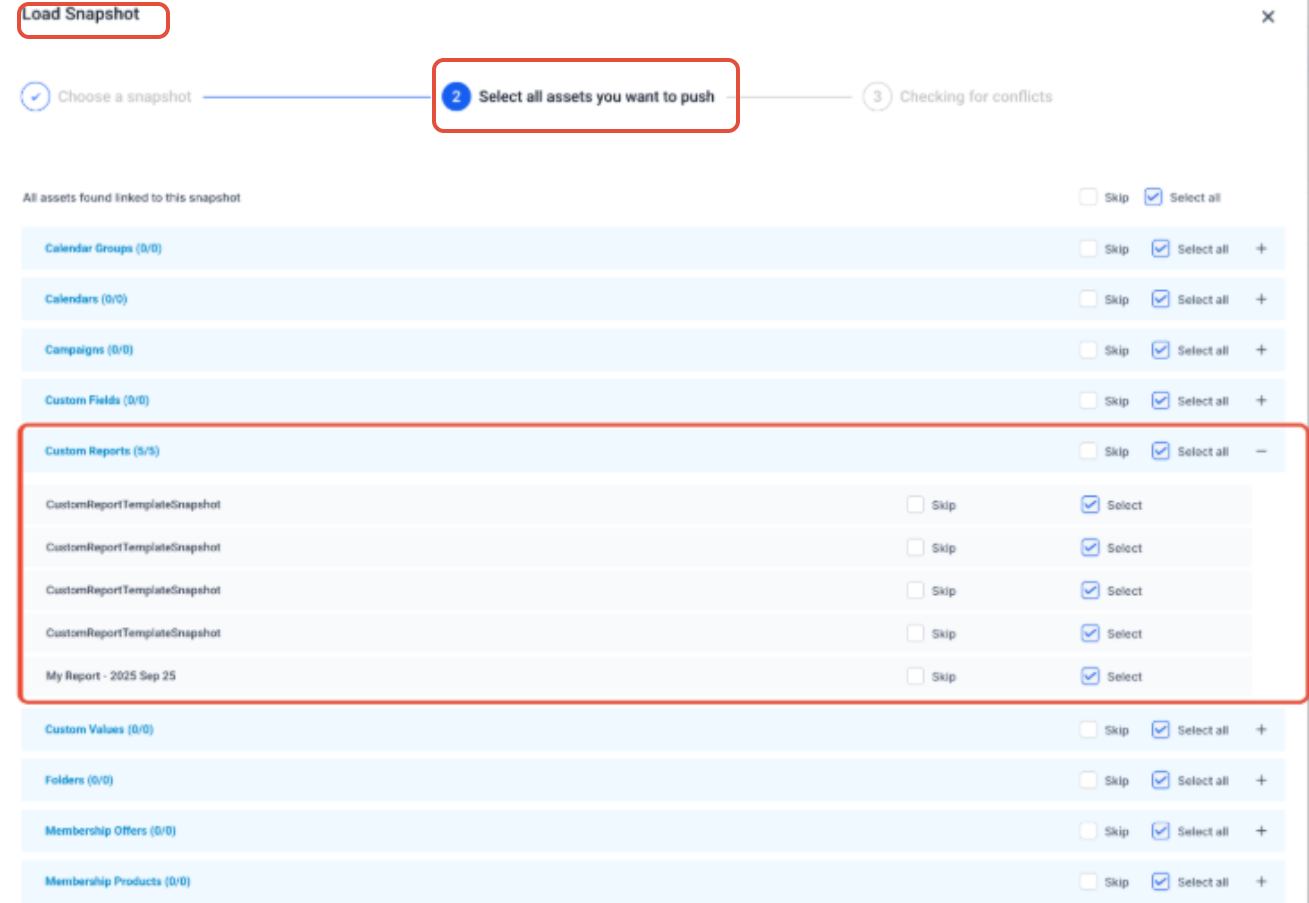
✅ Important: When loading Custom Reports via a snapshot, only the report templates themselves are transferred. Any existing schedules for these reports or their recipient lists will NOT transfer. You must manually set up new schedules and add recipients within the destination sub-account.
After loading, immediately check the imported reports for any widgets displaying 'No Data'. This often means the destination sub-account needs its data source integrations (e.g., Google Ads, Facebook Ads) reconnected under Settings → Integrations.
Common Questions About Snapshots and Custom Reports
Understanding the nuances of GoHighLevel snapshots for Custom Reports can prevent common issues. Here are answers to frequently asked questions to help you manage your reporting assets effectively.
Troubleshooting Common Issues
Common Mistakes to Avoid
- →Forgetting to specifically select 'Custom Reports' when creating the snapshot, leading to their exclusion.
- →Expecting report schedules, recipient lists, or private dashboards to transfer automatically with the Custom Reports.
- →Not verifying or reconnecting necessary data source integrations in the destination sub-account, resulting in 'No Data' errors.
- →Attempting to manage snapshots without having the required Agency-level permissions in GoHighLevel.
- →Trying to snapshot Custom Reports from a sub-account that is on a GoHighLevel plan that does not support the feature.
Frequently Asked Questions
Resell GoHighLevel as your own SaaS
Launch your own software business on the platform behind 78+ agencies. SaaS Mode, rebilling, unlimited sub-accounts.
Some links are affiliate links — if you sign up we may earn a commission, at no extra cost to you. We only recommend GoHighLevel because we build on it every day.

Arsalan writes GHL guides from real build experience — 78+ systems, $9.2M in client pipeline. Wharton, CXL & Google certified.
Connect on LinkedIn