Revset
Book a Free Audit

30-minute call · No obligation

HomeGHL HubSub-Accounts & AgencyHow to Refresh and Push Snapshot Updates in GoHighLevel
REVSET LABS · EXPERT GUIDE·Sub-Accounts & Agency

How to Refresh and Push Snapshot Updates in GoHighLevel

803 words·3 min read·Updated 27 April 2026·beginner·
Arsalan ZaffarArsalan ZaffarLinkedIn

👉 Resell GoHighLevel as your own SaaS.

Start SaaS Pro Trial
Quick Answer

To refresh an existing snapshot and then push those updates to your sub-accounts, go to Agency Settings → Snapshots. This process ensures your client accounts stay current with your latest agency-level changes and typically takes 5-15 minutes.

Key Takeaways
  • Always refresh your snapshot before sharing it or pushing updates to ensure all changes are captured.
  • Use the Push Update feature to selectively sync specific changes to client sub-accounts without a full re-import.
  • Pushed updates are non-destructive; they update selected assets without overwriting existing client data.
  • If assets fail during a refresh, retry only the failed ones to save time instead of restarting the entire process.
  • Understand that GoHighLevel automatically removes contacts from workflow steps deleted during a snapshot refresh to prevent them from getting stuck.

How to Refresh a GoHighLevel Snapshot

Refreshing a snapshot captures all the latest changes you've made at the agency level into that snapshot. This is the first crucial step before you share the snapshot or push updates to any sub-accounts. It ensures your snapshot always contains the most current version of your funnels, forms, workflows, and other assets.
1
Access Agency SettingsFrom your GoHighLevel agency dashboard, click on Settings in the left-hand navigation menu. This opens your agency-level configurations.
2
Navigate to SnapshotsIn the Agency Settings menu, locate and click on Snapshots. You will see a list of all snapshots created within your agency.
3
Find Your SnapshotScroll through the list or use the search bar to find the specific snapshot you wish to refresh. Ensure you select the correct snapshot to update.
4
Initiate the Refresh ProcessNext to your chosen snapshot, click the Refresh icon. This icon typically looks like two arrows forming a circle. A confirmation prompt will appear.
5
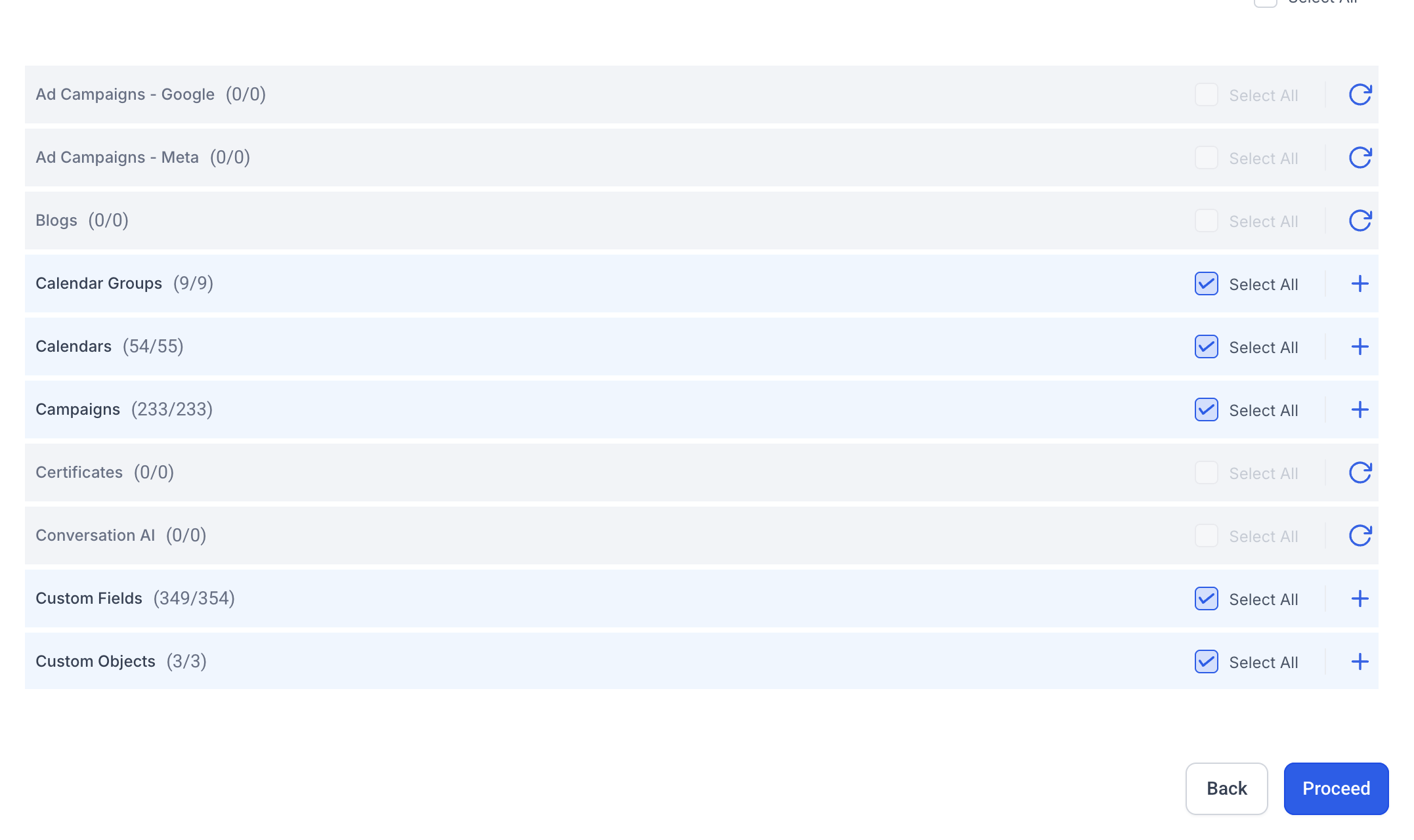
Select Assets to RefreshA window will open, allowing you to select which specific assets within the snapshot you want to refresh. You can choose to refresh all assets or pick individual items like Funnels, Workflows, or Forms.
6
Confirm and Start RefreshAfter selecting your desired assets, click the Refresh button within the pop-up window. GoHighLevel will begin processing the update, capturing all recent changes.
GoHighLevel screenshot
0
🔥 Pro Tip

Always refresh your snapshot before sharing it with new clients or pushing updates to existing sub-accounts. This guarantees that your snapshot is fully up-to-date.

How to Push Snapshot Updates to Sub-Accounts

Once your snapshot is refreshed, you can push specific updates to sub-accounts that previously imported this snapshot. This allows you to selectively sync new features or fixes without requiring a full re-import, keeping your client accounts current with minimal disruption.
1
Click Push Update ButtonAfter the refresh completes, return to the Snapshots list. Next to the refreshed snapshot, click the Push Update button. This button only appears after a refresh.
2
Select Target Sub-AccountsA new window will display all sub-accounts that have previously imported this snapshot. Select the specific sub-accounts you want to receive the update.
GoHighLevel screenshot
0
3
Choose Specific Assets to PushYou can choose to push all updated assets or select specific categories like Workflows, Forms, or Custom Fields. This gives you granular control over what gets updated in client accounts.
4
Review and Push UpdatesCarefully review your selections of sub-accounts and assets. Once confirmed, click the Push Update button to sync the selected changes to those sub-accounts.
GoHighLevel screenshot
1

✅ Important: The Push Update feature only works for sub-accounts created and managed within your own agency. External agencies must re-import the snapshot using a new share link to receive updates.

🔥 Pro Tip

Pushed updates are selective and non-destructive. They update specific assets without deleting or overwriting existing client data that isn't part of the update.

GoHighLevel SaaS Pro

Resell GoHighLevel as your own SaaS

Launch your own software business on the platform behind 78+ agencies. SaaS Mode, rebilling, unlimited sub-accounts.

Start SaaS Pro Trial

Some links are affiliate links — if you sign up we may earn a commission, at no extra cost to you. We only recommend GoHighLevel because we build on it every day.

What Happens During Workflow Contact Cleanup After a Refresh?

If a snapshot refresh removes steps from workflows that were originally created from that snapshot, GoHighLevel automatically performs a cleanup. This prevents contacts from getting stuck in a workflow step that no longer exists, ensuring smooth automation for your clients.

1
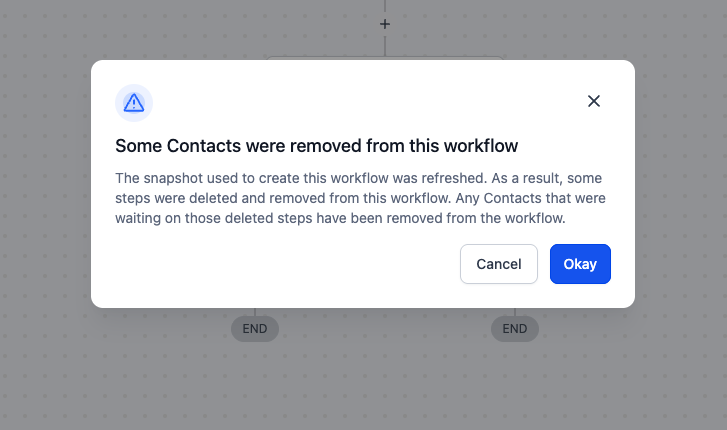
One-Time Heads-Up NotificationThe next time you open an affected workflow, you will see a one-time notification. This alert informs you that changes occurred due to a snapshot refresh.
2
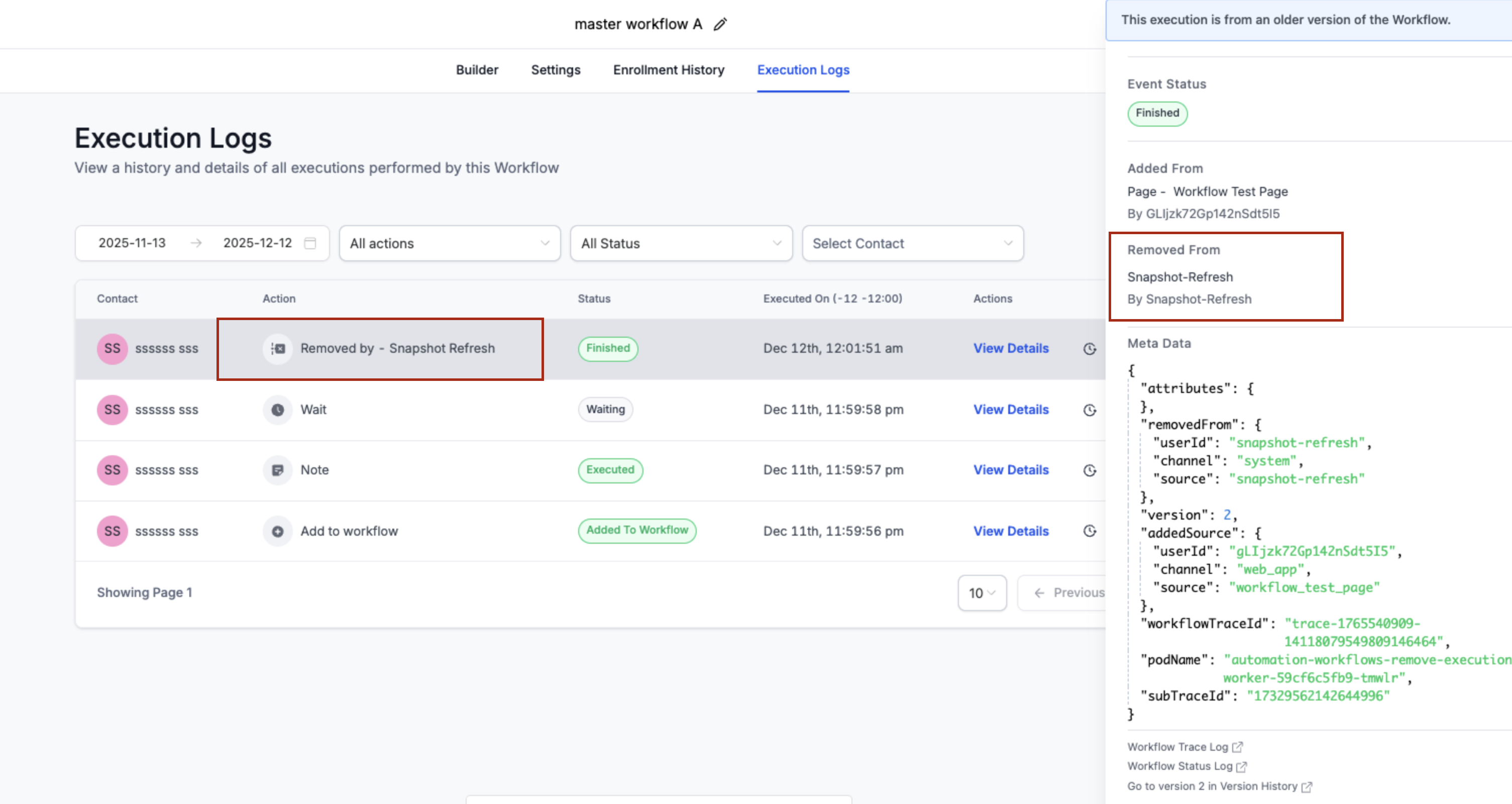
Execution Log EntryIn the workflow's Execution Logs, GoHighLevel records an entry for each removed contact. This entry is labeled 'Removed by - Snapshot Refresh' and includes more details in the side panel.

⚠️ Be aware that contacts actively waiting on a workflow step that is deleted during a snapshot refresh will be automatically removed from that step. This action cannot be undone for those specific contacts.

Handling Failed Assets During a Snapshot Refresh

Occasionally, one or more assets might fail to load properly during a snapshot refresh. GoHighLevel intelligently marks these assets as 'failed' while continuing to process the rest of your selections. This prevents a single issue from halting the entire update.

1
Identify Failed AssetsAfter a refresh attempt, check the status of your assets. Any assets that failed to load will be clearly marked, allowing you to quickly identify them.
2
Retry Failed Assets OnlyInstead of restarting the entire refresh process, click the option to retry loading only the failed assets. This targets the specific issues without reprocessing successful items.
🔥 Pro Tip

Retrying only failed assets is a significant time-saver. It's especially useful for fixing temporary network glitches or intermittent timeouts without a full system restart.

Troubleshooting Common Issues

⚠️ Some assets failed to load during my snapshot refresh.
Identify the failed assets in the refresh summary and click the option to retry loading only those specific assets. This often resolves temporary issues without needing a full re-run.
⚠️ I don't see the 'Push Update' button for my snapshot.
Ensure you have successfully refreshed the snapshot first. The 'Push Update' button only becomes available after a snapshot has been refreshed to capture new changes.
⚠️ My sub-account in another agency isn't receiving the pushed updates.
The 'Push Update' feature only works for sub-accounts within your own GoHighLevel agency. Sub-accounts belonging to external agencies must re-import the snapshot using a new share link.
⚠️ Contacts were removed from a workflow after I refreshed a snapshot.
This is expected behavior. If a snapshot refresh deletes a workflow step, GoHighLevel automatically removes any contacts waiting on that step to prevent them from getting stuck. Check the workflow's Execution Logs for 'Removed by - Snapshot Refresh' entries.
⚠️ I pushed an update, but some changes didn't appear in the sub-account.
When pushing updates, ensure you selected all the relevant assets (e.g., specific workflows, forms, or custom fields) in the 'Choose Assets to Push' step. If you only selected certain items, others will not be updated.

Common Mistakes to Avoid

  • Forgetting to refresh the snapshot before attempting to push updates, leading to outdated changes.
  • Assuming the 'Push Update' feature works for sub-accounts managed by other GoHighLevel agencies.
  • Restarting the entire snapshot refresh process when only a few assets have failed, instead of using the targeted retry option.
  • Not understanding why contacts are automatically removed from workflows when a step is deleted during a snapshot refresh.
  • Pushing updates without carefully selecting the specific assets, potentially pushing unintended changes or missing desired ones.

Frequently Asked Questions

QWhat is the primary difference between refreshing a GoHighLevel snapshot and pushing updates?
Refreshing a snapshot is the process of capturing all the latest changes from your agency account into the snapshot itself. Pushing updates, on the other hand, is the subsequent action of selectively sending those captured changes from the refreshed snapshot to specific sub-accounts that have previously imported it. You must refresh before you can push updates.
QCan I use the 'Push Update' feature to sync changes to sub-accounts owned by other GoHighLevel agencies?
No, the 'Push Update' feature is restricted to sub-accounts that are directly managed under your own GoHighLevel agency. If you need to update a snapshot in a sub-account belonging to an external agency, they will need to re-import the snapshot using a new share link you provide.
QWhat happens to contacts currently in a workflow if I delete one of its steps during a snapshot refresh?
If a snapshot refresh results in the deletion of a workflow step, GoHighLevel automatically removes any contacts that were actively waiting on that specific step. This prevents contacts from becoming 'stuck' indefinitely in a non-existent step, ensuring the integrity of your automation flows.
QHow should I handle assets that fail to load during the snapshot refresh process?
If some assets fail to load during a refresh, GoHighLevel will mark them. Instead of restarting the entire refresh, you should use the option to retry only the failed assets. This is much faster and often resolves transient issues like network timeouts, allowing the refresh to complete successfully.
QIs it always necessary to refresh a snapshot before sharing it, even if I think nothing has changed?
Yes, it is highly recommended to always refresh your snapshot immediately before sharing it or pushing updates. This ensures that the snapshot you are distributing or updating from contains the absolute latest version of all your assets, preventing any potential discrepancies or missing changes for your clients.
GoHighLevel SaaS Pro

Resell GoHighLevel as your own SaaS

Launch your own software business on the platform behind 78+ agencies. SaaS Mode, rebilling, unlimited sub-accounts.

Start SaaS Pro Trial

Some links are affiliate links — if you sign up we may earn a commission, at no extra cost to you. We only recommend GoHighLevel because we build on it every day.

Arsalan Zaffar
Arsalan Zaffar
Revset Labs · Revenue Systems · 78+ GHL Builds

Arsalan writes GHL guides from real build experience — 78+ systems, $9.2M in client pipeline. Wharton, CXL & Google certified.

Connect on LinkedIn
Tags:GoHighLevelSnapshotsAgency SettingsWorkflowsAutomationClient Accounts