
Manual vs Automated Lead Response: Which Is Better for Your Business?
When a new lead comes in, most businesses face a simple operational question: should someone respond manually, or should automation handle the first interaction?
It’s not as simple as picking one over the other.
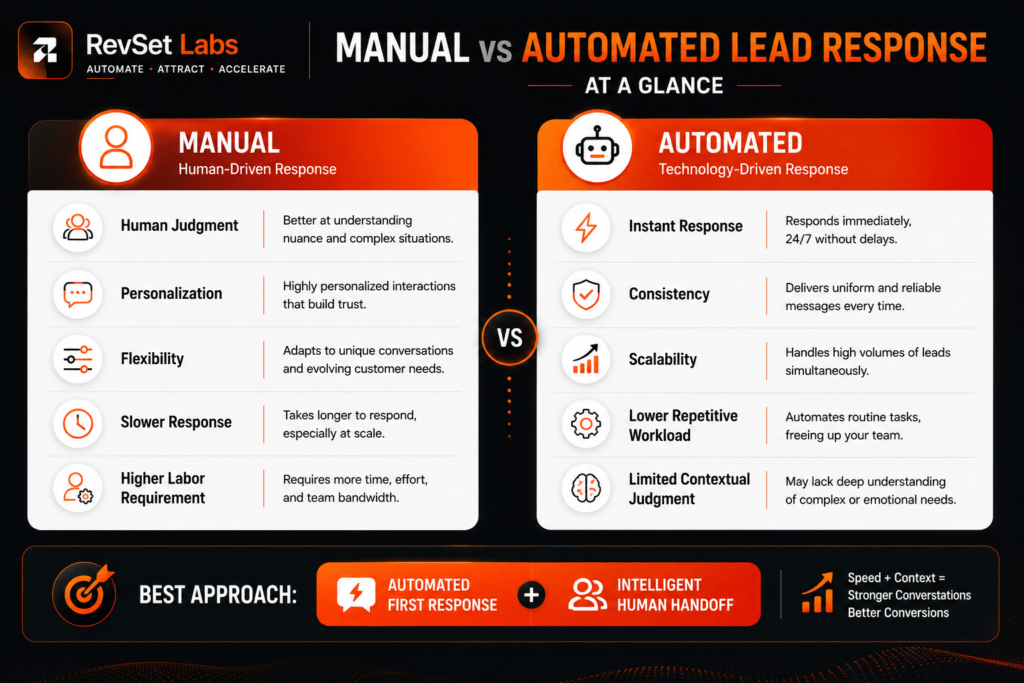
When a salesperson responds manually, they control the interaction. They can interpret the question, understand the customer’s situation, and give a contextual response. Automation, on the other hand, can qualify basic information, acknowledge an inquiry within seconds, route it to the right person, and start follow-up all without waiting for someone to notice a notification.
There are real benefits to both strategies. Each has real flaws, too. As lead volume rises, a manual process can become slow and inconsistent. When companies automate conversations that call for human judgment, the experience can feel impersonal, badly timed, or overengineered.
RevSet Labs doesn’t view manual vs. automated lead response as an either-or decision. The better question is: which parts of the lead response process should be automated, and where does human involvement create more value?
That distinction matters, because the strongest lead response systems usually combine both.
Automation for Speed, Humans for Conversion
For most service businesses, people should manage qualification, complex inquiries, objections, and high-value discussions, while automation should handle speed, routing, acknowledgment, and repeated follow-up.
When a question calls for context, empathy, negotiation, or expertise, a manual response is usually more effective. When a business needs quick response, consistency, scalability, and reliable execution, automation wins.
The practical model:
Automation for speed and consistency → Human handoff for judgment and conversion.
This hybrid approach lets businesses protect a customer’s initial buying momentum without turning every sales interaction into a robotic exchange.
What Is Manual Lead Response?
Manual lead response means a person is responsible for reviewing and responding to an incoming inquiry.
A typical process looks like this:
Lead submits form → Notification arrives → Employee reviews inquiry → Lead is assigned → Salesperson responds → Follow-up is scheduled
The exact process differs by business, but a human starts most of the pipeline.
One major benefit of manual response is context. A salesperson can read what a prospect wrote, assess the situation, and adjust the conversation accordingly.
This matters most for expensive services. Consider a prospect who submits:
“We currently use three different systems across fifteen sites. We’re looking for someone who can unify our lead routing and reporting.”
A generic automated message won’t be much help here. A skilled salesperson can immediately recognize this as a complex prospect and respond appropriately — a level of judgment that’s genuinely difficult to replicate consistently with automation alone.
Where Manual Response Works Well
Manual lead response is particularly useful when:
- Lead volume is relatively low
- Each inquiry requires substantial qualification
- Services are high-ticket
- The buyer has complex questions
- Trust and expertise strongly influence the purchase
- Negotiation is likely
- The sales process involves multiple stakeholders
- Customer circumstances vary significantly
In these situations, personalization usually matters more than shaving a few seconds off the initial response.
What Is Automated Lead Response?
Automated lead response uses CRM automation, workflows, AI, or other technology to perform predefined actions after an inquiry is received.
A basic workflow looks like this:
Lead submits form → CRM captures inquiry → Lead is scored → Lead is routed → Automated acknowledgement → Human notified → Follow-up begins
Automation can perform repetitive actions almost instantly. For example, a website form submission could automatically:
- Create a CRM record
- Capture the lead source
- Record the campaign or landing page
- Assign the inquiry to the correct salesperson
- Send an acknowledgement
- Trigger an internal notification
- Apply a lead score
- Create a follow-up task
- Offer appointment scheduling
- Start a nurture sequence if the prospect doesn’t respond
Modern CRM systems increasingly support this kind of process. According to HubSpot, workflow automation is a method of triggering tasks, emails, alerts, ownership rotation, and CRM updates based on predefined criteria.
It’s worth remembering: automation isn’t the conversation itself. It just makes sure the conversation starts appropriately and doesn’t get lost.
Manual vs Automated Lead Response: The Honest Comparison
The clearest way to understand the difference is to compare both approaches against the factors that actually affect revenue operations.
Speed
Manual: Manual response speed depends entirely on availability. A salesperson might respond within minutes if they see the notification right away — or the same lead might wait hours if they’re with another customer, on the phone, driving, or simply miss the message. That creates an uncomfortable operational reality: your real response time varies with someone’s schedule, even if your target is five minutes.
Automated: Automation can acknowledge and route inquiries instantly, which makes it especially valuable when quick decision-making matters. It also delivers consistent response-time performance instead of depending entirely on staff availability. A 2011 Harvard Business Review study underscored the importance of prompt follow-up on internet sales leads — the study is old enough that it should be treated as foundational background rather than a current universal benchmark, but the underlying principle still holds.
Winner for speed: Automation. But speed alone doesn’t guarantee conversion.
Consistency
This is where automated lead response has another major advantage.
A person’s response can vary depending on workload, experience, mood, time of day, lead volume, competing priorities, memory, and personal follow-up habits.
Automation doesn’t get distracted. If a workflow is configured correctly, the same trigger produces the same action every time. That makes automation particularly useful for lead routing, first acknowledgement, follow-up reminders, CRM updates, lead scoring, appointment confirmations, missed-call responses, and nurture sequences.
HubSpot’s current lead management guidance similarly emphasizes centralized capture, qualification, routing, nurturing, and tracking as core parts of a structured lead management process.
Winner for consistency: Automation. But consistent bad messaging is still bad messaging — automation only improves consistency when the underlying workflow and messaging are actually well designed.
Personalization
This is where manual response usually has the advantage.
A human salesperson can pick up on nuance that basic automation might miss. Consider these two inquiries:
Inquiry A: “How much does your service cost?”
Inquiry B: “We’re currently spending $12,000 per month on lead generation, and our sales team is responding too slowly. Can you help us fix the process?”
The same automated workflow might trigger for both — but they shouldn’t get the same response. The second prospect has already identified a business problem and provided useful context, and a skilled salesperson can address that directly.
AI-powered systems can use CRM data, interaction signals, and conversation context to improve personalization. Salesforce, for instance, describes AI lead nurturing as a way to automate scheduling, scoring, and customization while maintaining clear boundaries between automated and human interactions.
Still, businesses should be careful not to treat AI personalization as equivalent to human judgment. It isn’t.
Winner for complex personalization: Human response.
Cost
Cost involves more than comparing employee wages against software expenses.
The technical requirements for manual lead response are relatively minimal — a small business can technically run on a spreadsheet, a phone, and email. But employee time is the hidden expense.
As lead volume increases, someone has to check notifications, assign leads, send follow-ups, update CRM records, remember callbacks, track conversations, and monitor missed inquiries. Eventually, businesses have to either hire more people or accept slower response times.
Automation reduces repetitive administrative work and lets existing staff handle higher volume, but it comes with its own software and implementation costs.
This is why the right comparison isn’t “automation = cheaper.” It’s automation cost vs. the labor, missed opportunities, and operational inefficiency created by manual processes.
A small company receiving ten inquiries a week may not need extensive automation. A company receiving hundreds of inquiries a month can find relying entirely on manual processes increasingly expensive.
Winner: Depends on volume and process complexity.
Scalability
Manual response doesn’t scale well without more people. If one employee can consistently handle 30 active follow-ups, growing to 300 requires either more staff or a different process entirely.
Automation makes scaling repetitive tasks far more efficient. A single process with pre-set rules can route thousands of inquiries, and a single follow-up sequence can manage far more prospects than any one employee could track manually.
This is one reason automated lead follow-up becomes increasingly valuable as businesses grow. HubSpot’s automation guidelines specifically highlight automated workflows as a way to handle repetitive tasks, ensure prompt replies, and maintain consistent processes without constant human involvement.
Winner for scalability: Automation.
Human Judgment
Automation finds patterns. People understand context — and that distinction matters most during qualification.
A lead-scoring model might flag a prospect as highly engaged if they visited multiple pages, opened several emails, requested pricing, returned to the site, or downloaded a resource. But engagement doesn’t always mean readiness to buy.
A salesperson might learn a prospect won’t have budget until next year, despite high engagement — or discover a genuinely urgent need despite minimal online activity. Behavioral signals can’t always capture what comes out in a real conversation. This distinction matters even more for high-ticket transactions.
Winner for judgment: Human response.
The Real Answer: Hybrid Lead Response
The strongest approach isn’t manual or automated — it’s a deliberate combination of both.
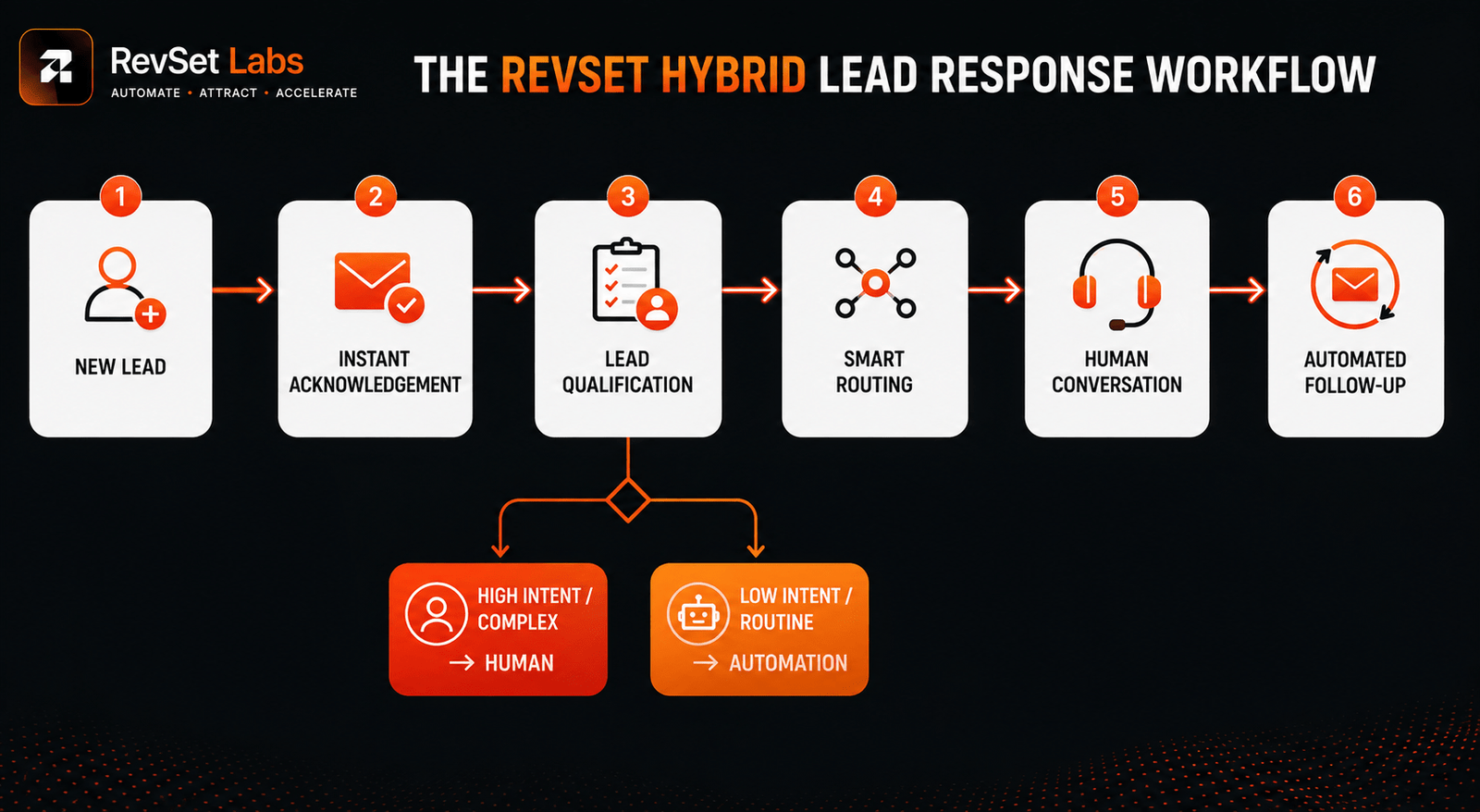
A practical RevSet Labs model looks like this:
Capture automatically — every inquiry is instantly entered into the CRM.
Respond automatically — the prospect gets a relevant acknowledgment without waiting for an employee.
Qualify automatically where appropriate — forms, workflows, scoring, and AI can gather basic information.
Route intelligently — the inquiry goes to the right salesperson based on region, service, lead type, urgency, or other business rules.
Escalate to a human — high-value, complex, urgent, or unpredictable opportunities get human attention.
Automate repetitive follow-up — the system handles reminders and pre-set nurturing stages if the prospect doesn’t respond.
Stop automation when human conversation begins — automated messaging shouldn’t continue mindlessly once a salesperson is actively engaged with the prospect.
That last point matters more than it might seem. Nothing damages trust faster than a prospect replying to a salesperson while simultaneously receiving an unrelated automated message.
Manual vs Automated Lead Qualification
Lead qualification is another area where businesses often try to pick a side.
Manual qualification lets salespeople uncover details a form can’t capture and ask follow-up questions. Automated qualification can quickly assess simple requirements — for example, a service business might automatically identify service requested, location, company size, budget range, urgency, and appointment preference. That information can help determine where a lead should go.
But automated qualification becomes risky when businesses take a score at face value. A lead score is a prioritization tool, not a replacement for judgment. A high score should tell a salesperson “look at this opportunity” — not “this customer is ready to buy.”
Salesforce also notes that successful AI lead nurturing requires segmentation, lead scoring, clean CRM data, and a clear line between automated and human interaction.
When Automation Hurts Lead Conversion
Automation becomes counterproductive when businesses automate the wrong part of the customer experience:
- Automating complex questions — a generic “thanks for reaching out” reply to a detailed technical question signals speed without substance.
- Over-automating high-value leads — a $50,000 opportunity shouldn’t run through the same automated process as a low-value inquiry.
- Sending too many messages — automation can create follow-up fatigue; more messages don’t always mean better nurturing.
- Poor data — automation just makes errors faster when CRM data is inaccurate or incomplete.
- No human escalation — automation becomes a hindrance rather than a help if customers can’t quickly reach a real person when they need one.
- Ignoring context — a prospect who’s already spoken with a salesperson shouldn’t get an automated message asking what they’re looking for.
This is where good automation differs from excessive automation. Automation should remove friction, not create it.
Manual vs Automated Lead Follow-Up for Small Business
A common misconception is that automation only benefits larger companies. That isn’t true.
Even a small business with relatively low lead volume can benefit from basic automation:
RevSet Labs Workflow: Website inquiry → Immediate acknowledgement → CRM task → Owner notification → Appointment link → Follow-up reminder
This doesn’t require a complex AI system — it’s simply a way to make sure the owner doesn’t miss an opportunity while handling everything else. That matters especially for small teams, where the same person often handles sales, operations, phones, and daily tasks.
The goal isn’t to automate the relationship. It’s to automate the memory needed to manage it well.
What Should Be Automated?
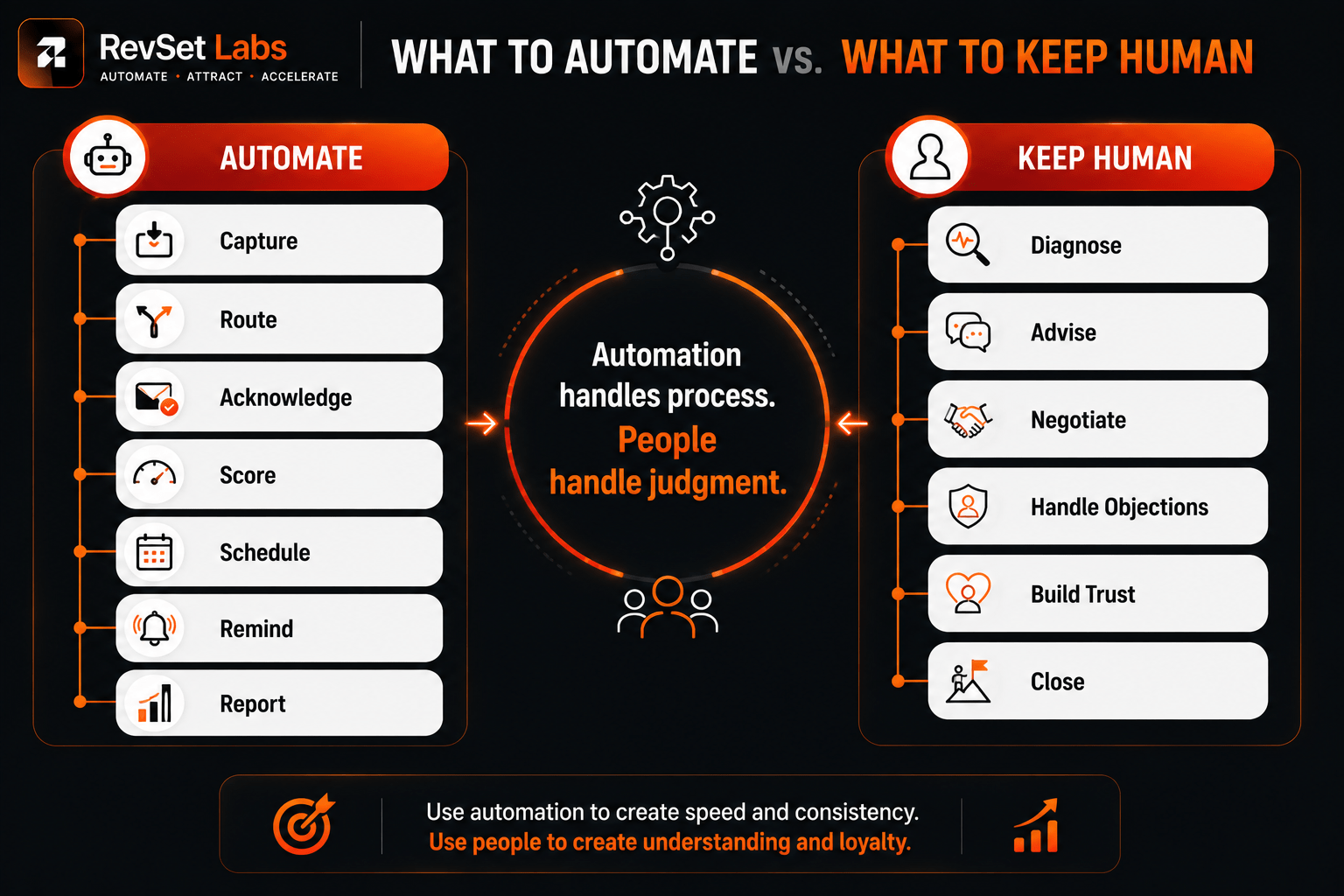
RevSet Labs starts with repetitive, time-sensitive tasks. Good candidates include:
- Lead capture
- Lead routing
- Internal notifications
- Acknowledgement messages
- Appointment scheduling
- Missed-call responses
- Follow-up reminders
- CRM data entry
- Lead scoring
- Basic qualification
- Nurture sequences
- Reporting
These activities are predictable enough to systematize.
What Should Stay Human?
Keep humans involved when the conversation requires:
- Complex qualification
- Pricing negotiation
- Technical advice
- Objection handling
- Emotional sensitivity
- Strategic recommendations
- High-ticket decisions
- Contract discussions
- Relationship building
- Unusual customer circumstances
In general, human judgment becomes more valuable as the decision becomes more significant. That doesn’t diminish automation’s role in high-ticket sales — quite the opposite. Automation can ensure a high-ticket opportunity reaches the right salesperson quickly, with useful context already attached.
How to Choose the Right Lead Response Method
Instead of asking whether automation beats manual response, RevSet Labs focuses on these questions:
How many leads do you receive? Low volume may be manageable manually; high volume increases the value of automation.
How quickly do customers expect a response? If customers expect a reply within minutes, automation becomes much more useful.
How complex is the sale? Simple transactions support more automation; complex purchases require more human involvement.
How valuable is each customer? The higher the potential customer value, the more carefully the human handoff should be designed.
How much administrative work does the team perform? If salespeople spend significant time updating CRM records, routing leads, and remembering follow-ups, automation can provide immediate operational value.
What happens when nobody is available? This is one of the most important questions for small businesses. If a lead arrives after hours, automation can acknowledge the inquiry, collect information, offer scheduling options, and create a follow-up task — the customer doesn’t need to know the team is temporarily unavailable.
The Right Balance: Automate the Process, Not the Relationship
RevSet Labs has seen businesses make two opposite mistakes.
Under-automation relies too heavily on people remembering what to do next — response times vary by who’s working that day, leads sit in inboxes, and follow-up happens irregularly.
Over-automation creates processes that send too many messages, score leads too aggressively, and keep running automated sequences long after a customer has asked for a human.
Neither approach solves the real problem. The goal is an operating system where people handle situations that require judgment, and technology handles repetitive tasks. That’s why we advise against measuring automation’s success by how many tasks are automated. Instead, look at outcomes:
- Has response time improved?
- Has response coverage increased?
- Are qualified leads reaching the right salesperson faster?
- Has follow-up consistency improved?
- Have contact rates increased?
- Did appointments increase?
- Are sales teams having more meaningful conversations?
- Has the customer experience improved?
Those are the metrics that actually determine whether automation is working.
A RevSet Labs Lead Response Model
For most service businesses, a practical structure looks like this:
| Stage | Owner | Primary Objective |
|---|---|---|
| Lead Capture | Automation | Capture every inquiry immediately |
| Initial Acknowledgement | Automation | Confirm receipt and set expectations |
| Lead Routing | Automation | Send inquiry to the right person |
| Basic Qualification | Automation + Human | Gather information and assess fit |
| High-Intent Engagement | Human | Build trust and understand needs |
| Follow-Up | Hybrid | Maintain momentum without unnecessary manual work |
| Appointment Booking | Automation + Human | Reduce scheduling friction |
| Complex Sales | Human | Advise, negotiate, and close |
| Reporting | Automation | Measure response and conversion performance |
This model creates a useful balance between scalability and personalization — the system moves quickly without pretending every customer conversation can be reduced to a workflow.
Final Thoughts
Is automated lead response better than manual response? Not on its own.
Automation wins on scalability, repetitive follow-up, speed, consistency, and routing. Humans win on context, judgment, empathy, complex qualification, negotiation, and relationship building.
The most effective lead response strategy uses both. For most businesses, the right order is: automate the initial stages of operation, escalate wisely, and let people take charge of the important conversation.
This strategy preserves speed to lead without sacrificing the personal element that makes sales work — and that balance is the real goal. Not just a prompt response, but one that’s intelligent enough to move the customer forward and fast enough to preserve their buying momentum.
When businesses combine automation with human expertise, lead response becomes both effective and efficient. No opportunity gets lost, and the personalization and trust that drive conversions stay intact. Over time, that balance builds a scalable system that reliably turns inquiries into real sales conversations.
FAQs
Is automated lead response better than manual response?
Neither strategy is always superior. Automation wins on speed, consistency, routing, and repetitive follow-up, while manual response wins on complex qualification, personalization, and high-value discussions. A hybrid system usually provides the best balance.
When should a business use manual lead follow-up?
Manual follow-up works best for high-ticket purchases, complex services, technical inquiries, negotiations, and situations where customer context matters more than raw response speed.
When should lead follow-up be automated?
Automate routine, predictable processes: CRM updates, appointment scheduling, lead routing, acknowledgements, reminders, and basic qualification. Human intervention should still be available once the conversation gets complex.
Can automation replace salespeople?
No. Automation can handle many repetitive administrative tasks, but salespeople remain essential for complex purchase decisions, relationship building, negotiation, objection handling, and qualification.
Does automation reduce lead response time?
Often, yes. Automated workflows can capture, route, acknowledge, and start follow-up instantly instead of waiting on an employee. The actual improvement depends on how well the workflow and CRM integration are designed.
When does automation hurt lead conversion?
Automation can hurt conversion when messages are irrelevant, follow-up is excessive, CRM data is inaccurate, high-value prospects don’t get human attention, or automated sequences continue after a real human conversation has already started.
What is the best lead response method for high-ticket sales?
A hybrid approach generally works best: automation handles fast capture, routing, qualification support, and reminders, while experienced salespeople manage discovery, advice, objections, negotiation, and closing.
Is automated lead follow-up suitable for small businesses?
Yes. Even simple automation that reduces missed inquiries, sends reminders and acknowledgements, and organizes customer data can benefit a small business; the system doesn’t need to be complex to add value.
RevSet Labs Builds Revenue Systems That Turn Leads Into Conversations Faster
RevSet Labs helps businesses build lead response systems designed around the realities of their sales process, not automation for its own sake.
Our approach integrates lead capture, CRM automation, lead routing, qualification, follow-up, and human handoff into a single operational process. The objective is simple: faster response, better routing, more consistent follow-up, and smarter human handoffs.
If your team is generating leads but still relying heavily on spreadsheets, inboxes, manual reminders, or inconsistent follow-up, there’s likely a real operational gap between lead generation and revenue.
Run the RevSet Labs Revenue Leak Scorecard to identify which process steps are worth automating first — and where that gap actually is.