
How to Respond to Facebook Ad Leads Faster
A Facebook lead might appear at any moment. The issue is that a lot of companies continue to treat the lead as tho it had just come via email.
When a Facebook Instant Form is submitted, a notification arrives, and the lead waits for a salesperson to see it, access the record, determine who owns it, and get in touch.
It might take several minutes to complete. It might take many hours.
The client could already be comparing providers by that point.
By integrating lead collection, CRM sync, routing, qualifying, alerts, and follow-up into a single process, Facebook Lead Response Automation resolves the operational issue. Sending a quick communication is not the only goal. The goal is to transfer a qualified Facebook lead as quickly as possible from submission to meaningful human interaction.
This guide describes how RevSet Labs handles Facebook lead response automation. How to create an automated follow-up sequence and how to route Facebook Lead Ads into a CRM. Which metrics should be tracked to determine whether the system is indeed improving conversion performance?
Why Facebook Lead Response Time Matters
Several phases in the conventional website conversion process are eliminated by Facebook Lead Ads.
Without ever leaving the site, a prospect may view an ad, click the call to action, fill out an Instant Form, and submit their details.
Lead generation benefits from such ease.
It also poses a problem for operations.
Businesses can generate leads more quickly than their sales process can manage them because conversion occurs swiftly.
According to Meta, over 1 billion Instant Forms were submitted in 2023, indicating the size of the lead-generation format. In order to help organizations obtain fresh leads and follow up more quickly, Meta also advises integrating a CRM.
Facebook’s ability to provide leads is not the problem.
It is what takes place following the submission of the form.
The advertising system has created an opportunity without establishing a dependable route to conversion, whether the lead remains within Meta, remains in a spreadsheet, or waits in an email.
Facebook Lead Response Automation is crucial in this situation.
Every Facebook lead should be handled as an operational event rather than just a notice, according to RevSet Labs. The system should record, acknowledge, sync the record to the CRM, apply qualifying or routing criteria, notify the relevant sales professional, and initiate the subsequent follow-up action when a prospect submits a Facebook Instant Form or Meta Lead Ad. Instead of depending on someone ultimately checking Facebook, the majority of service firms should aim to get from lead submission to the first significant human reaction within minutes.
What Is Facebook Lead Response Automation?
The technique of automatically advancing a fresh Facebook or Meta Lead Ad submission through the subsequent phases of the sales process is known as Facebook Lead Response Automation.
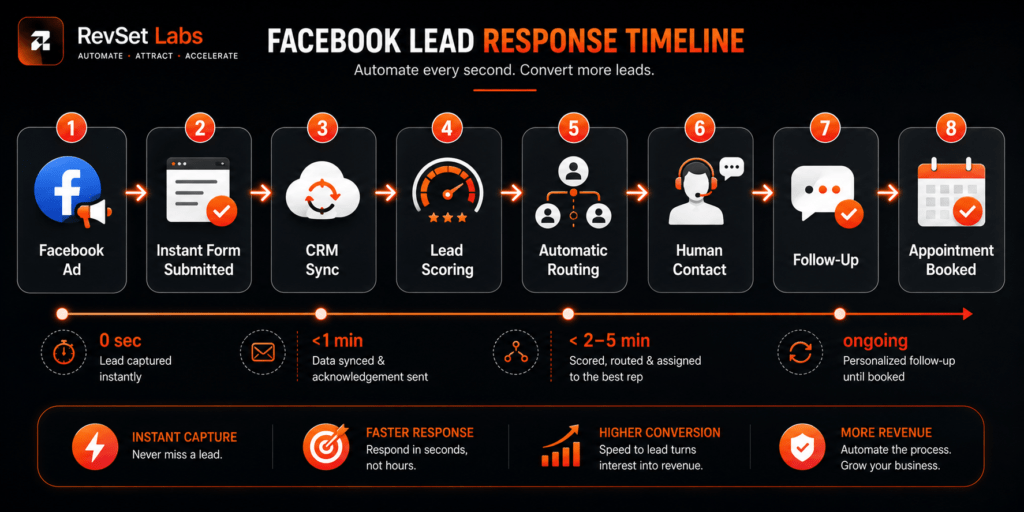
A practical RevSet Labs workflow looks like this:
Capture → Acknowledge → Assign → Contact → Follow Up → Book
Each stage has a specific operational purpose.
Stage 1: Capture
The Facebook Instant Form submission enters the lead-management system.
Stage 2: Acknowledge
The customer receives an immediate confirmation that the inquiry was received.
Stage 3: Assign
The lead is routed to the correct sales representative, location, department, or queue.
Stage 4: Contact
A representative makes the first meaningful human response.
Stage 5: Follow Up
If the prospect doesn’t respond, a structured follow-up sequence continues according to defined rules.
Stage 6: Book
The prospect moves toward an appointment, consultation, estimate, or other defined next step.
This distinction is important because automated acknowledgement time is not the same as first human response time.
Receipt is confirmed via an automated text message that is issued in a matter of seconds.
It doesn’t demonstrate that a salesman has interacted with the potential customer.
RevSet Labs advises keeping separate records of those occurrences.
How Fast Should You Respond to a Facebook Lead?
There isn’t a single response-time standard that applies to all Facebook campaigns.
A request for information for a six-month consulting engagement should be handled differently than a lead for emergency plumbing.
However, since the prospect has already taken an action intended to show interest, Facebook leads typically merit a prompt operational reaction.
RevSet Labs Facebook Lead Response Targets
| Lead Type | Automated Acknowledgement | First Human Response | Routing Priority |
| Emergency service inquiry | Under 1 minute | Under 2 minutes | Critical |
| High-intent quote request | Under 1 minute | Under 5 minutes | High |
| Appointment request | Under 1 minute | Under 10 minutes | High |
| Standard service inquiry | Under 1 minute | Under 10–15 minutes | Normal |
| Complex B2B inquiry | Under 2 minutes | Under 30 minutes | Qualified |
These are RevSet Labs operational targets. These are not universal Facebook or industry averages.
The target should also reflect business hours, team capacity, lead quality, and customer urgency.
Companies that tried to contact online leads within an hour had a significantly higher chance of qualifying those leads than those that waited longer, according to a 2011 Harvard Business Review study. Although the study provides valuable fundamental information, it is almost ten years old and shouldn’t be used as a current benchmark for Facebook.
The practical lesson is straightforward:
“Don’t confuse a fast notification with a fast sales response”.
Why Facebook Leads Often Sit Unanswered
Typically, a sales team’s lack of interest in fresh prospects is not the issue.
The procedure around them is the issue.
Delays are frequently caused by a number of operational problems.
Leads Stay Inside Facebook
A company’s ability to manually check Meta’s lead mailbox hinges on someone being available at precisely the right moment.
That response system isn’t scalable.
For quicker follow-up and instant access to new leads, Meta especially advises linking a CRM. Additionally, its documentation makes a distinction between providing downstream conversion data back via the Conversions API and retrieving CRM leads.
Because the lead can be integrated into the same workflow as other incoming chances right away, a CRM link improves the operational basis.
Manual Lead Assignment
Consider a simple process:
- Facebook generates the lead.
- Someone receives a notification.
- They open the lead.
- They determine the customer’s location.
- They find the right salesperson.
- They forward the information.
- The salesperson eventually calls.
Nothing in that process is inherently complicated.
But every handoff introduces delay.
A better workflow uses rules to route the lead automatically according to information already collected in the form.
Possible routing conditions include:
- ZIP code
- City
- Requested service
- Campaign
- Lead score
- Location
- Sales territory
- Business unit
- Team availability
Automation platforms can also connect Facebook Lead Ads to CRMs and trigger notifications or follow-up tasks when a new submission arrives.
Demonstrating Facebook Lead Ads Routing
A practical routing system doesn’t need to be complicated.
Imagine a home services company operating across three locations.
A prospect submits a Facebook Instant Form asking for an HVAC repair.
The form captures:
- Name
- Phone number
- ZIP code
- Service required
- Preferred appointment time
The automation receives the lead and evaluates the information.
Example Routing Logic
If ZIP = 75001–75020 → Dallas Team
If ZIP = 75021–75040 → North Dallas Team
If ZIP = 75041–75060 → East Dallas Team
Then add a second condition:
If Service = Emergency HVAC → Priority = Critical
The system can now:
- Create or update the CRM contact.
- Apply the Facebook campaign source.
- Add the lead to the appropriate pipeline.
- Assign the owner.
- Notify the assigned representative.
- Trigger the customer acknowledgement.
- Start the follow-up workflow.
- Create an appointment task if needed.
The salesperson doesn’t need to determine where the lead belongs.
The system has already done it.
This is the difference between receiving leads and operating a lead response system.
How to Automatically Connect Facebook Lead Ads to a CRM
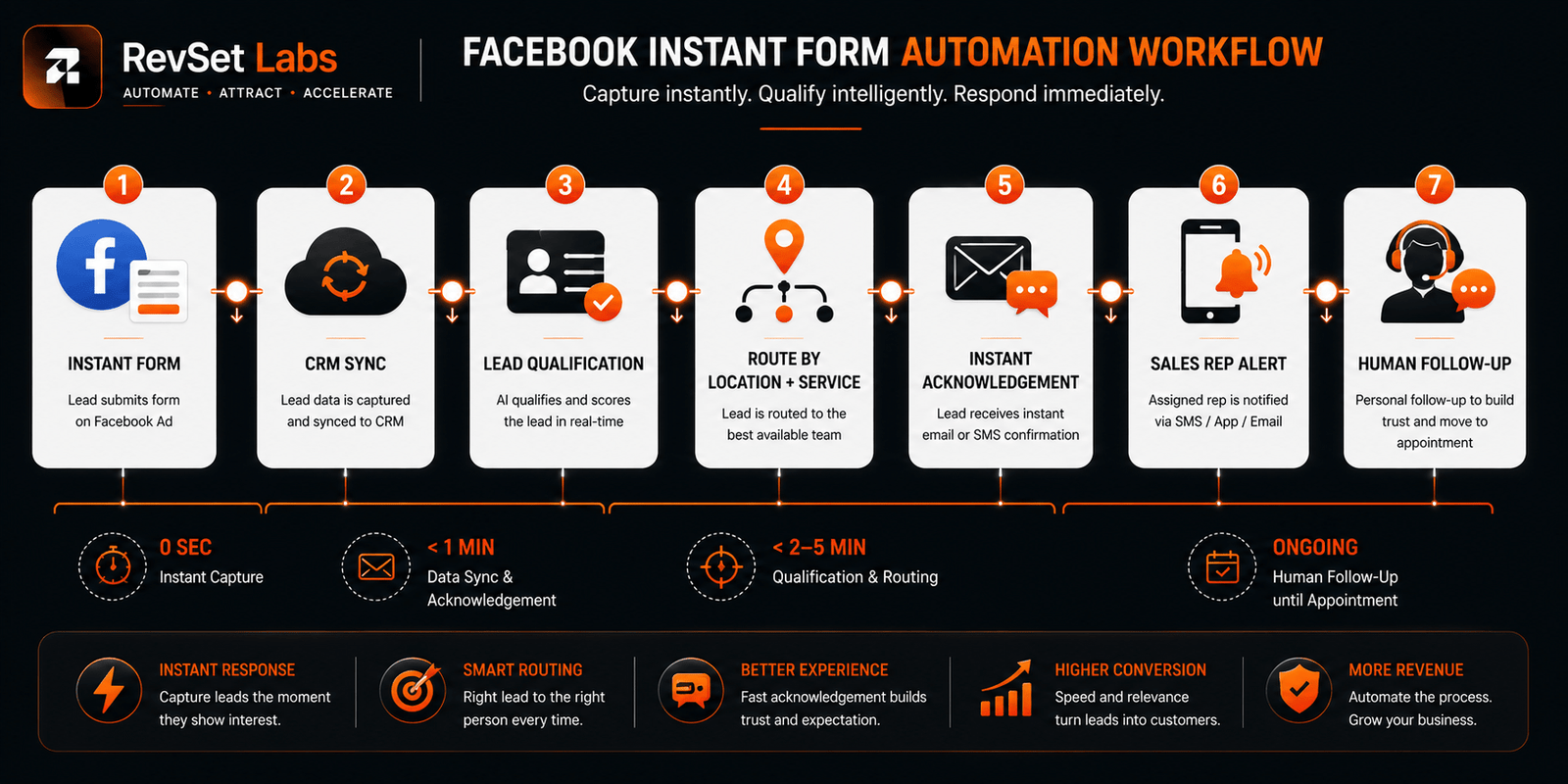
The basic architecture is straightforward:
Facebook Lead Ad → Lead Capture → CRM Sync → Routing → Follow-Up
The CRM and integration technique determine the precise configuration.
For instance, Facebook lead ad connections, lead synchronization, contact alerts, workflows, and custom field mapping are all presently supported by HubSpot. Facebook lead ad submissions can sync with HubSpot and be utilized in lists and processes, according to its website.
Additionally, synchronizing Facebook leads into the CRM and utilizing CRM data for downstream advertising and attribution are supported by HubSpot’s Meta Ads interface.
An alternative path may be offered by third-party automation technologies. Workflows that record Facebook Lead Ads submissions, normalize data, generate CRM records, and initiate follow-up actions are all supported by Zapier.
There are differences in the technology.
The operating principle should not:
The lead should enter the CRM automatically, with enough context to determine what happens next.
Facebook Instant Forms Automation: What Should Happen Next?
The consumer shouldn’t have to worry about what occurs after submitting the form.
An automatic acknowledgment that is helpful can verify:
Their request was received.
What they asked for.
When they should expect contact.
How to reach the business if they need immediate assistance.
For example:
“We appreciate you asking for an HVAC estimate. Your request has been received, and a member of our staff will be in touch with you soon. Call [number] if you need help right now.”
The message is straightforward.
Selling is not its goal.
Its purpose is to lessen ambiguity when the human reaction process gets underway.
Facebook Lead Follow-Up Should Not Stop at the First Attempt
While a prompt initial answer is beneficial, it does not ensure a dialog.
The call can be missed by the prospect.
They could be attending a meeting.
Later on, they could notice the message.
Facebook lead nurturing should thus go beyond the initial reaction.
A practical follow-up sequence could look like this:
Step 1: Immediate
Send an acknowledgement and notify the assigned representative.
Step 2: First Human Attempt
Call or send a personalized message based on the service and information provided.
Step 3: Follow-Up
If there is no response, send a short follow-up that adds context rather than simply saying, “Just checking in.”
Step 4: Scheduling
Offer a direct scheduling option when appropriate.
Step 5: Nurture
If the prospect isn’t ready, move them into an appropriate longer-term nurture sequence rather than leaving them in an inactive pipeline.
The exact timing should be adapted to the business.
Emergency services need compressed sequences.
Longer B2B sales cycles require more patience and useful information between touchpoints.
What Should You Measure?
Facebook Lead Response Automation should be evaluated using more than cost per lead.
A low cost per lead can look attractive while the actual conversion rate remains poor.
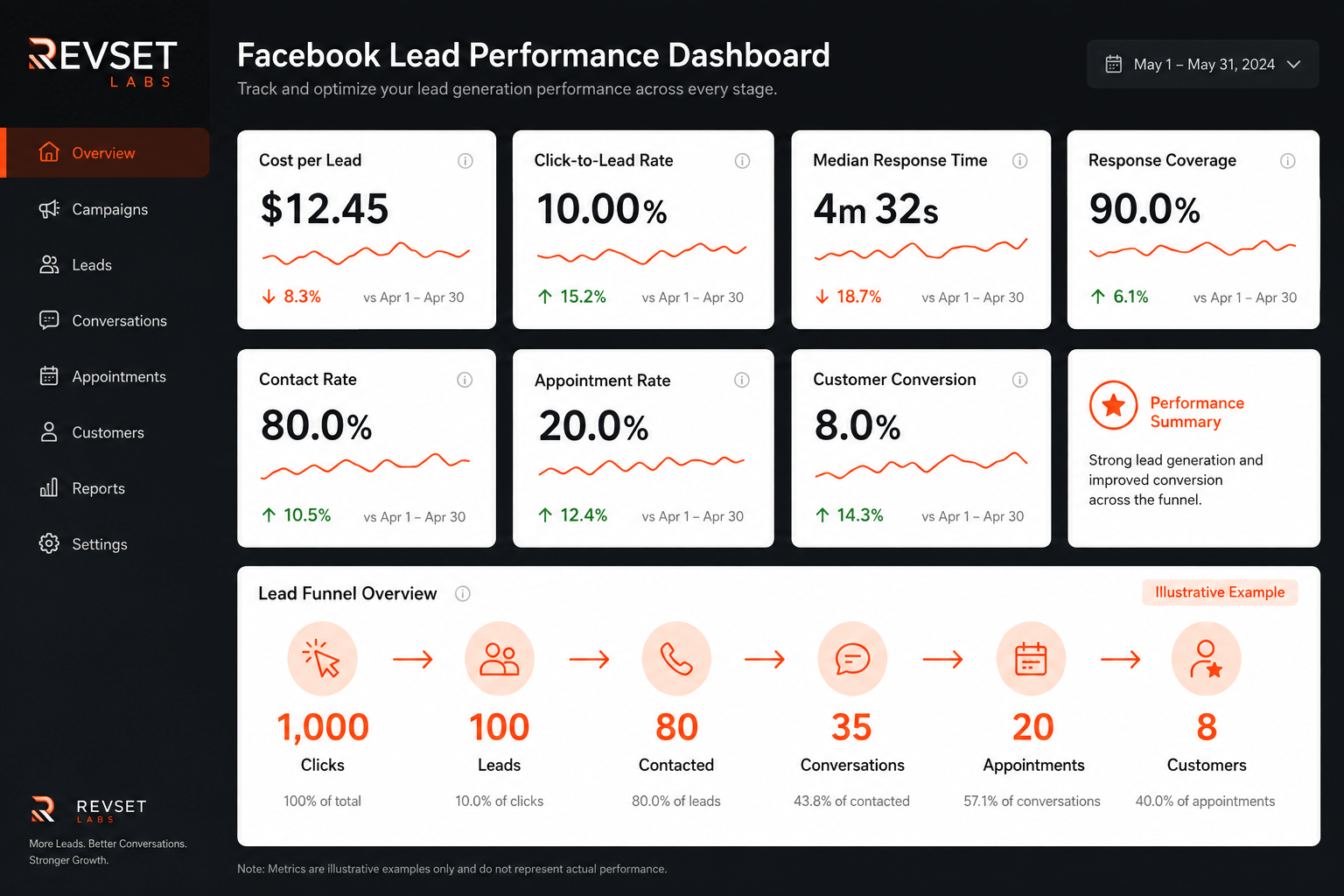
RevSet Labs monitors the complete path:
Click → Lead → Response → Conversation → Appointment → Customer
Key metrics include:
Click-to-Lead Conversion Rate
Measures how effectively Facebook traffic becomes submitted leads.
Cost Per Lead
Measures the advertising cost associated with generating a lead.
Lead Response Time
Measures the time from submission to first meaningful response attempt.
Response Coverage
Measures how many valid Facebook leads actually receive a response attempt.
Contact Rate
Measures how many leads become two-way conversations.
Lead-to-Appointment Rate
Measures how effectively qualified leads progress to a defined next step.
Cost Per Qualified Lead
Connects advertising spend with lead quality rather than raw lead volume.
Customer Acquisition Cost
Connects the full acquisition process with actual customers.
This prevents a common mistake: optimizing the Facebook campaign while ignoring the sales process receiving the leads.
The RevSet Labs Approach: Fix the Handoff, Not Just the Ad
This is the point at which the issue surpasses Facebook.
Even with excellent targeting, reasonable cost per lead, and a great click-to-lead conversion rate, a business may still miss out on possibilities once the form is completed.
The handoff between marketing and sales is frequently the problem.
The question is generated by marketing.
It is sent to the CRM.
It must be owned by someone.
Someone must answer.
A follow-up is required.
It must be moved in the direction of an appointment.
Lead volume may potentially exacerbate the issue if those processes are disconnected.
More leads result in more alerts.
There is more physical labor when there are more alerts.
There are increased chances for delays when there is more physical labor.
This is treated as a revenue operations concern by RevSet Labs.
The objective is to create a system in which the Facebook lead does more than just input data into a database. It starts a predetermined procedure.
Capture → Acknowledge → Assign → Contact → Follow Up → Book.
That framework gives every lead a next action.
How RevSet Labs Can Help With Facebook Lead Response Automation
The operational gap between lead generation and revenue conversion is our main emphasis at RevSet Labs.
In the case of Facebook Lead Ads, this may entail establishing routing rules, assigning ownership, initiating alerts, establishing automatic acknowledgment, linking Meta lead capture to the CRM, and developing organized follow-up procedures.
The business should determine the precise workflow.
Location-based routing could be necessary for a home services firm with many locations.
A practice-area qualification may be required by a legal firm.
Appointment scheduling may be necessary for a dental office.
Before notifying a sales representative, a B2B organization may need a lead score.
Technology is evolving.
The operational principle remains the same:
Every new lead should have an owner, a response target, and a defined next step.
Final Thoughts
Although lead creation and lead conversion are two distinct operational issues, Facebook Lead Ads may immediately build demand.
The possibility is created by the advertising system.
What comes next is determined by your response system.
Your advertising approach may not be the issue if Facebook leads are still being manually downloaded, passed via email, manually put into a CRM, or left waiting for someone to review a notification.
The handoff might be the issue.
Facebook Lead Response Automation makes the transition from form submission to human communication more dependable. Businesses may minimize needless response delays and safeguard the purchasing momentum they have already spent to create by integrating CRM sync, intelligent routing, lead qualifying, automatic acknowledgment, and organized Facebook lead follow-up.
Responding as quickly as technically possible is not the ideal objective.
The goal is to develop the quickest, most significant, and long-lasting response process your team can reliably provide.
This is where automation comes in handy, not because it takes the position of salespeople, but rather because it eliminates the operational delays that keep them from doing their duties.
FAQs
What is Facebook Lead Response Automation?
New Facebook or Meta Lead Ads are automatically moved through capture, CRM synchronization, routing, acknowledgment, follow-up, and booking using Facebook Lead Response Automation. It enables companies to react to leads more quickly and reliably.
Why is Facebook lead response time important?
Businesses may engage prospects while their interest is still strong by responding quickly. Automation shortens the time between submitting a form and receiving a relevant human answer.
How quickly should businesses respond to Facebook leads?
Lead kind, urgency, and company capability all affect response goals. For emergency queries, RevSet Labs operates with goals of less than two minutes, and for sophisticated B2B leads, less than thirty minutes.
How can Facebook Lead Ads be connected to a CRM?
Facebook Lead Ads are often connected to CRM, routing rules, follow-up automation, and a lead-collecting system. These integrations can be supported by platforms like HubSpot and Zapier.
What happens after a Facebook lead submits an Instant Form?
A follow-up procedure may be initiated; the lead can be automatically recognized, added to the CRM, and allocated to the proper representative. This guarantees that each lead has a well-defined next step.
Can Facebook leads be automatically assigned to sales representatives?
Indeed. Information like ZIP code, location, desired service, campaign, lead score, sales area, or business unit can all be used to route leads. This reduces needless handoffs and manual assignment.
What metrics should businesses track for Facebook leads?
Cost per lead, click-to-lead rate, response time, response coverage, contact rate, appointment rate, and customer conversion are all significant KPIs. A more comprehensive understanding of revenue performance may be obtained by tracking the whole funnel.
Does automation replace salespeople?
No, repetitive operational duties like routing, alerts, acknowledgments, and follow-ups are handled by automation. Its goal is to enable salespeople to reply more quickly and concentrate on having meaningful discussions with customers.
How can RevSet Labs help with Facebook Lead Response Automation?
Workflows for CRM synchronization, lead routing, automatic acknowledgments, alerts, qualification, and organized follow-up may be developed with the aid of RevSet Labs. Giving each new lead an owner, response objective, and clear next step is the aim.
Turn More Facebook Leads Into Customers
Don’t let valuable Facebook leads sit unanswered. RevSet Labs helps connect lead generation with a reliable response and follow-up process, so your team can respond faster, book more appointments, and improve conversion.
Ready to improve your Facebook lead response process? Get in touch with RevSet Labs today.