
 GoHighLevel“>

Resolving Duplicate Contacts in GoHighLevel via Zapier
If you’ve ever opened GoHighLevel and seen three versions of the same person—or watched a lead get added to the same campaign over and over again—the problem is almost always a combination of Zapier settings and GoHighLevel deduplication rules.
What This Troubleshooting Guide Covers
This guide walks you through a practical, step‑by‑step troubleshooting process so every lead enters your automations once, gets the right follow‑up, and doesn’t clutter your CRM.
Key Topics You'll Learn
Along the way, you’ll see:
- Why Zapier and GoHighLevel sometimes create duplicate contacts
- How GoHighLevel’s Contact Deduplication Preferences really work
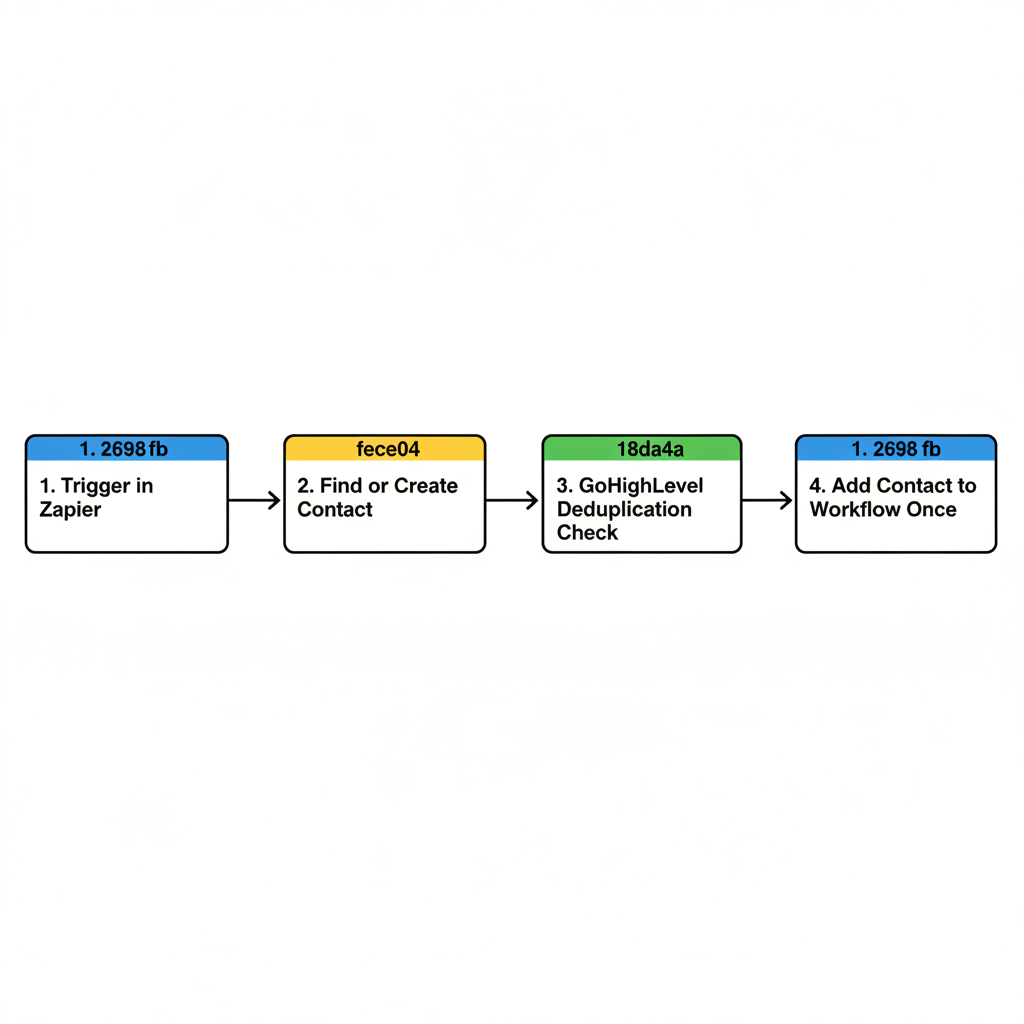
- The safest Zap pattern to use with Find or Create Contact
- How to stop contacts from being added to the same campaign or workflow multiple times
Start Your GoHighLevel Free Trial
If you’re still evaluating GoHighLevel and want a CRM that can be automated end‑to‑end, you can start a free GoHighLevel trial and follow this guide as you build.
In-Depth Troubleshooting Details
Then we dig into Zapier audits, GoHighLevel deduplication, workflow re‑entry rules, and a safe four‑step Zap pattern you can reuse across all your lead sources.