
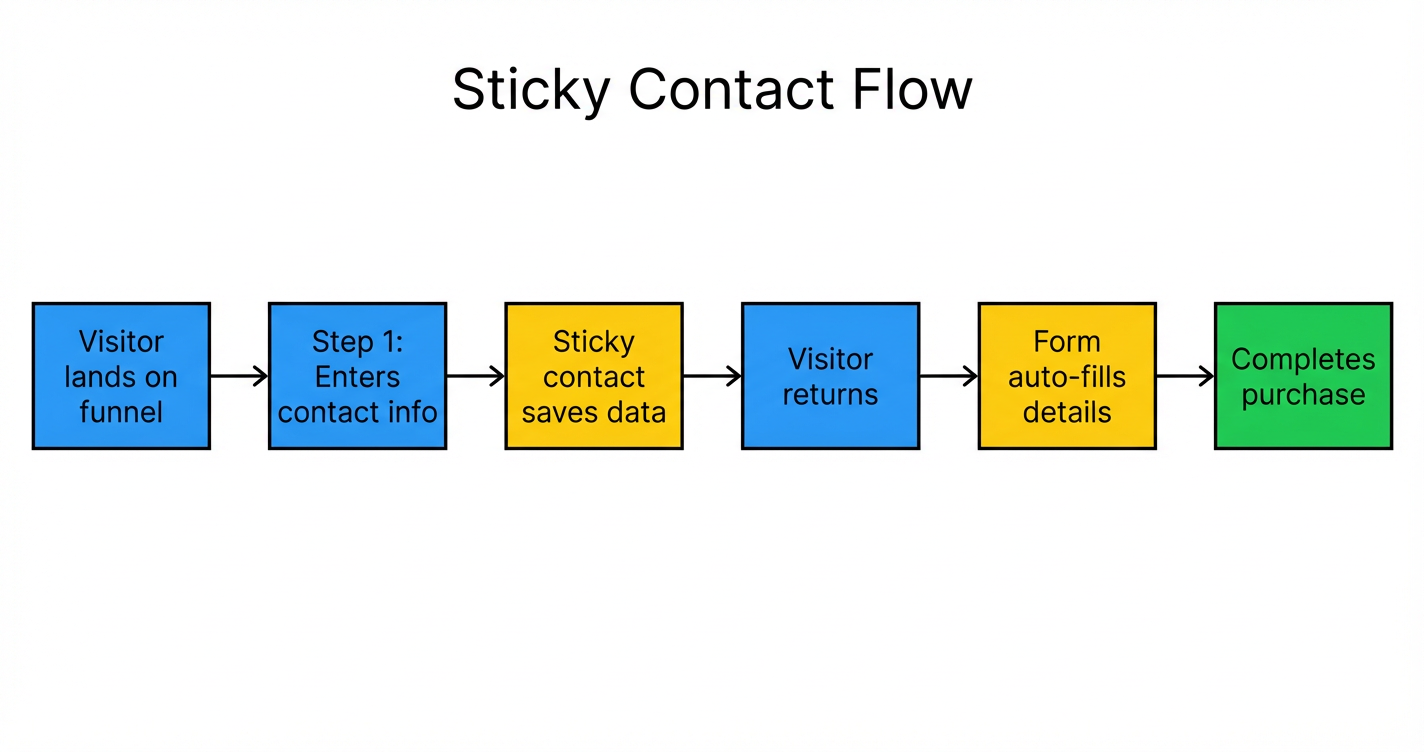
 GoHighLevel with a Two-Step Order Form” title=”Workflow flowchart for Sticky Contact in GoHighLevel – Two-Step Order Form Setup & Best Practices”>

What Sticky Contact Does in GoHighLevel
Sticky Contact is a simple but powerful GoHighLevel feature that remembers who your visitors are.
When someone fills out a form on your funnel (name, email, phone, etc.), GoHighLevel stores that information using browser cookies and ties it back to their contact record. The next time they come back to a page with a compatible form, those fields can automatically pre-fill.
For a busy agency owner or business, this means:
- Less friction on repeat visits.
- Fewer abandoned checkouts.
- A smoother experience for existing leads and customers.
If you don’t have a GoHighLevel account yet, you can start a free trial here: Start your free GoHighLevel trial.
Why Sticky Contact Works So Well with Two-Step Order Forms
Two-step order forms split the checkout into two logical stages:
-
Step 1 – Contact Details
The visitor enters name, email, and sometimes phone number. -
Step 2 – Payment Details
The visitor enters card details and completes the purchase.
Running Sticky Contact on this flow gives you important advantages:
- Faster checkouts for returning visitors – If they came through a previous funnel step or earlier campaign, their contact details can be pre-filled on Step 1 so they can move straight toward payment.
- Higher completion rate on Step 1 – Asking only for contact info feels lightweight. Even if they don’t finish payment, you still capture a contact you can follow up with via email, SMS, or automation.
- Better multi-channel follow-up – Because Sticky Contact ties form activity back to the GoHighLevel contact record, you can trigger workflows, automations, and pipelines around cart abandonment or partial checkouts.
In short, Sticky Contact makes the two-step order form feel like your funnel already “knows” your leads—and that familiarity converts.
How to Enable Sticky Contact on a Two-Step Order Form
Follow these steps inside your GoHighLevel account:
-
Open the correct funnel
- Go to Funnels in your GoHighLevel account.
- Select the funnel that contains your two-step order form.
-
Edit the two-step order form page
- Click the Edit icon on the funnel step that uses the two-step order form.
- This will open the funnel builder.
-
Open the order form settings
- Click on the order form element in the editor.
- In the right-hand panel, look for the Contact Options or Form Options section.
-
Toggle on Sticky Contact
- Locate the Sticky Contact setting.
- Turn the toggle On to let GoHighLevel remember and pre-fill contact details for returning visitors.
-
Save and test the flow
- Click Save in the builder.
- Visit the funnel as a test user:
- Fill out Step 1 with test contact details.
- Leave and come back to the funnel.
- Confirm that the Step 1 fields are pre-filled for that same browser.
Once this is working, every returning visitor using the same browser and device should see their contact info filled in automatically, making it easier to go straight to payment.
If you’re still getting set up in GoHighLevel, remember you can spin up a new account here: Launch GoHighLevel with a free trial.
Best Practices (and When Not to Use Sticky Contact)
Sticky Contact is powerful, but you should be intentional about when and where you turn it on.
1. Be careful on shared or public devices
On shared computers (coworking spaces, kiosks, clinics, etc.), Sticky Contact can surface one person’s details to another user on the same device.
Recommendations:
- Avoid using Sticky Contact on public-facing kiosks or shared desktops.
- Add a brief note near the form if you know many people access it from the same shared device.
2. Avoid using it for highly sensitive data
Sticky Contact is ideal for standard contact fields (name, email, phone). It’s not designed for storing or auto-filling confidential information.
Use it confidently for:
- Lead capture forms.
- Standard checkouts for digital products, coaching, or services.
- Funnels where visitors frequently return from retargeting ads or follow-up emails.
Avoid Sticky Contact for:
- Forms that collect sensitive personal, medical, or legal data.
- Workflows where multiple people routinely share the same device and login.
3. Keep your funnel analytics in mind
With Sticky Contact turned on, repeat visitors may move through Step 1 much faster. This is good for conversions, but it can slightly change how your funnel analytics look (you’ll see fewer “new" form submissions and more quick jumps to payment).
Watch:
- Step 1 completion rate – It should improve as more returning visitors see pre-filled fields.
- Overall order conversion rate – The main goal is a higher percentage of visitors completing payment.
Example Use Cases for Sticky Contact on Two-Step Order Forms
Here are a few real-world scenarios where Sticky Contact shines:
- Course or membership launches – Leads may click through multiple launch emails before buying. Sticky Contact means they don’t keep retyping their details every time they hit your order form.
- High-ticket services – Prospects often revisit a long-form sales page or funnel. When they finally click through to buy, pre-filled details lower friction at the most important moment.
- Retargeting campaigns – Visitors from Facebook, Google, or YouTube retargeting ads land back on your funnel already known to your system. Sticky Contact helps them complete what they started.
To fully capitalize on these flows, pair Sticky Contact with:
- Abandoned cart automation.
- Time-sensitive offers.
- Clear, relevant upsells.
GoHighLevel makes this possible out of the box. If you’re not using it yet, you can try it here: Get started with GoHighLevel.
How Revset Labs Can Help You Implement This
Sticky Contact plus a well-designed two-step order form can be the difference between a leaky funnel and a predictable revenue engine.
Revset Labs is an AI automation and marketing agency that helps businesses build and optimize GoHighLevel funnels end to end. That includes:
- Designing two-step order forms that match your offer and audience.
- Implementing Sticky Contact and other GoHighLevel features the right way.
- Building automations for abandoned checkouts, upsells, and post-purchase nurture.
- Connecting your funnels to the rest of your tech stack so leads never fall through the cracks.
If you’d rather skip the trial-and-error and go straight to a conversion-ready setup, this is exactly the kind of system Revset Labs builds every day.
And if you still need an account to work with, you can start with GoHighLevel here: .