
 GoHighLevel: How to Use Multiple Opportunities for the Same Contact in One Pipeline”>

Note: This article is based on GoHighLevel’s built-in "Allow Multiple Opportunities per Contact" feature. It’s written for agency owners and in-house teams who want clean data, clearer forecasting, and smarter automation – without losing deals when one person is in the middle of multiple journeys.
What is "Allow Multiple Opportunities per Contact" in GoHighLevel?
By default, many CRMs assume one person = one opportunity per pipeline.
That works until real life kicks in:
- A client is renewing while evaluating an add-on.
- A franchise owner is opening a second location.
- A coaching client joins a new program while still in an existing container.
If you try to force all of that into a single opportunity card, you end up overwriting history, breaking automation, and making reporting almost useless.
GoHighLevel solves this with the "Allow Multiple Opportunities per Contact" setting.
When this option is turned on for a sub-account:
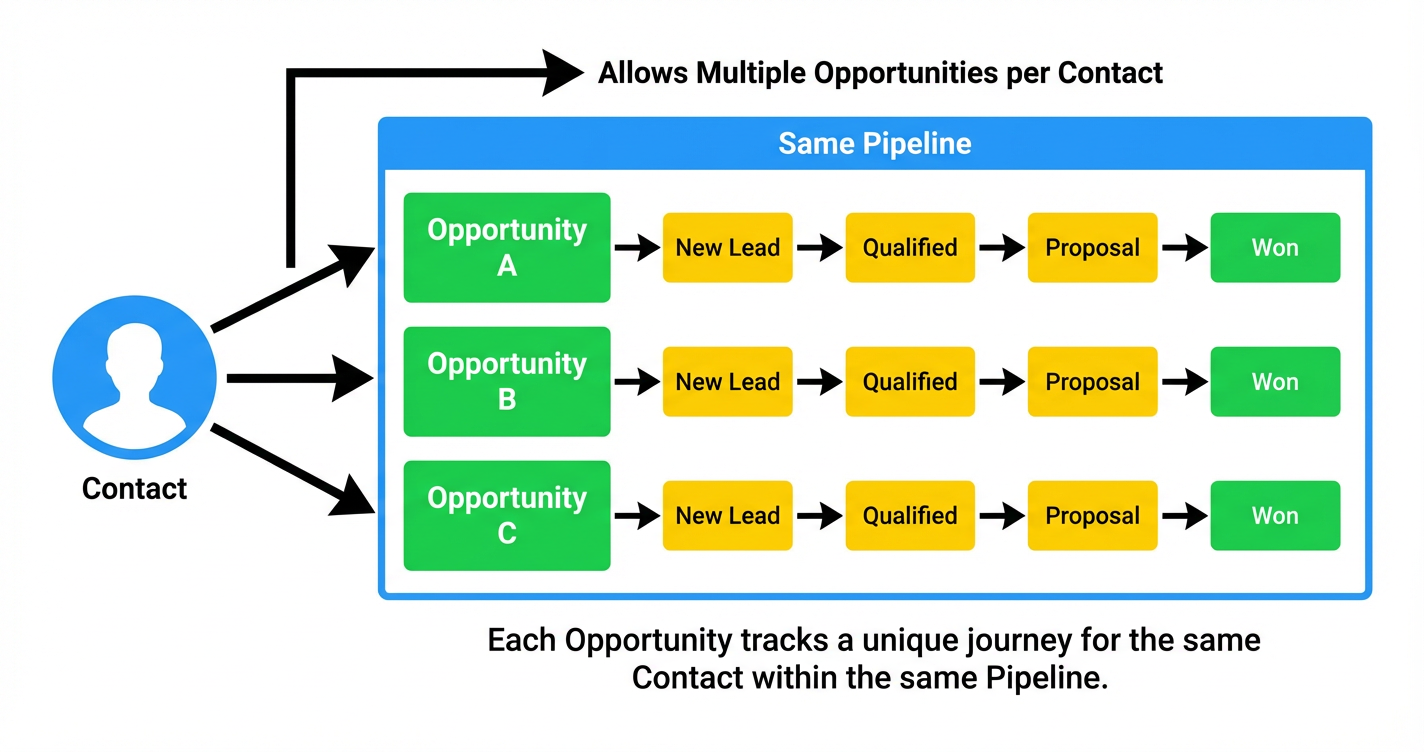
- A single contact can have multiple active opportunities in the same pipeline.
- Each opportunity tracks its own stage, value, close date, and notes.
- Automations and reporting can be configured to treat each opportunity as a separate journey instead of one messy, shared record.
Think of it as giving every deal its own lane, even when they all belong to the same person.
Don’t have a GoHighLevel account yet? You can start a free trial here: Start your GoHighLevel trial and follow along as you set this up.
Key benefits of multiple opportunities in the same pipeline
Allowing multiple opportunities per contact is not just a “nice to have”. Used correctly, it becomes a serious revenue and visibility upgrade.
1. Clean tracking for renewals, upsells, and add-ons
Without this feature, teams typically:
- Rewrite the same opportunity over and over (losing past context), or
- Create duplicate contacts for the same person just to track another deal.
With multiple opportunities per contact, you can:
- Keep a renewal opportunity open while a new offer is in play.
- Track add-ons (e.g. SEO, ads management, a new membership) as separate cards.
- Look back historically and see exactly which offers closed, when, and at what value.
2. One contact, multiple locations or brands
If you work with franchises or multi-location businesses, it’s common for one owner or decision-maker to:
- Open additional locations over time.
- Test new service lines or campaigns in parallel.
Multiple opportunities per contact lets you:
- Create Opportunity A – Location 1, Opportunity B – Location 2, etc.
- Keep them all inside the same pipeline, while still reporting on each separately.
3. More accurate forecasting and pipeline reporting
When each deal sits on its own card, your pipeline totals become real:
- No more inflated or undercounted pipeline because one “Frankenstein” card has been edited ten times.
- Win-rate calculations reflect individual journeys instead of blended histories.
- Revenue forecasts can include renewals, expansions, and cross-sells in the same view.
This matters for agencies that want to:
- Predict MRR growth.
- Track upgrade/cross-sell campaigns.
- See how often a single relationship expands into multiple revenue streams.
4. Smarter workflow automation
GoHighLevel workflows can be configured to:
- Create or update opportunities.
- Move them between stages.
- Trigger messaging based on stage, status, or custom fields.
When you allow multiple opportunities per contact, you can design automation that:
- Targets only the renewal opportunity for renewal reminders.
- Moves just the upsell opportunity when a specific funnel form is submitted.
- Keeps onboarding communication attached to the correct deal, even if the same person is in another pipeline or journey.
Pro tip: Use clear naming conventions like
Client Name – Offer – Cohort/Quarter(for example, "John Smith – Website Redesign – Q2 2026") so your team and automations always know which card to touch.
5. Operational flexibility without duplicate contacts
Enabling this feature means your team can stop creating fake contacts just to get around pipeline limits.
That reduces:
- Confusing duplicates in your CRM.
- Missed context when support, sales, or success teams open a record.
- Data cleanup work later.
Instead, one well-maintained contact record holds:
- All relevant contact details.
- Every opportunity (past and present).
- Notes, tasks, and communication tied to each opportunity’s journey.
If you’d like help designing that data model properly for your agency or SaaS, Revset Labs can architect it for you and plug it into the rest of your automation stack.
How to enable "Allow Multiple Opportunities per Contact" in GoHighLevel
You’ll configure this at the sub-account level so the whole team can use it consistently.
Step 1: Open your sub-account settings
- Log into GoHighLevel.
- Switch into the sub-account where you manage the pipeline.
- Click the Settings gear in the left sidebar.
Step 2: Go to the Opportunities object
- Inside Settings, look for Objects.
- Click Opportunities.
This is where you control how opportunity records behave in that sub-account.
Step 3: Toggle "Allow Multiple Opportunities per Contact"
On the Opportunities settings screen:
- Find the option labelled "Allow Multiple Opportunities per Contact".
- Turn the toggle ON.
- Click Save.
Go to Sub-Account Settings → Objects → OpportunitiesToggle Allow Multiple Opportunities per Contact ON.Click on Save changes
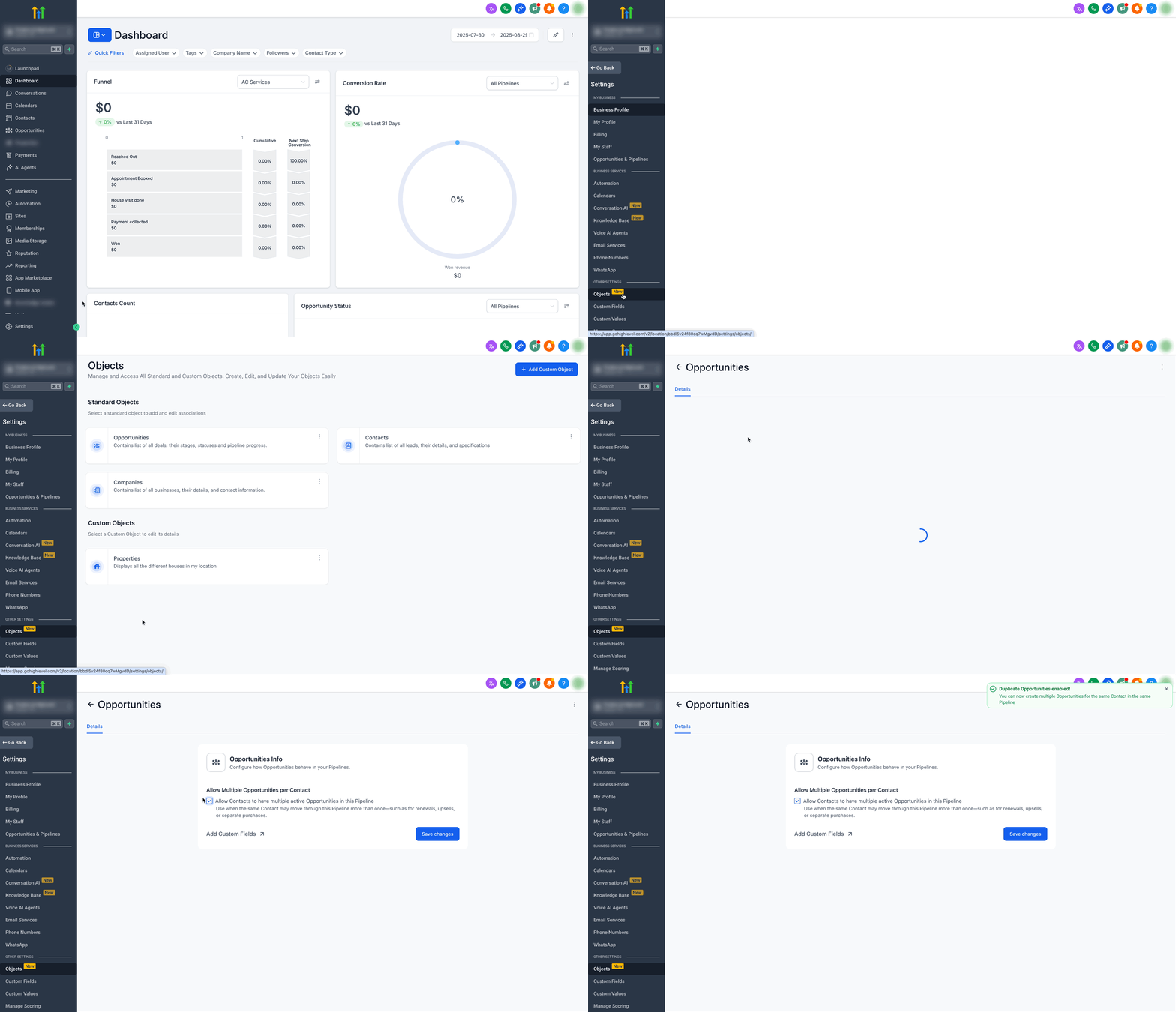
From this point forward, GoHighLevel will allow more than one opportunity card for the same contact in the same pipeline.
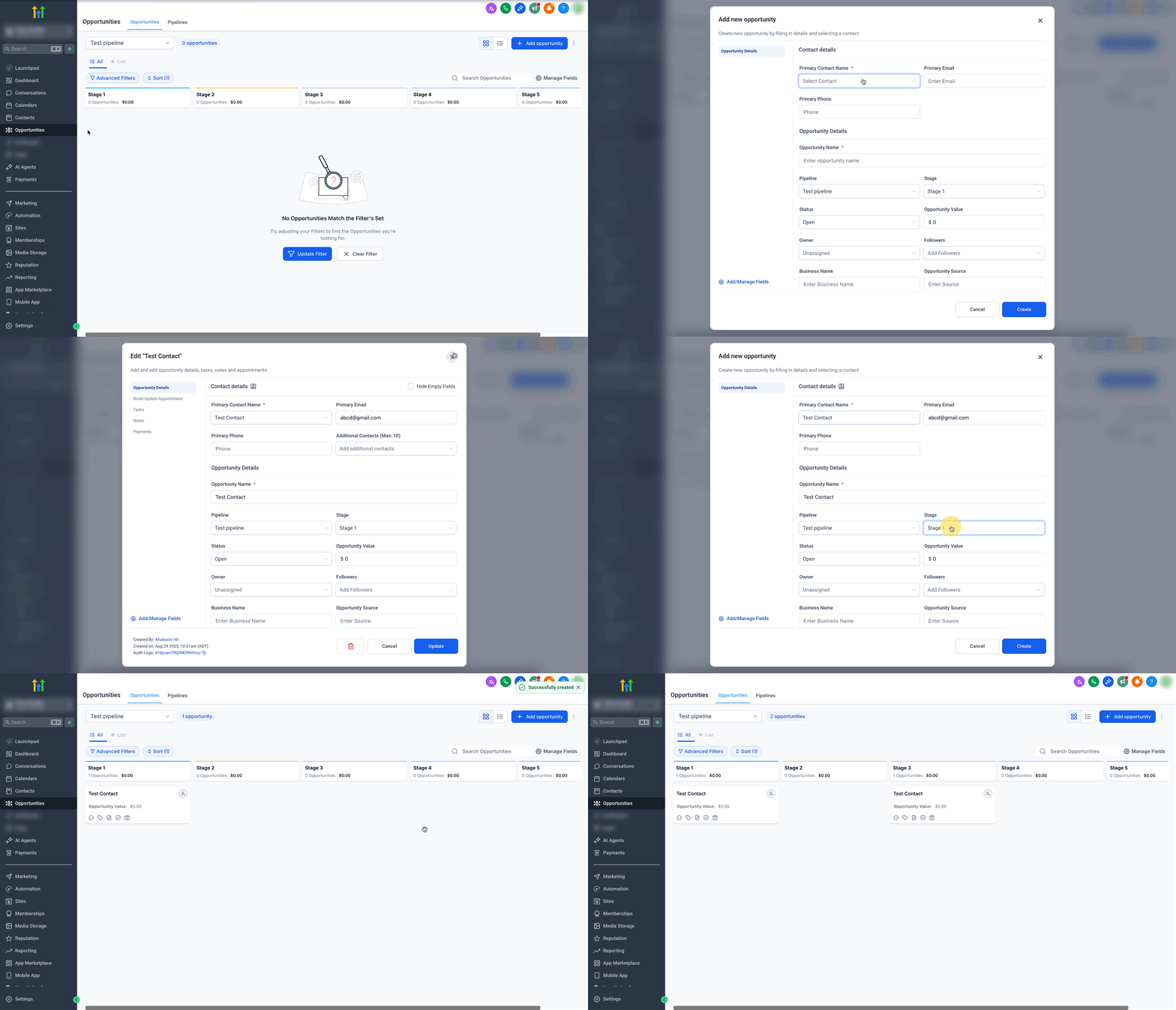
Step 4: Test with a real contact
Before you roll this out to the whole team, test it end-to-end:
- Open your primary sales pipeline.
- Pick an internal test contact or a real client you know well.
- Create Opportunity A (for example, "Website Redesign – Q2 2026").
- Create Opportunity B for the same contact (for example, "SEO Retainer – Q2 2026").
- Move them independently through stages like New Lead → Qualified → Proposal → Won.
You should now see two separate cards for the same person inside the same pipeline – each marching through the stages on its own timeline.
Test by creating two opportunities for the same contact in the same pipeline; confirm both appear and automations run as expected.
If you’re just getting started with pipelines and stages in GoHighLevel, pair this guide with a foundational walkthrough like “Getting Started: Set Up Pipelines and Opportunities in GoHighLevel” for best results.
When you’re ready to productize this inside your agency, you can also direct prospects to your own optimized funnels and sales pages built on GoHighLevel. If you’re not yet using the platform, you can grab a free trial here: Try GoHighLevel free.
Best practices when you allow multiple opportunities per contact
Turning the toggle on is the easy part. Getting predictable results from it comes down to process and automation design.
Use clear, consistent opportunity names
Give every opportunity a name that answers three questions at a glance:
- Who is this for? (Client or brand name)
- What is the offer? (Service, package, or product)
- When / which cohort is it for? (Month, quarter, or program name)
Examples:
Acme Dental – Google Ads Management – Q3 2026Jane Doe – Group Coaching – April 2026Smith Fitness – Location #2 Launch – 2026
This makes it easy for:
- Sales reps to work the right card.
- Account managers to see which opportunities are active.
- Automations to filter and update the correct record.
Align workflows with the correct opportunity
Inside GoHighLevel’s workflows, you’ll often:
- Use Create/Update Opportunity actions.
- Move opportunities forward when a form is submitted or a milestone is hit.
With multiple opportunities per contact, make sure your workflows:
- Reference a specific pipeline and stage instead of “any opportunity”.
- Use filters (like opportunity name, tags, or custom fields) to select the right card.
- Avoid generic “update all opportunities for this contact” logic unless that’s truly what you want.
When you need advanced routing – for example, renewal workflows that must only touch renewal opportunities – Revset Labs can help you model the logic and build resilient, testable workflows on top of GoHighLevel.
Prevent duplicate or conflicting messaging
The biggest risk when one person is in multiple journeys is message overload.
To avoid spamming contacts:
- Use suppression rules in your workflows (for example, "skip if this contact is already in Campaign X").
- Add conditions like: only send this sequence if the opportunity tag is
Renewaland status isOpen. - Use custom fields or tags to track whether a specific message set has already been delivered.
You can also centralize evergreen messaging inside GoHighLevel campaigns, then use opportunity-level triggers to enroll contacts once, even if they have multiple cards.
Keep reporting and dashboards honest
With multiple opportunities per contact, your dashboards should be configured intentionally:
- Make sure pipeline totals include (or exclude) renewals and upsells based on how you want to measure growth.
- Build views that isolate new business vs. expansion revenue.
- Tag or segment opportunities so you can slice data by offer, product line, or location.
This is where GoHighLevel shines as a central operating system: you can track everything in one place, and still zoom into just the revenue streams you care about.
FAQs about multiple opportunities for the same person
Does this affect existing opportunities when I turn it on?
No. Enabling Allow Multiple Opportunities per Contact does not change the data on your existing cards. It simply allows additional opportunities to be created for the same contact inside the same pipeline.
If you later turn it off, users will no longer be able to create new multiple opportunities in that pipeline, but existing ones will still remain until you archive or merge them based on your process.
Can a contact still have opportunities in different pipelines?
Yes. A contact can always have opportunities across multiple pipelines (for example, a sales pipeline and a fulfillment pipeline). The setting discussed here specifically controls whether more than one opportunity can exist for that contact inside the same pipeline.
How do I make sure workflows hit the right opportunity?
Use:
- Filters based on pipeline, stage, and status.
- Naming conventions and tags to distinguish opportunity types (for example,
New Sale,Renewal,Upsell). - The Duplicate Opportunity / Allow Multiple Opportunity options inside workflow actions when you explicitly want to spin up a new card.
Whenever possible, test workflows with a sandbox contact that has multiple opportunities open so you can watch exactly which cards are being updated.
Will my forecasts be inflated if one person has multiple deals?
Your forecast will show the sum of all open opportunities, even if they belong to the same contact. That’s a good thing if you:
- Sell both a core offer and expansions.
- Track per-location or per-product revenue.
If you want to see “net new logo” metrics separately, create custom views or reports that filter for first-time opportunities only.
What’s the difference between this and just duplicating an opportunity?
Duplicating an opportunity is a one-off action – useful when you want to reuse fields or structure.
Allowing multiple opportunities per contact is a structural setting that defines whether your pipeline supports multiple cards for the same person at all. In practice, you’ll often use both:
- Enable multiple opportunities per contact.
- Use duplication when you want a fast starting point for a similar deal.
How Revset Labs and GoHighLevel can help you operationalize this
Once you’ve enabled multiple opportunities per contact, the next step is to bake it into your systems:
- Clear pipeline definitions and stages.
- Automation that reacts to the right opportunity at the right time.
- Reporting that distinguishes between new, renewal, and expansion revenue.
Revset Labs is an AI automation and marketing agency that specializes in building these kinds of systems on top of GoHighLevel:
- Designing pipelines that match your real-world sales motions.
- Implementing workflows that keep data clean while driving timely follow-up.
- Connecting GoHighLevel to the rest of your stack so opportunities stay in sync.
If you’d like a done-for-you implementation, you can reach out to Revset Labs and we’ll help you design, build, and test a multi-opportunity pipeline that supports your growth strategy.
And if you’re still evaluating platforms, you can experience this feature (and the rest of the GoHighLevel ecosystem) by starting a free trial here: Explore GoHighLevel.
Related resources to go deeper
Here are additional topics you’ll want to explore once multiple opportunities per contact are live:
- Understanding Opportunities in GoHighLevel – a deep dive into how opportunities, pipelines, and stages fit together.
- Automating Opportunities with Workflows – how to create, update, and move opportunities automatically based on forms, funnels, and events.
- Create/Update Opportunity Workflow Action – detailed configuration options for the workflow step that manages opportunity records.
- Step-by-Step Guide to Creating Opportunities – a foundational walkthrough for newer users.
On the Revset Labs side, you’ll also want to connect this with guides on:
- Structuring high-converting GoHighLevel funnels for new offers.
- Building automation that reacts to stage changes (won, lost, stalled).
- Using AI to prioritize which opportunities your team should work first.
Use this article as your blueprint for enabling the feature, and pair it with a strategic implementation plan so you’re not just turning on more complexity – you’re turning on more revenue.