
Importing funnels from ClickFunnels into GoHighLevel lets you keep proven pages while consolidating everything into one platform for CRM, automation, and reporting. Instead of rebuilding funnels from scratch, you can pull in your existing layouts, then use GoHighLevel to close more leads, follow up automatically, and see what’s actually converting.

This guide walks you through exactly how to bring a ClickFunnels funnel into GoHighLevel, what to watch out for, and how to turn that imported funnel into a reliable revenue system.

Why move your funnels from ClickFunnels to GoHighLevel?
If you’re reading this, you probably already have funnels in ClickFunnels that are working "well enough"—but your tech stack is getting messy. Common reasons businesses migrate funnels into GoHighLevel include:
- Everything in one place. Funnels, CRM, email, SMS, pipelines, calendars, and reporting all live inside GoHighLevel.
- Stronger follow-up. Native automations let you trigger email, SMS, calls, and pipeline moves based on every funnel action.
- Lower total cost. Replacing multiple tools with GoHighLevel often cuts monthly software spend while adding capabilities.
- Cleaner reporting. You can see exactly which funnels, offers, and sources are driving revenue across the entire customer journey.
If you want to consolidate your tools and run everything from one dashboard, bringing your ClickFunnels assets into GoHighLevel is a smart first move.
📌 Pro tip: If you don’t yet have GoHighLevel, you can start a free GoHighLevel trial here and follow this guide step by step as you go.
Before you start: what you need in place
A smooth import starts with a few simple checks:
- A GoHighLevel sub-account where the funnel will live.
- A working ClickFunnels funnel you can access.
- The live (publishable) URL for each ClickFunnels funnel step you want to import.
- Clarity on your funnel’s goal (lead gen, booked calls, direct sales, etc.), so you can map forms, tags, and automations correctly afterward.
Once that’s in place, you’re ready to start the actual import.
Step 1: Prepare your ClickFunnels funnel
Before touching GoHighLevel, get your ClickFunnels assets organized:
- Open your funnel in ClickFunnels. Decide which funnel (and which specific steps) you’re going to migrate.
- List each step you want to import. For example: Opt-in page → Thank-you page → Sales page → Order form → Upsell.
- Copy the live URLs. For every step:
- Open the step in ClickFunnels.
- Click to view the live/published page.
- Copy the live URL from the address bar.
🔍 Important: Use the live (publishable) URL, not the share funnel URL. The GoHighLevel importer reads the actual live page, so a share link will not work.
Keep these URLs handy—you’ll paste them into GoHighLevel in a moment.
Step 2: Create a new funnel in GoHighLevel
Now you’ll set up the destination funnel inside GoHighLevel.
- Log into your GoHighLevel sub-account. Make sure you’re in the right location/workspace.
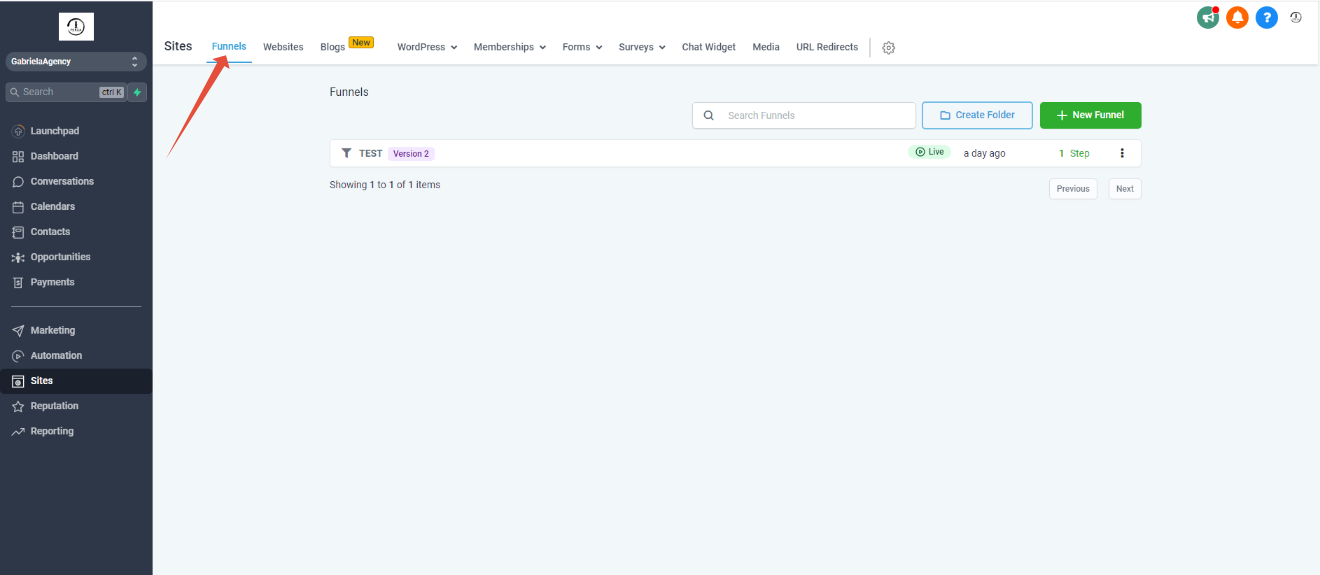
- In the left-hand navigation, go to Sites → Funnels.
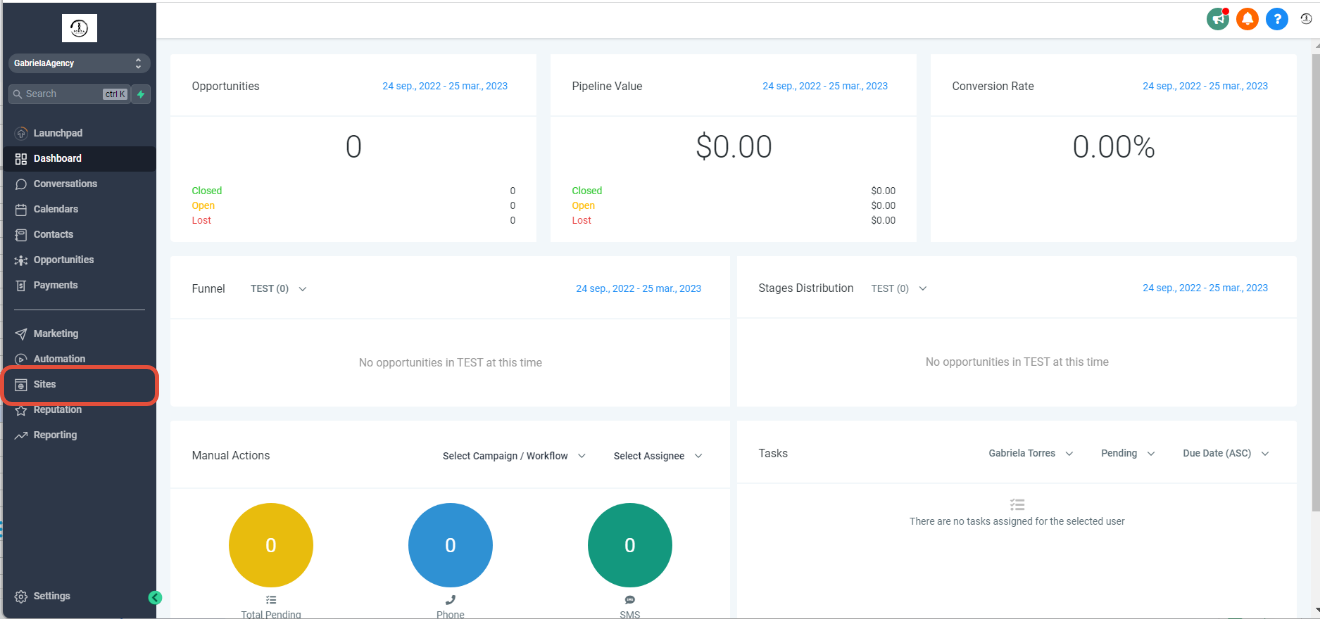
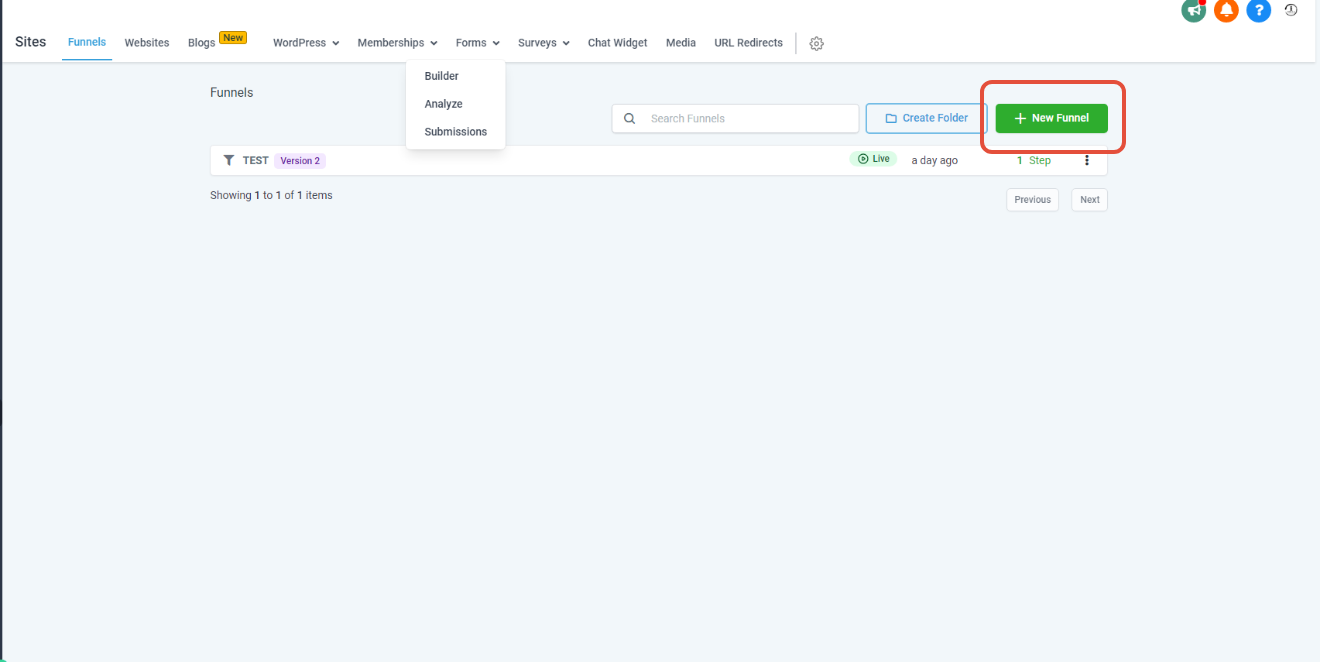
- Click “+ New Funnel”.
- Give your funnel a clear, descriptive name—something like:
CF → GHL – Main Lead Gen FunnelVSL Funnel – Imported from ClickFunnels
- Click “Create Funnel.”
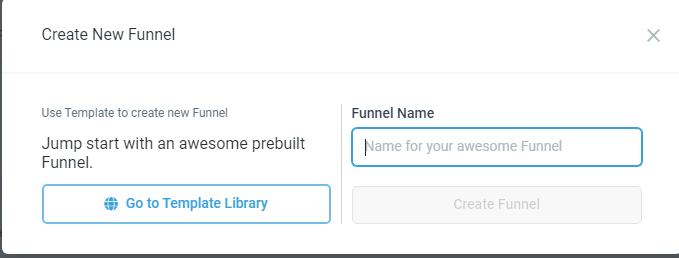
This creates the container that will hold each imported funnel step.
Step 3: Import each ClickFunnels step into GoHighLevel
With your new funnel in place, you can now import each page from ClickFunnels.
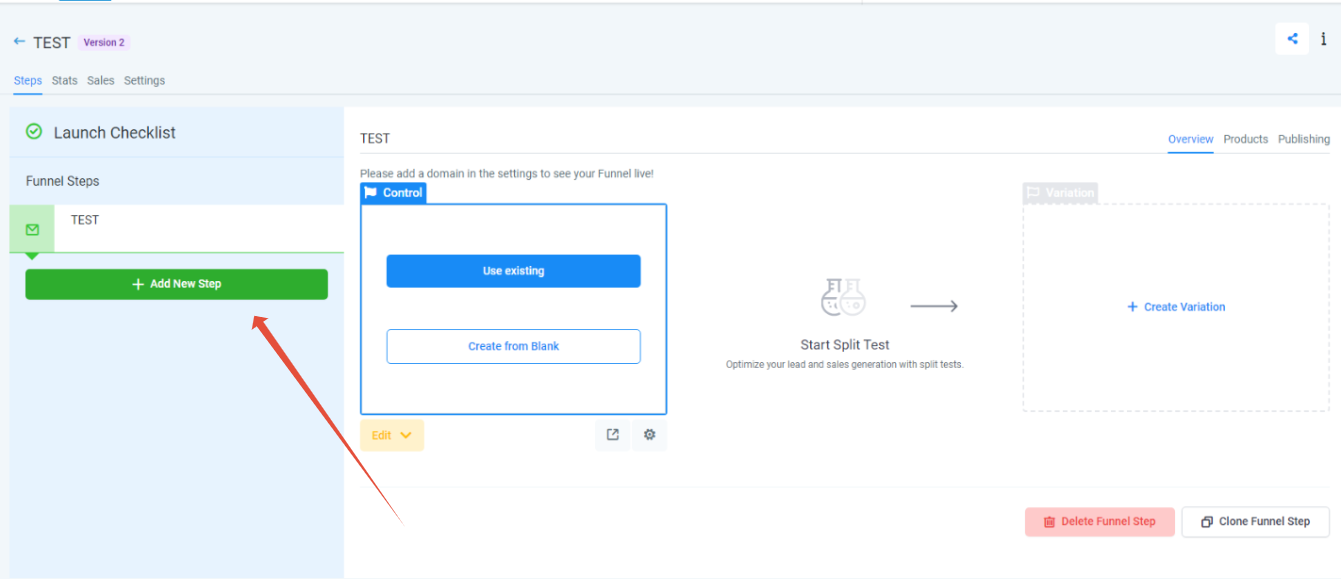
- Inside your new funnel, click “Add New Step.”
- In the pop-up:
- Name the step (for example,
Opt-in Page,Sales Page,Thank You). - Set a path that matches or improves on your existing URL structure.
- Paste the live ClickFunnels URL for that step into the import field.
- Name the step (for example,
- Check the confirmation box to allow GoHighLevel to import the page.
- Click “Create Funnel Step.”
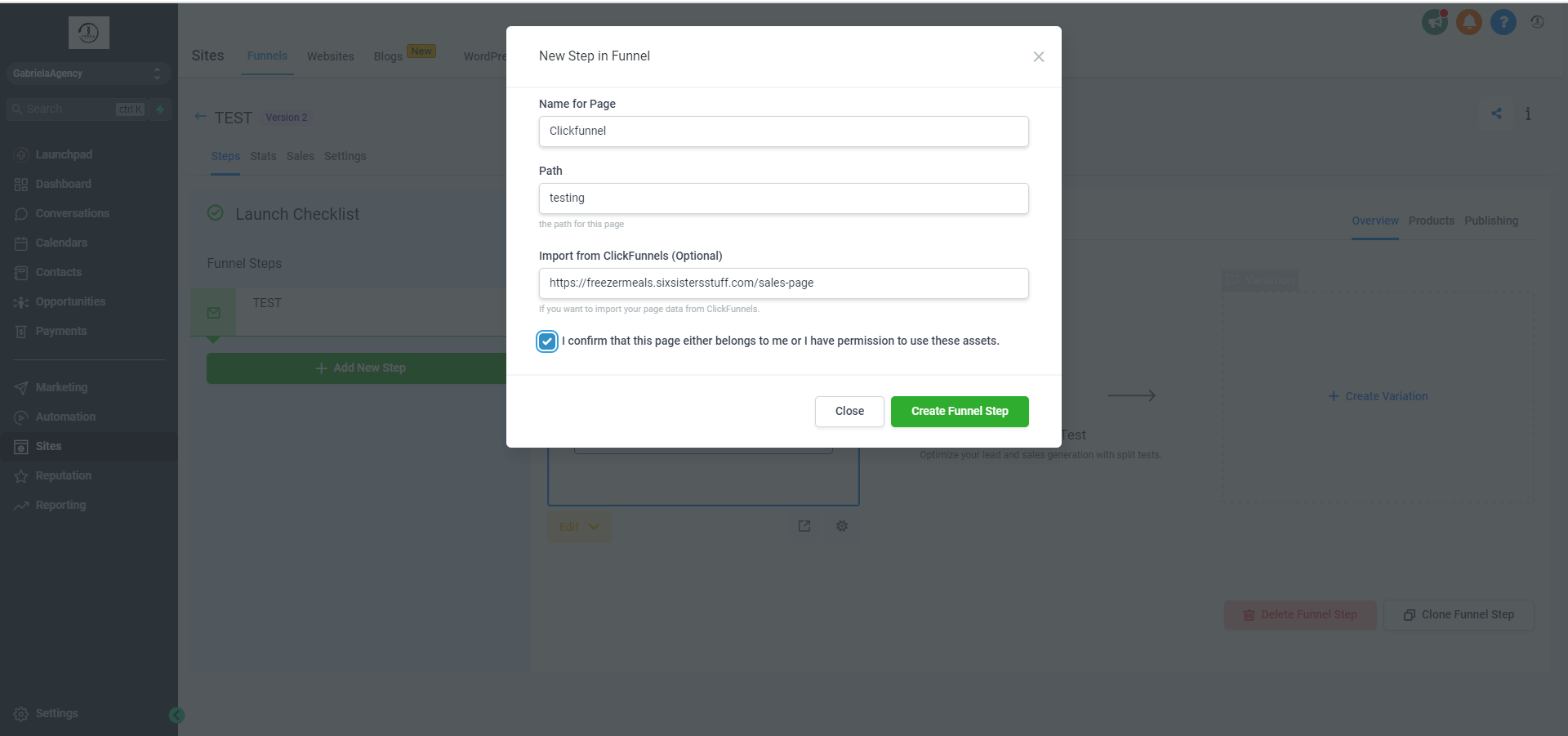
GoHighLevel will now pull in the content and layout from that ClickFunnels page.
✅ Best practice: Import one funnel step at a time. This makes it much easier to troubleshoot any layout or styling issues as you go.
Repeat this process for each step in your ClickFunnels funnel until the full journey has been imported into GoHighLevel.
Step 4: Review and optimize your imported funnel
Once all steps are imported, it’s time to clean up and upgrade the funnel inside GoHighLevel.
1. Check layout and styling
Open each funnel step and review:
- Headlines and copy – Did everything transfer correctly and stay readable?
- Images and backgrounds – Are they displaying correctly and not distorted or stretched?
- Fonts and spacing – Do sections look clean on desktop and mobile?
Make any layout tweaks directly in the GoHighLevel funnel builder.
2. Test all buttons, links, and forms
On every page, click through as if you were a real lead:
- Do all buttons go to the correct next step?
- Are links (privacy policy, terms, etc.) still valid?
- Do forms submit properly, and where does the data go?
If a form submits but doesn’t appear in your GoHighLevel contacts or pipeline, you’ll need to reconnect it to the right forms, custom fields, and workflows.
3. Connect GoHighLevel automations
This is where GoHighLevel becomes more powerful than a simple page builder.
- Attach form submissions to the right pipeline and stage.
- Trigger workflows for follow-up email and SMS when someone opts in or buys.
- Apply the correct tags so you can track which funnel and offer a contact came from.
💡 Want this fully built for you? Revset Labs is an AI automation and marketing agency that can design your GoHighLevel workflows, tagging, and reporting around your imported funnels so you’re not just moving pages—you’re building a real system.
Step 5: Handle membership areas and courses
ClickFunnels membership areas do not import using the funnel importer or share URLs. If your funnel includes a members’ area, plan to rebuild it natively inside GoHighLevel.
Here’s a simple approach:
- In GoHighLevel, go to Memberships from the main left-side navigation.
- Create your products/courses and structure modules and lessons.
- Replace any old ClickFunnels membership links in your emails or funnels with new GoHighLevel membership links.
Treat this as an opportunity to clean up and modernize your member experience instead of trying to clone ClickFunnels pixel-for-pixel.
Common issues when importing from ClickFunnels (and how to fix them)
Even with a solid importer, a few things often need manual attention:
1. Styling doesn’t perfectly match
Different page builders handle spacing, fonts, and containers in their own way. If your imported page looks “off”:
- Adjust section padding and margins.
- Re-apply fonts from your GoHighLevel design settings.
- Simplify overly complex ClickFunnels layouts into cleaner GoHighLevel sections.
2. Integrations and payments don’t carry over
Payment gateways, webhook integrations, and third-party tools do not automatically migrate.
- Reconnect your payment processor (for example, Stripe) inside GoHighLevel.
- Rebuild any order forms or upsell flows using GoHighLevel’s native checkout tools.
- Recreate key automations as GoHighLevel workflows.
3. Tracking and analytics need to be reconfigured
If you relied on ClickFunnels for tracking scripts or Facebook/Google pixels, make sure you:
- Add your pixels and scripts to the new GoHighLevel funnel settings.
- Test events (page view, lead, purchase) using tools like Facebook’s Test Events or Google Tag Assistant.
This ensures your reporting stays accurate after the move.
Turn your imported funnel into a true revenue system
Importing the pages is just step one. The real leverage comes from everything GoHighLevel lets you stack on top of those pages:
- Automated follow-up: Email and SMS sequences triggered by opt-ins, bookings, or purchases.
- Sales pipelines: Visual pipelines that show exactly where each lead sits in your sales process.
- Centralized CRM: Every contact, opportunity, and conversation in one place.
- Reporting: See which funnels, offers, and sources produce the most revenue.
If you’re ready to go beyond “just pages” and build a revenue engine around your funnels, you can start your free GoHighLevel trial here and begin importing your ClickFunnels funnels today.
And if you’d rather have an expert team handle it for you, Revset Labs can:
- Audit your existing ClickFunnels funnels.
- Migrate and optimize them inside GoHighLevel.
- Build the automations, tagging, and reporting around them.
That way, you end up with a clean, scalable system instead of another one-off migration project.
Quick FAQ: ClickFunnels → GoHighLevel imports
Can I import ClickFunnels 1.0 and 2.0 funnels into GoHighLevel?
Yes. GoHighLevel’s importer supports both ClickFunnels 1.0 and 2.0 as long as you use the live page URL for each step.
Do membership sites import automatically?
No. Membership areas from ClickFunnels don’t import via the funnel importer. You’ll rebuild these using GoHighLevel’s Memberships tool.
Which ClickFunnels link should I use for the import?
Always use the live (publishable) URL of the page—not the share funnel URL.
Will my integrations and payment settings carry over?
No. Integrations, payment gateways, and most automations need to be recreated inside GoHighLevel.
What’s the easiest way to get this migration done right the first time?
Follow the steps in this guide, start a free GoHighLevel trial, and consider partnering with Revset Labs if you want a done-for-you migration and automation buildout.