HighLevel is one of the few all‑in‑one platforms where your CRM, funnels, automations, email, SMS, and reporting all live under one roof. That power is incredible—but only if you clearly understand what you’ll actually pay each month.
This guide breaks down HighLevel’s core subscription plans, the most important add‑ons, and how billing really works so you can predict costs, protect your margins, and choose the right plan for your stage.
Throughout the article, you’ll see practical examples, pricing scenarios, and simple rules of thumb—plus a few suggestions for when it makes sense to have a partner like Revset Labs, an AI Automation and Marketing Agency, handle setup for you.
If you’re already convinced you want to test the platform, you can skip ahead and start a free trial here: Start your free GoHighLevel trial.

What this HighLevel pricing guide covers
In this guide you’ll learn:
- How HighLevel billing works at the agency level.
- The differences between the Starter, Unlimited, and SaaS Pro plans.
- Which add‑ons actually move the needle (and which you can add later).
- How usage‑based costs (phone, email, AI, and workflows) are calculated.
- Simple decision rules to choose the right plan for your business or agency.
The goal is not just to list prices—it’s to help you understand what you get for every dollar and how to line that up with your current funnel, lead volume, and service model.
How HighLevel billing works
All billing is managed from the Agency View inside your HighLevel desktop app:
- Log into HighLevel.
- Switch to Agency View.
- Go to Billing.
From there you can:
- See your active subscription plan (Starter, Unlimited, or SaaS Pro).
- Track wallet balances and usage for phone, email, and other add‑ons.
- Review your invoices and payment history.
- Upgrade or downgrade plans when your needs change.
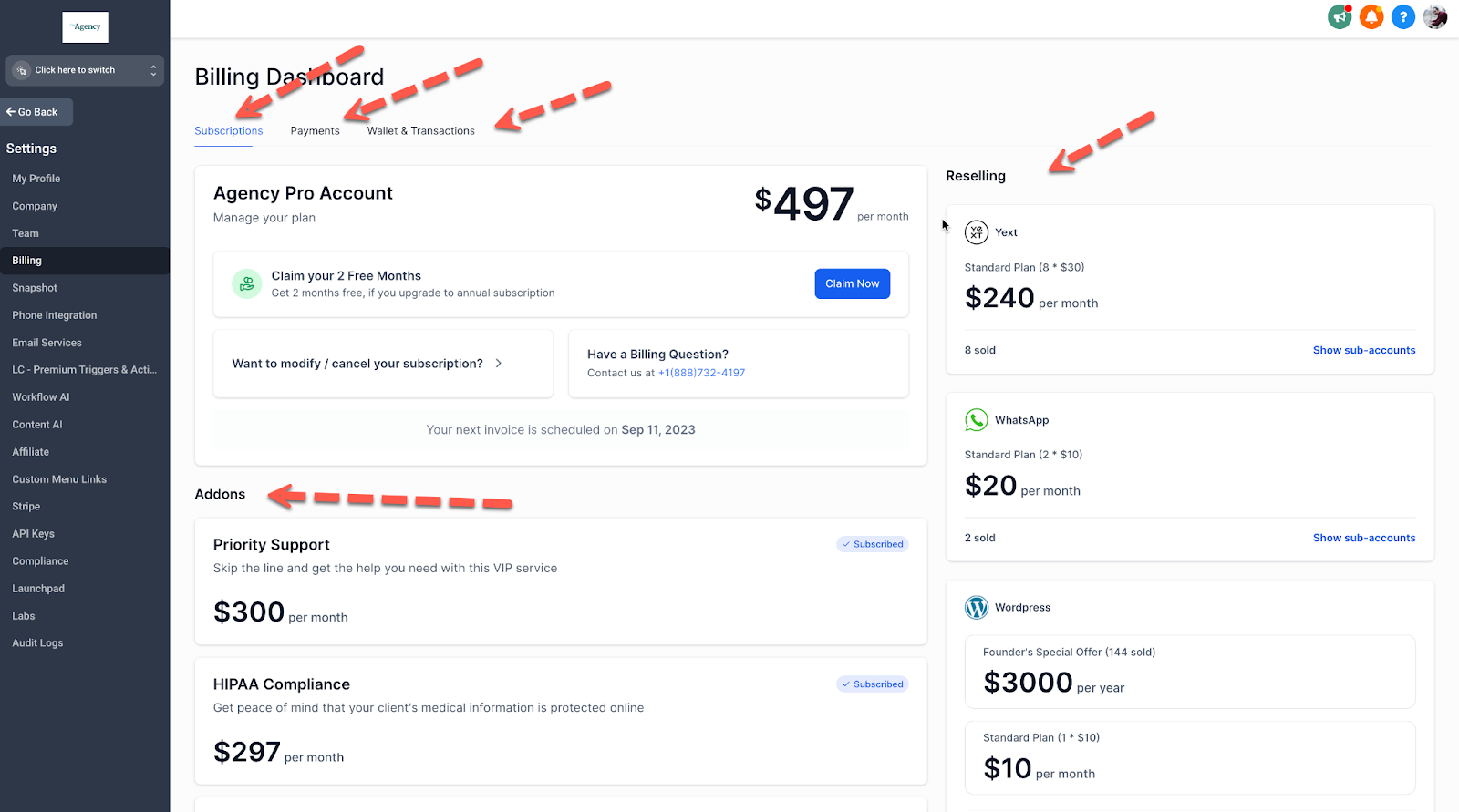
HighLevel separates your costs into two layers:
- Base subscription – your core monthly plan.
- Usage‑based and add‑on services – things like phone minutes, SMS segments, email sends, AI, workflow premium actions, and Online Listings.
Understanding both is critical before you forecast ROI or set pricing for your own clients.
Tip: Before you change plans or enable new add‑ons, take a quick snapshot of your current spend and campaign performance. That way you can clearly measure whether the upgrade is paying for itself.
HighLevel subscription plans
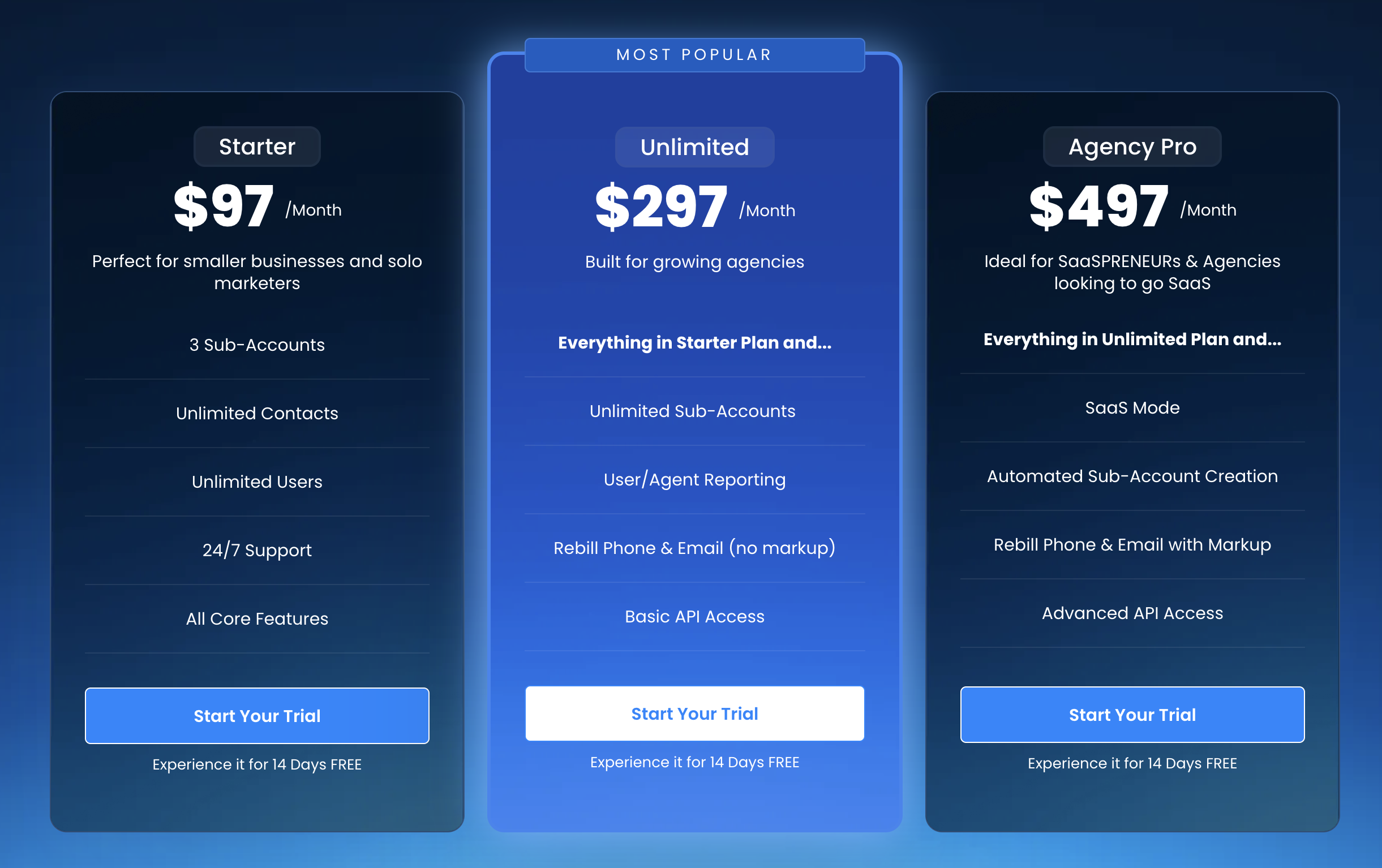
As of 2026, HighLevel offers three main plans. Exact pricing and features can change over time, so always confirm on the official site—but this is the structure you’ll typically see:
-
Starter – $97/month
Best for solo operators, small businesses, or early‑stage agencies validating their first offers. -
Unlimited – $297/month
Best for growing agencies managing multiple clients under one roof. -
SaaS Pro – $497/month
Best if you want to resell HighLevel as your own white‑label SaaS, with automated account creation, rebilling, and full white‑label control.
Let’s unpack what this actually looks like in practice.
Starter – best for solo operators and small teams
The Starter plan is designed to give you the full HighLevel engine for a single brand or a very small number of accounts.
Typical use cases:
- A local business replacing a patchwork of tools (Mailchimp, Calendly, ClickFunnels, basic CRM) with one platform.
- A solo consultant or creator building a simple lead‑to‑booking funnel.
Core capabilities you can expect:
- CRM and pipeline management for your leads and customers.
- Funnel and website builder (landing pages, forms, thank‑you pages).
- Email and SMS marketing campaigns.
- Calendars and appointment scheduling.
- Basic automations and workflows.
— Reporting and basic attribution data.
When the Starter plan makes sense:
- You run one primary brand and don’t need to manage dozens of client sub‑accounts.
- You want to validate HighLevel quickly without a large upfront commitment.
- You’re primarily focused on getting a single funnel working (e.g. lead magnet → nurture → booking → sale).
If you know you’ll eventually manage multiple brands, you can absolutely start here and upgrade once revenue catches up.
Ready to try HighLevel at the Starter level? Lock in your trial here: Try the Starter plan on a free GoHighLevel trial.
Unlimited – best for growing agencies
The Unlimited plan is where HighLevel really starts to shine for agencies.
Typical use cases:
- A marketing agency rolling out HighLevel accounts for each client.
- An in‑house team managing several brands under one umbrella.
What you typically get on Unlimited, in addition to Starter features:
- Unlimited sub‑accounts—spin up new client workspaces without extra per‑account subscription fees.
- More advanced automation options, including workflows across sub‑accounts.
- Priority support so your team can get issues resolved faster.
- API access for deeper integrations with your internal systems.
Why agencies prefer Unlimited:
- Your marginal cost per client drops as you add more sub‑accounts.
- You can package HighLevel as part of a retainer or done‑for‑you offer, with better margins.
- You stay in one ecosystem instead of wrangling dozens of separate tools.
SaaS Pro – best if you want your own white‑label SaaS
The SaaS Pro plan is built for agencies that want to turn HighLevel into their own software product.
On top of everything in Unlimited, SaaS Pro is designed for:
- Automated account creation when someone buys your offer.
- Built‑in subscription and rebilling via Stripe.
- White‑label desktop app with your branding and domain.
- Rebilling for phone, email, AI, and other usage so you can control margins.
Common SaaS Pro scenarios:
- You sell a niche marketing platform (e.g. “Dental Growth OS”) built on top of HighLevel.
- You want predictable, recurring SaaS revenue layered over your service retainers.
- You need granular control over client pricing, packaging, and feature access.
If you’re planning to sell HighLevel as your own SaaS, you almost certainly want SaaS Pro plus a solid launch plan. You can combine a free GoHighLevel trial with a Revset Labs implementation sprint to go to market faster: Launch your HighLevel‑powered SaaS with a free trial.
HighLevel add‑ons and usage‑based pricing
Beyond the base subscription, a big part of your monthly bill will come from add‑ons and usage‑based services. Here are the most important ones from the HighLevel pricing guide and how to think about them.
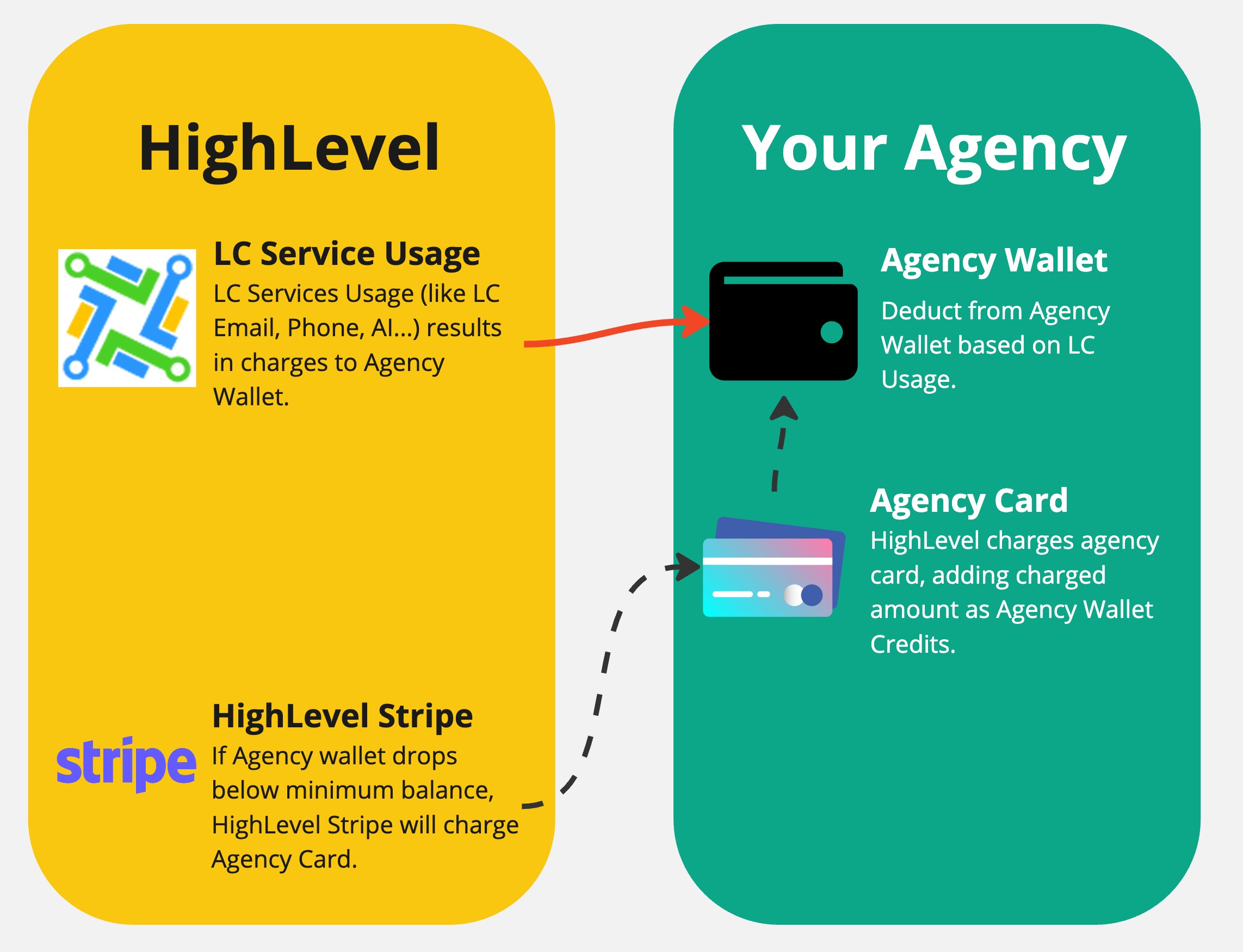
LC Phone System
The LC Phone System lets you use HighLevel as your all‑in‑one calling and SMS platform—no separate Twilio account needed.
Key points:
- Available on all HighLevel plans.
- Pricing is generally aligned with Twilio’s underlying rates.
- On Unlimited, you can rebill phone usage to clients without markup.
- On SaaS Pro, you can rebill with markup, building healthy margins into your SaaS pricing.
When to enable it:
- You want a single source of truth for calls, SMS, and conversations.
- You’re replacing multiple separate tools and want cleaner reporting.
LC Email System & Email Validation
HighLevel’s LC Email System handles outbound email sending from inside the CRM.
Best practices:
- Use it for campaigns, automations, and transactional emails tied to your funnels.
- Pair it with Email Validation to reduce bounces and protect deliverability (especially for cold or older lists).
Email Validation is usage‑based: you pay per email validated, but this is often cheaper than the cost of landing in spam or getting blocked.
Workflow Premium Actions & the Workflow Pro Plan
HighLevel offers Workflow Premium actions for heavier automation use cases—think complex routing, advanced filters, or high‑volume automation.
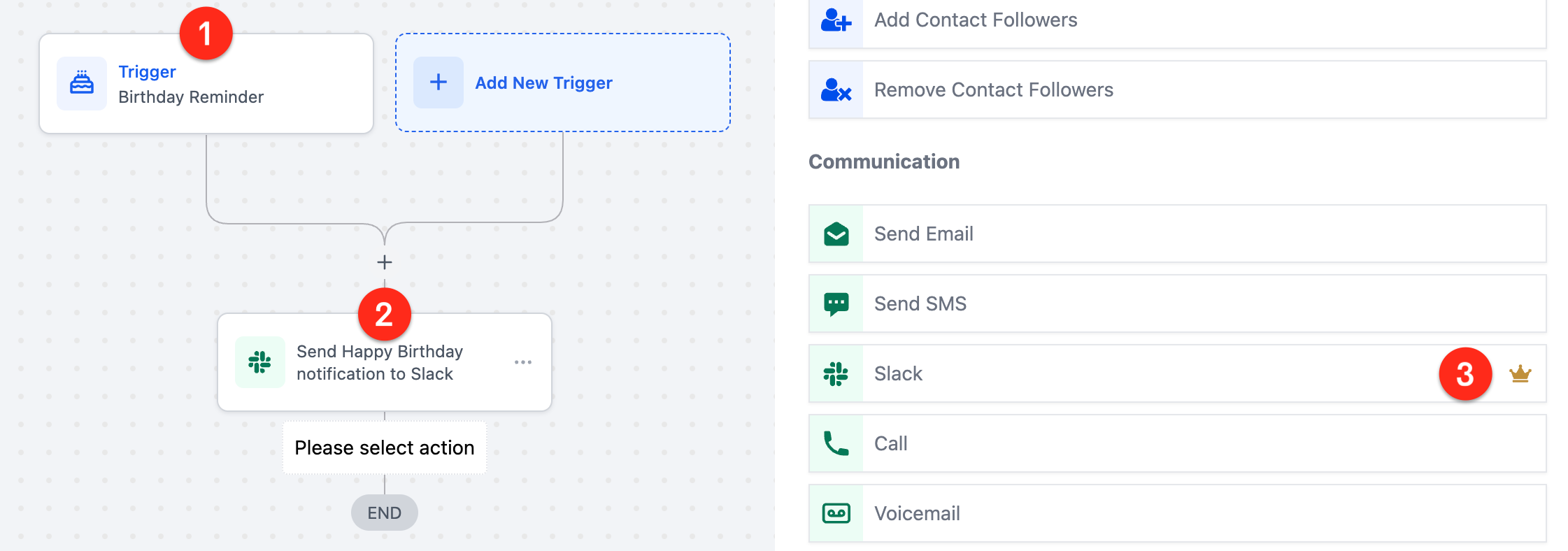
Pricing typically follows a volume‑based model, for example:
- Free: 100 lifetime premium executions, then per‑execution billing.
- Starter / Growth / Scale tiers: with higher included execution counts and lower per‑execution overages.
How to think about it:
- For most small businesses, the included executions are more than enough.
- Agencies running many high‑volume workflows (e.g. multi‑step lead scoring, pipeline routing) may want a paid Workflow Pro tier.
Online Listings (SEO)
Online Listings pushes your business information (name, address, phone, hours) out to 70+ reputable sites.
Why it matters:
- More consistent citations = better local SEO signals.
- It saves hours of manual directory updates.
Typical pricing options include:
- Monthly plan – lower commitment, pay as you go.
- 6‑month “smart saver” plan.
- Annual plan – usually the best effective monthly rate.
For local‑first businesses—gyms, dentists, home services—this add‑on can pay for itself with a few extra local leads per month.
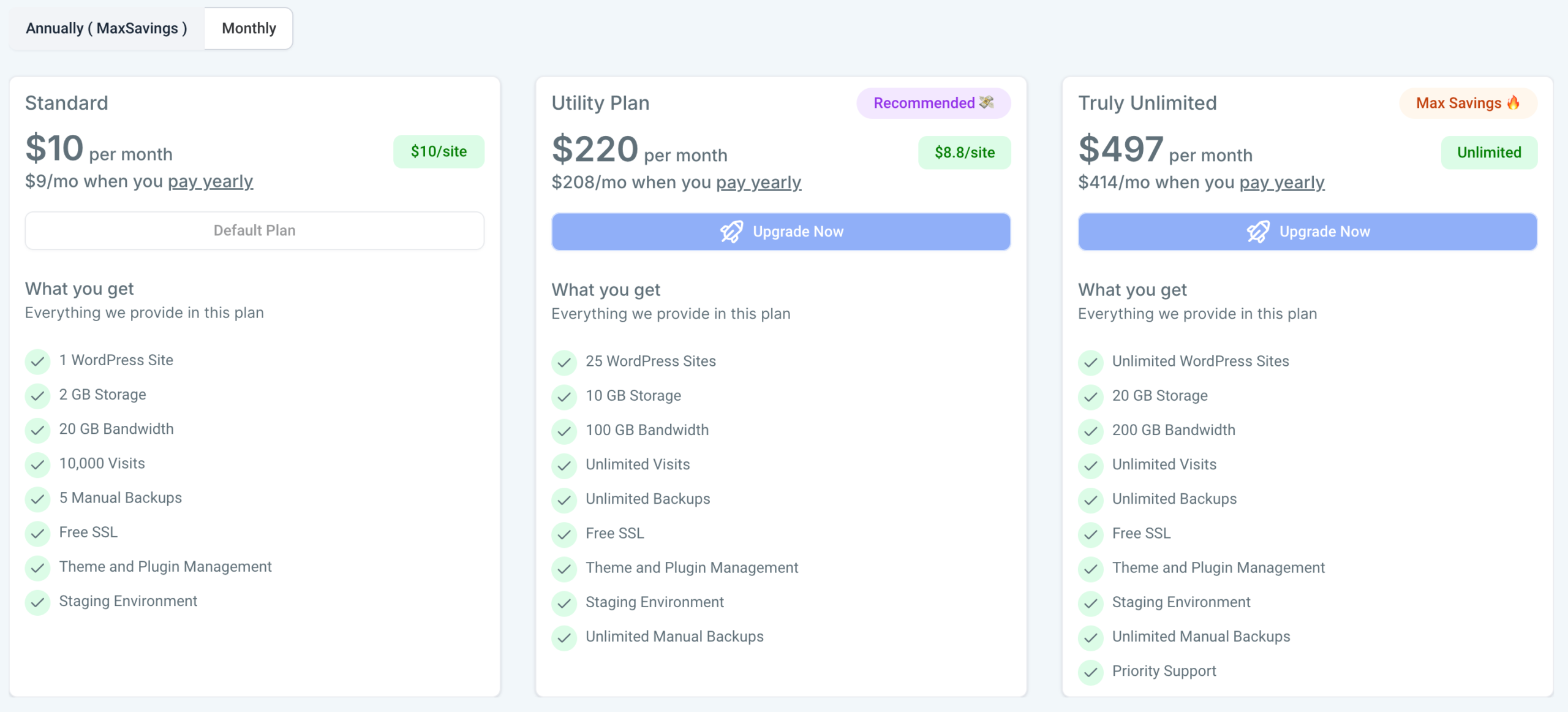
WordPress Hosting
If you run sites on WordPress, HighLevel’s WordPress Hosting lets you host and manage them from within a sub‑account.
Expect to see:
- A Standard tier for a single site or a handful of lower‑traffic sites.
- Higher tiers that support dozens or unlimited sites for agencies.
When it’s worth it:
- You want to consolidate hosting, funnels, and CRM under one roof.
- You need to manage many client sites with consistent security and backups.
Other notable add‑ons
Depending on your geography and use cases, you’ll also see:
- WhatsApp messaging for regions where WhatsApp is the default channel.
- AI Employee style tools to help with drafting replies and content.
- Autocomplete Addresses to improve form completion rates.
- Ad Manager integrations to connect your ad accounts more deeply.
- Marketplace services for specialized done‑for‑you work.
You don’t need all of these on day one. Start with the essentials (phone, email, maybe Online Listings), then layer in more once your funnel is stable and you can clearly measure uplift.
Which HighLevel plan is right for you?
A simple way to decide:
-
Choose Starter if you:
- Run one main brand.
- Are replacing a handful of point tools and want an all‑in‑one stack.
- Care most about getting a single predictable funnel live.
-
Choose Unlimited if you:
- Run a marketing agency with several paying clients.
- Want to create separate workspaces for each client without per‑account subscription fees.
- Plan to package HighLevel into done‑for‑you or done‑with‑you retainers.
-
Choose SaaS Pro if you:
- Want to sell your own white‑label SaaS on top of HighLevel.
- Need automated account creation, in‑app billing, and rebilling with markup.
- Are serious about building recurring software revenue, not just service retainers.
You can think of the plans as steps on a ladder:
- Prove your first funnel works (Starter).
- Layer on clients and retainers (Unlimited).
- Turn your system into a scalable software product (SaaS Pro).
The comparison graphic in this article (Starter vs Unlimited vs SaaS Pro) gives you a quick snapshot of how features and rebilling options scale as you move up.
How much will HighLevel really cost per month?
Here are a few rough, conservative scenarios. Actual numbers will vary based on your volume and how aggressively you use phone, SMS, email, and AI.
Scenario 1: Local business on Starter
- Plan: Starter – $97/month.
- Phone and SMS: Light calling and a few campaigns per month.
- Email: Ongoing nurture and a monthly promo.
- Add‑ons: None initially.
Realistic monthly range: $110–$150 once you include phone and email usage.
Scenario 2: Boutique agency on Unlimited
- Plan: Unlimited – $297/month.
- Sub‑accounts: 5–10 active client workspaces.
- Phone/SMS: Each client running lead follow‑up automations.
- Online Listings: Enabled for 3–5 local clients.
If you rebill usage at cost, your agency might pay $350–$450 blended—but remember, you’re packaging this into retainers. One or two clients typically cover the whole platform, and the rest is largely margin.
Scenario 3: Niche SaaS with SaaS Pro
- Plan: SaaS Pro – $497/month.
- Sub‑accounts: 20–50 paying SaaS customers.
- Rebilling: Marked‑up phone, SMS, and AI usage baked into your SaaS pricing.
- Add‑ons: WordPress hosting and Online Listings for premium tiers.
Your net cost after rebilling can be extremely low relative to revenue. Many agencies on SaaS Pro see their HighLevel bill effectively covered by a subset of customers while the rest of the MRR is margin.
If you’d like help running your own numbers, Revset Labs can model realistic cost and revenue scenarios based on your offers, list size, and traffic.
How Revset Labs can help you get more from HighLevel
Choosing the right plan is only half the battle. The real ROI comes from implementing funnels, automations, and reporting that match your business model.
Revset Labs specializes in:
- Designing and building HighLevel funnels aligned with your offers.
- Automating follow‑up across email, SMS, voice, and chat.
- Setting up dashboards so you can see where revenue is really coming from.
- Turning a successful agency implementation into a white‑label SaaS offer on SaaS Pro.
If you’d rather skip the trial‑and‑error and have an expert team set up HighLevel for you, we can help you:
- Choose the right plan based on your goals and budget.
- Map your lead flow, pipeline stages, and automations.
- Launch a minimum viable funnel in weeks, not months.
You can start by exploring the platform yourself and then bring Revset Labs in to scale what’s working.
Step one: Start your free GoHighLevel trial.
Step two: Loop in Revset Labs when you’re ready to turn HighLevel into a serious revenue engine.
HighLevel pricing FAQs
What are the HighLevel pricing plans?
HighLevel currently offers three core plans:
- Starter – built for single brands or small teams who want an all‑in‑one tool without managing many sub‑accounts.
- Unlimited – designed for agencies and marketers running many client workspaces.
- SaaS Pro – for agencies who want to sell their own white‑label SaaS product on top of HighLevel.
Pricing is typically $97/month, $297/month, and $497/month respectively, though promotions and regional differences can apply. Always confirm on the official pricing page before purchasing.
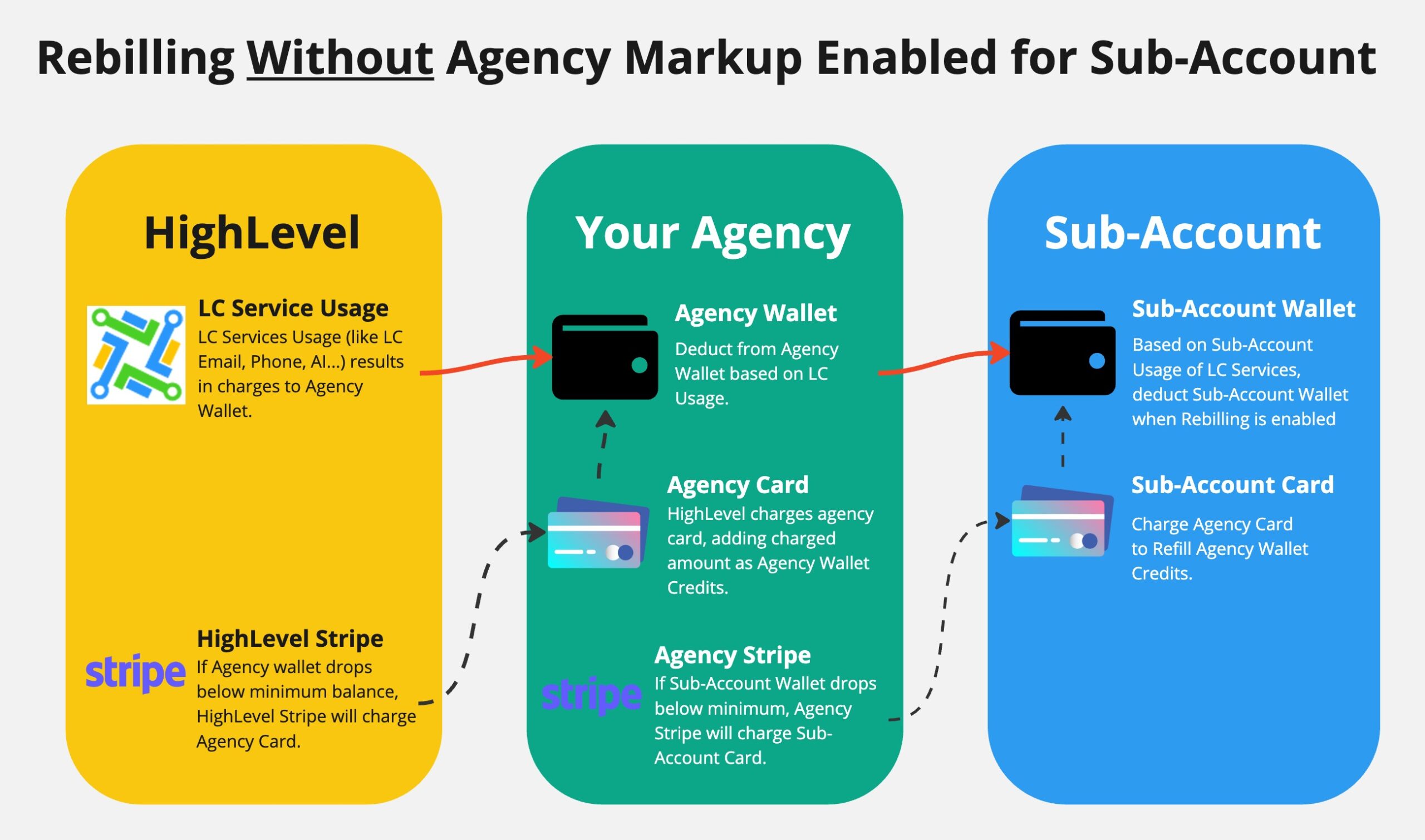
What does “rebilling” mean in HighLevel?
Rebilling means you pass through usage‑based costs (like phone minutes, SMS segments, email sends, or AI executions) to your clients inside your own pricing, often with margin added on top.
On Unlimited, you can typically rebill at cost.
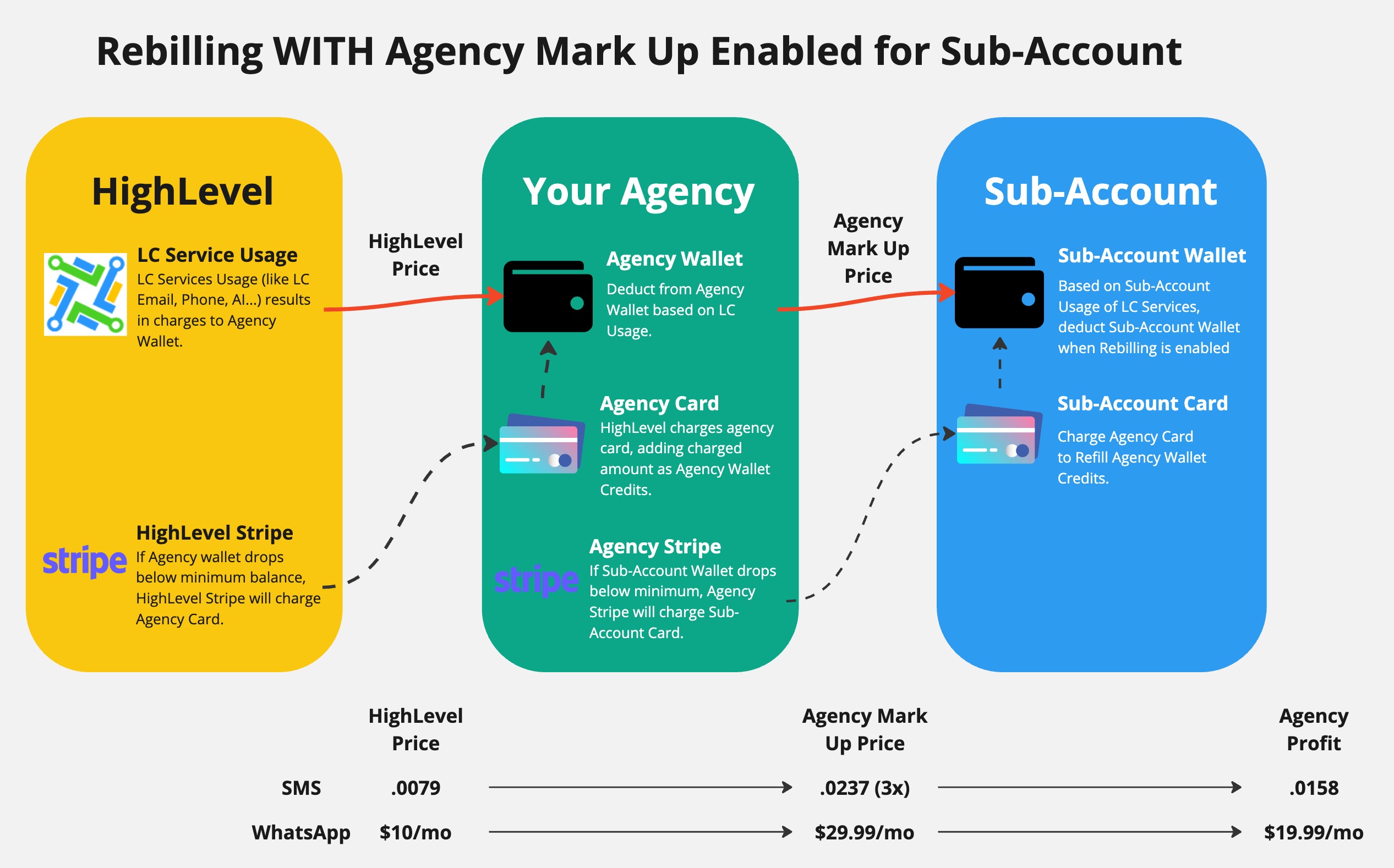
On SaaS Pro, you can:
- Set your own pricing tiers.
- Mark up usage.
- Bundle everything into a simple, predictable package for your customers.
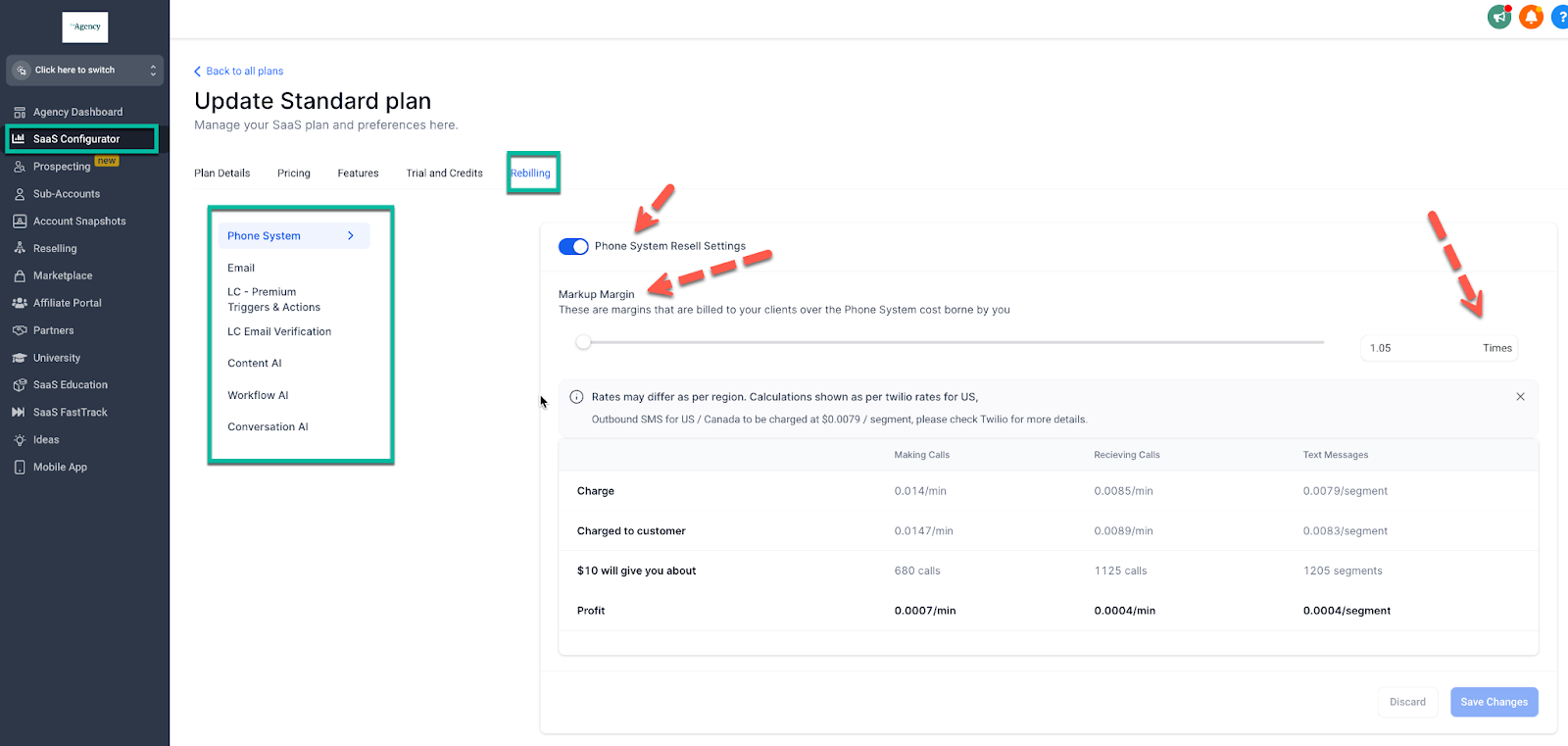
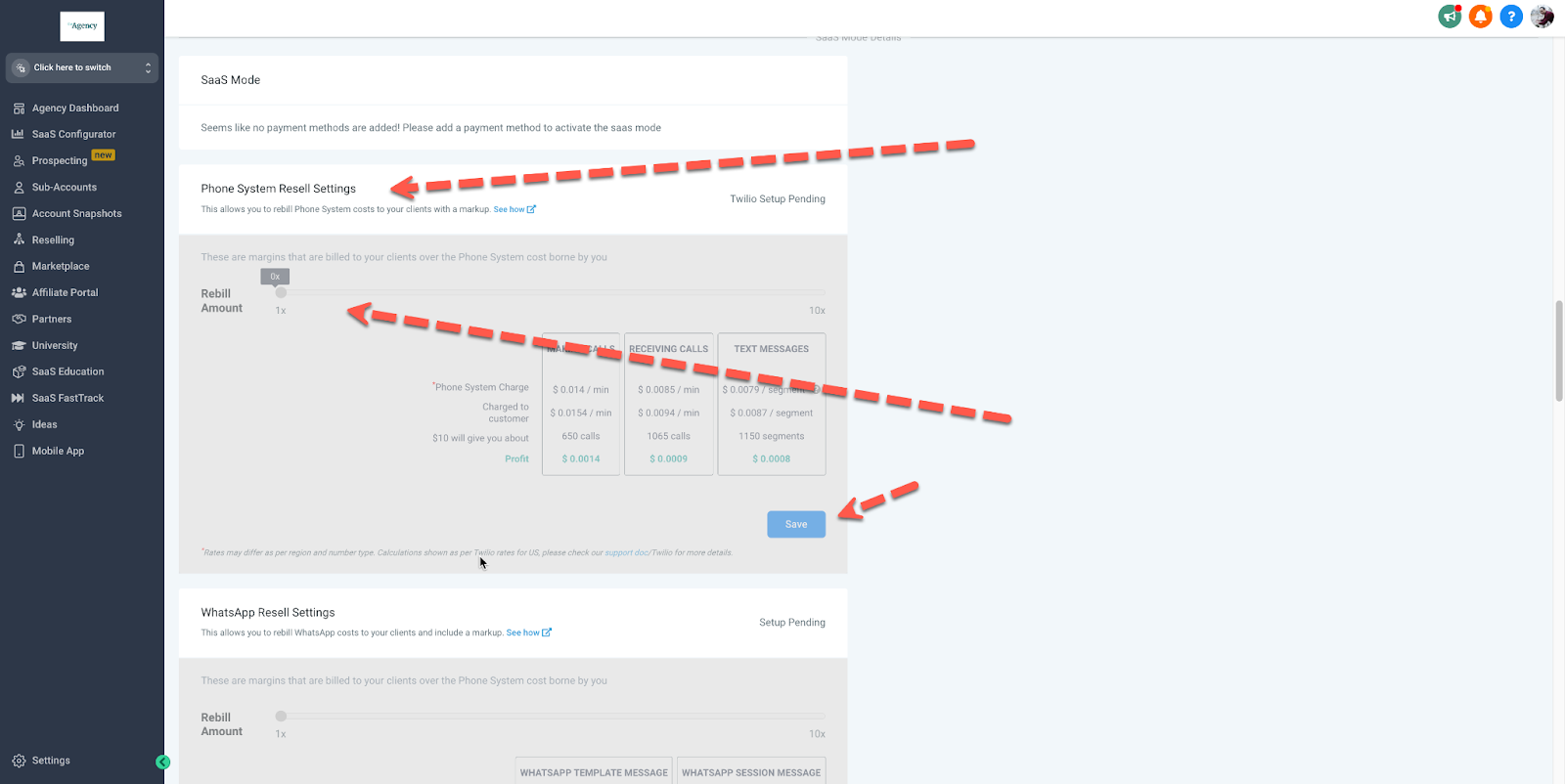
What does “Re-sell” or “Reselling” mean?
Am I charged for unanswered calls?
In most telephony systems, you’re billed for the connection and duration of the call, not whether a human answered. That means unanswered or missed calls can still incur a small cost.
This is why it’s so important to:
- Use smart routing and voicemail.
- Build automations that follow up by SMS when calls go unanswered.
- Track call outcomes in your pipelines so you can cut waste.
What is an SMS “segment” and why does it matter?
Carriers bill SMS by segments, not by “messages.” A short text might be billed as one segment; a longer one can be split into two or more segments behind the scenes.
In practice, that means:
- Short, clear messages are cheaper and more likely to deliver well.
- Long, multi‑paragraph texts can quickly multiply your SMS costs.
HighLevel shows you segment usage so you can keep an eye on spend as you scale campaigns.
When should I upgrade from Starter to Unlimited or SaaS Pro?
Upgrade once your bottleneck becomes scale, not validation:
- Move from Starter → Unlimited when you’re consistently closing clients and need clean separation between accounts.
- Move from Unlimited → SaaS Pro when you’re ready to launch a true SaaS offer or when rebilling and white‑label control become core to your model.
If you’re unsure, start small, track your numbers, and upgrade once the economics are obvious.
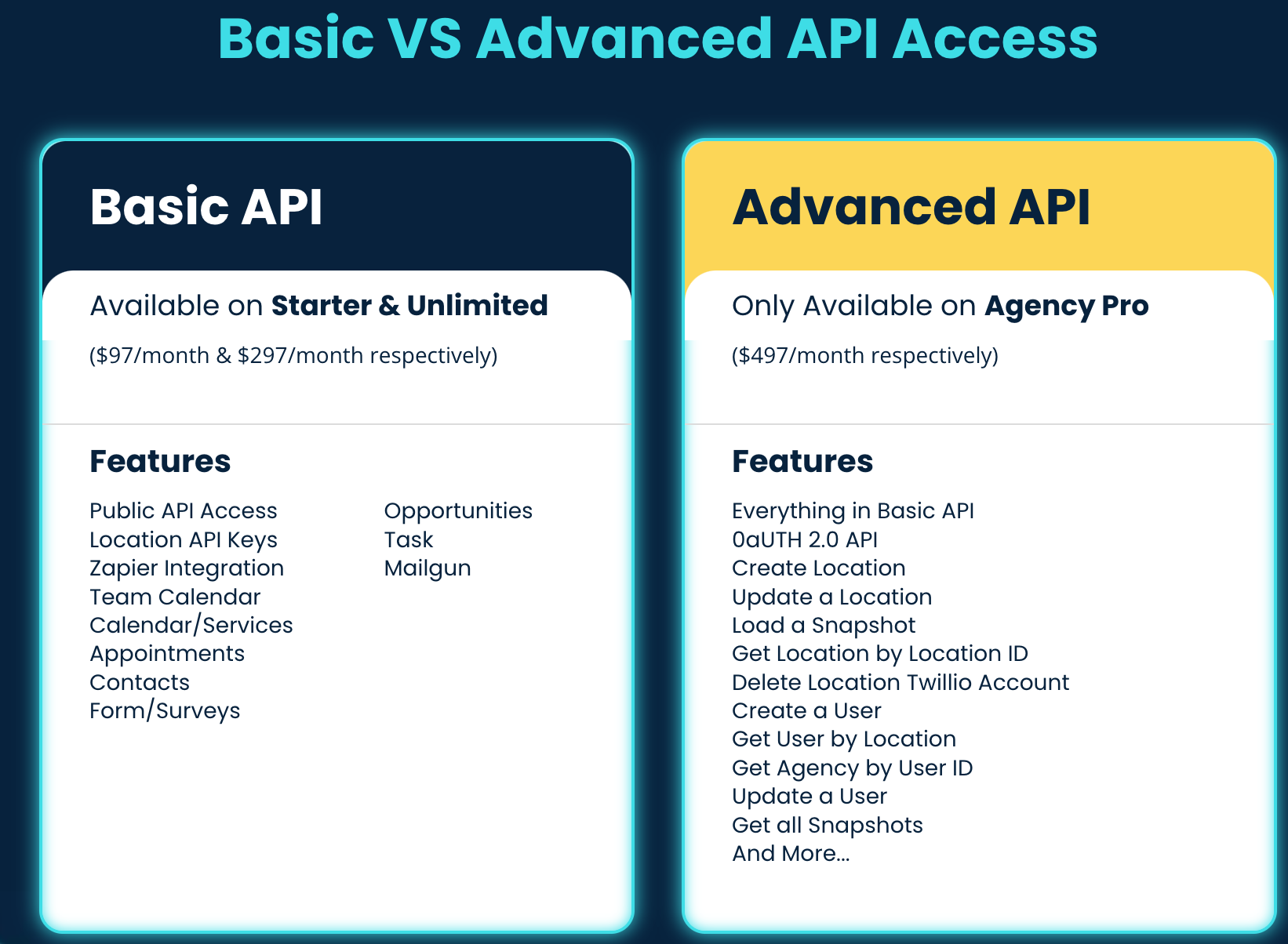
What are the differences between Basic and Advanced API Access?
Learn more about our Developer documentation and join our Dev Community at: https://developers.gohighlevel.com/