
 GoHighLevel (Complete Guide)”>
If you run your agency or business on GoHighLevel, LaunchPad is where a lot of first impressions are made. New users either glide through onboarding… or they stall, get confused, and quietly churn.
Launchpad contextual in-app nudges are GoHighLevel’s way of giving those users a gentle, well-timed push in the right direction — inside the UI, at the exact moment they need help.
In this guide, we’ll break down how these nudges work, where they appear, and how to turn them into a real conversion lever for your agency and your clients.
If you’re not on GoHighLevel yet, you can start a free trial here and follow along as you implement LaunchPad and contextual nudges.
What are LaunchPad contextual in-app nudges?
LaunchPad contextual in-app nudges are small, targeted prompts that appear when a user stalls, abandons, or lingers on an onboarding step inside the GoHighLevel LaunchPad.
Instead of forcing users to dig through help docs or contact support, the platform offers help in context — right where the friction is happening.
Typical outcomes these nudges drive:
- More users completing LaunchPad actions like account setup, integrations, and first campaigns.
- Higher trial-to-paid conversion rates because people actually finish their initial setup.
- Fewer “I’m lost” support tickets since users are pointed to the best next step automatically.
For agencies, this means your sub-accounts see value faster, adopt more features, and are less likely to churn during those fragile first weeks.
Why contextual nudges matter for GoHighLevel onboarding
A normal onboarding flow looks great on paper:
- User signs up.
- User follows the guided LaunchPad checklist.
- User completes key actions and experiences a quick win.
Reality is messier. Users get distracted, confused by a single step, or unsure which action matters most. That’s where contextual in-app nudges earn their keep.
With LaunchPad nudges in place, GoHighLevel can:
- Detect friction when a user stalls on a step or abandons a flow.
- Offer support immediately so they don’t drift away.
- Guide them back to a completed action instead of an abandoned setup.
Want to see this in a live GoHighLevel account? Spin up a free trial and walk through LaunchPad as if you were a brand-new user.
Revset Labs — an AI automation and marketing agency — helps agencies design these flows so every nudge points toward activation, not distraction.
Dynamic contextual support options inside LaunchPad
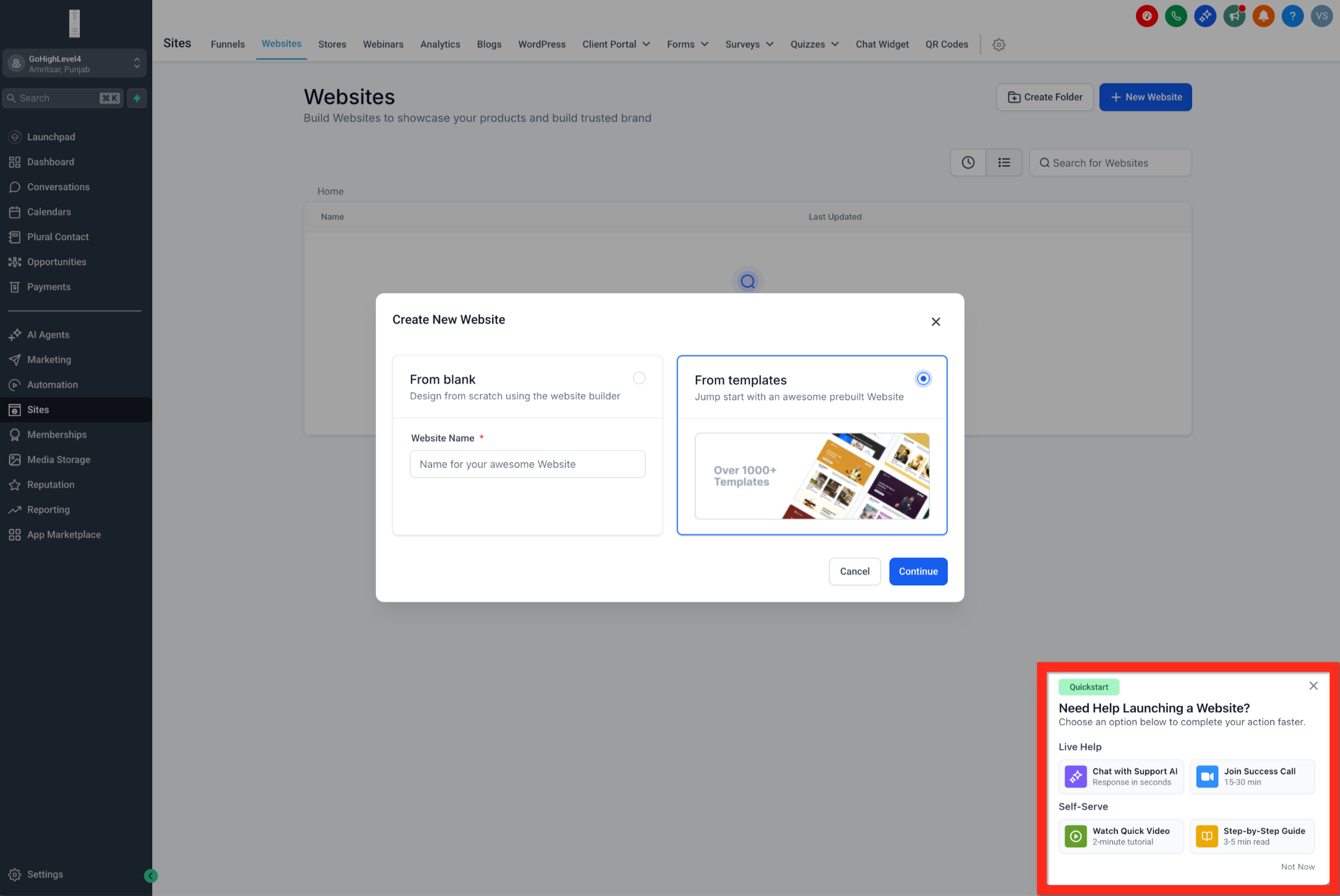
When GoHighLevel detects friction in LaunchPad, it can offer several contextual help options in a single nudge. The idea is simple: different people prefer different ways to learn.
A typical contextual in-app nudge can offer links to:
- Support article – Deep written documentation for users who want to read the details.
- Tutorial video – A visual walkthrough for users who learn faster by watching.
- Kickoff / implementation call – A direct path to book a strategy or setup session.
- Chat with Support AI – Real-time conversational help to unblock quick questions.
These links are shown in the context of the exact action the user is stuck on. If they stalled on integrations, the nudge points them straight to integration-focused help — not a generic help center.
This is where your agency can win big: pair GoHighLevel’s built-in nudges with your own onboarding content, implementation offers, and Revset Labs–style automation to create a scalable but still personalized experience.
How LaunchPad contextual nudges work (step-by-step)
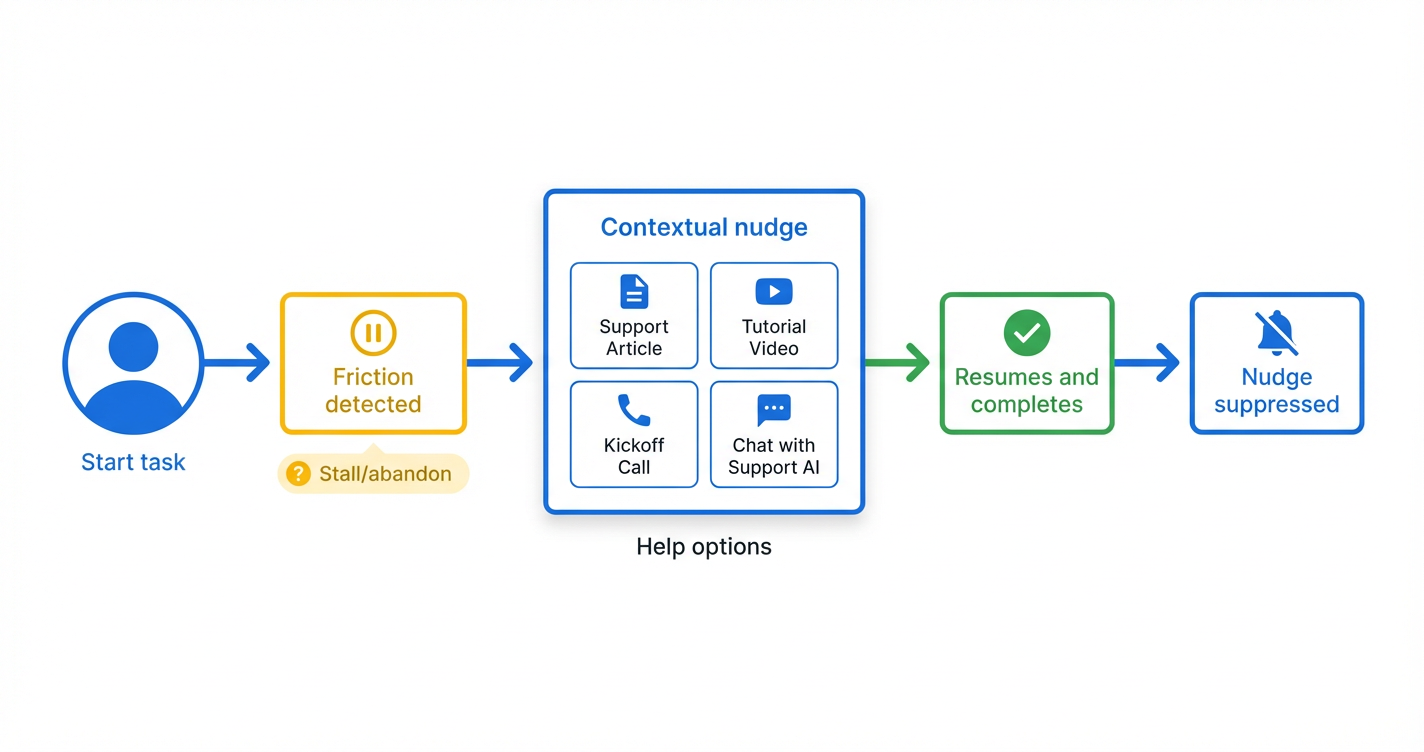
At a high level, the flow looks like this:
- User starts a LaunchPad task – For example, connecting a domain, importing contacts, or launching the first funnel.
- Friction is detected – The user pauses mid-step, abandons the flow, or lingers on a screen for longer than expected.
- A contextual nudge appears – A small in-app prompt slides in with relevant help options.
- User chooses a help path – They click a support article, watch a video, book a call, or open Chat with Support AI.
- User resumes and completes the action – Once they understand what to do, they finish the step.
- Nudge is suppressed for that action – After any user in the sub-account completes that specific action, the related nudges stop showing for everyone in that sub-account.
Here’s a simple visual you can use in your content or onboarding decks:
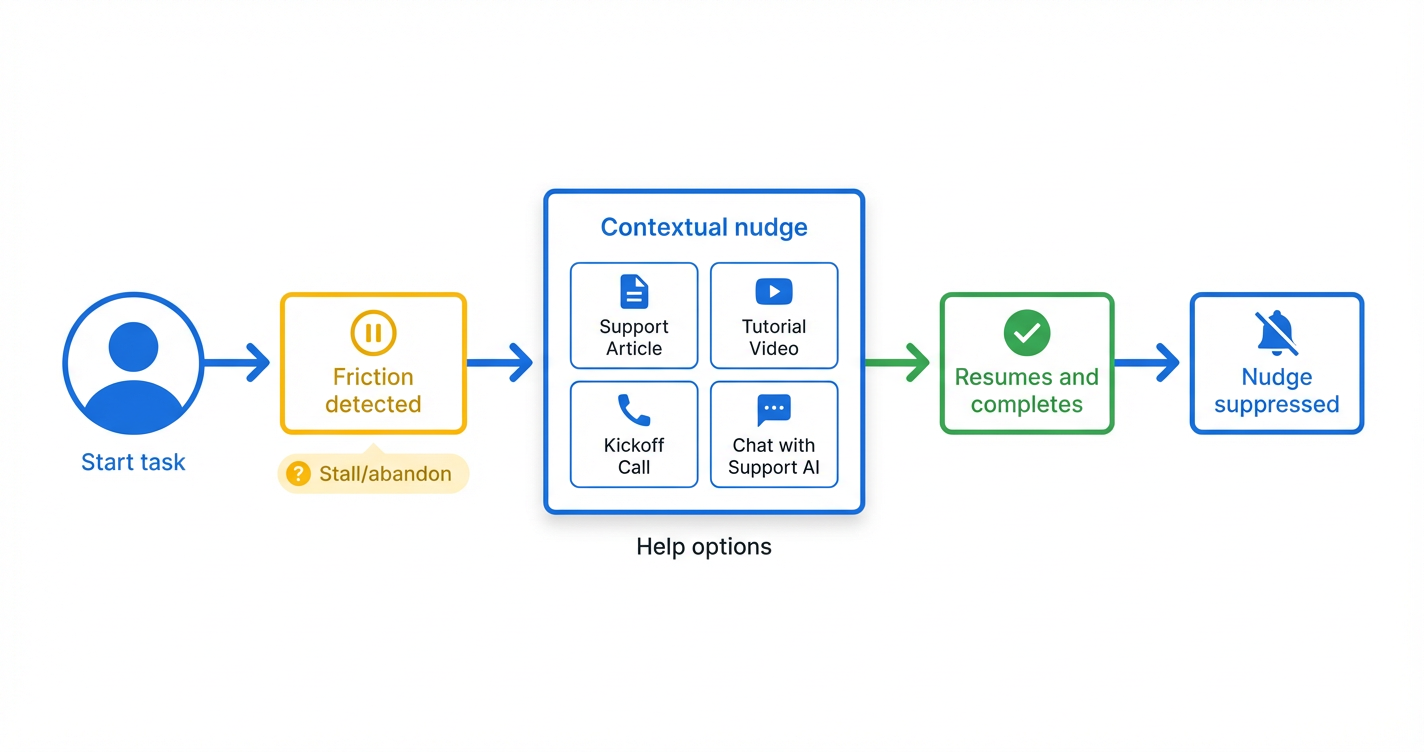
This suppression behavior prevents nudges from becoming noise. Users see them when they’re needed — and they disappear once the job is done.
Where these nudges appear: Agency vs. sub-account LaunchPad
LaunchPad contextual in-app nudges are available across both:
- Agency LaunchPad actions – Helping your internal team get up and running quickly.
- Sub-account LaunchPad actions – Supporting your clients as they adopt GoHighLevel.
Nudges only show where LaunchPad itself is visible. If LaunchPad is hidden for a particular plan, role, or sub-account, users won’t see LaunchPad-based nudges.
As an agency, this gives you a lot of control:
- Decide which SaaS plans or sub-accounts should have LaunchPad enabled.
- Align LaunchPad visibility with your onboarding offers.
- Use contextual nudges as a default safety net for users who don’t follow your 1:1 onboarding.
Practical use cases for LaunchPad contextual nudges
Here are a few high-impact ways to use LaunchPad contextual in-app nudges inside GoHighLevel:
1. Saving stalled trials
A user signs up for a trial, pokes around the LaunchPad, and then stalls on “Connect your CRM” or “Import contacts.”
A well-timed nudge:
- Reminds them why the step matters.
- Offers a short video or article that shows how quick it really is.
- Gives them the option to book a kickoff call if they still feel stuck.
Every saved trial is a chance to move someone into a paid plan.
2. Reducing support tickets on repetitive issues
If your support inbox is full of the same questions — “How do I connect my domain?” or “Why didn’t my first campaign send?” — contextual nudges can take the first line of defense.
Instead of your team answering the same thing over and over, users get:
- A contextual article.
- A 2–3 minute tutorial video.
- An option to open Chat with Support AI for quick clarifications.
3. Driving deeper feature adoption
Once the basics are complete, you can still use LaunchPad + nudges to push users toward higher-value actions, like launching their first funnel or automating follow-up sequences.
An example internal link path you might create:
- From this article to a deeper guide on launching your first GoHighLevel funnel.
- From there to tutorials on creating and managing contacts in GoHighLevel.
- And then to a guide on importing existing contacts into GoHighLevel.
Together, these paths help users move from “just signed up” to “actually running live campaigns.”
Turning LaunchPad nudges into a revenue lever for your agency
For agencies, LaunchPad contextual nudges aren’t just a UX feature — they’re a sales and retention asset.
You can:
- Bundle nudges into your onboarding offer – “We’ll build you a guided LaunchPad experience with contextual nudges that rescue stuck users.”
- Position them as a churn reducer – Show clients how many users resumed an action after clicking a nudge.
- Tie them to done-for-you services – When users repeatedly click the "book a call" option, that’s a signal they’re ready to pay for more help.
If you’re setting up new GoHighLevel accounts or migrating clients, start a free GoHighLevel trial through this link. You’ll still get full access to LaunchPad and contextual nudges while you design your ideal onboarding flows.
Revset Labs can help you turn that setup into a repeatable system — from automation logic to funnel strategy to the content behind each nudge.
Implementation checklist: Getting value from LaunchPad contextual nudges
Use this simple checklist as you roll out LaunchPad nudges across your agency or client accounts:
-
Map your critical activation steps
- Account setup basics.
- Integrations (email, phone, CRM, payment, etc.).
- First contacts imported.
- First pipeline or funnel created.
-
Identify where users usually get stuck
- Look at support tickets and chats.
- Ask your sales team where new customers hesitate.
- Review analytics for steps with high drop-off.
-
Draft contextual help for each friction point
- One short article.
- One short video.
- A clear “book a kickoff call” outcome.
-
Align LaunchPad actions with those resources
- Ensure each action has a matching help resource.
- Verify that the content is specific to that step, not generic.
-
Test as a brand-new user
- Create a fresh sub-account or trial.
- Walk through LaunchPad slowly.
- Intentionally stall on key steps to see when nudges appear.
-
Measure and refine
- Track completion rates for key LaunchPad actions.
- Watch how many users click each support option.
- Improve or replace any content that isn’t driving completions.
If you’d like Revset Labs to shortcut this entire process, we can help you design the activation map, build the assets, and connect everything to your GoHighLevel setup so LaunchPad nudges actually move the needle.
FAQs about LaunchPad contextual in-app nudges
Do I need to manually enable contextual in-app nudges?
No. They’re available by default wherever LaunchPad is visible. If LaunchPad is hidden for a specific role, plan, or sub-account, users in that view won’t see LaunchPad-based nudges.
Are LaunchPad nudges available for both agency and sub-account users?
Yes. Both agency-level and sub-account LaunchPad actions can trigger contextual in-app nudges.
Will users get spammed with nudges once they’ve completed a task?
No. Once any user in a sub-account completes a specific LaunchPad action, nudges related to that action are automatically suppressed for everyone in that sub-account.
How do LaunchPad nudges impact trial-to-paid conversions?
By rescuing stalled users and helping them complete key setup actions, nudges increase the number of people who get to an early “win” — which is strongly correlated with upgrades and long-term retention.
What if I want a more advanced onboarding strategy than the basics?
That’s where an agency plus Revset Labs shines. GoHighLevel gives you the infrastructure — LaunchPad, in-app nudges, support AI — and your strategy, funnels, and automations turn that into a predictable onboarding and upsell machine.
 GoHighLevel LaunchPad, offering dynamic help links when a user stalls.” title=”GoHighLevel LaunchPad Nudge Example”>