
Geo Permissions for voice in GoHighLevel decide which countries your LC Phone numbers are allowed to call. Done well, they help you protect your account from fraud and surprise charges—while still letting your team reach the regions they actually do business in.

This guide explains how Geo Permissions for voice work in GoHighLevel, which countries are enabled by default, when you should request changes, and how to work with GoHighLevel support to safely open up (or lock down) specific destinations.
If you’re still evaluating platforms and want voice, SMS, funnels, and CRM under one roof, you can spin up a live account and follow along:
Start your GoHighLevel free trial
What Geo Permissions for Voice Actually Do
Geo Permissions for voice are country‑level controls on where your GoHighLevel/LC Phone numbers are allowed to place outbound calls.
Behind the scenes, LC Phone is powered by enterprise‑grade telecom infrastructure. Without guardrails, fraudsters can sometimes exploit phone systems to generate expensive calls to high‑risk destinations. Geo Permissions reduce that risk by:
- Allowing calls only to approved countries.
- Blocking calls to countries you haven’t explicitly enabled.
- Giving GoHighLevel and its telecom providers a safer baseline to protect all users.
A few key points:
- Geo Permissions in this context apply to voice calls only. SMS and MMS have their own compliance and routing systems.
- The controls live at the platform and LC Phone level—you don’t switch individual countries on/off from a simple toggle in each sub‑account today. Instead, you work through GoHighLevel support (more on that below).
- Within the countries that are allowed, your normal LC Phone number, workflow, and user‑permission rules still apply.
Default Countries Enabled for Voice in GoHighLevel
To give most accounts a safe, usable starting point, GoHighLevel enables a focused set of countries for outbound voice by default.
By default, you can typically call:
- United States and Canada – available to all LC Phone users.
- Your business’s home country – based on the physical address in your business profile, as long as it isn’t flagged as high‑risk.
- Any country where you have purchased a phone number – for example, if you buy a UK LC Phone number while your agency is based in South Africa, the UK will be enabled so that number can make calls.
This combination covers the vast majority of use cases:
- Agencies serving US/Canadian clients.
- Local businesses calling within their home country.
- Global agencies that deliberately buy local numbers for specific regions.
Everything else is treated as off by default unless you specifically request changes.
When You Should Adjust Your Geo Permissions
You may want to enable or further restrict countries when:
- You’re expanding into new regions (for example, opening a sales office in the UK or EU).
- Your team regularly needs to call international partners or vendors.
- You support clients in countries where you don’t yet have LC Phone numbers but still need to call.
- You’ve detected suspicious call patterns to countries nobody on your team works in and want to lock things down.
A useful rule of thumb:
Only enable countries where you have a real, documented business need to call.
Treat Geo Permissions like firewall rules: start tight, open carefully, and review periodically.
How Geo Permissions for Voice Work with LC Phone
When LC Phone places an outbound call, the platform checks that destination against its Geo Permissions configuration for your account.
At a high level:
- A user, workflow, or dialer initiates an outbound call.
- LC Phone checks which country the destination number belongs to.
- If that country is enabled, the call proceeds as normal.
- If that country is not enabled, the call is blocked before it ever leaves the platform.
Because these permissions sit close to the carrier layer, they’re a powerful backstop against:
- Toll‑fraud campaigns that try to abuse your numbers to dial high‑cost destinations.
- Misconfigured workflows that accidentally blast calls to the wrong region.
- Human error when agents mis‑dial international numbers.
You still control day‑to‑day access with normal LC Phone features (user permissions, call routing, caller IDs). Geo Permissions are your final safety net.
Step‑by‑Step: How to Request Geo Permission Changes
You don’t toggle countries on/off yourself inside settings today. Instead, you work with GoHighLevel support so the LC Phone team can update your Geo Permissions safely.
Here’s the process that matches the flowchart for this article.
1. Gather the details GoHighLevel needs
Before you reach out to support, collect:
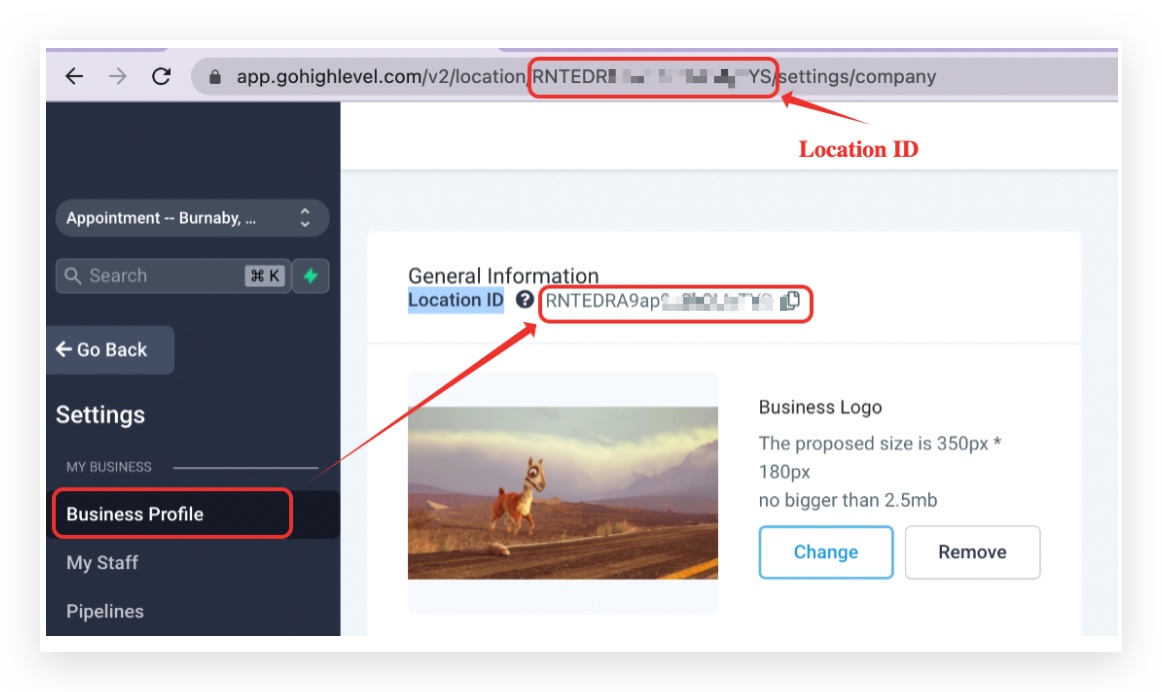
- Your Location ID – you’ll find this in your GoHighLevel account settings.
- The list of countries you want to enable and/or disable for voice calls.
- The type of traffic you plan to send (for example, sales calls to existing customers, support calls, appointment reminders).
If you have multiple sub‑accounts with different needs, note that clearly as well.
2. Identify what should change
Look at your current and planned usage:
- Which countries are you already calling that you know need to stay enabled?
- Which new countries do you need to reach in the next 3–6 months?
- Are there any countries showing up in your call logs that you don’t recognize or never intend to call?
Use this to build two lists:
- Countries to enable (because you have legitimate business needs).
- Countries to disable (because they’re irrelevant or high‑risk).
3. Contact GoHighLevel support
When you’re ready:
- Log into your GoHighLevel Agency account.
- Open the Support menu (blue question‑mark icon in the top‑right).
- Start a Live Chat or open a Support Ticket.
- Clearly explain that you want to update LC Phone Geo Permissions for voice.
Include, in writing:
- Your Location ID.
- Your enable/disable country lists.
- Any relevant context about the kinds of calls you’ll be placing.
If you aren’t sure which support channel to use, pair this with the "24/7 Customer Support Options in GoHighLevel" guide your team is publishing for Revset Labs.
4. LC Phone team reviews and applies changes
Support will pass your request to the LC Phone team, who will:
- Review your account and country list.
- Ask for clarification if anything is unclear.
- Update your Geo Permissions configuration.
Once the changes are live, they’ll confirm back through your ticket or chat. At that point, you should:
- Run a small test: place calls to a sample of newly enabled countries.
- Confirm calls to disabled destinations now fail as expected.
- Update any internal documentation so your team knows which countries are allowed.
Best Practices for Secure and Cost‑Effective Calling
To get the most from Geo Permissions while keeping risk low, build a simple operating playbook.
1. Start with the minimum you need
Avoid turning on “the whole world” just in case. Instead:
- Enable only the countries you actually serve.
- Add new countries one region at a time as your business expands.
2. Combine Geo Permissions with spending controls
Use LC Phone’s built‑in tools to:
- Monitor call logs for unusual spikes in volume.
- Keep an eye on calls to unexpected destinations.
- Set internal alerts or limits if your team suddenly starts dialing new regions.
3. Lock down who can edit workflows and numbers
Many risky call patterns come from misconfigured workflows or inexperienced team members.
- Limit who can create or edit LC Phone numbers, workflows, and power dialers.
- Use clear naming conventions for outbound campaigns so anomalies stand out.
4. Review Geo Permissions periodically
Once or twice a year (or after major expansions):
- Export recent call logs.
- Check which countries are actually being used.
- Remove countries that no longer make sense.
A quick periodic review prevents “permission creep” over time.
Do Geo Permissions Affect SMS or Only Voice?
Today, the Geo Permissions described in this article apply to voice calls placed via LC Phone.
SMS and MMS routing depend on:
- Which countries your numbers are registered for.
- Carrier‑level rules.
- Separate compliance features (like A2P registration and, for Texas, the Texas SMS Safeguard – One‑Toggle Block for SB 140).
You should treat SMS compliance as its own workstream. For example:
- Use HighLevel’s compliance tools for opt‑outs, quiet hours, and registered sender IDs.
- Refer to your internal Texas SB 140 / A2P documentation for messaging rules.
The big idea:
Geo Permissions keep your voice traffic under control. SMS compliance tools and workflows cover the messaging side.
Both matter if you want a resilient, compliant communications stack.
Example: Expanding Calling to a New Region Safely
Imagine your agency is based in the US and Canada, and you’re opening a sales team in the UK.
A safe expansion plan might look like this:
- Buy a UK LC Phone number for your new team.
- Confirm default permissions already allow outbound calls from that UK number (they typically do for countries where you own numbers).
- If you’ll also be calling nearby countries (for example, Ireland or other parts of Europe), request Geo Permission updates so only those specific countries are enabled—not the whole world.
- Update workflows so UK leads route through the right pipelines, SMS follow‑ups, and call outcomes.
- Monitor call logs from the new team for the first few weeks.
If you later decide to sell into another region (for example, Australia), repeat the same pattern instead of flipping everything on at once.
Where Revset Labs Fits Into Your LC Phone Strategy
Geo Permissions are one piece of a larger phone strategy. To really get leverage from LC Phone, you need:
- Clean pipelines and opportunity stages tied to calls.
- Well‑designed workflows that trigger the right follow‑up based on call outcomes.
- Clear reporting on which campaigns, numbers, and regions drive revenue.
That’s where Revset Labs comes in.
Revset Labs is an AI Automation and Marketing Agency that specializes in building high‑ROI systems on top of GoHighLevel. For LC Phone and Geo Permissions, we can help you:
- Design a global calling architecture that matches your offers and regions.
- Implement workflows, routing rules, and dashboards so every call is tracked.
- Pair voice, SMS, and email into a single, cohesive follow‑up strategy.
- Build internal SOPs so your team knows when and how to request Geo Permission changes.
If you’re just getting started—or if you’ve outgrown a patchwork of phone tools—you can:
- Start your GoHighLevel free trial and enable LC Phone.
- Work with Revset Labs to turn Geo Permissions, workflows, and reporting into a calling system that’s safe, scalable, and built for revenue.
You bring the markets you want to serve. We’ll help you build the calling engine that reaches them, without opening the door to avoidable risk.