
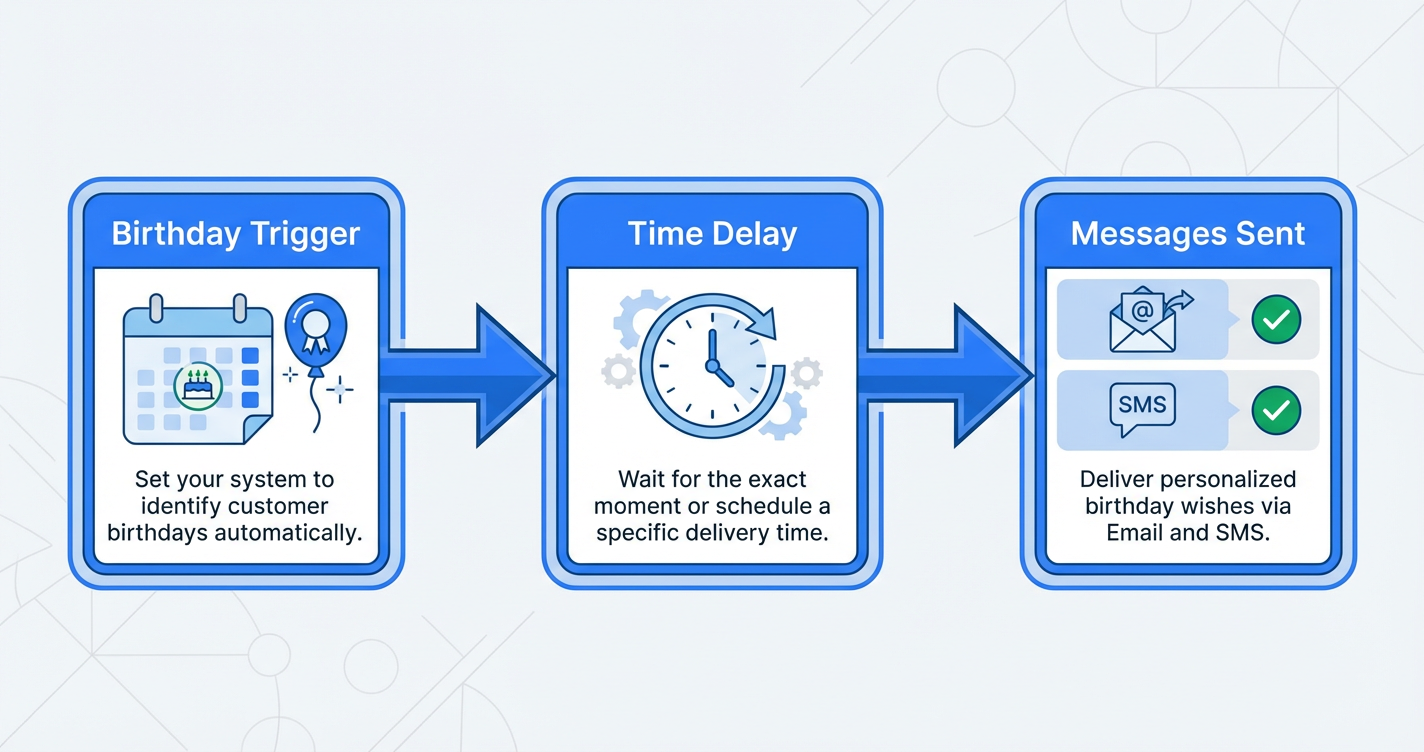
 GoHighLevel Birthday Reminder Workflow (Step-By-Step Guide for Revenue-Driving Campaigns)”>

Why Birthday Reminder Workflows in GoHighLevel Are a No-Brainer
If you collect customer birthdays and you are not using them inside automation, you are leaving easy revenue and goodwill on the table.
A simple GoHighLevel birthday reminder workflow can:
- Surprise customers with a genuinely personal touch
- Nudge lapsed buyers back to your offers
- Increase average order value with time‑limited birthday promos
- Strengthen loyalty without adding workload for your team
In this guide, you’ll learn how the GoHighLevel Birthday Reminder workflow trigger works, how to set it up step‑by‑step, and how to turn it into a high‑converting campaign that runs on autopilot.
Quick context: Revset Labs is an AI automation and marketing agency. We help teams turn tools like GoHighLevel into revenue systems—not just software subscriptions.
How the GoHighLevel Birthday Reminder Workflow Trigger Works
Inside GoHighLevel, every contact can have a birthdate stored on their record. The Birthday Reminder workflow trigger checks your database once per day (by default around 8:00 AM in your account’s timezone) and looks for contacts whose birthday matches your rules.
When there’s a match, the workflow fires and can automatically:
- Send a personalized birthday email
- Fire off an SMS with a special offer
- Add or remove tags
- Update opportunities or custom fields
- Notify your team in a pipeline or Slack‑style channel
Because it’s a native GoHighLevel workflow trigger, you can combine it with:
- Filters (for example, only VIP customers or active subscribers)
- Time delays (send a reminder 3 days before, on the day, and a last‑chance follow‑up)
- Conditions (only send offers people haven’t already redeemed)
If you’re not yet using GoHighLevel and want to follow along, you can start a free trial here:
Start your GoHighLevel trial and build this birthday workflow
Step‑by‑Step: Set Up a Birthday Reminder Workflow in GoHighLevel
This walkthrough assumes you’re comfortable with the basics of the workflow builder, but you don’t need to be an automation pro.
1. Create or Edit Your Birthday Workflow
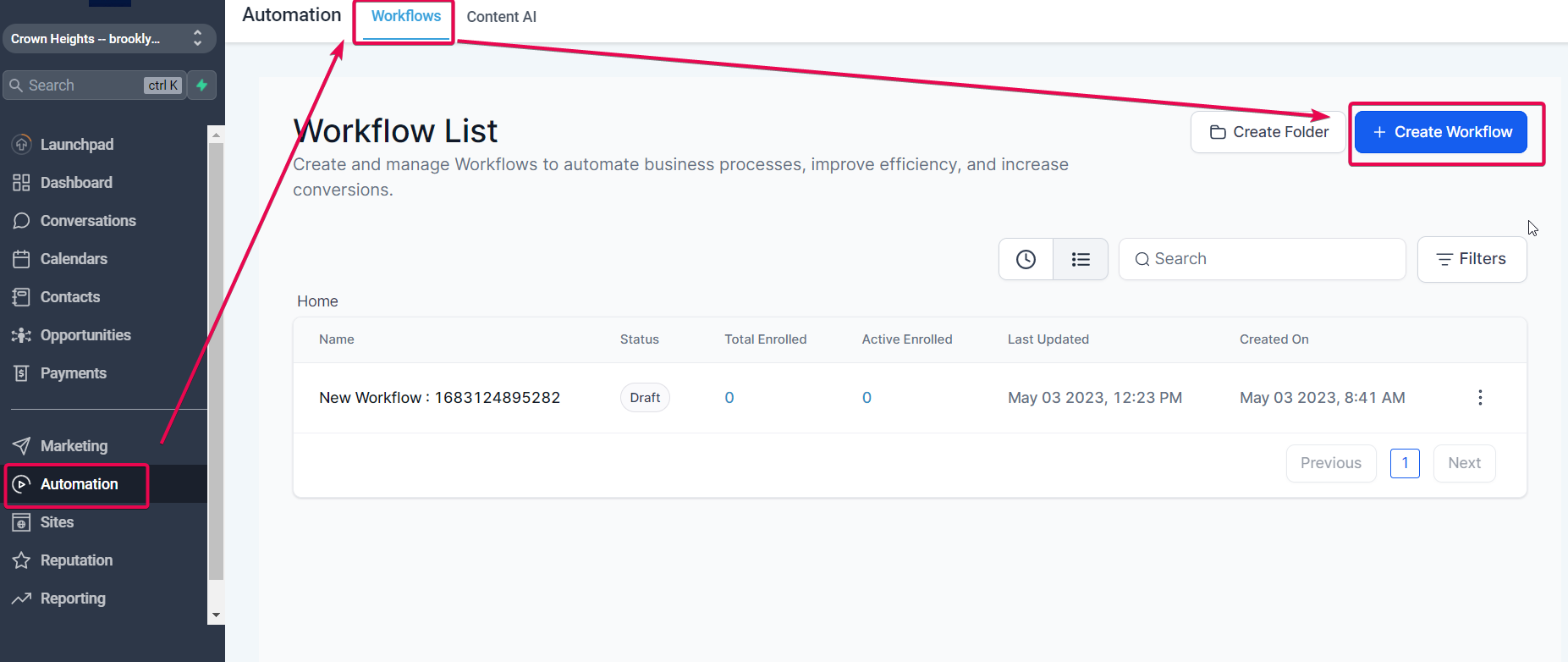
- Log into GoHighLevel.
- Go to Automation → Workflows.
- Click + Create Workflow (or open an existing "Birthday" or "Customer Loyalty" workflow if you already have one).
- Choose Start from scratch so you have full control.
Give your workflow a clear internal name like "Customer Birthday Reminder – Email + SMS".
2. Add the Birthday Reminder Trigger
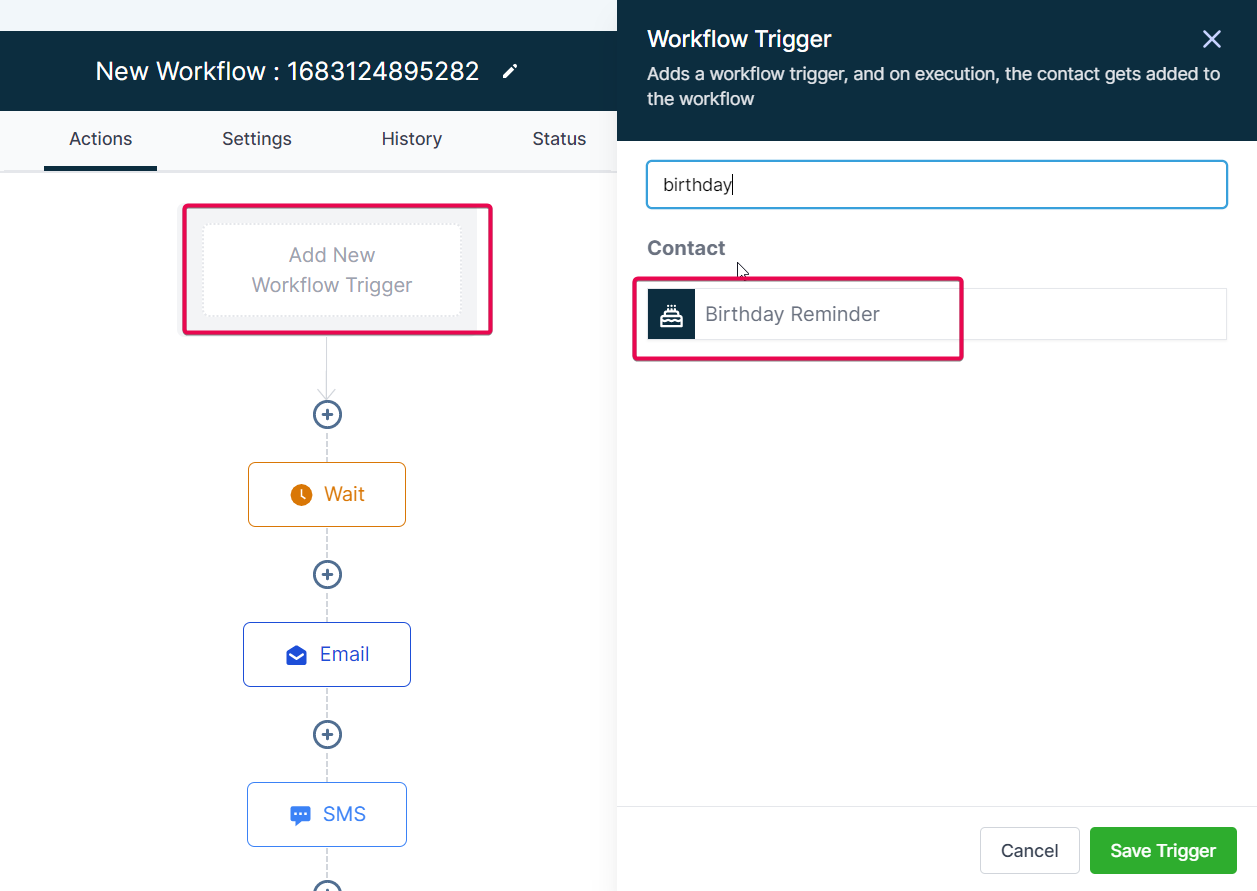
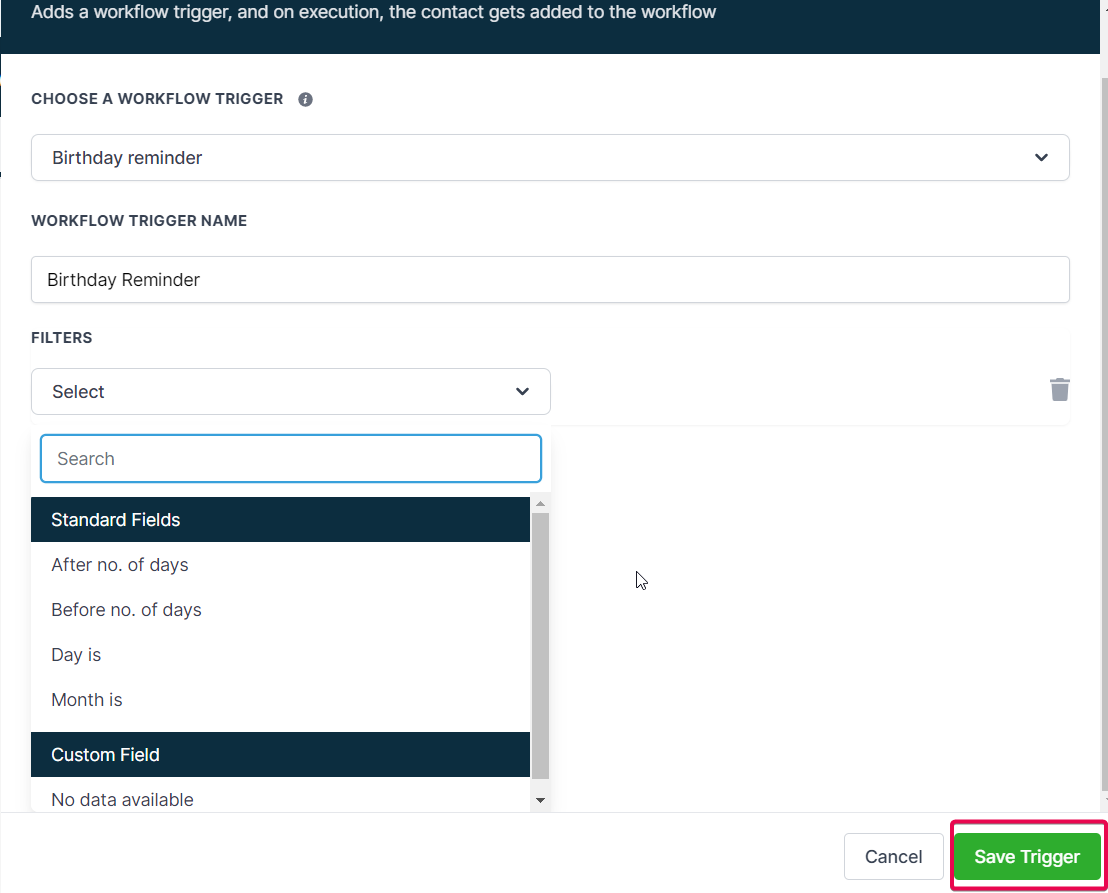
- Inside the workflow canvas, click Add New Trigger.
- From the trigger list, choose Birthday Reminder.
This tells GoHighLevel to evaluate contacts based on their birthdate field and push matching contacts into this workflow.
3. Configure When the Birthday Reminder Fires
By default, GoHighLevel checks birthdays daily and runs the trigger around 8:00 AM in your account’s timezone.
You can fine‑tune the behavior to match your offer and audience:
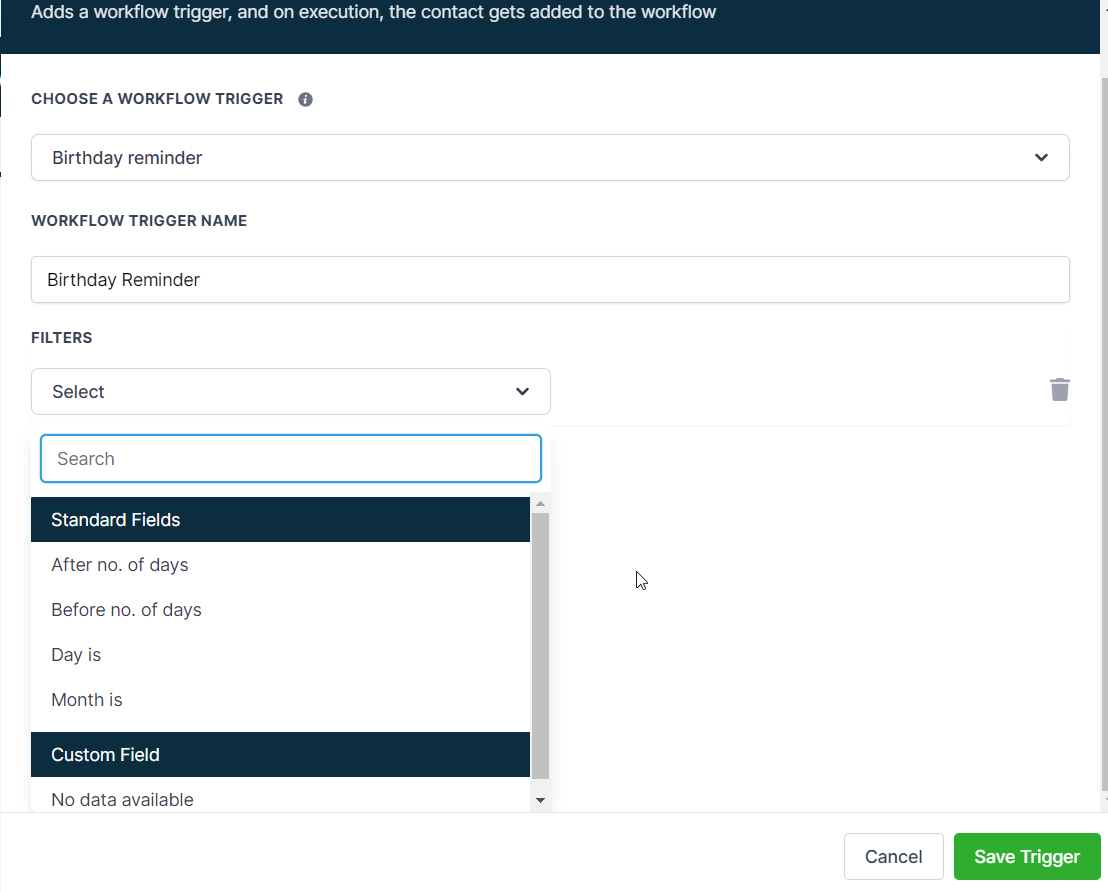
- Days before / after birthday – Run the workflow a set number of days before, on, or after the birthday (for example, 7 days before, on the day, and 3 days after for a "last chance" reminder).
- Month or day filters – Target specific months or days if you want to batch campaigns (for example, everyone with a birthday in June).
- Custom field filters – Only trigger for people who meet conditions like
Customer Type = VIP,Location = US, orHas Consented to Marketing = Yes.
Configure the trigger rules so that only the contacts you actually want to celebrate are pulled into the workflow.
4. Add a Time Delay for Message Timing
Even though the trigger checks birthdays at a set time, you gain more control by using Wait steps:
- After the trigger, add a Time Delay (Wait) action.
- Choose when to send your first message:
- Same day at a specific time (for example, 9:00 AM)
- A certain number of hours after the trigger
- A specific number of days before or after the birthday
This keeps messages from landing at awkward hours and lets you design a small birthday sequence instead of a single one‑off ping.
5. Add Your Birthday Email and/or SMS Actions
Now decide how you want to reach people.
Common patterns:
- Email only – For B2B or info‑style offers
- SMS only – For restaurants, salons, gyms, and local businesses
- Email + SMS – Email carries the full offer; SMS acts as a "heads‑up" and reminder
In the workflow:
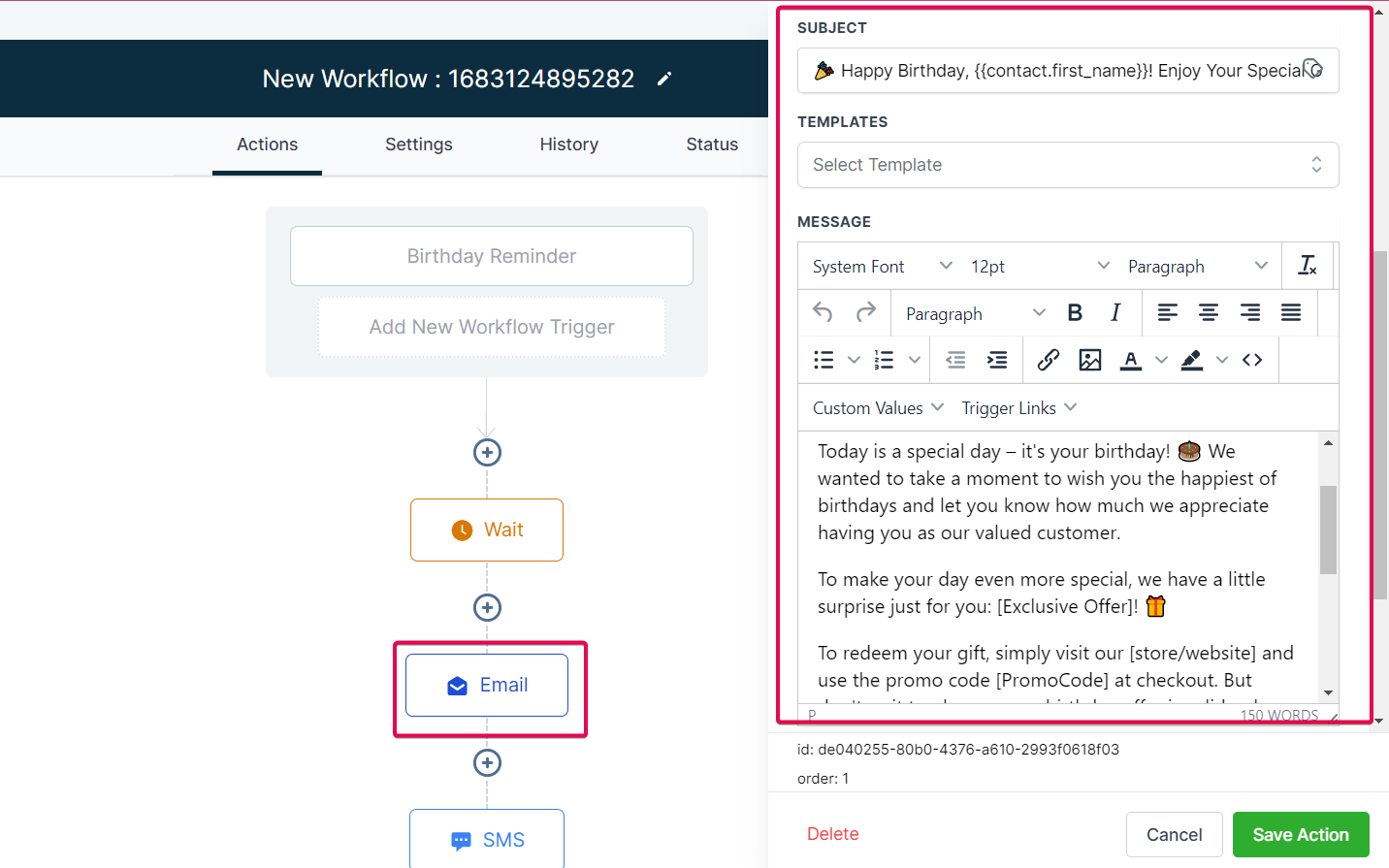
- Add a Send Email action.
- Use personalization fields like
{{contact.first_name}}in the subject line and body. - Clearly state the birthday benefit (discount, free gift, bonus service).
- Include a simple, mobile‑friendly call‑to‑action button or link.
Then, optionally, add a Send SMS action either:
- Right after the email, or
- A day later as a reminder for people who haven’t redeemed yet.
Pro tip: Use conditional splits (If/Else) to treat VIPs or high‑value segments differently—larger discounts, extended redemption windows, or exclusive experiences.
6. Add Safeguards with Conditions and Goals
You don’t want people to receive birthday promos after they’ve already used them or opted out.
Add a few safety checks:
- If/Else step based on a "Birthday Offer Redeemed" tag or field.
- Goal step to pull contacts out of the sequence once they convert (for example, place an order or book an appointment).
- Unsubscribe and compliance checks to honor opt‑outs for email and SMS.
This keeps your GoHighLevel birthday automation feeling helpful, not spammy.
7. Test the Workflow
Before flipping this live, test it end‑to‑end:
- Create a test contact with a birthdate set to tomorrow.
- Manually add the right tags or custom field values to match your filters.
- Publish the workflow and wait for the trigger window.
- Confirm:
- The contact enters the workflow
- Delays run as expected
- Email and SMS messages arrive correctly and look good on mobile
Adjust timing and copy until the experience feels smooth.
8. Publish and Monitor Performance
Once you’re happy with the behavior:
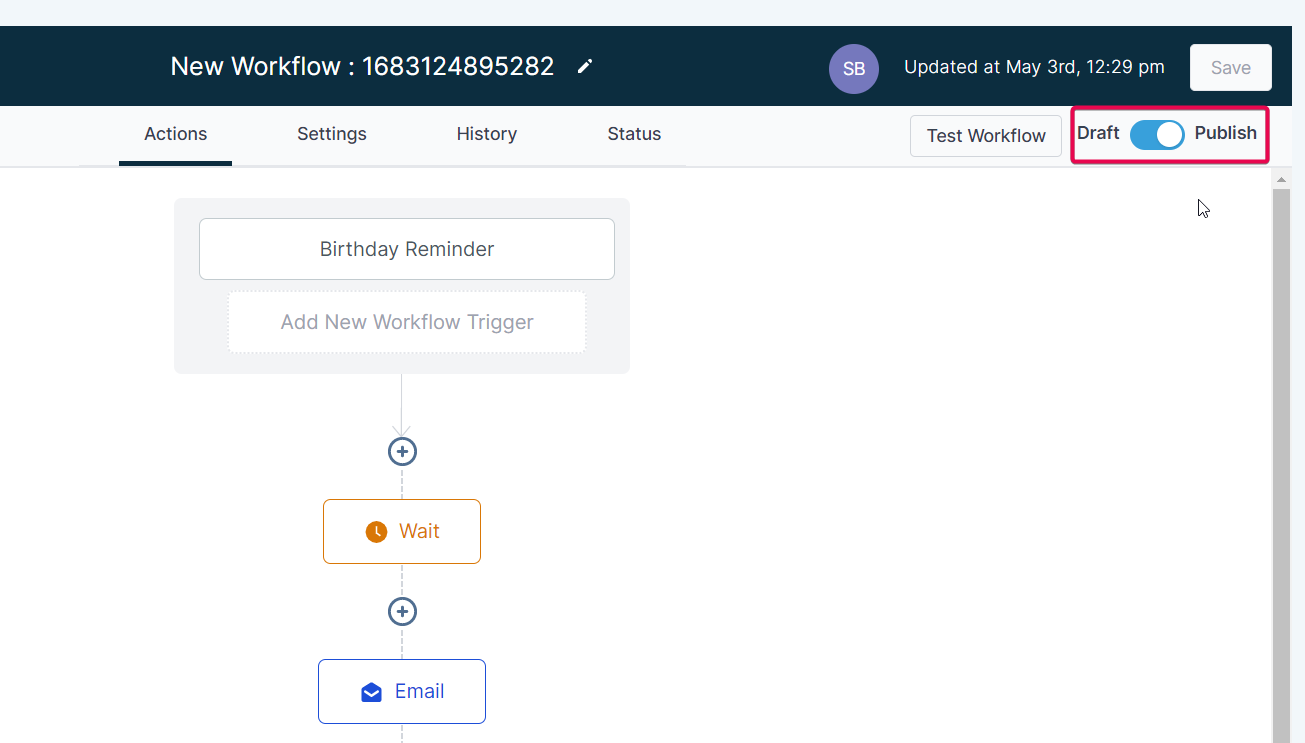
- Set the workflow to Publish.
- Monitor key metrics over time:
- Email open and click‑through rates
- SMS delivery and reply rates
- Coupon redemptions or booked appointments
- Additional revenue attributed to the birthday campaign
Small tweaks to offer, timing, and copy can compound significantly across your customer base.
If you’d like a shortcut, you can sign up for GoHighLevel using this link and follow a pre‑built birthday workflow template from Revset Labs:
Launch your birthday automation with GoHighLevel
Best Practices for High‑Converting Birthday Reminder Campaigns
A basic "Happy Birthday" message is better than silence—but a few strategic upgrades can turn it into a reliable revenue driver.
1. Make the Offer Feel Like a Gift, Not a Coupon
People are more likely to act when something feels special and exclusive:
- Free dessert or drink
- Complimentary upgrade or add‑on service
- Bonus credits, points, or a free month on a subscription
- A "birthday bundle" instead of a generic percentage discount
Explain the benefit in plain language and keep the redemption instructions dead simple.
2. Time Messages Around the Actual Birthday
For many businesses, the sweet spot is:
- 7 days before – Announce the birthday perk and set expectations
- On the day – Send a warm "Happy Birthday" message and reminder
- 2–3 days after – A final reminder before the offer expires
You can build this entire sequence in one GoHighLevel birthday workflow using a mix of time delays and conditions.
3. Personalize Beyond the First Name
Use the data GoHighLevel is already capturing:
- Past purchases or services used
- Location, interests, or membership tier
- Channel preference (email vs SMS)
For example:
"Because you’re part of our VIP program, we’ve added a complimentary upgrade to your next booking this month."
4. Keep Compliance and Consent Tight
Birthday messages rely on personal data, so make sure you:
- Collect birthdates with explicit permission
- Clearly state how you’ll use that data (for occasional birthday perks and relevant messages)
- Provide easy opt‑out links for email and SMS
5. Treat Birthday Workflows as a Test Bed
Because birthday campaigns are predictable and low‑risk, they’re a great place to test:
- Subject lines and SMS hooks
- Offer structures (cash vs percentage vs free add‑on)
- Different follow‑up timings
Once you find a pattern that works for birthdays, you can often copy it into anniversary, win‑back, or loyalty workflows.
Birthday Campaign Examples You Can Launch in GoHighLevel
Here are a few proven ideas you can implement quickly:
1. Birthday Week Discount (E‑Commerce or Info Products)
- Channel: Email + SMS
- Offer: 20% off any order in their birthday week
- Automation:
- 7 days before – "Your birthday week is coming up—here’s what we’ve lined up for you."
- On the day – "Happy Birthday, {{contact.first_name}}! Your 20% off link is inside."
- 3 days after – "Last call to use your birthday gift before it expires."
2. Free Birthday Dessert or Drink (Restaurants)
- Channel: Primarily SMS
- Offer: Free dessert or drink with any dine‑in order during the birthday month
- Automation:
- 5 days before – Invite them in and explain how to claim the offer
- On the day – Quick reminder + address or booking link
3. Complimentary Upgrade (Salons, Spas, Gyms)
- Channel: SMS + Email
- Offer: Free upgrade (for example, deep conditioning add‑on, VIP locker access, bonus class)
- Automation:
- 3 days before – Present the upgrade and link to your booking calendar
- On the day – "Happy Birthday! Your upgrade is waiting—book here."
4. Loyalty Points Boost (Membership or SaaS)
- Channel: Email
- Offer: Bonus points or credits when they take a specific action during their birthday month
- Automation:
- 7 days before – Explain how to earn the bonus
- Follow‑up – Nudge non‑converters near the end of the month
Each of these flows can live inside a single GoHighLevel birthday reminder workflow, segmented by tags, custom fields, or pipelines.
FAQ: GoHighLevel Birthday Reminder Workflow Trigger
How often should I send birthday messages to customers?
For most businesses, 1–3 messages around the birthday are enough:
- One announcement or teaser before
- One on the actual birthday
- One short final reminder before the offer expires
More than that starts to feel pushy unless you have a very engaged audience and a strong relationship.
Can I use the Birthday Reminder trigger for anniversaries or other dates?
The Birthday Reminder trigger is designed specifically for birthdays, but GoHighLevel also offers Custom Date or anniversary‑style triggers. You can:
- Track the date of first purchase, signup, or membership start
- Fire similar "anniversary" or "milestone" workflows based on those fields
What makes a birthday campaign actually work?
High‑performing birthday campaigns usually share three traits:
- Clear, valuable offer – A perk that feels like a genuine gift
- Clean timing – Messages land close to the date, not randomly in the month
- Simple redemption – One or two obvious steps, no hoops to jump through
How do I measure if my GoHighLevel birthday workflow is effective?
Track:
- Email opens, clicks, and replies
- SMS delivery and responses
- Coupon or offer redemptions
- Revenue attributed to birthday‑driven orders or bookings
In GoHighLevel, you can tag contacts when they redeem an offer and build reports or dashboards around those tags.
How do I keep my birthday automation compliant (GDPR, CAN‑SPAM, TCPA, etc.)?
- Collect birthdates transparently with consent
- Store proof of consent for email and SMS
- Include clear unsubscribe options on every message
- Respect regional sending times and frequency guidelines
If you’re unsure, have legal counsel review your data collection and messaging flows.
Turn Birthday Workflows into a Full Lifecycle System
A well‑built GoHighLevel birthday reminder workflow is often a quick win: it’s simple to launch and tends to perform well because it feels personal.
But the real leverage comes when you plug it into a larger lifecycle:
- New leads → Nurture sequences
- Onboarding → First purchase or first booking
- Birthdays and anniversaries → Loyalty and referrals
- Win‑backs → Re‑engagement for lapsed customers
If you’re ready to build that kind of system, you have two strong next steps:
- Get GoHighLevel live in your business – You can start a trial here and follow along with our GoHighLevel tutorials and templates:
- Work with Revset Labs – As an AI automation and marketing agency, we help teams design and implement end‑to‑end revenue workflows inside GoHighLevel. That includes:
- Mapping your lifecycle from first touch to repeat purchase
- Building workflows like this birthday reminder, plus win‑backs, upsells, and more
- Connecting your CRM, website, and messaging into one streamlined system
When you’re ready for done‑for‑you execution instead of more how‑to articles, bring this workflow idea to Revset Labs and we’ll turn it into a live, revenue‑producing asset inside your GoHighLevel account.