
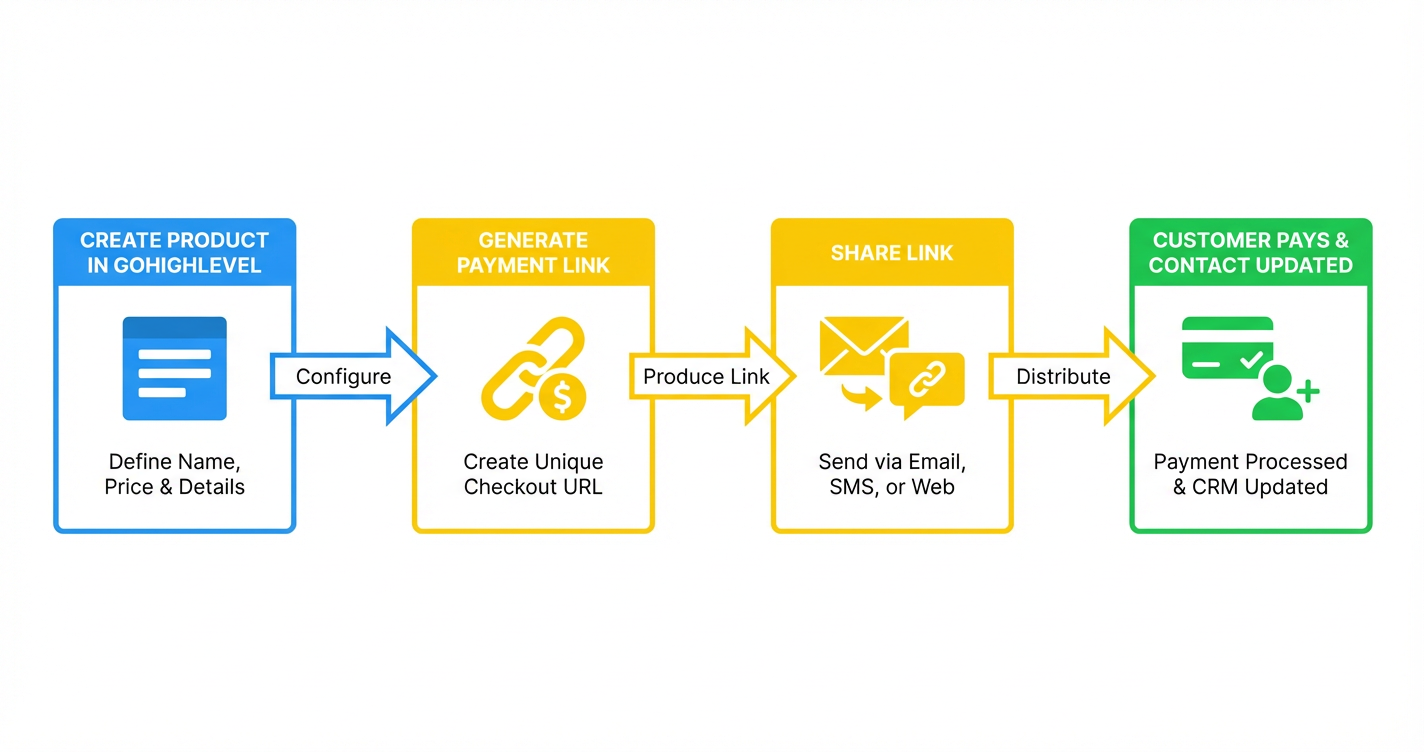
 GoHighLevel (Fast Payment Links Guide)”>
Payment links in GoHighLevel give you a fast, conversion-friendly way to get paid without spinning up a full website, funnel, or checkout build. In a few clicks, you can generate a hosted checkout page, share it by email, SMS, or chat, and have every purchase feed straight back into your CRM and automations.
This guide walks you through how to set up GoHighLevel payment links step-by-step, plus the optimizations Revset Labs uses when we build these flows for clients.
If you don t have a GoHighLevel account yet, you can start a free GoHighLevel trial here and follow along as you build your first payment link.
What are payment links in GoHighLevel?
A GoHighLevel payment link is a secure, hosted checkout page that you can share as a simple URL. When someone clicks it, they land on a fast, mobile-friendly checkout where they can pay for a product, plan, or package.
Behind the scenes, GoHighLevel:
- Processes the payment via your connected provider (for example Stripe or PayPal via payment elements).
- Creates or updates the contact in your CRM.
- Triggers any workflows you ve attached (tags, pipelines, automations, emails, and SMS).
That makes payment links perfect when you want to get paid quickly without designing a full page or funnel.
Common use cases include:
- One-off strategy calls or consultations.
- Small service packages and retainers.
- Event tickets, workshops, or cohorts.
- Deposits and first-payments before onboarding.
- Simple digital products or memberships.
If you re just getting started with GoHighLevel, combining payment links with a clean contacts setup is powerful. You can read more about that in our companion guide, Getting Started: Create and Manage Contacts in GoHighLevel.
Prerequisites: what you need before creating a payment link
Before you create your first fast payment link, make sure you have:
- Payments connected Stripe and/or other providers connected inside Payments > Integrations.
- At least one product created price, description, and image set up.
- A clear offer what the payment covers, what happens next, and which automations should fire.
Not set up yet? This is exactly the type of technical plumbing Revset Labs handles for clients. As an AI automation and marketing agency, we design offers, build products, and wire in payment links so every sale kicks off the right workflows.
Step 1: Create your product in GoHighLevel
GoHighLevel payment links are powered by products. If you haven t created one yet:
- Go to Payments > Products.
- Click Create Product.
- Set the product name, price, currency, and billing type (one-time or recurring).
- Add a short description that clearly explains what the buyer is getting.
- Upload a simple product image if relevant.
- Save the product.
You can reuse this product in multiple payment links, funnels, or order forms, so it s worth taking a minute to name it clearly.
If you re selling an onboarding package or done-for-you service that leads into a bigger engagement, this is also a great place to think about your funnel: which tags should be applied, which pipeline stage should they land in, and what happens after they pay.
Step 2: Generate a fast payment link
Once your product exists, you can generate a fast payment link in a few clicks.
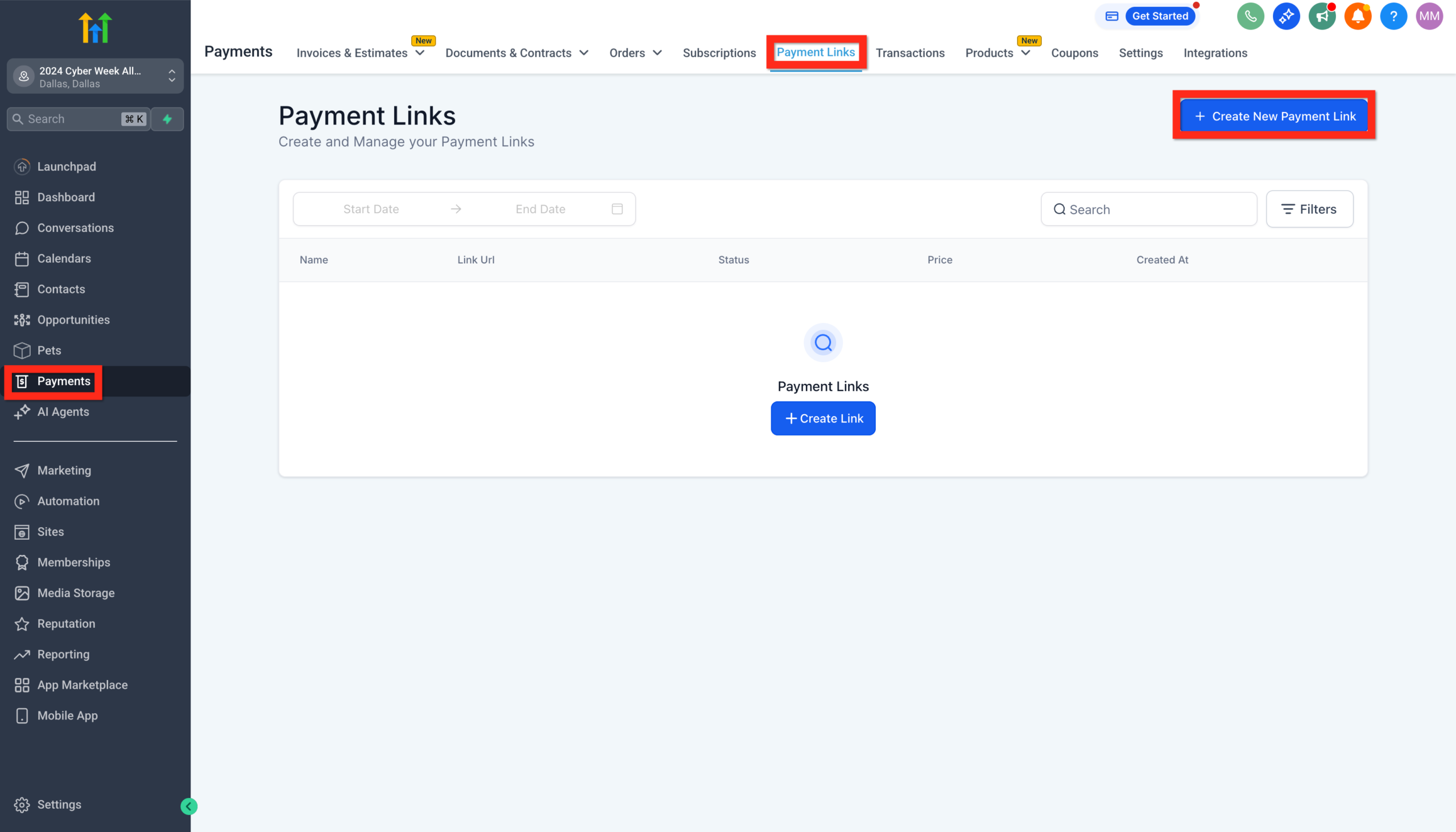
- Go to Payments > Payment Links.
- Click Create New Payment Link.
- Give your link a descriptive name (for example, VIP Strategy Session One-Time Payment ).
- Select the product you just created and confirm the price.
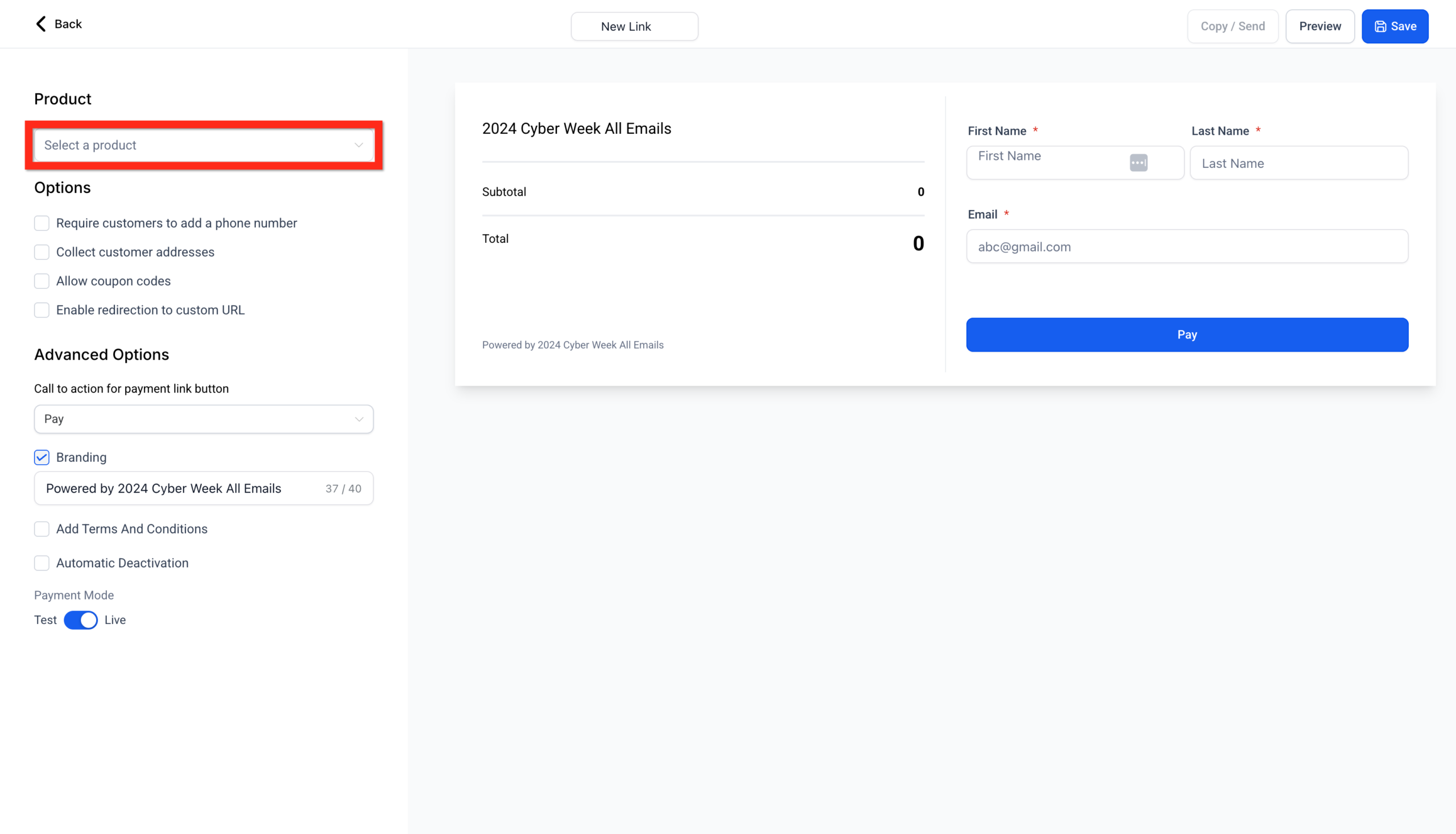
- Choose any available payment methods (for example card, wallets, or PayPal buttons via payment elements).
- Configure optional settings like quantity controls, taxes, and address collection.
- Click Save to generate the link.
Tip: The hosted checkout adapts to the Platform Language configured in Business Profile. Supported languages include English, Danish, German, Spanish, Finnish, French (regional variants), Italian, Dutch, Norwegian, Portuguese (regional variants), and Swedish.
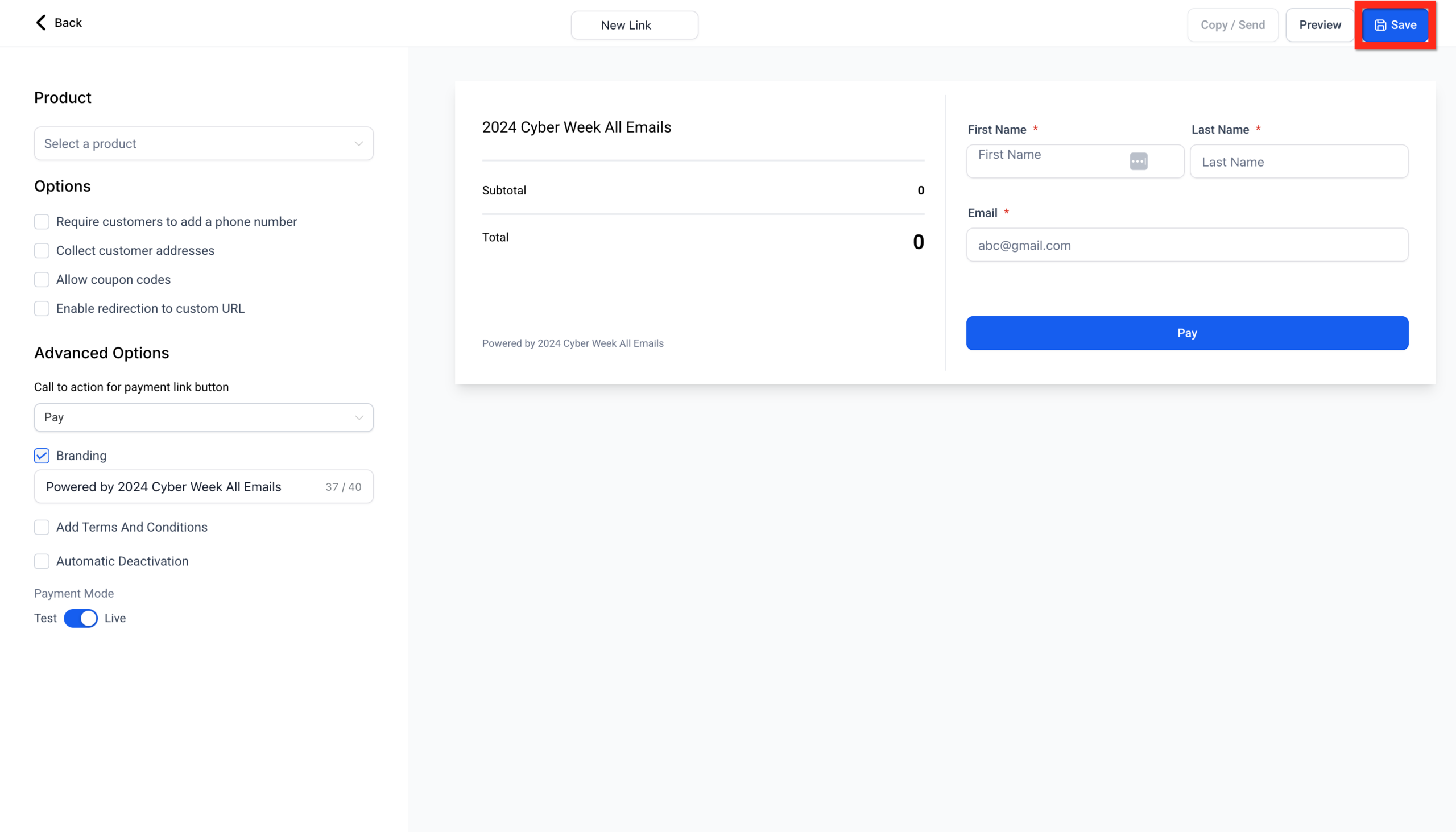
You can now Preview the checkout page to see exactly what your buyers will see.
At this point you have a working GoHighLevel payment link you can share anywhere but a few quick optimizations will make a big difference to conversions.
Step 3: Share your payment link via email, SMS, and funnels
You can share payment links in three main ways:
-
Generic link
A single URL that anyone can use. Great for public pages, social posts, or broadcast emails. -
Personalized link
A URL that is tied to a specific contact and can pre-fill their details. Ideal for 1:1 sales conversations. -
Send to contacts from inside GoHighLevel
Use the Send options to push the link directly to selected contacts by email or SMS.
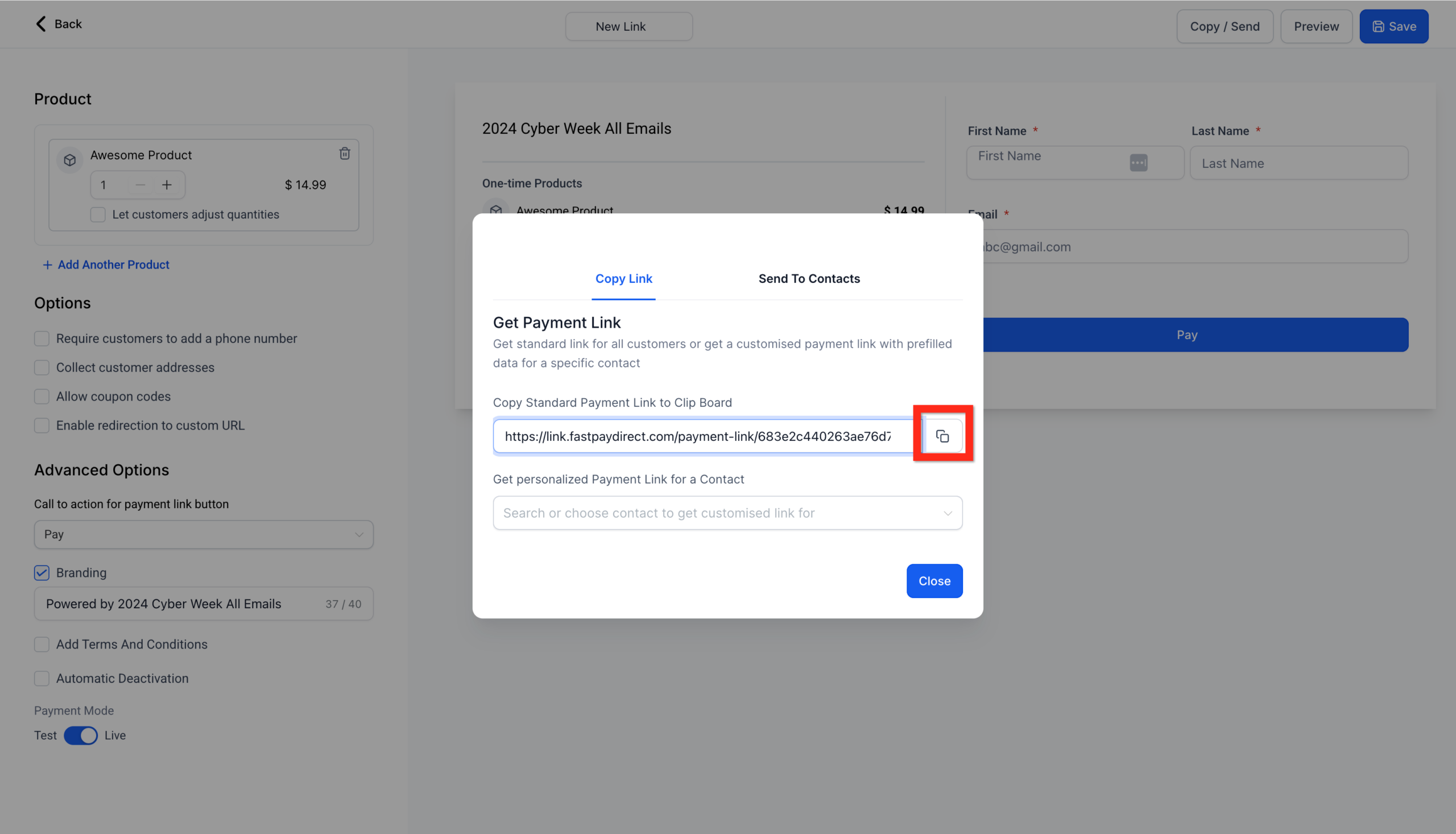
Some high-converting ways to use payment links: -
Drop a payment link at the bottom of a discovery call recap email with a clear CTA.
-
Add a "Pay Now" button in your SMS follow-up sequence.
-
Embed the link behind a button on a simple landing page.
If you want a dedicated onboarding sequence after purchase, this is a great moment to set up automatic email and SMS follow-up in GoHighLevel so buyers immediately feel looked after.
Step 4: Optimize the checkout experience
The basics will work, but a few details turn your payment link into a smooth, high-converting checkout.
Enable editable quantities
If you re selling anything where someone might buy more than one (seats, licenses, units), enable editable quantities on the payment link:
- Set a sensible minimum (usually 1).
- Set a maximum to protect against mistakes or abuse.
This lets customers scale up their order without contacting you manually.
Set up automatic taxes (where required)
If you sell to US customers, you can enable automatic taxes on the payment link so the system calculates the correct tax based on the customer s address.
This keeps you compliant while removing friction for the buyer. Make sure you also enable address collection on the payment link when taxes are needed.
Pre-fill customer details with URL parameters
For one-to-one sales or account management, pre-filling contact details on the checkout page makes paying feel effortless.
You can add URL parameters to your payment link such as:
firstName=lastName=email=phone=
Example:
https://links.fastpayments.co/payment-link/xyz123?firstName=Alex&lastName=Taylor&email=alex@example.com&phone=2155554545
When the contact clicks that link, their details are already filled in, reducing typing errors and drop-off.
Redirect buyers to a thank-you or onboarding experience
After payment, you can automatically redirect buyers to a next step using:
redirectIn=how many seconds to wait before redirecting.redirectUrl=where they should land (for example a thank-you page, onboarding form, or calendar).
Example:
https://links.fastpayments.co/payment-link/xyz123?redirectIn=8&redirectUrl=https://yourdomain.com/thank-you
Use this to:
- Show a clear receipt and expectations.
- Upsell or cross-sell a related offer.
- Move people into an onboarding workflow.
If you want this whole journey from payment to booked call to onboarding emails designed for you, Revset Labs can architect and implement the full GoHighLevel funnel.
Step 5: Sell multiple products or subscriptions from one link
Sometimes you want a mini-cart style experience rather than a single fixed offer. GoHighLevel payment links can handle this too.
You can:
- Combine multiple one-time products in a single link.
- Mix one-time and recurring subscriptions.
- Let customers choose the items and quantities that fit them best.
This works well for:
- Bundled service packages.
- Event tickets plus add-ons (VIP upgrade, recordings, merch).
- Productized services with optional extras.
Make sure the copy on your payment link clearly explains what is required versus optional, and consider using a short loom or screenshot in the email that shows buyers exactly what to select.
Step 6: Track payments and automate your CRM
One of the biggest wins with GoHighLevel payment links is how tightly they connect to your CRM.
Every successful payment can:
- Create or update the contact record.
- Apply tags that segment the buyer by product or plan.
- Move the opportunity to the right pipeline stage.
- Start workflows that send onboarding emails and SMS.
- Notify your team in Slack or email that a new sale came in.
Over time, this gives you clean reporting on which payment links, offers, and channels perform best.
If you want a team to design these automations with an eye on ROI, Revset Labs can help you turn every payment link into the start of a fully automated customer journey.
FAQs about GoHighLevel payment links
Do I need a website or funnel to use GoHighLevel payment links?
No. Payment links are hosted by GoHighLevel, so you can take payments with nothing more than a URL. You can always add funnels and full pages later.
Can I sell multiple products from a single payment link?
Yes. You can include several one-time and recurring products on one checkout so buyers can choose the combination that fits them best.
Can customers pay with PayPal?
If you ve enabled PayPal via payment elements, buyers can see PayPal as an option on your checkout and complete payment that way.
How do I collect addresses for tax or shipping?
Enable address collection and, if needed, automatic taxes inside the payment link settings so the checkout form captures the right fields.
Can I personalize links for each contact?
Yes. You can either send personalized payment links directly from GoHighLevel or append URL parameters to pre-fill contact details.
Done-for-you setup with Revset Labs
If you like the idea of fast, hosted checkouts but don t have time to design the offer structure, automations, and follow-up, Revset Labs can help.
We re an AI automation and marketing agency that specializes in building GoHighLevel systems that:
- Turn payment links into full customer journeys.
- Keep your CRM clean and segmented.
- Use automation to reduce manual admin and missed follow-ups.
We can audit your current setup, recommend quick wins, and build the actual workflows so your team just sees qualified, paid customers coming in.
In parallel, if you re still evaluating GoHighLevel, you can try GoHighLevel free with this link while we help you design a setup that fits your business model.
Next steps
Here s how to move forward from here:
- Make sure payments and products are set up in your account.
- Create your first GoHighLevel payment link for a simple, clearly defined offer.
- Share it with a warm audience by email or SMS and track conversions.
- Add optimizations like editable quantities, automatic taxes, and post-purchase redirects.
- Layer on automations so every new payment kicks off a predictable, measurable journey.
With a handful of well-designed payment links, you can start taking revenue through GoHighLevel in days, not weeks.