
 GoHighLevel (Step-by-Step Guide)”>
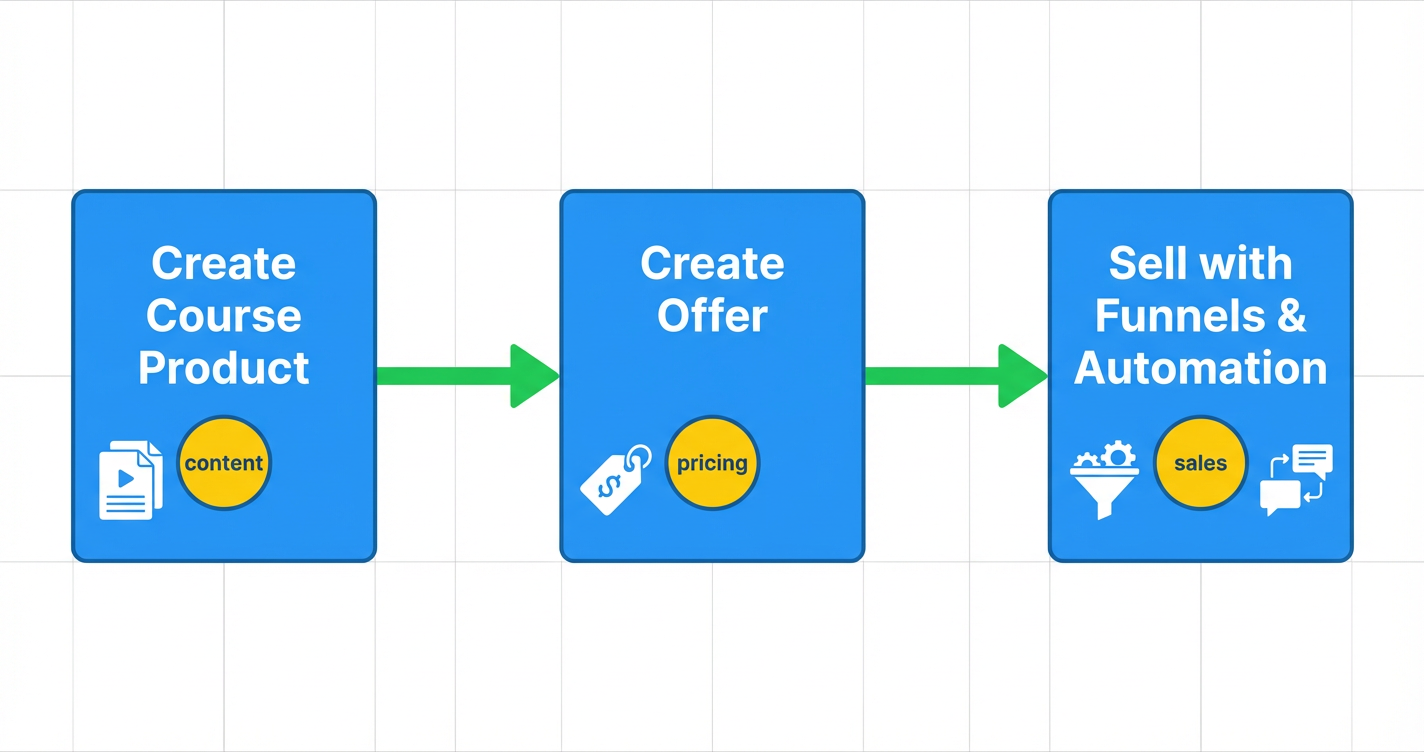
Launching a course directly inside GoHighLevel lets you keep your marketing, sales, and delivery in one place. Instead of duct‑taping a course platform, funnel builder, and email tool together, you can use a single system to:
- Host your course content
- Take payments
- Automate access and onboarding
- Nurture students with email and SMS
In this guide, you’ll walk through the exact steps to create a GoHighLevel course, package it into an offer, and start selling it – even if this is your first time using the course builder.
If you don’t have an account yet, you can start a free GoHighLevel trial here and follow along as you build:
👉 Start your GoHighLevel free trial
Revset Labs is an AI Automation and Marketing Agency that specializes in GoHighLevel. We’ll also show you where automation, funnels, and follow‑up can compound your results – and where it makes sense to bring in a partner if you’d rather not build everything yourself.
Before you build: get clear on your course strategy
A clean GoHighLevel setup is much easier when you’ve already made a few decisions on paper. Before you open the Memberships area, answer three questions:
1. Who is this course for?
Write down:
- The type of person you’re targeting (coach, agency, local business, creator, etc.)
- The starting point they’re at today
- The big problem they want to solve
This will drive your lesson topics, examples, and the language you use in your sales page and emails.
2. What outcome will they get?
A strong GoHighLevel course is framed around a clear, measurable promise, for example:
- “Launch and sell your first cohort‑based program in 30 days”
- “Fill your agency’s pipeline with 10–20 qualified sales calls per month”
- “Build an evergreen nurture engine that turns leads into booked calls”
If the outcome is fuzzy, everything downstream – your offer, pricing, and funnel – becomes harder to optimize.
3. How will you deliver the content?
Decide whether you want to:
- Release everything at once – best for short, tactical courses.
- Drip lessons over time – best for behavior change and implementation.
- Run a membership – ongoing content, office hours, and community.
You’ll mirror this decision when you choose your course type in GoHighLevel.
Pro tip: Already using GoHighLevel for contacts and pipelines? Tie this course to your existing data. Tag students, track opportunities, and keep everything in a single CRM instead of adding yet another platform.
For more context on foundations, you may also want to read:
- Getting Started: Create and Manage Contacts in GoHighLevel
- Getting Started: Launch a Funnel in GoHighLevel
Step 1 – Create your course product in GoHighLevel
In GoHighLevel, your course product is where you store lessons, videos, and resources.
Navigate to the course builder
- In your GoHighLevel dashboard, go to Memberships → Courses → Products.
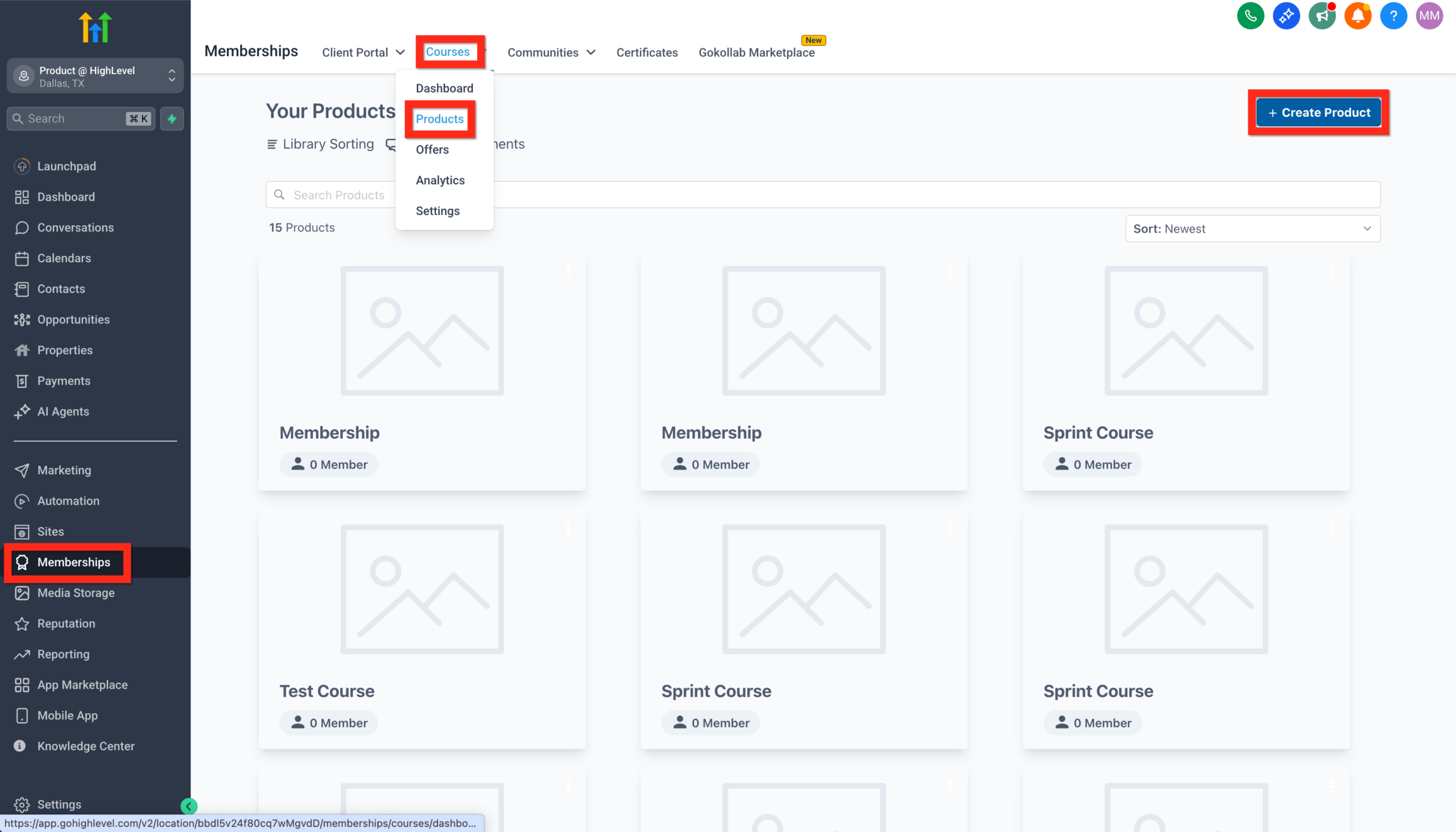
- Click Create Product.
- Choose Start from Scratch or a template.
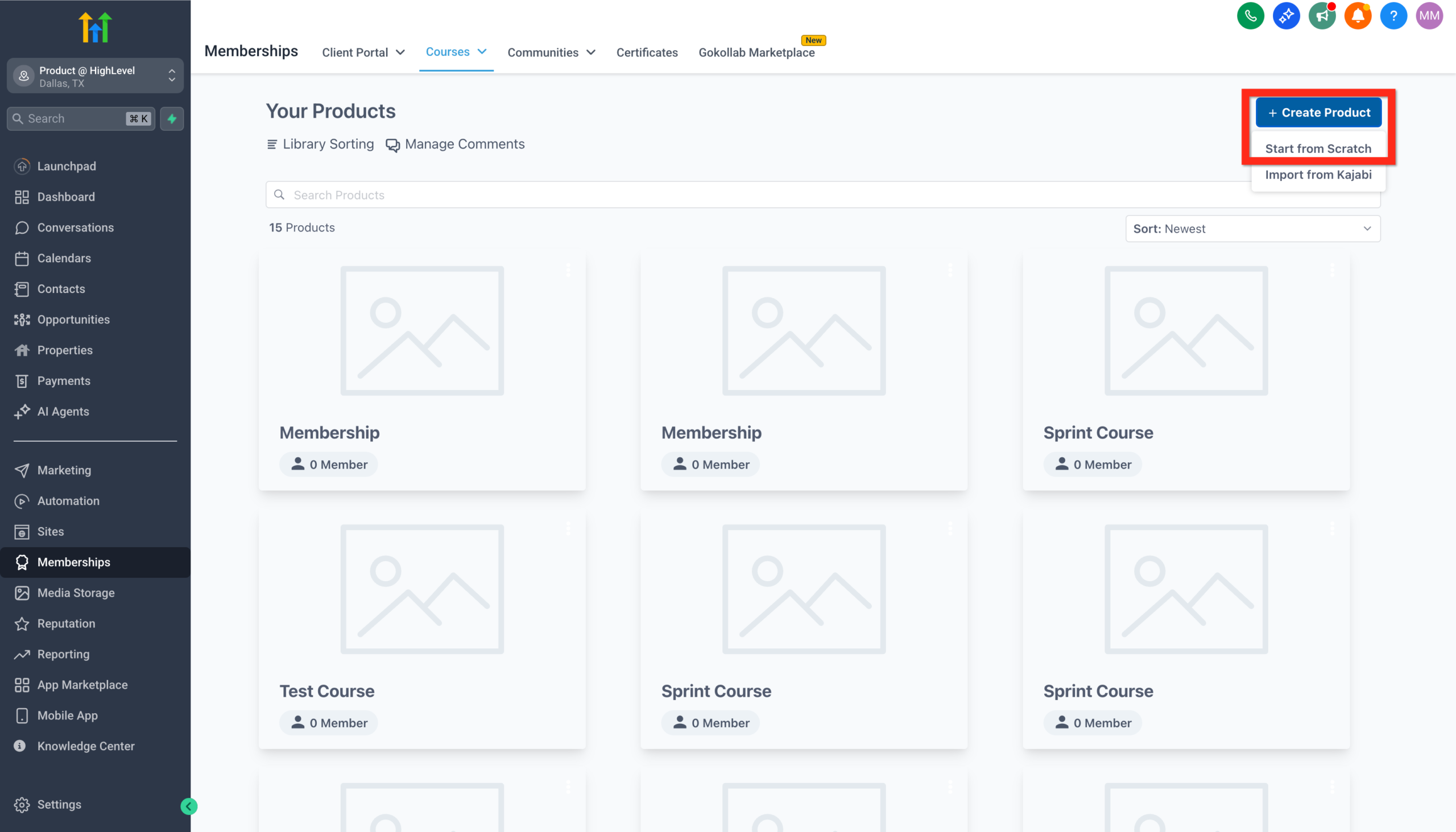
You’ll see several course formats:
- Sprint Course – short, focused outcome, usually 3–7 modules.
- Marathon Course – deeper transformation with more modules and longer duration.
- Membership – recurring content where students stay long term.
- Build Your Own – maximum flexibility to design a custom structure.
Pick the template that best matches the delivery model you chose earlier. You can always tweak it later.
Set the course basics
Configure the core details first:
- Course name – make it outcome‑driven (for example, “Launch Your First GoHighLevel Course”).
- Thumbnail/cover image – a simple, bold visual that matches your brand.
- Description – 2–4 sentences that restate the problem, promised outcome, and who it’s for.
- Welcome message – a short note that appears when students log in the first time.
A clear setup here reduces confusion and support tickets later.
Structure your modules and lessons
Next, break the outcome into logical stages. Common structures:
- Stage‑based (Plan → Build → Launch → Optimize)
- Skill‑based (Foundations → Tech Setup → Content → Sales & Marketing)
- Timeline‑based (Week 1 → Week 2 → Week 3, etc.)
In GoHighLevel:
- Use Categories for modules/stages.
- Add Lessons under each category.
- For each lesson, add:
- A video (hosted in your preferred tool, embedded into the lesson)
- Supporting text that outlines key points
- Links to resources, templates, or checklists
Aim for short, focused lessons (5–15 minutes) instead of hour‑long recordings. Shorter lessons improve completion rates and make it easier for students to revisit specific topics.
Configure lesson settings and drip
Depending on your course model, you can:
- Make all lessons visible immediately, or
- Set drip schedules so lessons unlock over days or weeks
- Require lessons to be completed in order
- Gate certain bonuses until later modules
Start simple. You can always add more complex rules after your first cohort.
If you’d like a second pair of eyes on your structure, Revset Labs can help you blueprint a course that fits your funnel and offer stack – while our team handles the technical build inside GoHighLevel.
And if you haven’t yet, this is a great moment to open your GoHighLevel account so you can follow along and implement:
👉 Launch your course with a GoHighLevel free trial
Step 2 – Package your course into a high‑converting offer
A great course product won’t sell if the offer isn’t positioned clearly. In GoHighLevel, offers connect your product to pricing and access.
Create an offer and connect your product
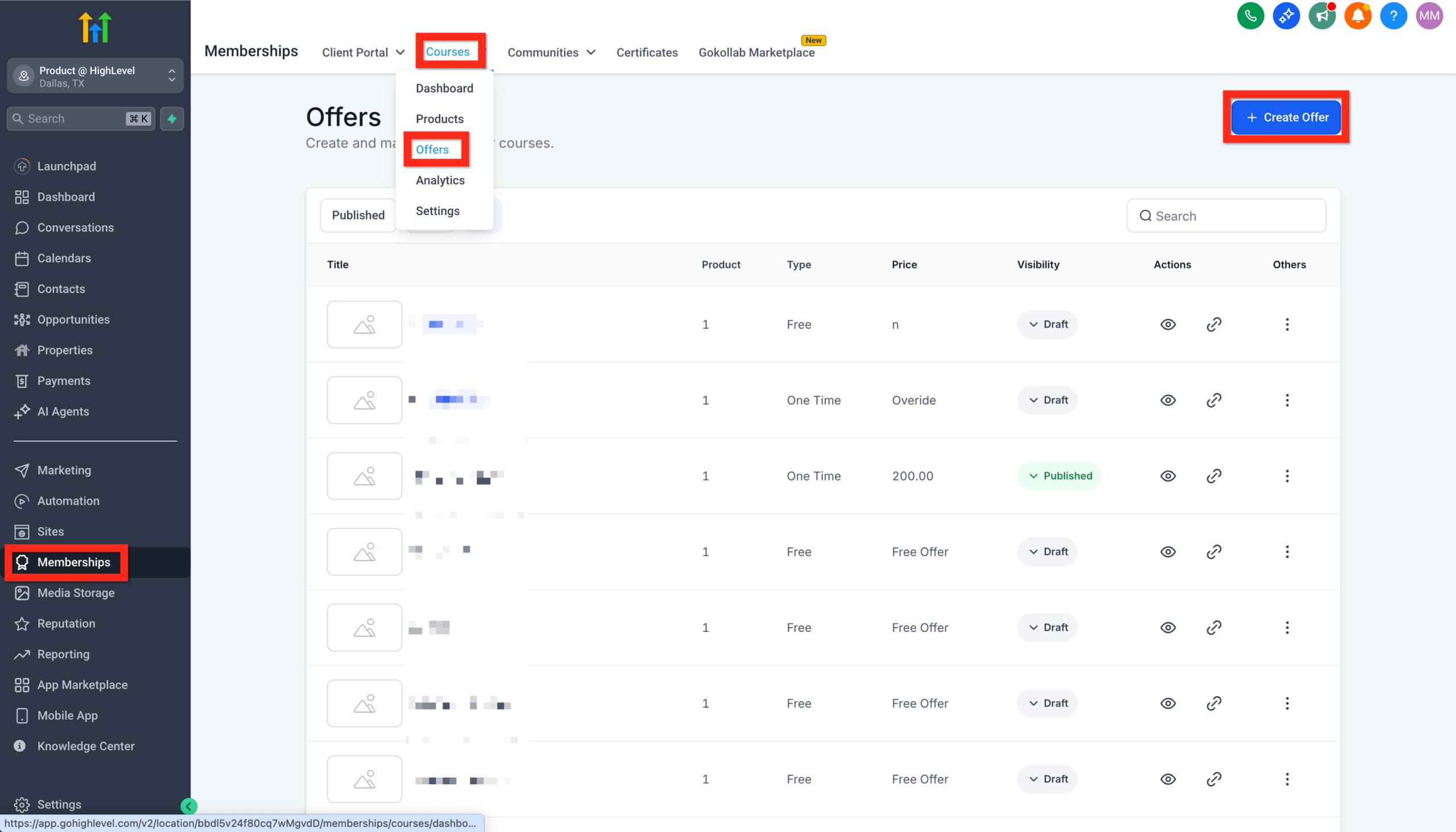
- Go to Memberships → Courses → Offers.
- Click Create Offer.
- Name the offer in language your market actually uses (for example, “GoHighLevel Course Launch Bootcamp”).
- Assign the course product you just created to this offer.
- Add a short summary of what’s included.
Now, define how people will pay and what they get.
Choose the right pricing model
GoHighLevel supports common monetization options:
- One‑time payment – simple, low friction; great for short tactical courses.
- Payment plan – spreads a higher ticket over a few months.
- Subscription – ongoing access; perfect for memberships and communities.
Match your pricing model to:
- The depth of transformation
- The support you provide (office hours, community, 1:1 help)
- How your ideal buyer prefers to pay
Configure access and bonuses
Within the offer:
- Set how long students will keep access (lifetime, 12 months, etc.).
- Decide whether to include:
- Bonus modules
- Templates and checklists
- Live call replays or Q&A sessions
- Make sure these are clearly labeled so students can find them.
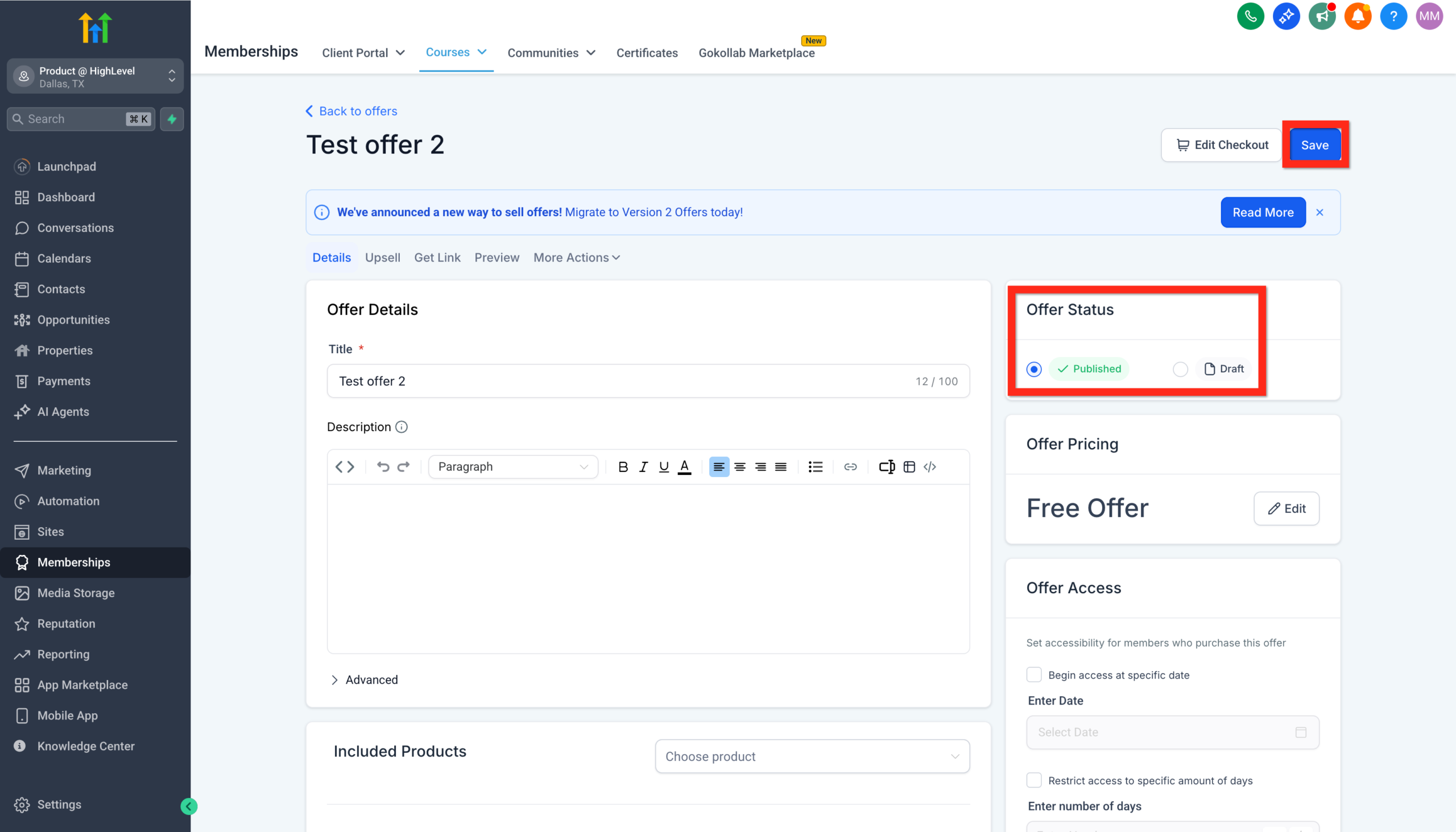
When you’re ready:
- Switch the offer from Draft to Published.
- Double‑check the preview and payment flow.
At this point you have:
- A structured course product
- A connected offer that can take payments
- A membership area ready to welcome students
GoHighLevel becomes your all‑in‑one stack for hosting, selling, and delivering the course – no extra course platform required.
👉 Try GoHighLevel and set up your course + offers in one place
Step 3 – Sell your course with funnels and automation
Now it’s time to get students in the door.
Grab your offer link
- Go back to Memberships → Courses → Offers.
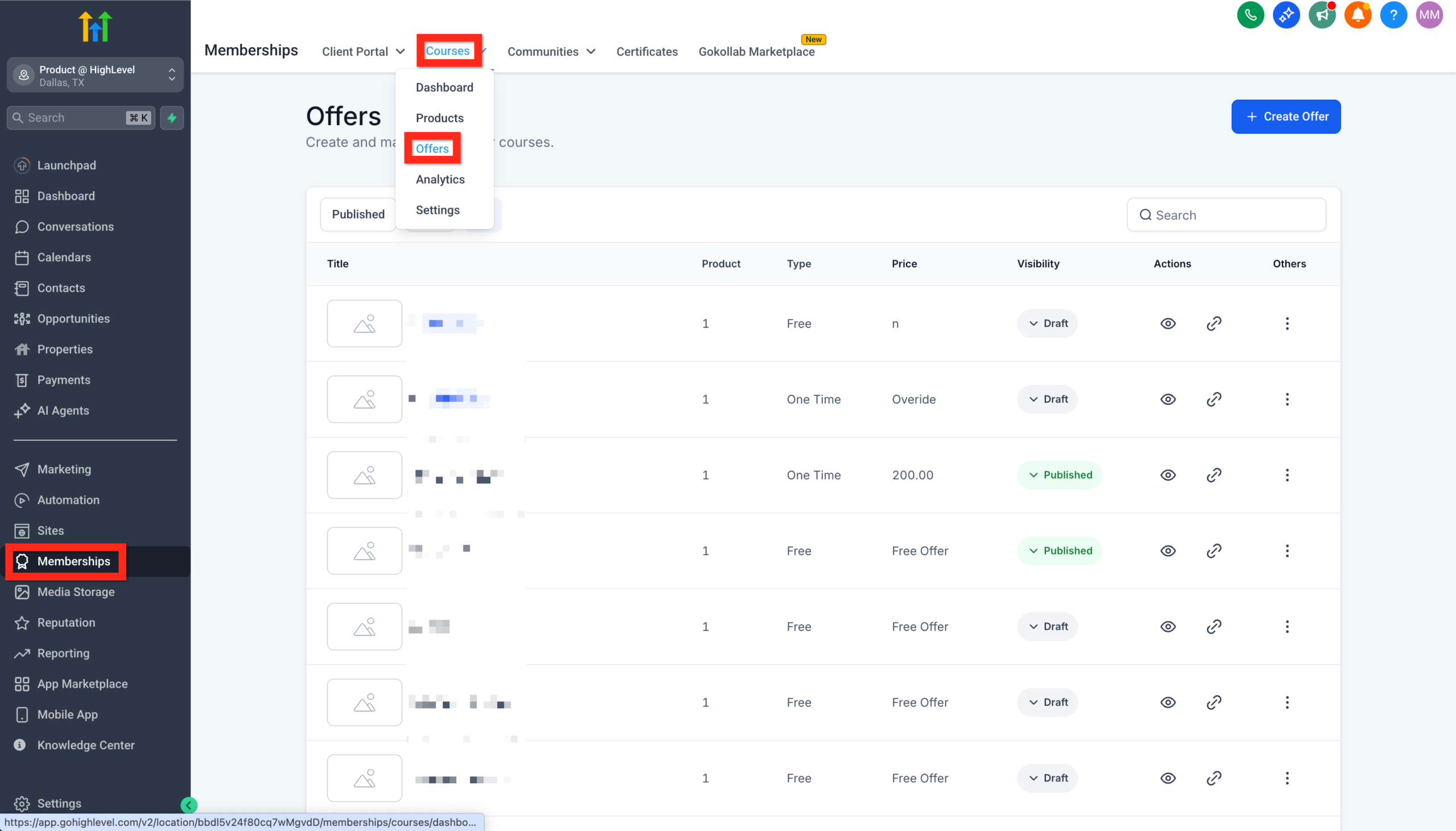
- Find the offer you just published.
- Click the link icon to copy the checkout URL.
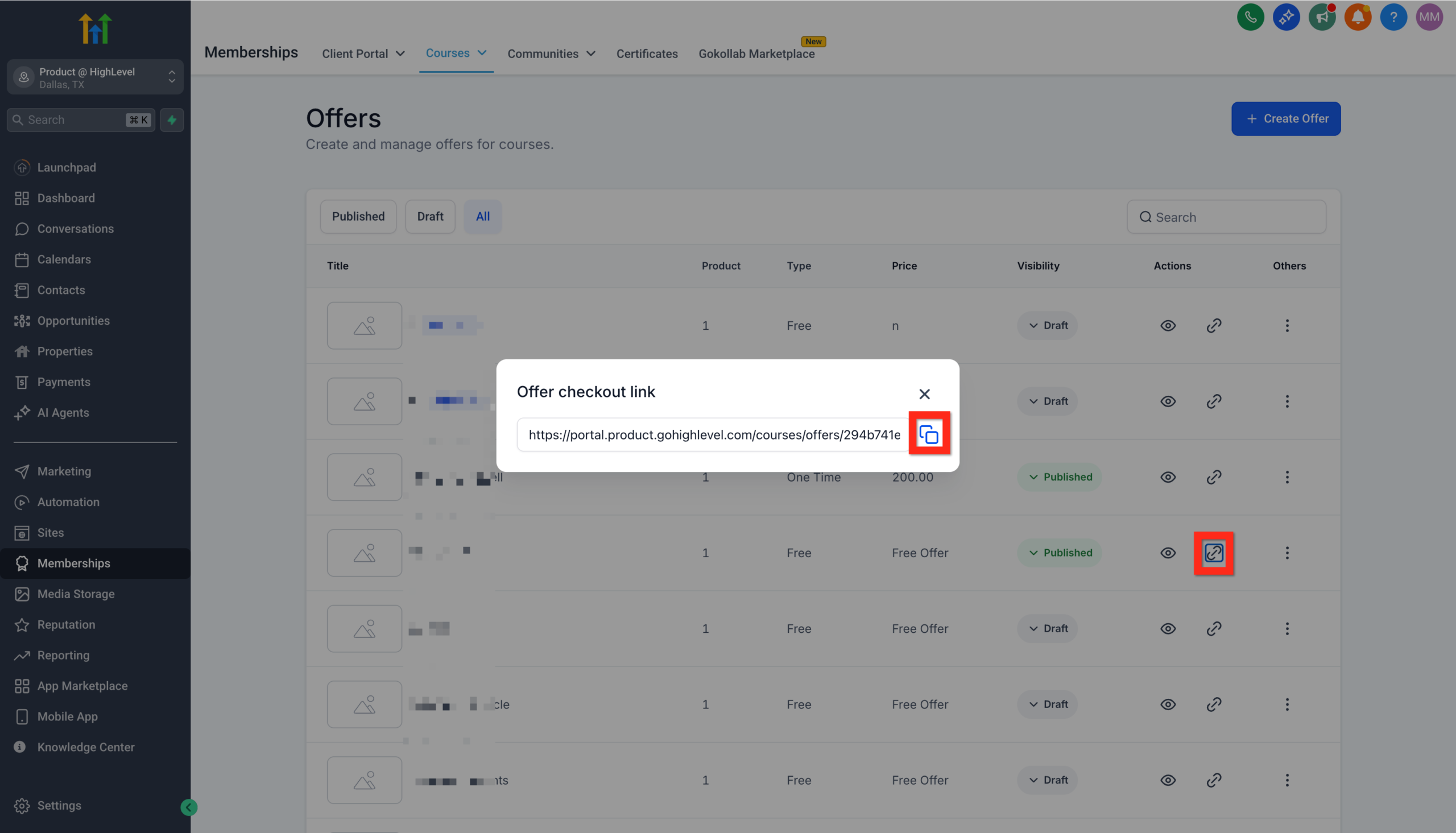
Share it across your channels—social media, emails, or your website.
Build a basic GoHighLevel funnel for your course
Inside GoHighLevel, create a new funnel with:
- Opt‑in or lead magnet page
Capture leads who aren’t ready to buy yet. Offer something tightly related to your course (for example, a checklist or mini training). - Sales page
Explain who the course is for, the outcome, what’s inside, and social proof. Address objections and answer common questions. - Checkout page
Connect this page to your course offer so payment and access are tied together. - Thank‑you / onboarding page
Confirm their purchase, explain how to log in, and give them a clear “start here” step.
Because GoHighLevel already handles funnels and membership, you don’t have to glue multiple tools together. Everything lives in one system.
For a deeper dive into funnels, see:
Automate access and onboarding
Use GoHighLevel’s automation to remove manual work:
- When an offer is purchased:
- Grant access to the course
- Tag the student appropriately in your CRM
- Trigger a welcome email and SMS with login instructions
- Start a course onboarding sequence that points them to the first module
- If someone starts checkout but doesn’t finish:
- Trigger a short abandoned checkout sequence (email/SMS) with a reminder and additional context.
- After students complete key modules:
- Trigger messages that:
- Celebrate wins
- Ask for feedback or testimonials
- Invite them into your next product or membership
- Trigger messages that:
To wire this up, you’ll likely lean on core messaging infrastructure. If you haven’t already set up messaging, start here:
- Getting Started: Set Up Email, Phone & SMS in GoHighLevel
- Getting Started: Automatic Email and SMS Follow-Up in GoHighLevel
Best practices to increase completion and revenue
Once your GoHighLevel course is live, shift your focus to engagement and expansion.
Keep lessons short and implementation‑focused
- Aim for one clear outcome per lesson.
- Use checklists and worksheets instead of walls of text.
- Add “Do this next” sections so students know exactly what to implement.
Use progress tracking and reminders
- Periodically email or text students who haven’t logged in recently.
- Highlight quick wins they can achieve in the next 15–30 minutes.
- Celebrate milestones (for example, 25%, 50%, 100% completion).
Layer in strategic upsells
Once students are making progress, they’re primed for:
- 1:1 strategy sessions
- Group coaching programs
- Higher‑level implementation packages
You can create additional courses or membership offers inside GoHighLevel and promote them via in‑course banners, email campaigns, and automations.
Ask for feedback and testimonials
Use simple in‑course surveys or automated emails to ask:
- “What was happening before you joined?”
- “What changed after implementing the course?”
- “Would you recommend this course to others?”
Feed this directly into your sales pages and funnels to improve conversion over time.
Common mistakes to avoid when launching a course in GoHighLevel
Even strong operators get tripped up by a few predictable issues.
1. Building the tech before clarifying the offer
If your promise, audience, and price point are fuzzy, you’ll end up re‑recording or rebuilding. Lock in your outcome and positioning before you film or build funnels.
2. Overcomplicating your stack
You don’t need a separate course platform, plus a funnel builder, plus an email tool. GoHighLevel already gives you:
- Membership site
- Funnels and pages
- CRM
- Email and SMS
Start there first. Add other tools only when you’ve outgrown what’s built in.
3. Skipping onboarding and follow‑up
Dropping someone straight into a dashboard with no context kills completion rates. Always:
- Send a welcome sequence that explains where to start.
- Give them a clear “Week 1” or “Start here” track.
- Follow up when they stall.
These automations are fast to build and have an outsized impact on revenue and referrals.
How Revset Labs can help you launch faster
If you’d rather not spend weeks figuring out the perfect course structure, funnel flow, and automations, you don’t have to do it alone.
Revset Labs is an AI Automation and Marketing Agency that specializes in GoHighLevel implementations for course creators, agencies, and service businesses. We help you:
- Design a course and offer that fits your broader funnel
- Build the course, offers, funnels, and automations inside GoHighLevel
- Connect everything to your CRM, pipelines, and follow‑up
- Use AI to personalize messaging and increase conversions
You can DIY everything in this guide, or you can have an experienced team set it up for you while you stay focused on your clients and content.
Either way, the starting point is the same:
👉 Start your GoHighLevel free trial and launch your course the right way
Frequently asked questions about courses in GoHighLevel
Do I need a separate course platform if I use GoHighLevel?
For most small teams, you don’t. GoHighLevel can host your course content, manage logins, take payments, and automate onboarding and follow‑up. You might pair it with a dedicated video host, but you don’t need an additional “course platform” subscription on top.
Can I drip course content over time in GoHighLevel?
Yes. When you structure your course, you can set drip schedules so lessons or modules unlock over days or weeks. This is ideal for implementation‑heavy programs where you don’t want students to binge everything at once.
How do I protect my course content in GoHighLevel?
Your content sits inside a membership area behind a login. Only customers with the correct offer or access tag can see your modules and lessons. You can also control how long access lasts (for example, 12 months vs. lifetime).
What’s the easiest way to sell my first GoHighLevel course?
Start with a simple funnel:
- A clear sales page that explains who it’s for and the outcome.
- A checkout page tied to your course offer.
- A short email/SMS sequence that invites your existing list or social audience.
You can always layer in lead magnets, webinars, and advanced sequences later.
How does GoHighLevel compare to other course platforms for small teams?
GoHighLevel shines when you want everything in one place – CRM, funnels, email/SMS, and courses. Traditional course platforms can be great for community features or marketplaces, but they often require you to bolt on extra tools for marketing and sales. With GoHighLevel, you get a unified system that’s built for agencies, creators, and service businesses who care about pipeline and revenue, not just content hosting.