
 GoHighLevel“>

You’ve probably hit this message in GoHighLevel when you try to plug in a Gmail, Yahoo, or Outlook address as your SMTP and wondered:
“Why can’t I just use the email I already have?”
On the surface it feels like a technical limitation. In reality, it’s a deliverability and reputation safeguard—for you, your subscribers, and the platforms you rely on.
This article breaks down why free email addresses don’t belong in your SMTP settings, what can go wrong if you ignore the warning, and exactly how to set up a proper domain email that keeps your GoHighLevel campaigns landing in the inbox.
What’s really happening when you send from a free email address
Free inboxes like Gmail, Yahoo, Outlook, iCloud, Hotmail, etc. are built for personal communication, not high‑volume marketing or automated workflows.
When you plug user@gmail.com into GoHighLevel as your SMTP and start sending campaigns, three things collide:
- Provider policies – Free inbox providers explicitly restrict bulk and commercial email. If you push volume, they can rate‑limit, throttle, or suspend the account.
- Shared reputation – You’re sending from infrastructure shared with millions of other users. If other people abuse it, your emails inherit their bad reputation.
- No control over authentication – You don’t own the domain, so you can’t configure SPF, DKIM, and DMARC to prove “yes, this system is allowed to send for this domain.”
Email providers see those signals, and the outcome is predictable: more spam, more bounces, more blocking, and less revenue from your list.
That’s why GoHighLevel (and most serious CRMs) steer you away from free email SMTP in the first place.
If you want a platform that’s built for serious automation and long‑term list health, centralizing your communications inside GoHighLevel with a properly authenticated domain email is the only sustainable play.
1. How free email SMTP quietly kills your deliverability
You can sometimes plug in a free email address and get messages to send—for a while. But under the hood, several issues stack up against you:
1.1 Bulk sending limits and sudden blocks
Free inboxes are tuned for 1:1 or small‑batch sending. When you start pushing:
- Newsletter blasts
- Automated follow‑ups
- Nurture sequences for every new lead
…you quickly cross invisible thresholds. Providers respond by:
- Throttling how many messages can go out per hour or per day.
- Soft‑bouncing messages with vague “try again later” responses.
- Hard‑blocking your account if activity looks like spam.
From your perspective inside GoHighLevel, it just looks like “email is unreliable.” In reality, the provider is protecting their infrastructure from behavior they never designed free inboxes to handle.
1.2 Shared IPs and borrowed reputation
With a free email address, you’re sending from an IP pool that millions of strangers also use.
If enough of those users:
- Send shady cold outreach
- Buy lists and blast spam
- Get consistent spam complaints
…the IP’s reputation drops. Your perfectly legitimate campaigns get punished right along with them. You have no way to isolate your sending reputation or repair it.
1.3 No way to own your sender identity
When you send from @gmail.com, you’re effectively saying:
“Google owns this domain and infrastructure. I’m just borrowing it.”
You can’t:
- Publish SPF records that authorize GoHighLevel to send on your behalf.
- Add DKIM keys from GoHighLevel to your DNS.
- Tune DMARC policy to tell inbox providers how to treat failed messages.
Without those controls, you fail more authentication checks. More of your emails land in spam or get rejected before they’re ever seen.
2. Why a custom domain email is the non‑negotiable foundation
The alternative is straightforward: send from an email address on a domain you control, like hello@yourbrand.com.
Once you own the domain, you can:
- Configure SPF, DKIM, and DMARC so inbox providers can verify every message.
- Separate transactional, marketing, and personal email onto different addresses or even different subdomains.
- Build a reputation that belongs to your brand, not a shared free inbox pool.
From a business and brand perspective, domain email also:
- Looks more professional on every touchpoint.
- Feels safer and more legitimate to subscribers.
- Keeps support and sales conversations out of someone’s personal inbox.
This is the baseline you want before you push any scale through GoHighLevel.
Once you have a domain email in place, you can plug it into GoHighLevel as your SMTP and let the platform handle sequences, pipelines, and automation without fighting deliverability every step of the way.
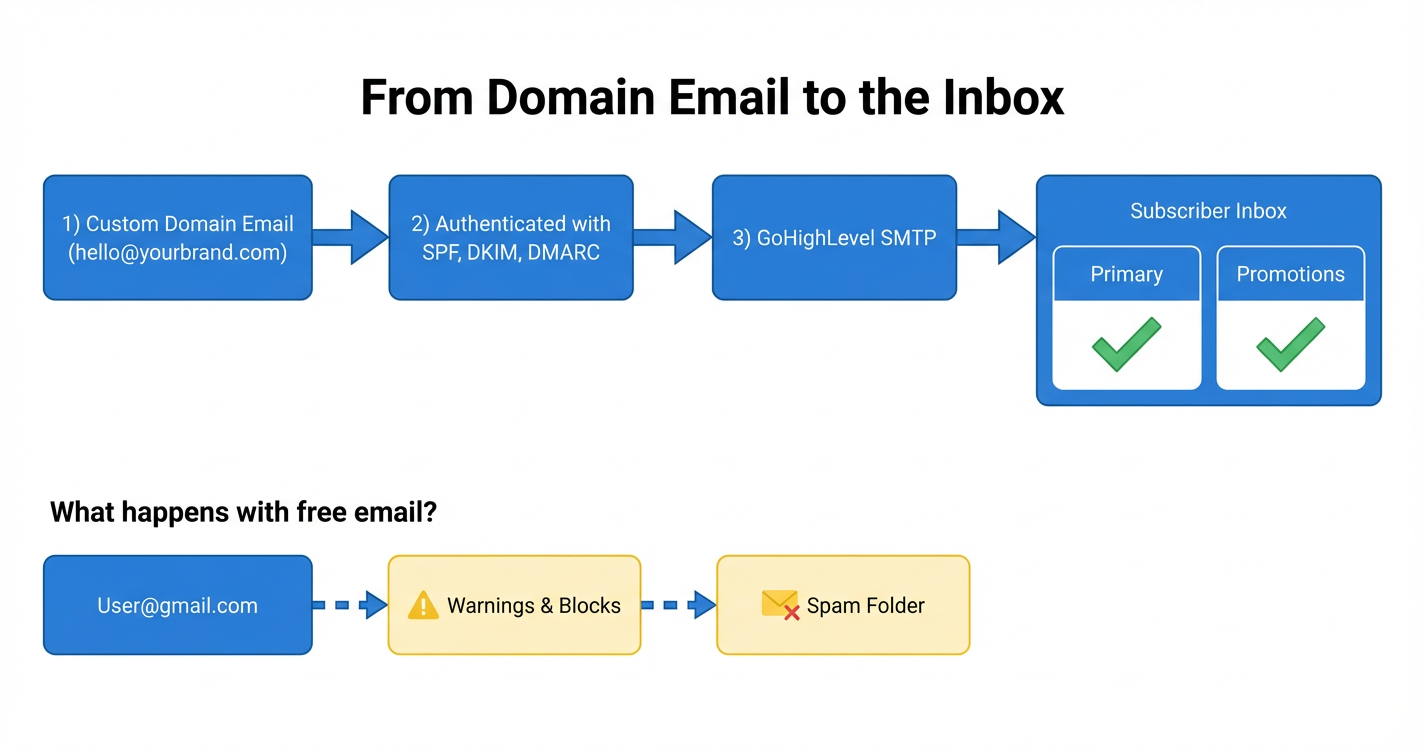
3. From domain email to the inbox (and what goes wrong with free email)
At a high level, the path from “send” to “seen” looks like this:
- Custom domain email – e.g.
hello@yourbrand.com. - Authenticated with SPF, DKIM, DMARC – your DNS tells inboxes that GoHighLevel is allowed to send.
- GoHighLevel SMTP – orchestrates campaigns, workflows, and transactional messages.
- Subscriber inbox – messages land in Primary/Promotions instead of spam.
In contrast, when you start with user@gmail.com:
- You can’t publish your own SPF/DKIM/DMARC for that domain.
- Provider policies flag bulk or automated sending as risky.
- Messages are far more likely to earn warnings, rate limits, and spam‑folder routing.
A simple visual summary:
- Top lane:
hello@yourbrand.com → Authenticated (SPF/DKIM/DMARC) → GoHighLevel SMTP → Inbox - Bottom lane:
user@gmail.com → Warnings & blocks → Spam folder
If your revenue depends on email, that bottom lane is not a risk worth taking.
4. Three practical ways to get a domain email (even if you’re not technical)
You don’t need a big IT team to get this right. Here are three common paths you can use in a few hours or less.
4.1 Through your domain provider
Most registrars and DNS providers offer simple email add‑ons. Examples include Google Domains, Namecheap, Cloudflare‑routed domains plus an email provider, and more.
Typical flow:
- Buy or use your existing domain.
- Add their basic email or “email forwarding” product.
- Create addresses like
hello@yourbrand.comorsupport@yourbrand.com. - Forward them to a personal inbox if you don’t want to manage a new mailbox.
You can then use these addresses as the “from” email in GoHighLevel once SPF/DKIM are configured.
4.2 Through your website host
If your site is hosted on platforms like Bluehost, HostGator, GoDaddy, or similar, you can usually create domain‑based email directly inside the hosting dashboard.
Common pattern:
- Log in to hosting.
- Find the “Email” or “Email Accounts” section.
- Create mailboxes like
info@yourbrand.com. - Use their webmail or connect the inbox to your favorite email client.
Website builders like Squarespace and Wix integrate with business email solutions as well, making it straightforward to attach a branded inbox to your existing site.
4.3 Through Google Workspace or another business email suite
For the smoothest day‑to‑day experience, many teams choose Google Workspace or a similar suite:
- You keep the familiar Gmail interface.
- You get Docs, Sheets, Drive, Meet, and more.
- Plans start around $6/month per user at the time of writing.
Setup basics:
- Sign up for Google Workspace with your domain.
- Follow the guided setup to verify domain ownership.
- Let Google publish or prompt you to add SPF and DKIM records.
- Create user accounts like
team@yourbrand.com.
Once this is live, you’ll connect that address into GoHighLevel as your SMTP sender.
5. Plugging your domain email into GoHighLevel the right way
With a domain email ready, you can now wire everything into GoHighLevel so campaigns send reliably.
At a high level, you’ll:
- Choose the email address you want as your primary sender, such as
hello@yourbrand.com. - Connect SMTP inside GoHighLevel, following the platform’s latest instructions for your preferred email service.
- Add SPF and DKIM records from GoHighLevel (or your email provider) into your DNS so mailbox providers can authenticate your messages.
- Set a sensible DMARC policy (even
p=noneto start) so you can monitor deliverability and move toward stricter enforcement over time. - Warm up gradually – start with low volume to your most engaged contacts before pushing full campaigns.
As you centralize more of your operations inside GoHighLevel—pipelines, follow‑ups, campaigns, and automations—you’ll feel the compounding impact of better deliverability: more booked calls, more replies, and more revenue from the same list.
If you’d rather not wrestle with DNS records and SMTP dashboards, Revset Labs can help you shortcut the process.
6. How Revset Labs can help you implement this
Revset Labs is an AI automation and marketing agency that specializes in building revenue systems on top of GoHighLevel.
For this specific problem—migrating away from a free email sender and into a robust domain‑based setup—we can help you:
- Audit your current sending setup and list health.
- Choose the right domain and sender structure (e.g.
@brand.comvs@mail.brand.com). - Configure SPF, DKIM, and DMARC correctly for GoHighLevel.
- Connect the right SMTP and sending profiles inside your GoHighLevel account.
- Build or refine your core automations so every new lead gets a clean, reliable journey.
Most importantly, we keep the focus on outcomes: more of your messages seen, opened, and acted on, not just a technically correct setup.
Pairing a well‑configured domain email with GoHighLevel turns your account into a true revenue engine instead of “just another CRM.”
7. Frequently asked questions
Why can’t I just keep using my Gmail address as the SMTP in GoHighLevel?
Because free inboxes are not designed for automated or bulk marketing. You’re sending from shared infrastructure you don’t control, without proper authentication, under terms of service that can block or suspend you at any time. That combination creates unreliable deliverability and real business risk.
Will my existing campaigns break if I switch to a domain email?
You may need to update send‑from addresses and SMTP settings, but the logic of your automations can stay the same. In practice, most businesses see better open and click rates once they move to a properly authenticated domain sender.
Do I need a whole new domain just for email?
Not necessarily. Many businesses start with their main domain (for example yourbrand.com) and send from addresses like hello@yourbrand.com. As you scale, you can add a dedicated sending subdomain (for example mail.yourbrand.com) to isolate reputation even further.
What if I’m already sending from a free email—what should I do next?
Treat it as a temporary mistake, not a permanent pattern. Get a domain email set up, configure SPF/DKIM/DMARC, plug that into GoHighLevel, and begin sending from the new address. Monitor results over a few weeks—you should see more stable inbox placement and fewer issues with blocks or bounces.