
Email verification is one of the simplest ways to protect your sender reputation in GoHighLevel. Instead of blasting campaigns to every address that hits your CRM, Mailgun can quietly check whether an email is valid the moment it enters your system.\n\nThat means fewer hard bounces, cleaner lists, and better inbox placement for the messages that actually matter.\n\nIf you’re still getting set up with GoHighLevel, you can start a free trial here and follow this guide as you build out your account.\n\n## What “Email Verification from Mailgun within the CRM” actually does\n\nGoHighLevel uses Mailgun behind the scenes to send email. When you turn on Email Verification from Mailgun within the CRM, Mailgun also becomes your list hygiene layer.\n\nAt a high level the flow looks like this:\n\n1. A new lead submits a form, calendar, survey, chat widget, or is added manually/imported.\n2. The email address is saved to the contact record in GoHighLevel.\n3. Mailgun checks that address against its verification service.\n4. Depending on the result, the contact is either safe to email or flagged as risky/invalid.\n\nMailgun charges for this service (currently $0.012 per verification), but it’s usually far cheaper than the cost of burning a domain because of bad list quality.\n\n## When it makes sense to enable Mailgun email verification\n\nYou’ll get the most value from verification if:\n\n- You’re capturing a steady flow of new leads from forms, funnels, and opt‑in pages.\n- You’re emailing cold or older lists and want to avoid surprise bounce spikes.\n- You run high‑volume broadcasts, nurture sequences, or automations where a bad list can tank deliverability.\n\nSituations where you might hold off (or use it selectively):\n\n- Super small, hand‑curated lists you already know are clean.\n- Internal testing environments where you’re mostly sending to your own team.\n\nMost real customer accounts benefit from turning verification on early so you never end up cleaning a huge mess later.\n\nIf you’re planning to move your marketing and automation into a single CRM, GoHighLevel is built for this. You get email, SMS, funnels, and automation under one roof—plus native hooks into Mailgun for verification.\n\n## How to enable Email Verification from Mailgun in GoHighLevel CRM\n\nFollow these steps from the Agency view in GoHighLevel.\n\n### 1. Open Email Services for your agency\n1. Switch to Agency View.\n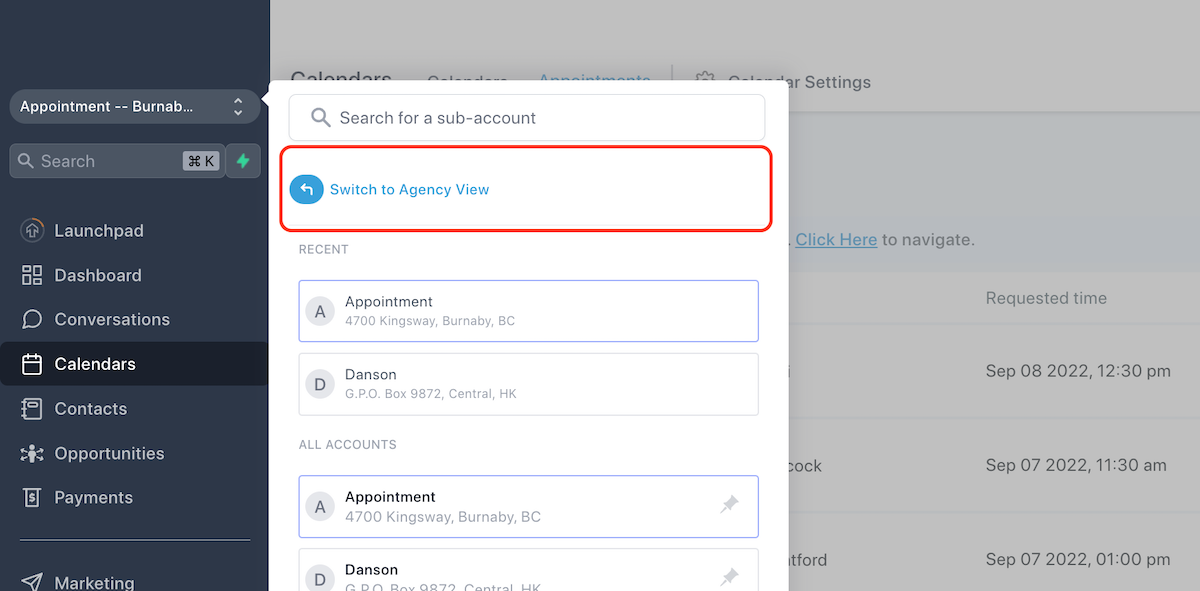 \n2. In the left sidebar, click Settings.\n
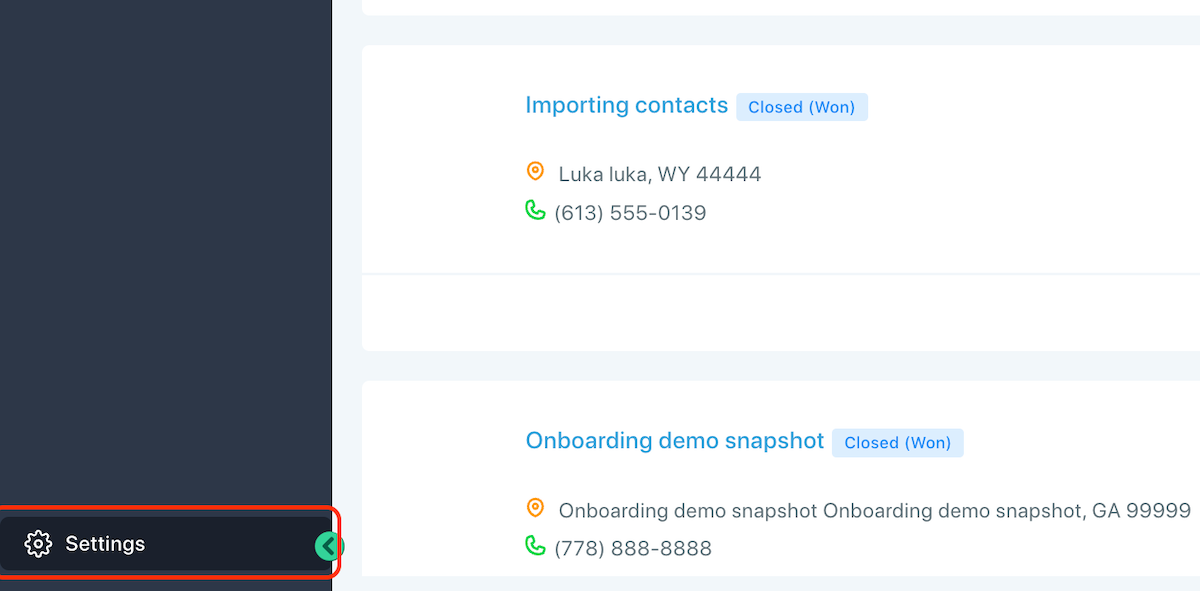 \n3. Go to Email Services.\n4. Open the Location Settings tab.\n
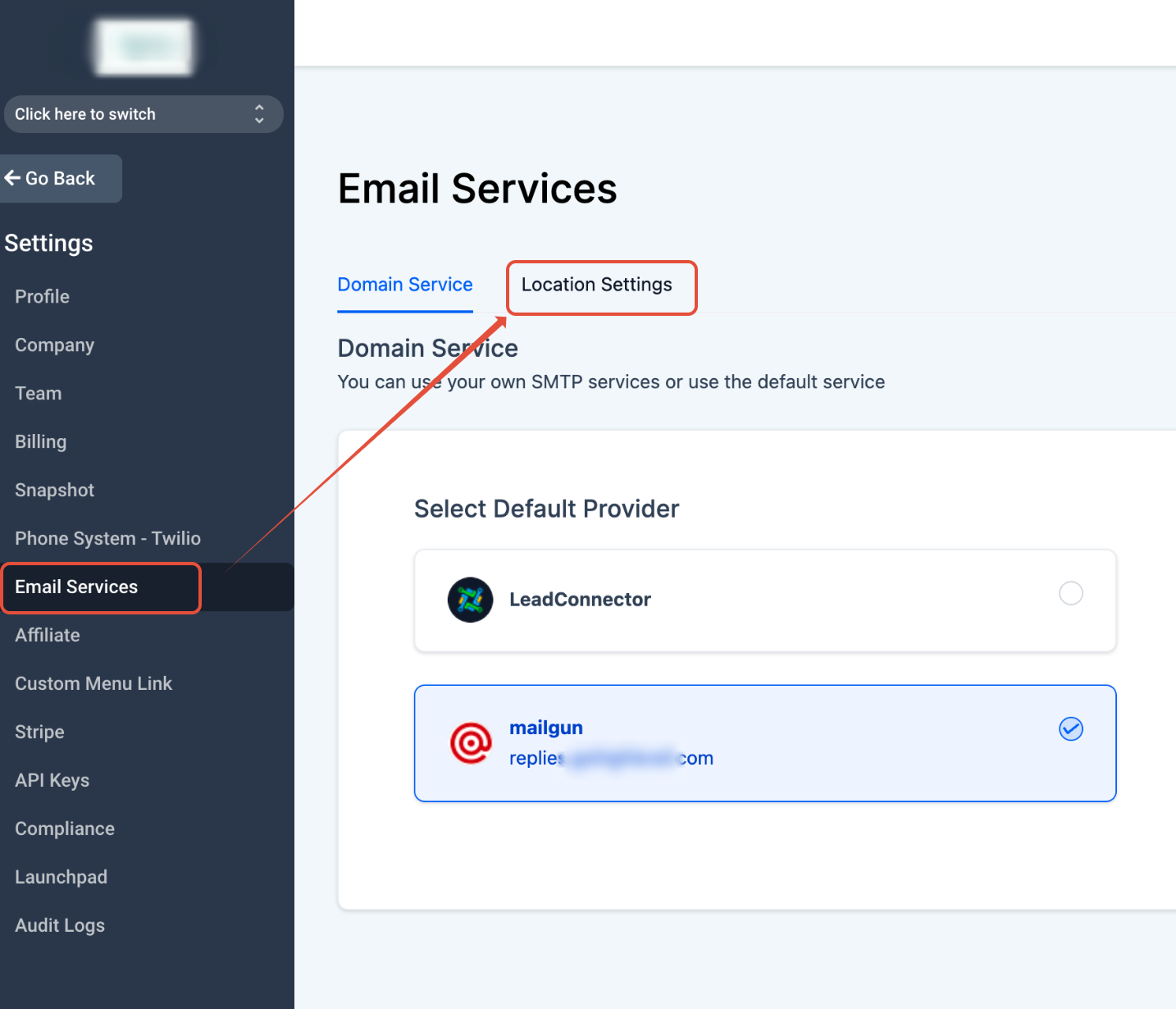 \n\nThis is where you control which sub‑accounts use Mailgun and which features (like verification) are enabled.\n\n### 2. Turn on Email Verification for a sub‑account\n1. In Location Settings, find the sub‑account you want to protect.\n2. Toggle Email Verification on for that account.\n
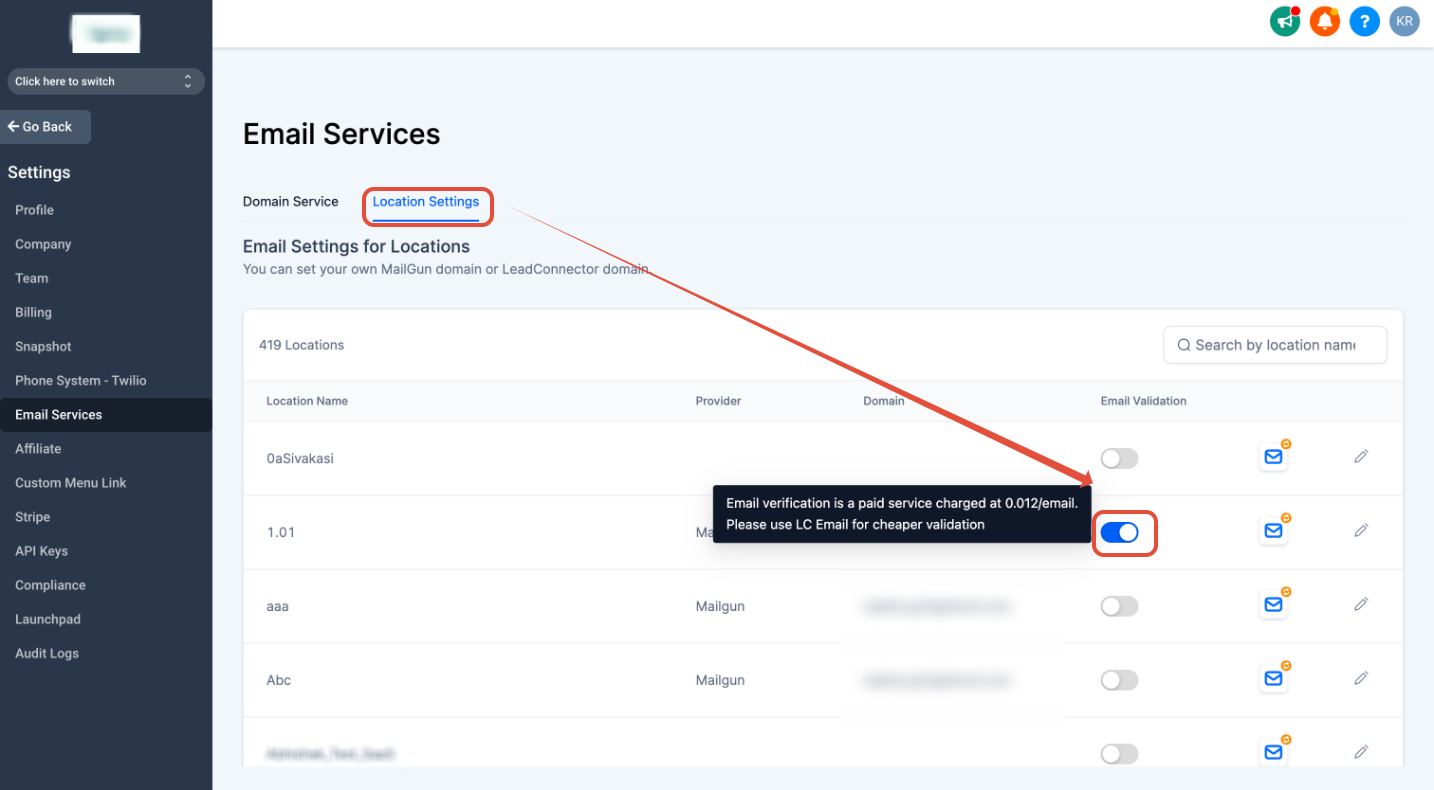 \n3. Confirm any Mailgun billing details so you understand the cost per verification.\n\n> Tip: If you manage multiple client sub‑accounts, roll this out gradually. Start with one or two high‑value accounts, confirm stats look good, then enable verification across the rest.\n\n## How to enable 90‑day re‑verification\n\nEmail addresses can go bad over time. People change jobs, abandon inboxes, or mark too much email as spam. Re‑verification gives you an automated safety net.\n\nTo enable it:\n\n1. From Agency View, click Sub‑Accounts.\n2. Search for and select the sub‑account you want to update.\n
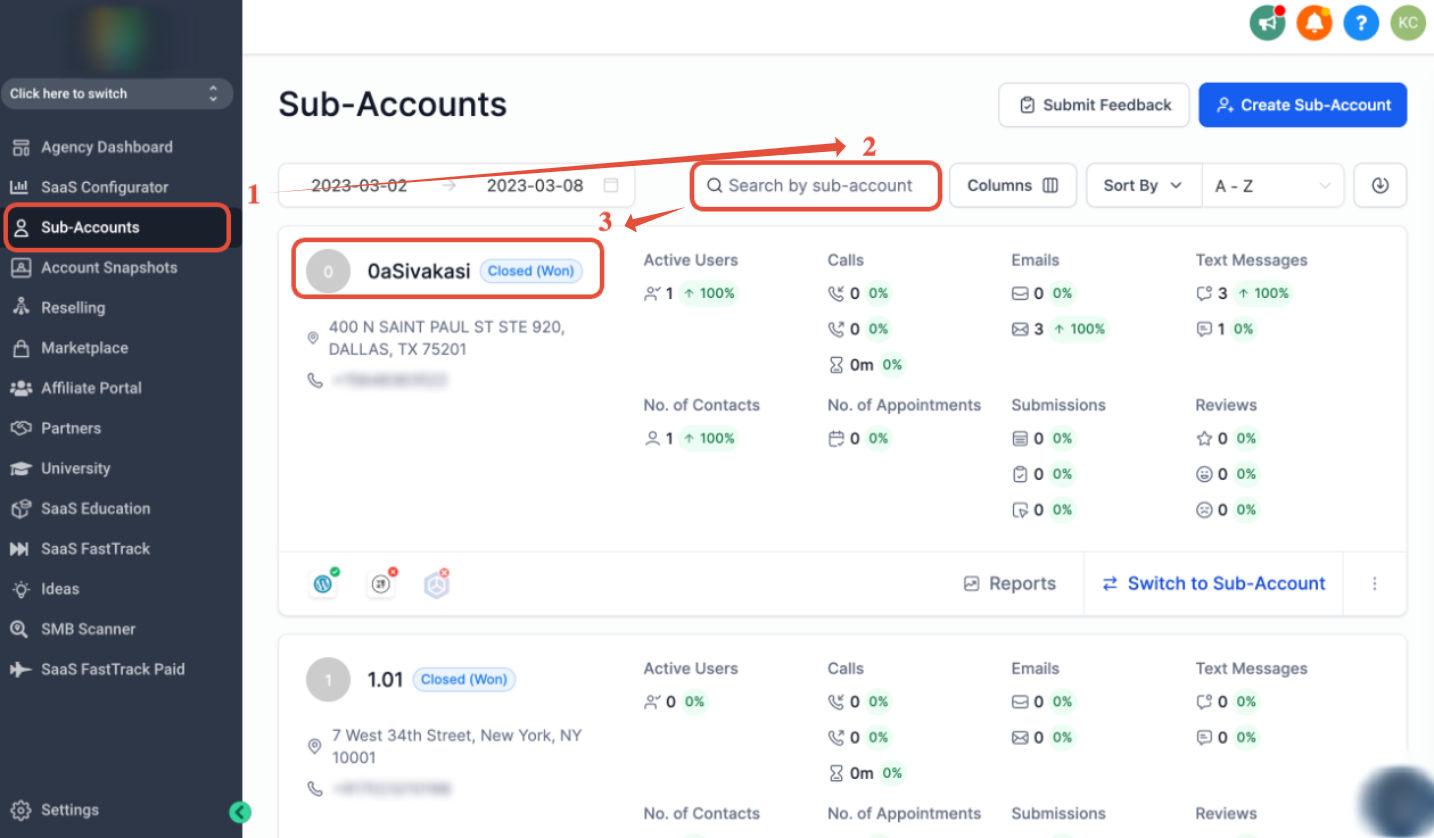 \n3. Scroll down to Email Advanced Settings.\n4. Toggle Re‑verification for 90 days on.\n
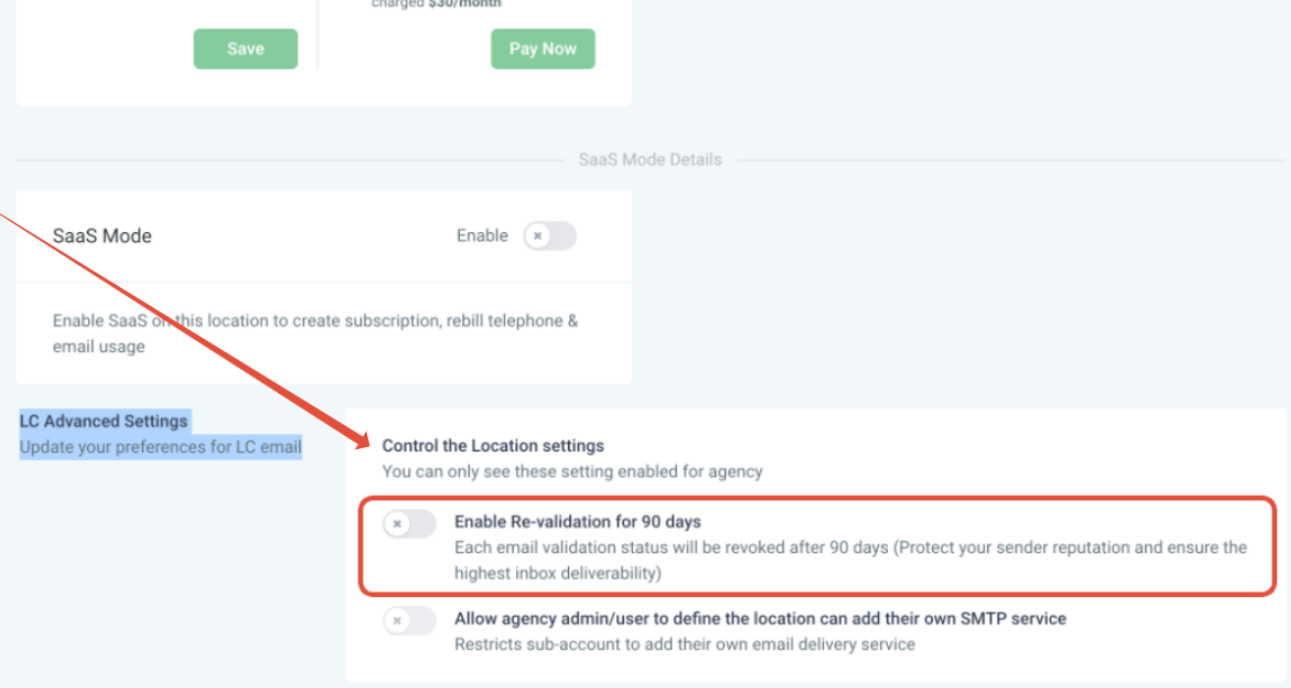 \n\nWith this enabled, Mailgun will periodically re‑check addresses so that contacts who were valid six months ago don’t quietly become a deliverability risk.\n\n## How Mailgun email verification behaves in daily use\n\nOnce verification is enabled, you don’t have to babysit it. It runs automatically at key moments:\n\n- When a new contact is created via form, survey, calendar, chat widget, import, or API.\n- When you send an email to a contact for the first time after enabling verification.\n- When re‑verification is on, every 90 days for existing contacts to make sure they’re still safe to email.\n\nBehind the scenes Mailgun checks the address against multiple signals, such as:\n\n- Syntax issues (is the address even formatted correctly?).\n- Whether the domain can receive mail.\n- Whether the address is known to bounce, be disposable, or appear on suppression lists.\n\nContacts then fall into two broad buckets:\n\n- Valid (safe to email) – okay for broadcasts, automations, and 1:1 emails.\n- Invalid or risky – should be suppressed, cleaned, or treated cautiously.\n\n## How to read verification status inside a contact record\n\nYou can see the verification status right where you already work—on the contact record.\n\n1. Open a contact in the appropriate sub‑account.\n2. Look down the right‑hand panel for the envelope icon.\n3. Hover over or click the icon to see the email status.\n\nWhat the colors mean:\n\n- Green envelope – the email is valid. You’re safe to include this contact in campaigns.\n- Red envelope – the address is invalid, too old, or has a negative history (hard bounces, spam complaints, unsubscribed, etc.). The specific error will explain why.\n\nRecommended actions for red/invalid addresses:\n\n- Stop including them in broadcasts and automations.\n- Consider moving them to a suppression list or marking them as DND.\n- If the contact is important (for example, a paying client), reach out via another channel to confirm a fresh email.\n\n## Deliverability best practices to get the most from verification\n\nVerification is powerful, but it works best as part of a bigger deliverability strategy. Combine it with these practices:\n\n### 1. Authenticate your sending domain\n\nBefore you lean on verification, make sure your Mailgun + GoHighLevel setup includes:\n\n- SPF: An SPF record in your DNS that authorizes Mailgun to send on behalf of your domain.\n- DKIM: A DKIM record so receiving servers can verify that emails weren’t tampered with.\n- DMARC: A DMARC policy to tell providers how to treat messages that fail SPF/DKIM, and to give you reports.\n\nThis trio, plus verification, dramatically reduces the chance of landing in spam.\n\n### 2. Protect your sender reputation with good sending habits\n\n- Warm up new sending domains and IPs gradually instead of blasting a huge list on day one.\n- Send consistent, relevant content that people actually open and click.\n- Honor unsubscribes immediately and make the unsubscribe link easy to find.\n\n### 3. Keep your lists clean beyond verification\n\nVerification stops a lot of bad addresses at the door, but you should still:\n\n- Periodically remove contacts who haven’t opened or clicked in a long time.\n- Avoid buying lists or scraping emails—these almost always contain spam traps and invalid addresses.\n- Use double opt‑in for high‑value or sensitive lists so people confirm their email before you start nurturing them.\n\n### 4. Build verification into your funnels and automations\n\nOnce you trust that Mailgun is cleaning new addresses, you can be more aggressive with automation:\n\n- Auto‑enroll verified contacts into onboarding or nurture sequences.\n- Route invalid contacts to a “recovery” workflow that asks for a new email via SMS or chatbot.\n- Build reports that compare results before and after enabling verification so clients can see the impact on bounce and open rates.\n\nIf you’d like help designing these kinds of systems, Revset Labs can handle the strategy and the build for you—so you get better deliverability without living inside DNS dashboards all day.\n\n## Where Revset Labs fits in\n\nRevset Labs is an AI automation and marketing agency focused on building revenue systems on top of tools like GoHighLevel.\n\nWhen it comes to email verification and deliverability, we can help you:\n\n- Configure Mailgun and domain authentication correctly.\n- Design funnels and automations that only enroll high‑quality, verified leads.\n- Build reports that make deliverability, engagement, and revenue easy to track.\n\nIf you want to move faster, you can have Revset Labs handle the technical setup while your team focuses on offers and content.\n\n## Next steps\n\n1. Enable email verification for your key sub‑accounts in GoHighLevel.\n2. Turn on 90‑day re‑verification to keep older lists clean automatically.\n3. Review a sample of contacts and clean up any invalid addresses Mailgun finds.\n4. Layer in authentication and list hygiene best practices so your sender reputation keeps improving.\n\nIf you’re not yet on GoHighLevel, now is the time to start. You can try GoHighLevel with this free trial link and have a deliverability‑friendly CRM from day one.\n\nAnd when you’re ready to automate more of this work, Revset Labs can help you turn clean data and strong deliverability into a predictable pipeline.
