
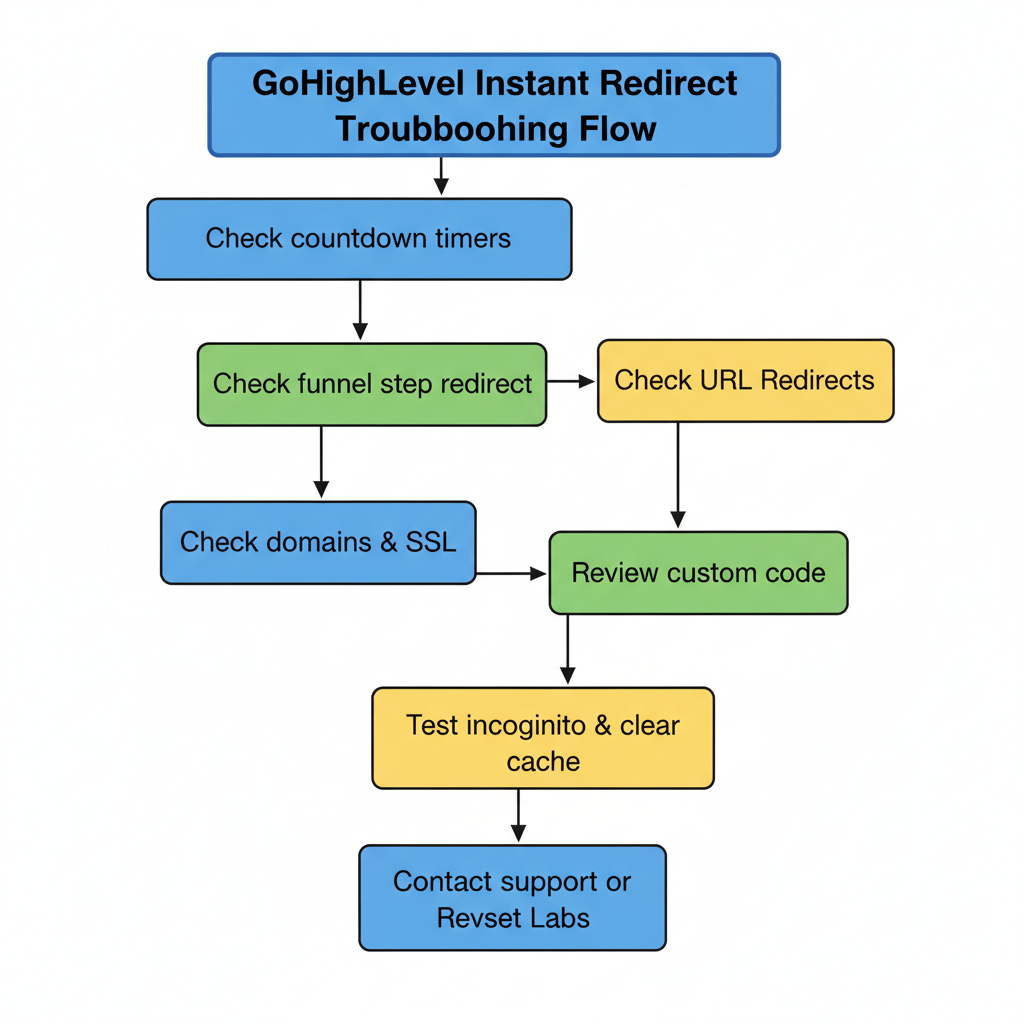
 GoHighLevel Instant Redirect Page: Funnel Troubleshooting Guide”>

When an instant redirect fires at the wrong time in your funnel, it quietly kills conversions. Visitors click an ad, land on your page for half a second, and are suddenly pushed somewhere else – a 404, the wrong offer, or a blank screen.
This guide walks you through a practical, step‑by‑step flow to troubleshoot instant redirect issues in GoHighLevel so every click lands exactly where it should.
Along the way, you’ll see where it makes sense to centralize your funnels, automations, and follow‑up inside GoHighLevel – and how Revset Labs can help you build a system that just works.
If you’re not already using GoHighLevel, you can start a free GoHighLevel trial here and follow this checklist as you set up or migrate funnels.
What the instant redirect page is really doing
In GoHighLevel, an instant redirect is simply a rule that sends a visitor to a different URL or funnel step based on:
- A countdown timer that has expired
- A funnel step setting that redirects the page
- A URL redirect rule at the account level
- Custom code that pushes the browser to another URL
Used correctly, instant redirects are powerful. You can:
- Move late buyers to a waitlist or price‑increase page
- Send unqualified traffic to a lower‑touch offer
- Redirect people away from deprecated pages to your current funnel
Used incorrectly, they create confusing loops and instantly drain paid traffic.
Common symptoms when instant redirects are broken
You’re likely dealing with an instant redirect problem in GoHighLevel if you notice things like:
- The funnel page flashes, then instantly jumps somewhere else
- Visitors land on the right URL but end up on the wrong step or offer
- Traffic loops between two URLs until the browser throws an error
- Some visitors see the page normally while others always get redirected
- Analytics show very low time‑on‑page despite strong traffic
The good news: most issues trace back to a small set of root causes. You can work through them in a consistent troubleshooting flow.
The high‑level troubleshooting flow
Before you start changing settings at random, walk through this simple flow:
- Check countdown timers on the page
- Check the funnel step’s redirect settings
- Check URL Redirects in GoHighLevel settings
- Confirm domains & SSL are configured correctly
- Review custom code and scripts on the page
- Test in incognito and clear cache
- Escalate to GoHighLevel support or Revset Labs if the issue persists
You can see the same logic visually in the supporting flowchart image on this page.
If you don’t yet have a centralized CRM and funnel platform, this is also a good moment to consolidate into GoHighLevel so all of these moving parts live in one place. You can launch your funnel stack on GoHighLevel with this free trial link.
Step 1 – Check countdown timers on the page
Countdown timers are one of the most common reasons a page instantly redirects.
In many funnel templates, the timer controls a redirect action: when the timer hits zero, send the visitor to another page or URL.
How to troubleshoot timers
- Open the funnel step inside GoHighLevel.
- Click on the countdown timer element.
- Check the “Action on Expiry” or similar setting.
- If the timer is set to redirect on expiry and the deadline has passed, the page will immediately send visitors away.
Fixes:
- Extend the deadline so visitors can see the page again.
- Change the action so the timer does nothing on expiry.
- Remove the timer entirely on evergreen pages.
Timers are great for urgency, but they must reflect a real offer timeline. If you’re rebuilding the funnel in GoHighLevel, this is a good moment to standardize how your time‑limited offers work across all campaigns.
Step 2 – Check the funnel step’s redirect settings
Each funnel step in GoHighLevel can have its own redirect behavior.
For example, you might have configured the step so that:
- After a form submission, visitors go to a thank‑you page
- After a purchase, they go to an upsell page
- After a specific condition, they’re sent to a fallback page
If these settings point to the wrong step or URL, you’ll see unexpected instant redirects.
What to review
- In the funnel builder, open the Settings for the problem step.
- Look for “On Submit”, “Next Step”, or “Redirect URL” options.
- Confirm the next step is the page you actually want.
- If you’re using a custom URL instead of another step, paste it into a new tab to confirm it loads correctly.
Pro tip: keep your core funnels inside GoHighLevel as connected steps instead of scattering them across external URLs. That way, you can use built‑in reporting, automations, and split‑testing. If you’re just getting started, Revset Labs can help you plan that funnel map and implement it end‑to‑end.
Step 3 – Check global URL Redirects in Settings
Beyond individual funnel steps, GoHighLevel also supports account‑level URL redirects. These are often used to:
- Redirect deprecated URLs to their latest versions
- Force visitors from old domains to new branded domains
- Clean up legacy landing pages
If a redirect rule is misconfigured, any visit to that URL will instantly jump somewhere else – even if your funnel step is set up correctly.
How to audit URL Redirects
- In GoHighLevel, go to Settings → URL Redirects.
- Look for rules that match the problem URL or path.
- Check for:
- Paths that are too broad (for example, redirecting
/funnelinstead of/funnel/old-offer) - Redirects that send visitors to a URL that no longer exists
- Chains of redirects that bounce between multiple URLs
- Paths that are too broad (for example, redirecting
Fixes:
- Narrow the path so the redirect only affects the old page.
- Update the destination URL to the current offer or funnel.
- Remove legacy redirects that are no longer needed.
If you need more structured help designing your redirect strategy (especially during a migration), consider looping in Revset Labs so you don’t accidentally tank SEO or paid campaigns.
Step 4 – Confirm domains and SSL are configured correctly
Sometimes the issue isn’t the redirect rule itself – it’s the domain or SSL configuration behind it.
Symptoms that point to a domain problem:
- Redirects behave differently on the root domain vs. subdomain
- Some visitors see security warnings or mixed‑content errors
- The page works on the GoHighLevel preview URL but not on your custom domain
Checks to perform
- Inside GoHighLevel, go to Settings → Domains and confirm:
- The domain or subdomain is marked as Connected
- SSL is active for the domain
- In your DNS provider, verify that CNAME and A records match GoHighLevel’s current recommendations.
- Test the same funnel step on both the preview URL and the custom domain to see where the issue appears.
If the redirect only misbehaves on the custom domain, you’re likely dealing with a domain or DNS misconfiguration.
Step 5 – Review custom code and scripts
Custom JavaScript, tracking pixels, or embedded widgets can all trigger redirects.
Common culprits include:
- Old split‑testing scripts that still point to retired URLs
- Third‑party tools that run A/B tests or personalization
- Custom scripts that manually call
window.locationorwindow.location.replace
How to debug scripts
- In the funnel editor, inspect the Custom JS/HTML areas.
- Temporarily comment out or remove non‑essential scripts.
- Test the page again in a new incognito window.
If the instant redirect stops when a script is removed, you’ve found the source.
From there, either:
- Update the destination URL inside the script, or
- Replace that script with a native GoHighLevel feature (for example, built‑in split testing).
If you’d like a technical partner to clean this up, Revset Labs can audit your funnel scripts and refactor them so you can track, test, and scale without breakage.
Step 6 – Test in incognito and clear cache
Sometimes the redirect works correctly for new visitors but misbehaves for you or your team because of:
- Cached versions of the page
- Old cookies or local storage values
- Browser extensions that inject their own scripts
Sanity checks
- Open the URL in an incognito/private window.
- Test on a second browser (for example, Chrome vs. Firefox).
- Try a different device or network if possible.
- Clear cache and cookies for the domain and reload.
If the problem only appears in your regular browser but not in incognito or on another device, it’s usually a local issue rather than a funnel configuration problem.
Step 7 – When to escalate to GoHighLevel support or Revset Labs
After you’ve walked through timers, funnel settings, URL redirects, domains, scripts, and browser checks, most instant redirect issues will be resolved.
If you’re still stuck, it’s time to escalate.
Contacting GoHighLevel support
- Gather exact URLs where the redirect occurs.
- Record a quick screen capture showing what happens.
- Note the browser and device you’re using.
- Share which of the troubleshooting steps above you’ve already tried.
You can also reference GoHighLevel’s official help article, "Instant Redirect Page – Funnel Troubleshooting", when you open a ticket.
Bringing in Revset Labs as your implementation partner
If you’d rather not spend hours hunting down edge‑case issues across timers, redirects, DNS, and scripts, Revset Labs can help.
Revset Labs is an AI automation and marketing agency that specializes in building and optimizing GoHighLevel funnels. We can:
- Audit your existing funnels and redirect rules
- Design clean, scalable funnel maps inside GoHighLevel
- Implement automations, follow‑up campaigns, and reporting
- Help you safely migrate from legacy tools without breaking redirects
Pair that with GoHighLevel’s all‑in‑one platform and you get a system that consistently routes every visitor to the right page, at the right time.
If you’re ready to simplify your tech stack and fix redirect headaches for good, start your free GoHighLevel trial here and then talk to Revset Labs about turning it into a revenue‑producing machine.