
This article is for agencies and healthcare-related businesses evaluating or already using GoHighLevel who need to understand how HIPAA compliance works, what the add-on actually covers, and how to enable it safely.

Why HIPAA compliance matters if you’re using GoHighLevel
If you work with healthcare, wellness, or any business that touches Protected Health Information (PHI), you can’t treat your CRM like any other SaaS tool. You’re legally required to protect patient data under HIPAA—and that includes what happens inside GoHighLevel.
HighLevel offers a dedicated HIPAA Compliance add-on that layers contractual and technical safeguards on top of the core platform. It’s optional, but once you enable it, it applies agency-wide and can’t be turned off.
In this guide, you’ll learn:
- What the GoHighLevel HIPAA add-on actually includes
- How pricing works (and why it’s a permanent decision)
- Which parts of your data are covered
- Exactly how to turn on HIPAA in HighLevel step-by-step
- FAQ-style answers to the most common questions agencies ask
If you’re planning to build HIPAA-conscious funnels, reminders, and patient journeys, GoHighLevel can be a strong foundation—especially when paired with smart automation strategy.
Ready to test HighLevel with HIPAA in mind? You can start a free GoHighLevel trial here: Start GoHighLevel free.
What the GoHighLevel HIPAA add-on includes
HighLevel’s HIPAA Compliance package is an account-wide add-on you activate at the agency level. Once enabled, it applies to all locations under that agency.
Key components include:
1. Data encryption for PHI
HighLevel encrypts all data at rest using AES-256, a widely adopted encryption standard. Practically, that means:
- Data is automatically encrypted before it’s written to disk.
- Authorized users see data normally inside the app, but the underlying records are encrypted.
- Encryption is handled by the underlying Google-managed infrastructure, using hardened key management systems.
You don’t need to wire up any custom encryption yourself—this is handled at the platform level.
2. Business Associate Agreement (BAA)
HIPAA requires a Business Associate Agreement between you (the covered entity or business associate) and any vendor that touches PHI.
With the HIPAA add-on:
- HighLevel provides a BAA as part of the package.
- You review and sign it directly in the Documents & Contracts area.
- Once signed, HIPAA controls are automatically applied—no manual switch or hidden toggle.
This BAA is what lets you confidently say, “Yes, our CRM provider is under a HIPAA-compliant agreement.”
3. Audit logging and access tracking
A core part of HIPAA is being able to tell who accessed what and when.
HighLevel’s HIPAA add-on:
- Enables audit logging for key PHI-related actions.
- Gives you visibility into access and usage patterns inside your account.
This doesn’t replace your internal policies, but it gives you the system-level trail you need for investigations or compliance reviews.
4. Multi-factor authentication (MFA) enforcement
With HIPAA enabled, MFA is enforced across users.
- Users must use multiple factors to log in, reducing the risk of credential-based breaches.
- This is especially important for remote teams or agencies with many subcontractors.
5. Agency-wide scope
When you purchase HIPAA for your agency:
- It applies across all locations under that agency.
- The add-on is permanent—once activated, it cannot be disabled, downgraded, or refunded.
That permanence is intentional: once PHI is stored under HIPAA-grade controls, it can’t simply be “un-encrypted” later.
If you’re just starting with GoHighLevel and know you’ll be working with PHI, it’s smart to plan your setup around HIPAA from day one. You can launch your account using this link: Launch GoHighLevel with HIPAA in mind.
Pricing: How much is GoHighLevel’s HIPAA add-on?
The GoHighLevel HIPAA Compliance package is billed at $297/month, added on top of your existing agency subscription.
Important details:
- Flat monthly fee: $297/month per agency account (not per sub-account).
- Non-refundable & non-cancellable: Once you pay and activate HIPAA, you’re committing for the lifetime of that agency account.
- Permanent scope: It applies agency-wide and cannot be removed or downgraded later.
Because of that permanence, you should only enable HIPAA when:
- You are actively working with PHI, or
- You have clear, near-term plans to onboard healthcare, wellness, or medical clients who require HIPAA.
When in doubt, talk to your legal counsel or compliance advisor before turning this on.
What data is covered under HighLevel HIPAA?
HighLevel’s HIPAA add-on is designed to cover any object that can store PHI, including:
- Contacts and contact custom fields
- Notes and conversations
- SMS/MMS message content
- Call and voice recordings
- Email bodies and attachments
- Form and survey submissions
- Calendars and booked appointments
- Invoices and payment-related records
The same protections extend to the HighLevel mobile app—Conversations, Contacts, and Calendars in the app inherit the same encryption and MFA controls.
What it doesn’t do is magically make your processes HIPAA compliant. You’re still responsible for:
- Configuring user roles and access appropriately
- Training staff on secure workflows
- Managing PHI retention and deletion policies
- Ensuring your other connected tools (e.g., third-party email services) are also covered under BAAs where needed
Need help architecting HIPAA-conscious automation, pipelines, and messaging flows? Revset Labs can design and implement end-to-end GoHighLevel systems for you.
How to enable HIPAA compliance in HighLevel (step-by-step)
Here’s the practical, click-by-click process to turn on the HIPAA add-on inside your agency account.
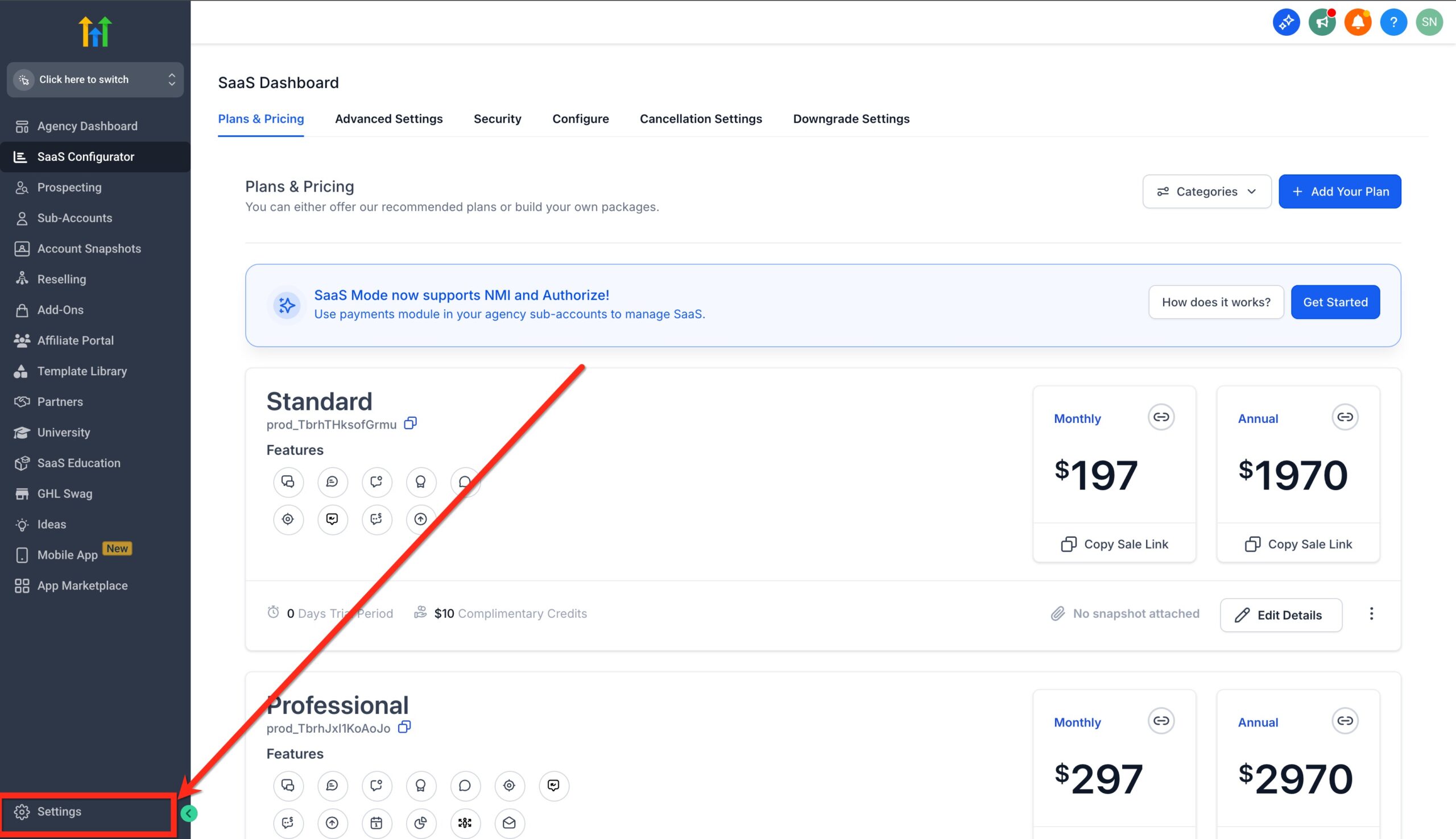
Step 1: Open Agency Settings
Log into your agency (not just a sub-account) and go to Settings.
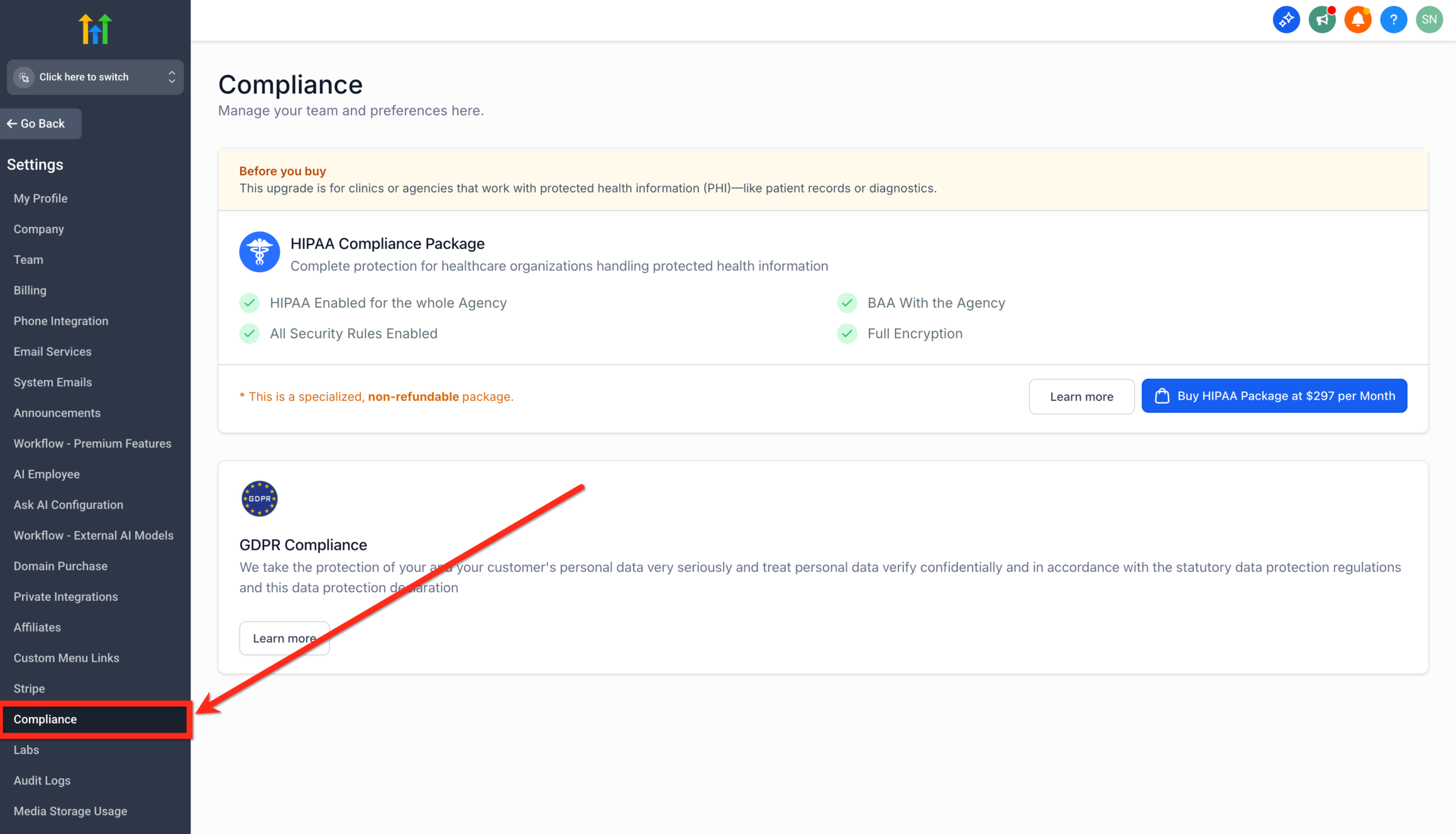
Step 2: Go to Compliance
In the left-hand navigation, click Compliance. This is where HighLevel centralizes agency-level compliance controls.
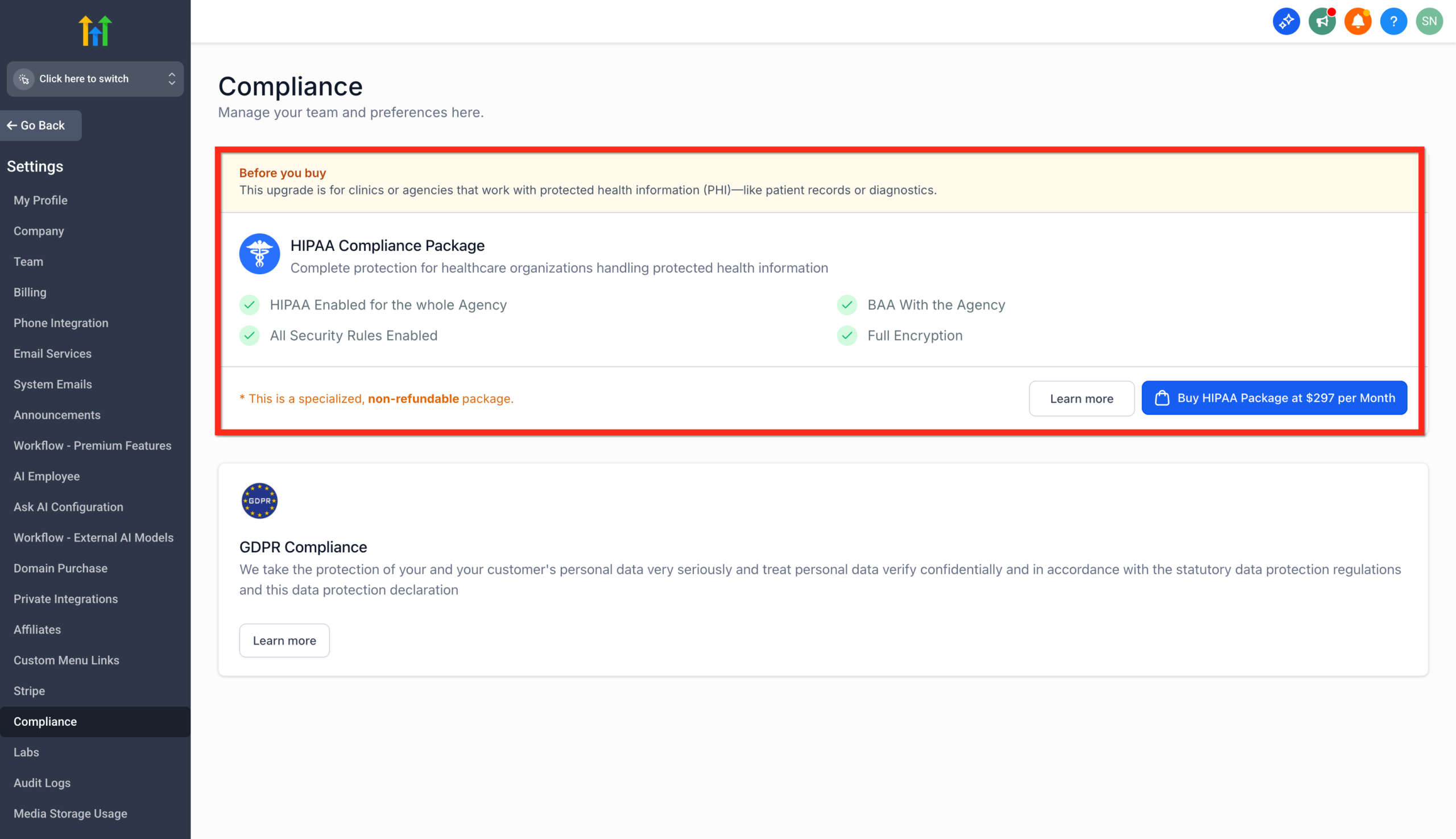
Step 3: Review the “Before You Buy” details
On the HIPAA page, carefully review:
- What the package includes
- The $297/month pricing
- The permanent nature of the add-on (no refunds, no downgrades)
This page is designed to make sure you fully understand the commitment before moving forward.
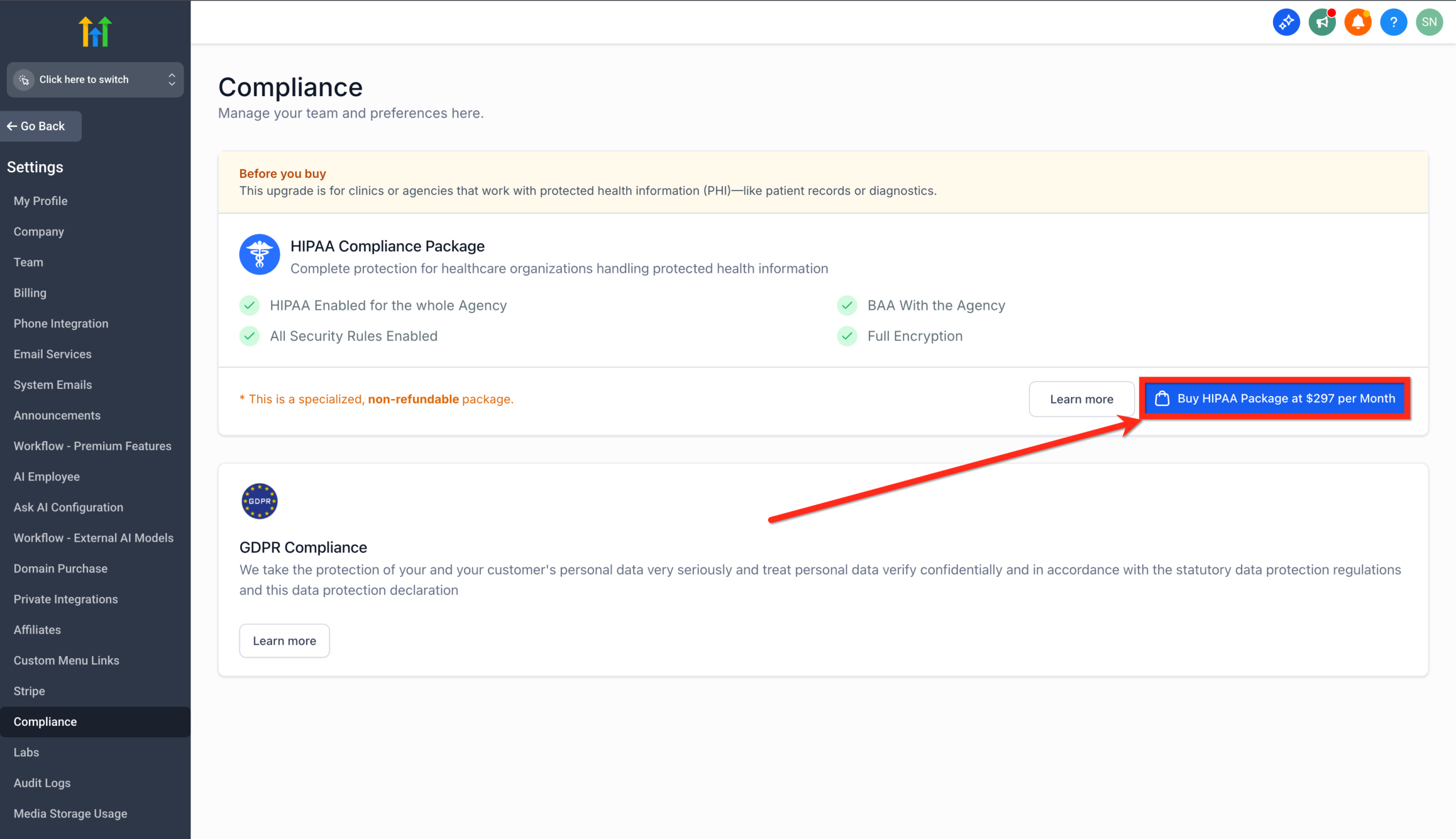
Step 4: Confirm the $297/month subscription
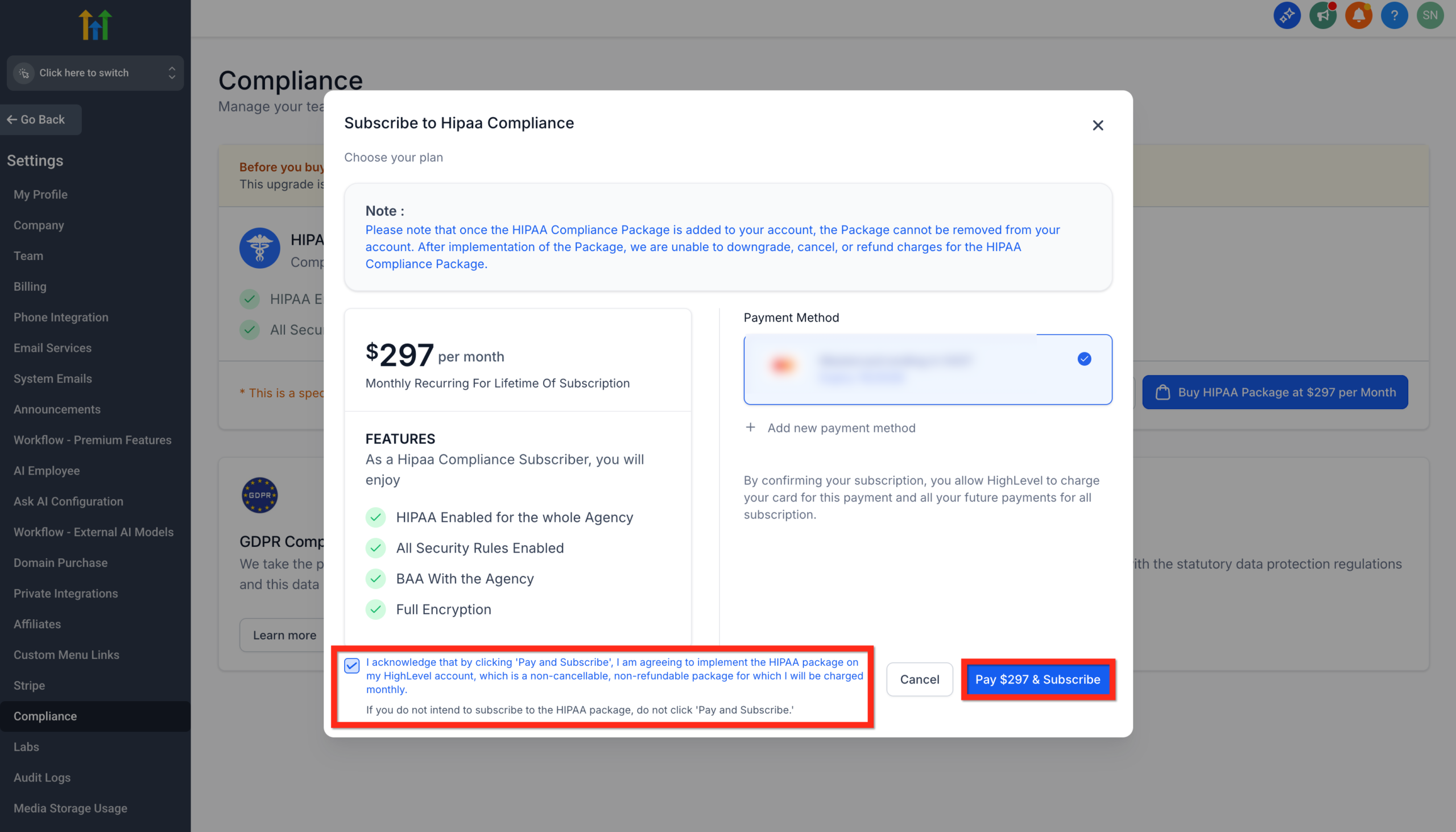
Click “Buy HIPAA Package at $297 per Month”.
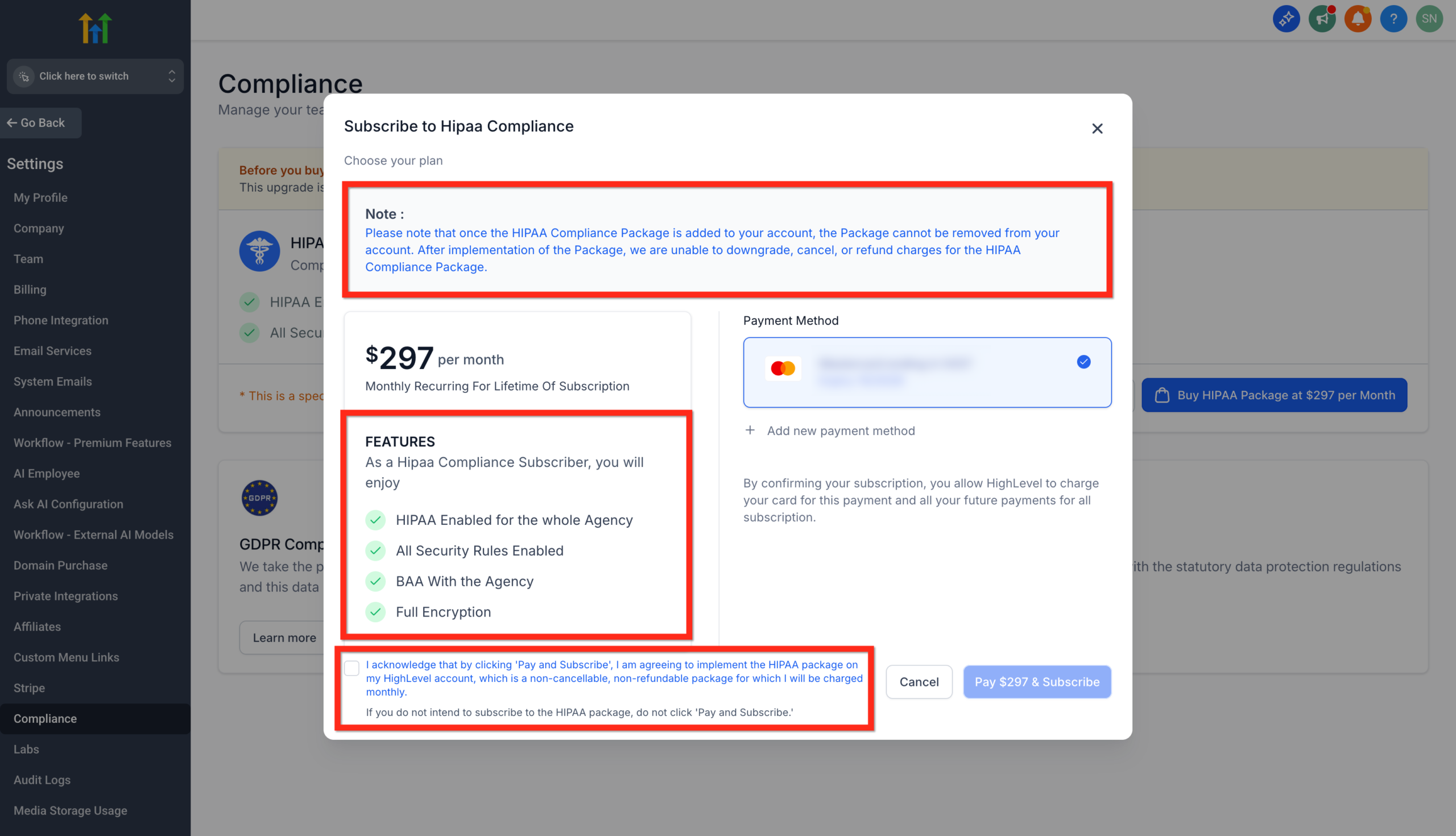
You’ll be prompted to:
- Choose or add a payment method
- Confirm that you understand the recurring charge
- Acknowledge that HIPAA is permanent for this agency account
Step 5: Sign the BAA in Documents & Contracts
After payment, HighLevel routes you into the Documents & Contracts system to review and sign your BAA.
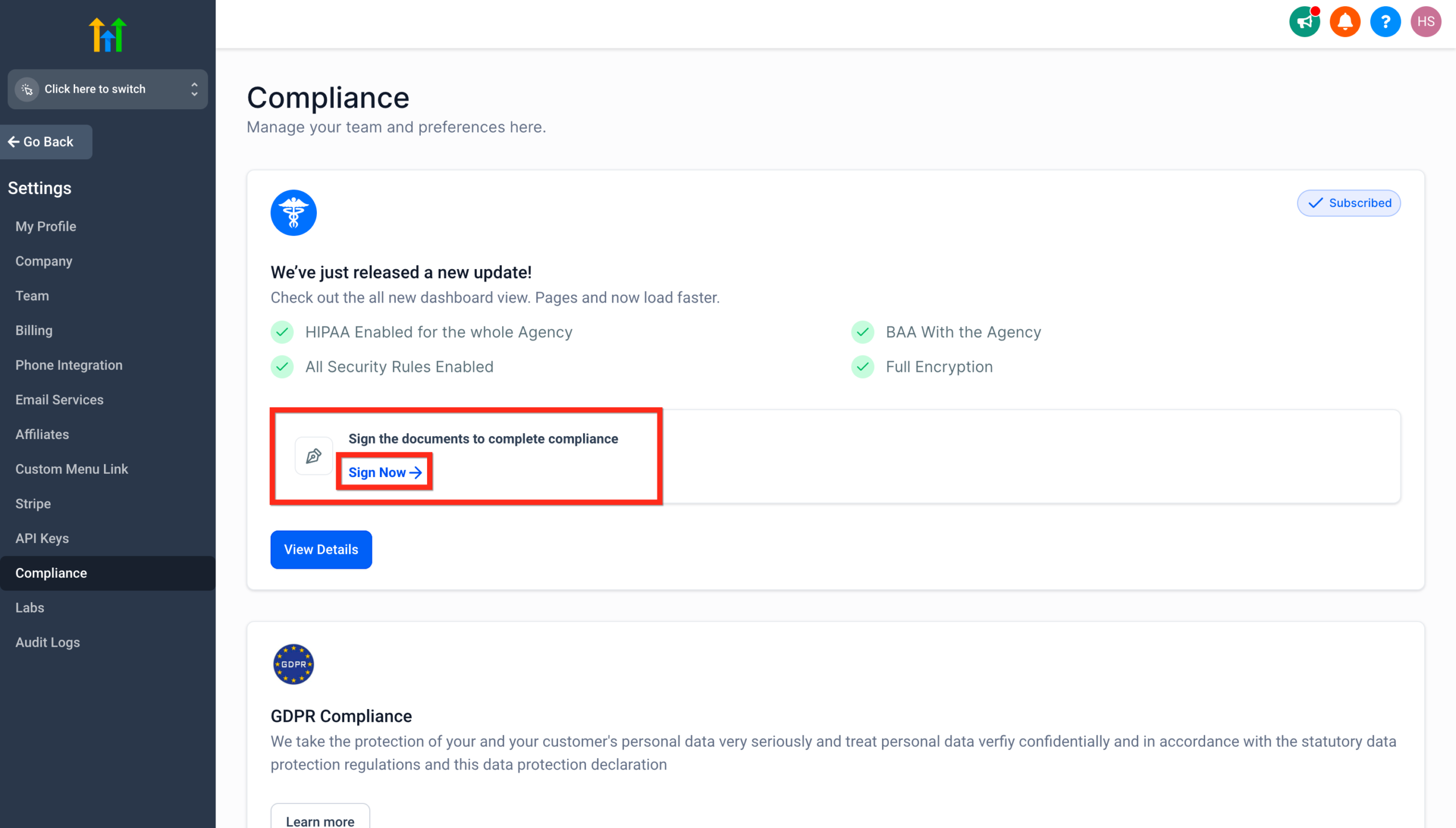
From here you can:
- Review the full agreement text
- Update signer details (name, title, company) directly in the document
- Sign electronically—no external tools or PandaDoc required
Step 6: HIPAA is automatically enabled
Once the BAA is fully signed:
- HighLevel automatically enables HIPAA compliance for your agency
- You do not need to toggle anything manually
- All relevant data classes begin inheriting HIPAA-grade protections
At this point, you should:
- Enforce good password policies for all users
- Review which team members actually need access to PHI
- Tighten role permissions and location-level access
If you’re launching GoHighLevel for the first time, this is also a great moment to map out your ideal funnels, intake forms, and follow-up automations.
Want a done-for-you implementation of HIPAA-safe funnels, appointment flows, and follow-up automations? Talk to Revset Labs about a GoHighLevel build-out, then launch your account via this link: Start GoHighLevel with Revset Labs.
How to View and Download Your BAA Document
Your BAA lives inside HighLevel’s Documents & Contracts system and can be:
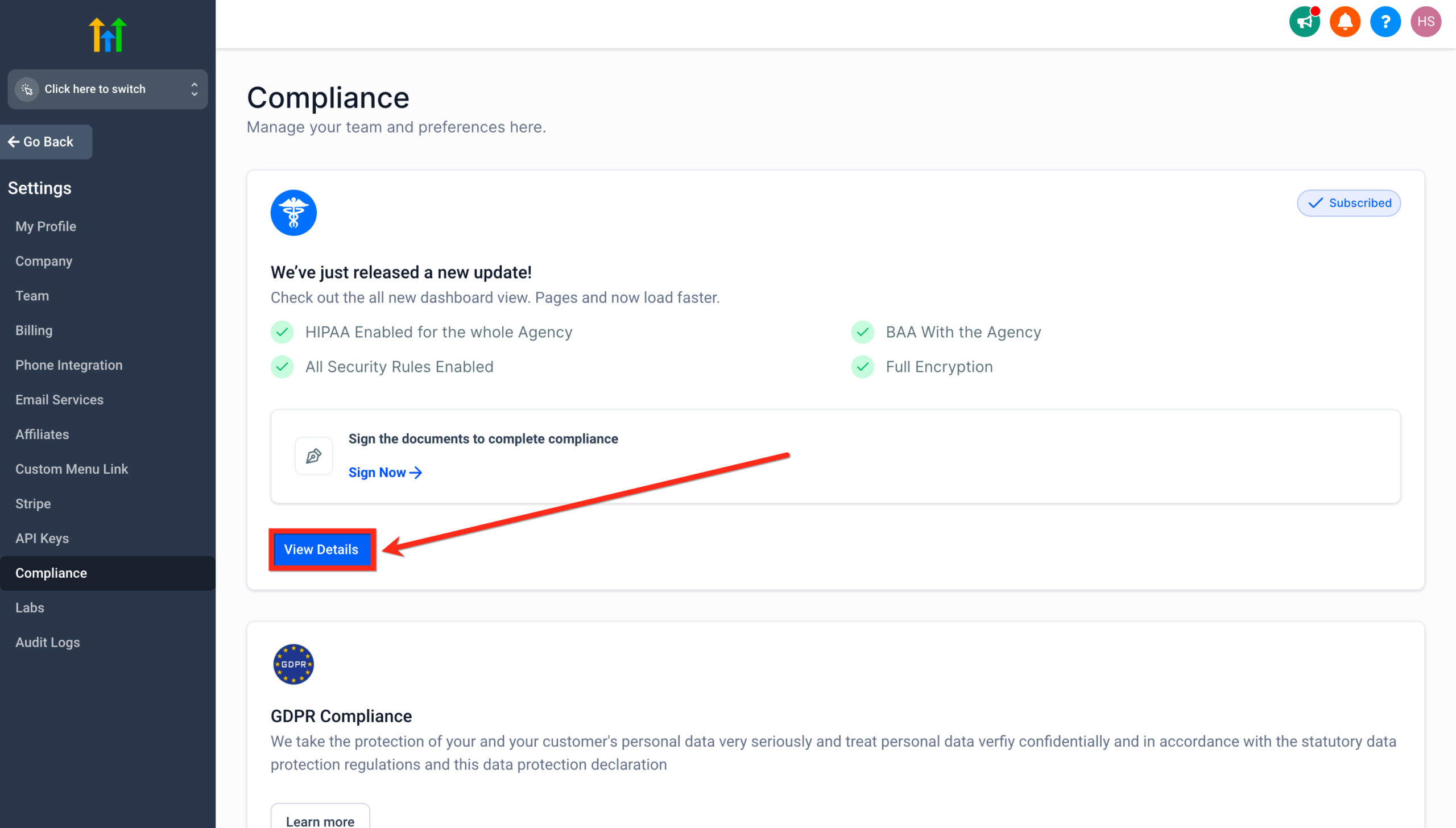
- Viewed any time from Settings → Compliance
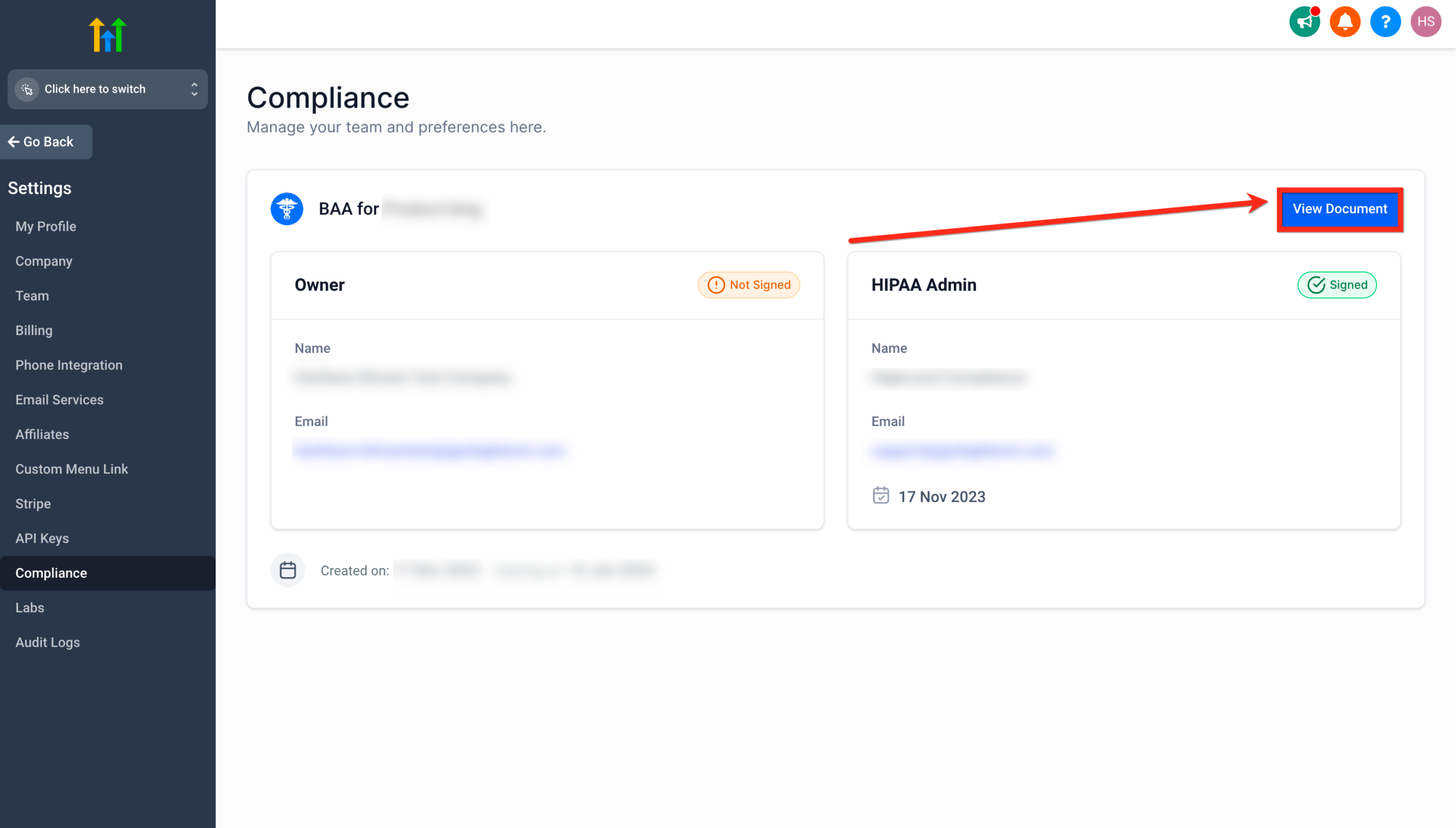
- Downloaded for your files or to share with compliance reviewers
- Updated for signer details (for example, if ownership or leadership changes)
You no longer need a separate document workflow tool just to manage the BAA—everything stays inside your GoHighLevel environment.
FAQs about GoHighLevel HIPAA compliance
Below are concise answers you can use when clients or internal stakeholders ask about HIPAA inside GoHighLevel.
Can I cancel or remove the HIPAA Compliance package later?
No. Once HIPAA is enabled for an agency, it is permanent. You cannot cancel, downgrade, or remove it.
Is the HIPAA fee refundable if we change our mind?
No. The $297/month HIPAA fee is non-refundable.
Who should enable HIPAA in GoHighLevel?
You should enable HIPAA if:
- You are a covered entity or business associate handling PHI, and
- You intend to store, process, or transmit PHI using GoHighLevel (e.g., intake forms, appointment details, care-related messaging).
If you only work with non-PHI marketing data, HIPAA may not be necessary—but confirm that with your legal counsel.
Can a HIPAA-compliant sub-account be transferred between agencies?
Yes. A sub-account can be transferred from one agency to another as long as both agencies have HIPAA enabled.
Is the HighLevel mobile app covered under HIPAA?
Yes. The Conversations, Calendars, and Contacts features inside the mobile app inherit the same encryption and MFA requirements.
What data types are included under HIPAA protections?
All major objects that can contain PHI—contacts, custom fields, notes, messages, call recordings, emails, forms, surveys, calendars, and invoices—are covered.
How Revset Labs can help you go live with HIPAA-safe systems
Turning on HIPAA is only half the story. The other half is designing workflows, funnels, and automations that respect those rules while still driving revenue.
Revset Labs is an AI Automation and Marketing Agency that specializes in:
- Architecting HIPAA-conscious GoHighLevel workspaces
- Designing patient and client journeys that respect consent and privacy
- Building appointment, reminder, and follow-up automations
- Integrating your website, landing pages, and EMR/PM tools where appropriate
If you want expert help to plan and implement a HIPAA-ready GoHighLevel setup, Revset Labs can handle the heavy lifting while your team focuses on operations and care.
When you’re ready to move forward, you can:
- Spin up your GoHighLevel account with HIPAA in mind using this link.
- Partner with Revset Labs to blueprint and build the compliant funnels, automations, and reporting you need.
For reference, you can also explore our broader GoHighLevel onboarding content, like this deep dive on contact management.
Disclaimer: This article is for informational and educational purposes only and does not constitute legal advice. Always consult qualified legal counsel to interpret HIPAA requirements for your specific organization.