
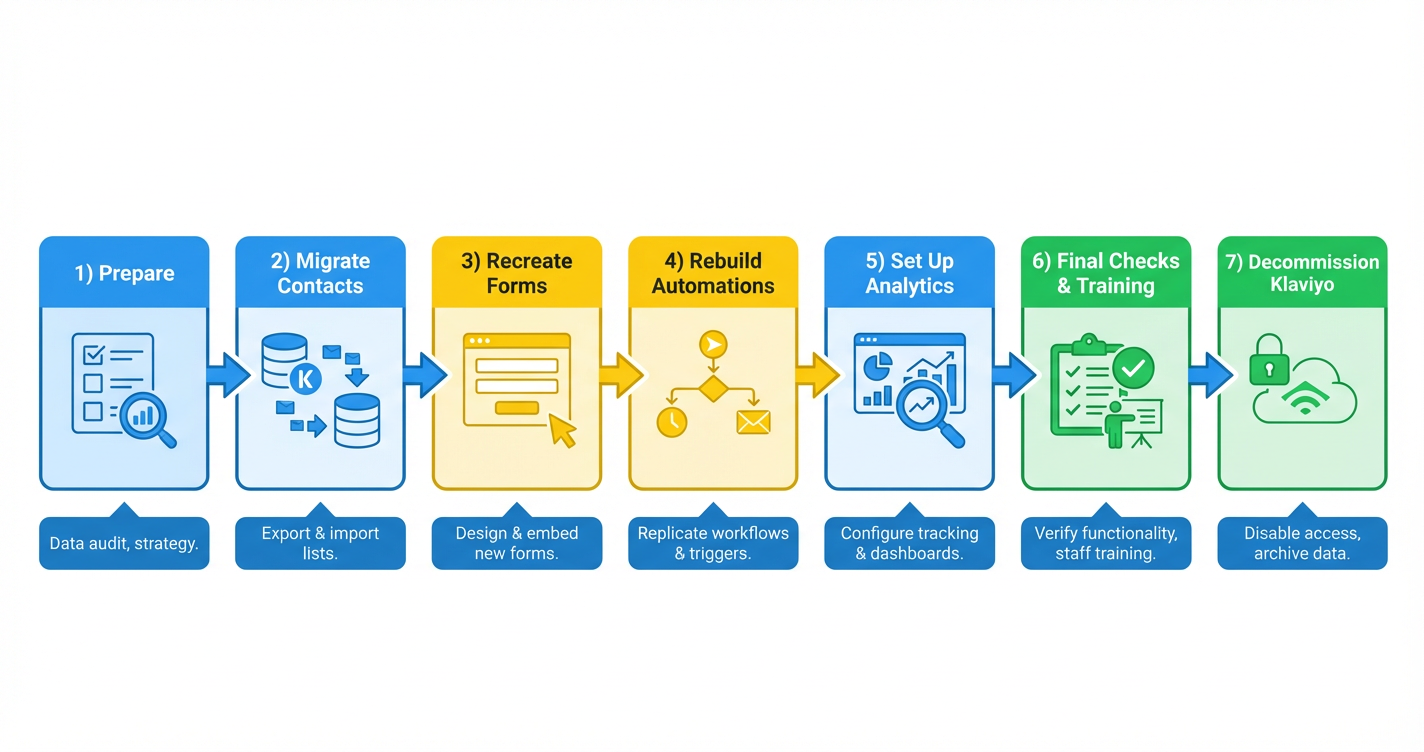

Migrating from Klaviyo to HighLevel is a big move – but if you rely on automation, email, and SMS to drive revenue, it can also unlock a much more powerful, all‑in‑one system.
This guide walks you through a complete Klaviyo to HighLevel migration, step by step. You’ll learn how to move contacts, segments, forms, automations, and campaigns without losing data, breaking journeys, or confusing subscribers.
Along the way, you’ll see where HighLevel can actually improve on what you had in Klaviyo – especially when it comes to CRM, pipelines, and multi-channel automation.
If you don’t have a HighLevel account yet, you can start a free trial here: Start your free GoHighLevel trial.
1. Prepare your Klaviyo to HighLevel migration
A smooth migration starts with clarity. Before you move any data, make sure you understand exactly what you have in Klaviyo and what you want to reproduce (or improve) inside HighLevel.
1.1 Review your current Klaviyo setup
List out all the moving parts in your current account:
- Contacts (profiles) – active subscribers, customers, and leads
- Segments and lists – engaged subscribers, buyers, VIPs, trial users, etc.
- Automations (flows) – welcome sequences, abandoned cart flows, post-purchase, win-backs
- Forms and popups – lead capture forms, newsletter signup, exit-intent overlays
- Email and SMS campaigns – one-off broadcasts, promotions, and launches
For each key flow or campaign, document:
- What triggers it (signup, purchase, tag, page visited, etc.)
- The steps and timing between messages
- Any filters or conditional splits
- The goal of the journey (first purchase, upsell, repeat purchase, booking, etc.)
Screenshots or exported diagrams are useful here – they’ll make it easier to rebuild workflows inside HighLevel.
1.2 Define your migration objectives
Next, get clear on why you’re moving from Klaviyo to HighLevel. Common reasons include:
- You want email, SMS, and CRM in a single platform instead of multiple tools
- You need better sales pipelines and opportunity tracking
- You want more advanced automation across channels (email, SMS, calls, pipelines, tasks)
- You’re consolidating tools to save on monthly subscription costs
Write down 3–4 concrete objectives, for example:
- “Migrate all active Klaviyo flows and campaigns without losing deliverability”
- “Use HighLevel workflows to replace Klaviyo flows and expand into SMS + pipeline automation”
- “Give sales reps full visibility on what contacts are doing in our marketing automations”
You’ll use these objectives later to decide what needs a 1:1 rebuild and where it makes sense to simplify or upgrade.
1.3 Back up your Klaviyo data
Before you touch anything, make sure you have a clean backup:
- Export contacts (profiles) with all available fields
- Export segments and lists or document their filter logic
- Export key analytics for high-performing flows and campaigns (open, click, conversion rates)
- Store exports securely so you can always roll back or re-check your data
If you want an expert team to architect your migration with minimal risk, Revset Labs can help you design the right HighLevel setup and migration roadmap so nothing critical is missed.
2. Migrate contacts and segments from Klaviyo to HighLevel
With your prep done, you can start the actual data migration. The goal here is to move clean, well-mapped contact data into HighLevel.
2.1 Export contacts from Klaviyo
In Klaviyo:
- Go to Profiles.
- Filter or select the contacts you want to export (for many accounts, this will be all profiles).
- Export as CSV (often wrapped in a .zip file) including:
- Phone number (including country code)
- First and last name
- Custom properties (lifetime value, last product purchased, subscription type, etc.)
- Subscription and consent fields (email/SMS marketing consent)
If you rely heavily on segments, either:
- Export each important segment as its own CSV, or
- Document the segment logic so you can recreate it as a Smart List in HighLevel.
2.2 Import contacts into HighLevel
In HighLevel:
- Go to Contacts → Import Contacts.
- Upload your CSV file(s).
- Map each Klaviyo field to the right HighLevel field:
- Basic fields: email, phone, name
- Custom fields: map important properties to Custom Fields in HighLevel
- Tags: use tags to mark source (e.g.
klaviyo-import,klaviyo-vip-buyers)
- Run a small test import first (for example 50 records) to validate field mapping.
- Once validated, import the full list.
2.3 Recreate segments as Smart Lists
HighLevel uses Smart Lists and filters to replace Klaviyo segments.
- Go to Contacts → Smart Lists.
- Rebuild your most important segments using filters such as:
- Recent activity (opened, clicked, replied)
- Tags
- Custom field values
- Pipeline stage or opportunity status
- Prioritize segments that feed automations (e.g. “Engaged last 30 days”, “New customers”, “Trial users”).
Tip: As you import into HighLevel, you can improve your segmentation by combining marketing behavior with CRM data like pipeline stages and deal size.
If you want to skip the manual mapping and segment recreation, Revset Labs can help you design the ideal contact structure and handle the heavy lifting inside HighLevel.
3. Recreate web forms and capture points in HighLevel
Your forms and popups are the front door to your list. Getting them right in HighLevel ensures new leads go straight into your new workflows instead of Klaviyo.
3.1 Rebuild forms in HighLevel
In HighLevel:
- Go to Sites → Forms.
- Create a new form for each active Klaviyo form:
- Match required fields (email, name, phone, custom questions)
- Mirror any key styling elements for brand consistency
- Add hidden fields or tags if you used them in Klaviyo (e.g.
source=blog-popup)
- Under Options or Automation, configure what happens on submission:
- Add a specific tag
- Add contact to a workflow
- Notify your team
3.2 Replace Klaviyo embeds with HighLevel embeds
On your website or landing pages:
- Swap Klaviyo embed codes with the new HighLevel form embeds
- Clear any old caching or CDN layers so new forms display correctly
- Submit a few test entries to confirm:
- The form looks correct
- Contacts appear in HighLevel with the right fields and tags
- The right workflows fire after submission
Once your capture points are live in HighLevel, you’re no longer dependent on Klaviyo to grow your list. From here, you can plug those leads directly into HighLevel pipelines, SMS sequences, and more.
If you want to go beyond a basic 1:1 form rebuild, Revset Labs can help you design higher-converting funnels and forms tailored to HighLevel.
4. Recreate Klaviyo automations and campaigns in HighLevel
Flows are where most of your revenue is generated. Treat this step carefully and test thoroughly.
4.1 Inventory your Klaviyo flows
From Klaviyo, create a simple inventory of:
- Lifecycle flows: welcome series, onboarding, post-purchase, win-back, re-engagement
- Behavioral flows: abandoned cart, browse abandonment, product interest
- Transactional or trigger-based flows: order confirmations, shipping updates (if applicable)
For each flow, note:
- Trigger (list joined, tag added, event fired)
- Number of steps
- Delays between steps
- Key filters and splits
- Primary KPI (first purchase, repeat order, booked call, etc.)
4.2 Rebuild flows as HighLevel workflows
In HighLevel:
- Go to Automation → Workflows.
- For each critical Klaviyo flow, create a new workflow using:
- Triggers: form submitted, tag added, pipeline stage changed, appointment booked, etc.
- Actions: send email, send SMS, add tag, update opportunity, assign to user, wait steps.
- Recreate the sequence timing and logic from Klaviyo, but ask:
- Can we simplify the logic now that we’re in a full CRM?
- Should we add SMS touchpoints for key moments?
- Should we create pipeline opportunities when someone reaches a certain stage?
- Use HighLevel’s visual builder to mirror (or improve) the original experience.
After building each workflow:
- Run test contacts through it
- Confirm emails and SMS send correctly
- Verify tags, opportunities, and pipeline updates behave as expected
4.3 Recreate email and SMS campaigns
For ongoing campaigns:
- Go to Marketing → Emails and Marketing → SMS.
- Rebuild your standard templates:
- Brand header and footer
- Typography and basic layout
- Reusable content blocks (product rows, testimonial sections, CTAs)
- Recreate your key recurring campaigns (e.g. weekly newsletter, monthly promotion) with the appropriate Smart Lists as audiences.
- If you used A/B testing in Klaviyo, plan tests in HighLevel as you go live.
At this stage, you have the foundations to turn HighLevel into your main email and SMS engine. If you want to shortcut the experimentation curve, start your free GoHighLevel trial and then work with Revset Labs to plug best-practice workflows straight into your account.
5. Set up analytics and reporting in HighLevel
You don’t want to lose visibility just because you switched platforms. Your goal is to replicate your key Klaviyo reports and then extend them with CRM and pipeline data.
5.1 Capture baseline performance from Klaviyo
Before you fully shut down Klaviyo, record:
- Open rates, click rates, and conversion rates for your top flows
- List growth and unsubscribe trends
- Revenue attributed to email/SMS (if tracked)
These benchmarks help you validate that your HighLevel setup is performing at least as well (and ideally better).
5.2 Build equivalent (and better) reports in HighLevel
In HighLevel:
- Use the Dashboard and Reporting areas to track:
- Email and SMS performance
- Pipeline value and conversion rates
- Appointment bookings and show-up rates
- Create saved reports and dashboards for:
- Marketing performance (campaigns + workflows)
- Sales performance (pipeline stages, opportunity velocity)
- Combined views that show how campaigns drive pipeline and revenue
Because HighLevel is a true CRM, you can go beyond what was possible in Klaviyo alone and connect marketing touches to closed revenue.
Revset Labs can help you design dashboards that your leadership team can rely on for daily decision-making, wired directly into your HighLevel instance.
6. Run final checks, train your team, and optimize
Once the main pieces are in place, it’s time to validate everything end-to-end.
6.1 Validate data and automations
Work through this checklist:
- New leads from forms land in HighLevel (not Klaviyo)
- Contacts have the right tags and custom fields
- Key Smart Lists match your expectations
- Workflows fire when they should, and stop when goals are met
- Emails and SMS send with correct branding and links
Run test contacts and real-world scenarios through your funnels and pipelines.
6.2 Train your team on HighLevel
Schedule focused training for:
- Marketing: campaigns, workflows, forms, tracking
- Sales: pipelines, opportunities, tasks, call tracking
- Operations/support: shared inboxes, conversations, automations that touch customers
Encourage your team to use HighLevel’s built-in help resources and community, and document your own internal playbooks as you go.
If you want done-for-you onboarding, Revset Labs can architect your workflows, configure your account, and train your team so they’re productive in HighLevel from day one.
6.3 Monitor and iterate
Over the first 30–60 days:
- Compare HighLevel performance to your Klaviyo baselines
- Watch for deliverability issues, broken links, or automation gaps
- Optimize subject lines, offers, and sequences based on early results
The goal isn’t just a 1:1 migration; it’s to use HighLevel to outperform what you had before.
7. Decommission Klaviyo safely
Only once you’re confident HighLevel is fully handling your marketing and CRM should you shut down Klaviyo.
7.1 Run a short transition period
For a couple of weeks, you may choose to:
- Keep Klaviyo active but stop sending campaigns
- Monitor whether any live forms or flows still point to Klaviyo
- Confirm all revenue-driving flows are working correctly in HighLevel
7.2 Cancel your Klaviyo subscription
When you’re satisfied that:
- All essential data is backed up
- HighLevel owns your active marketing and CRM
- No live traffic is hitting Klaviyo forms or flows
– then follow Klaviyo’s cancellation process to close out your subscription.
7.3 Run a post-migration review
Finally, review the project:
- What worked well in your migration approach?
- Where did you hit friction or uncover gaps?
- Which HighLevel workflows, dashboards, or automations had the biggest impact?
Capture these learnings so you can keep improving your HighLevel setup over time.
Next steps: Turn your HighLevel account into a growth engine
At this point, you’ve successfully migrated from Klaviyo to HighLevel, moved your core automations, and stood up reporting.
To get the full benefit of HighLevel:
- Expand your automations beyond email into SMS, pipelines, and tasks
- Use HighLevel forms, funnels, and calendars to capture and convert more leads
- Layer in advanced segmentation that combines marketing behavior with CRM and sales data
If you’re ready to centralize your marketing and sales in one place, you can launch your GoHighLevel free trial and start implementing these steps right away.
And if you want an expert partner to architect and implement everything for you, Revset Labs – an AI Automation and Marketing Agency – can help you:
- Design your ideal HighLevel architecture
- Migrate from Klaviyo without breaking key revenue flows
- Build high-converting funnels, automations, and dashboards tailored to your business.
That way, your move from Klaviyo to HighLevel becomes the starting point for a more scalable, measurable growth engine.