
What Is GoHighLevel Premium Customer Support?
GoHighLevel Premium Customer Support is an add-on service designed for agencies that rely on HighLevel for mission‑critical operations and can’t afford slow responses or long back‑and‑forth threads.

With Standard Support, you still get 24/7 coverage via chat, tickets, and help docs—but you’re in the general queue with every other customer.
With Premium Customer Support, you get:
- A dedicated Technical Account Manager (TAM) who understands your account, workflows, and history.
- A private Slack channel where you and your team can talk directly to the Premium Support team.
- Priority handling for tickets and live support, so your issues are pulled to the front of the line.
- Structured Quarterly Business Reviews (QBRs) that surface patterns, risks, and opportunities inside your account.
For growing agencies running dozens of sub‑accounts, this can be the difference between scrambling to react to issues and getting proactive guidance from a team that knows your setup.
Not on GoHighLevel yet? You can start a free GoHighLevel trial here and upgrade to Premium Customer Support once your account is live.
When Does Premium Support Make Sense?
Premium Customer Support is built for agencies that:
- Manage multiple sub‑accounts or workspaces and can’t risk extended downtime.
- Have non‑technical clients who expect you to be the first line of support.
- Rely on HighLevel for core revenue activities—pipeline tracking, campaigns, funnels, billing, and reporting.
- Want a single strategic partner inside GoHighLevel who can point out best practices instead of just answering one‑off questions.
If you’re still testing HighLevel with a single account, Standard Support is usually enough. Once you’re:
- Handling consistent client volume,
- Running complex automations, or
- Owning “always on” offers (evergreen funnels, 24/7 lead gen, recurring campaigns),
…Premium Support often pays for itself through faster resolutions, fewer outages, and better implementation decisions.
Step‑by‑Step: How to Upgrade to GoHighLevel Premium Customer Support
Upgrading only takes a few minutes. You’ll do everything from your agency (top‑level) account.
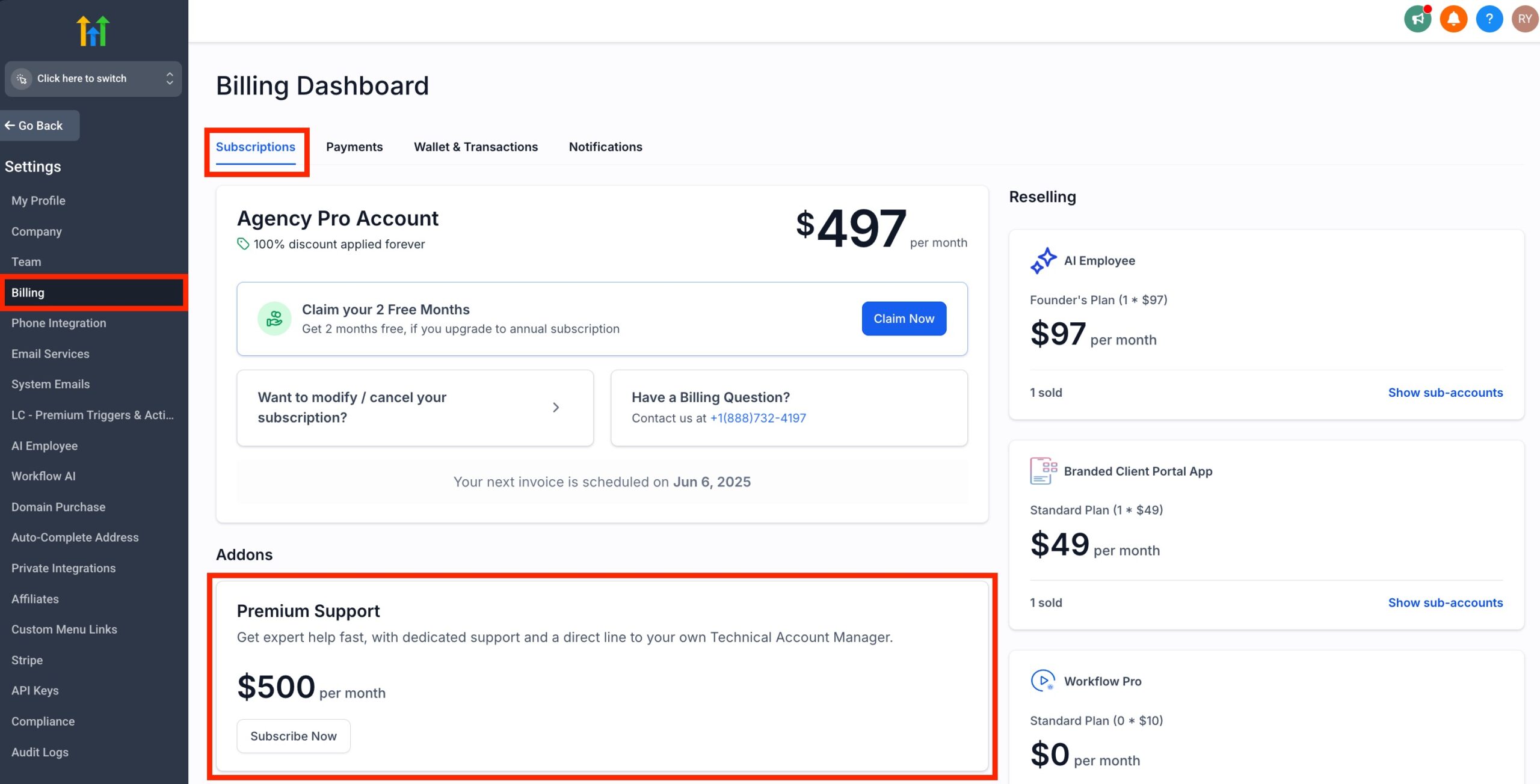
Step 1: Open Settings → Billing
- Log in to your agency dashboard.
- Click Settings in the left‑hand menu.
- Open the Billing tab.
- Scroll to the Add‑ons section and locate Premium Support.
- Click Subscribe Now.
This takes you to the Premium Support add‑on checkout.
Step 2: Choose Your Premium Support Plan
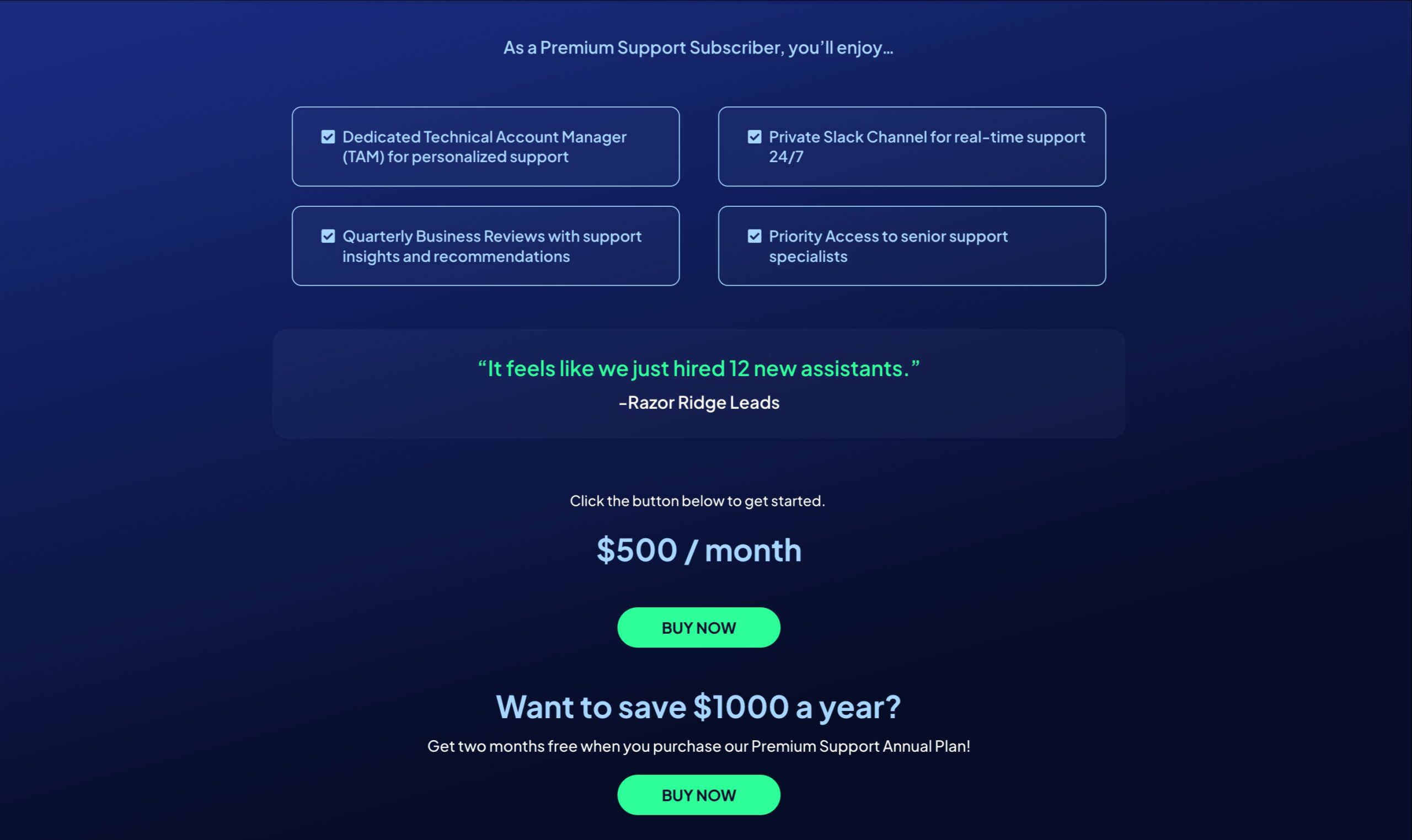
On the Premium Support screen you’ll see two primary options:
- Monthly plan – typically $500/month.
- Annual plan – billed once per year with an overall discount compared to paying monthly.
Choose the plan that matches how you budget for tools:
- Use monthly if you’re still proving the ROI or expect short‑term usage.
- Use annual if Premium Support is clearly a long‑term operational requirement—you’ll usually save the equivalent of at least one to two months of fees.
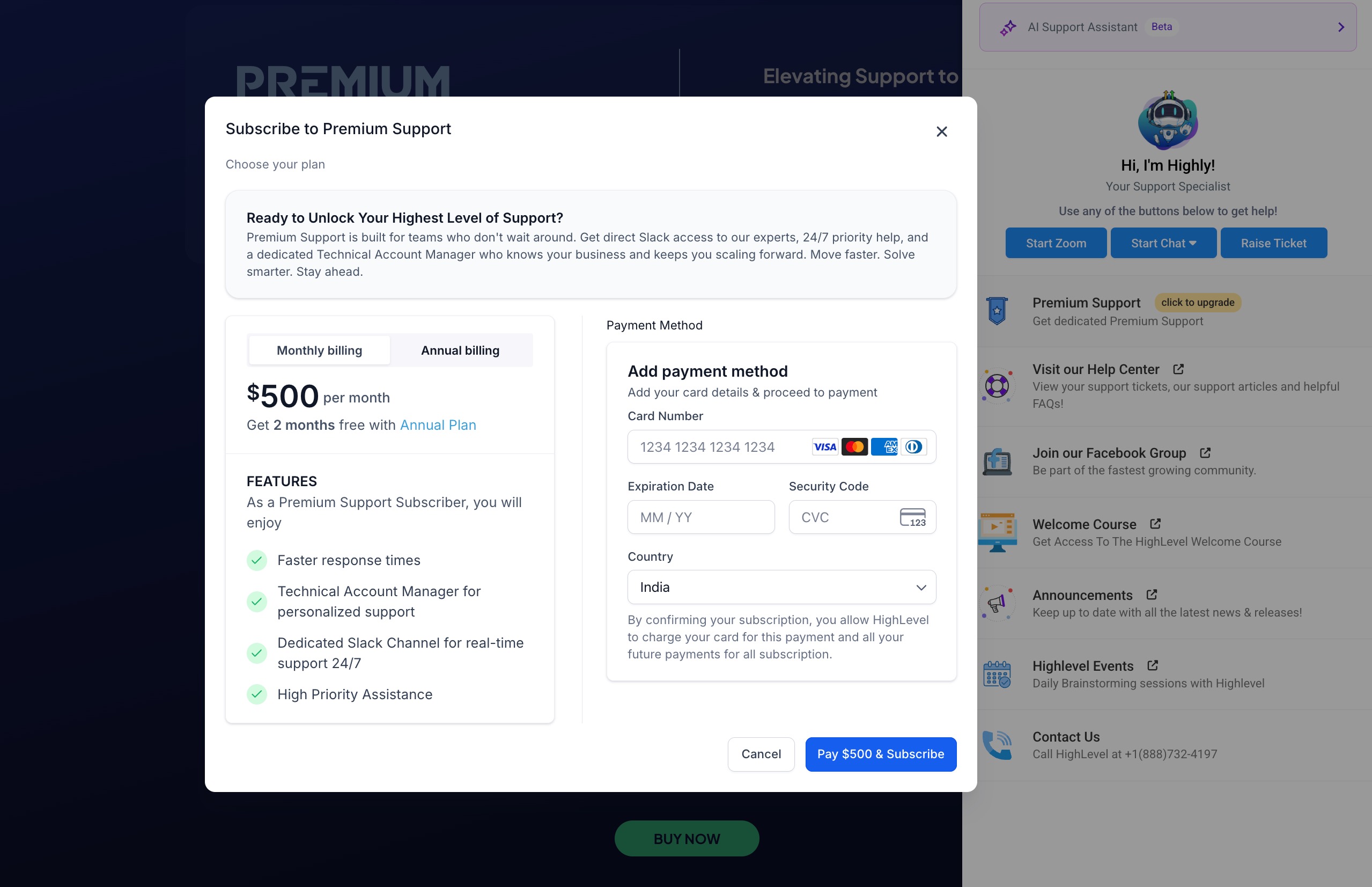
Then:
- Confirm your billing details.
- Enter or verify your payment method.
- Click Pay & Subscribe to activate Premium Customer Support.
Your account is now on Premium—next you’ll set up the communication channel.
Step 3: Create Your Dedicated Slack Channel
After your payment is processed, you’ll see a Slack button in the Premium Support panel.
- Click the Slack button to open the setup form.
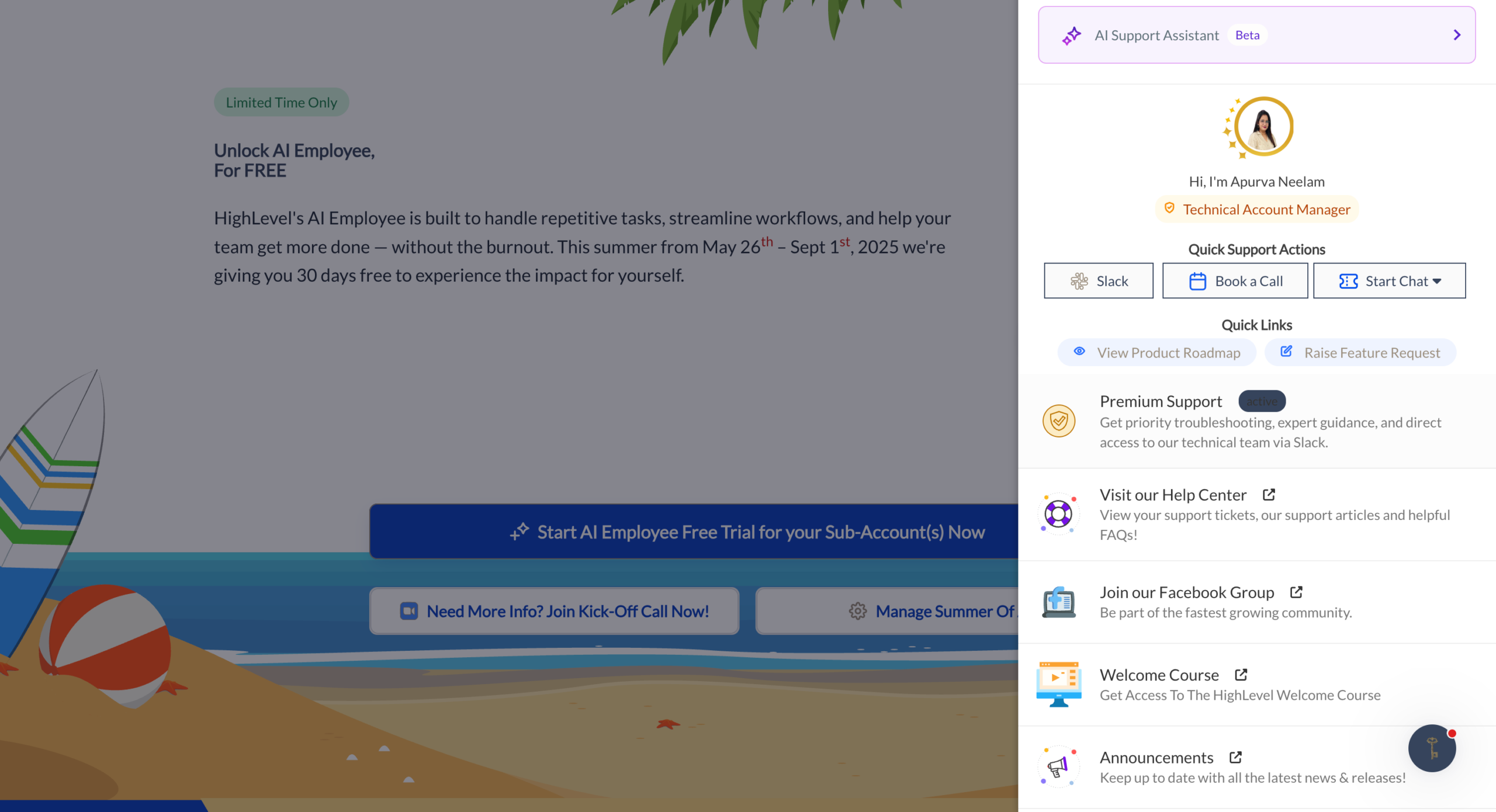
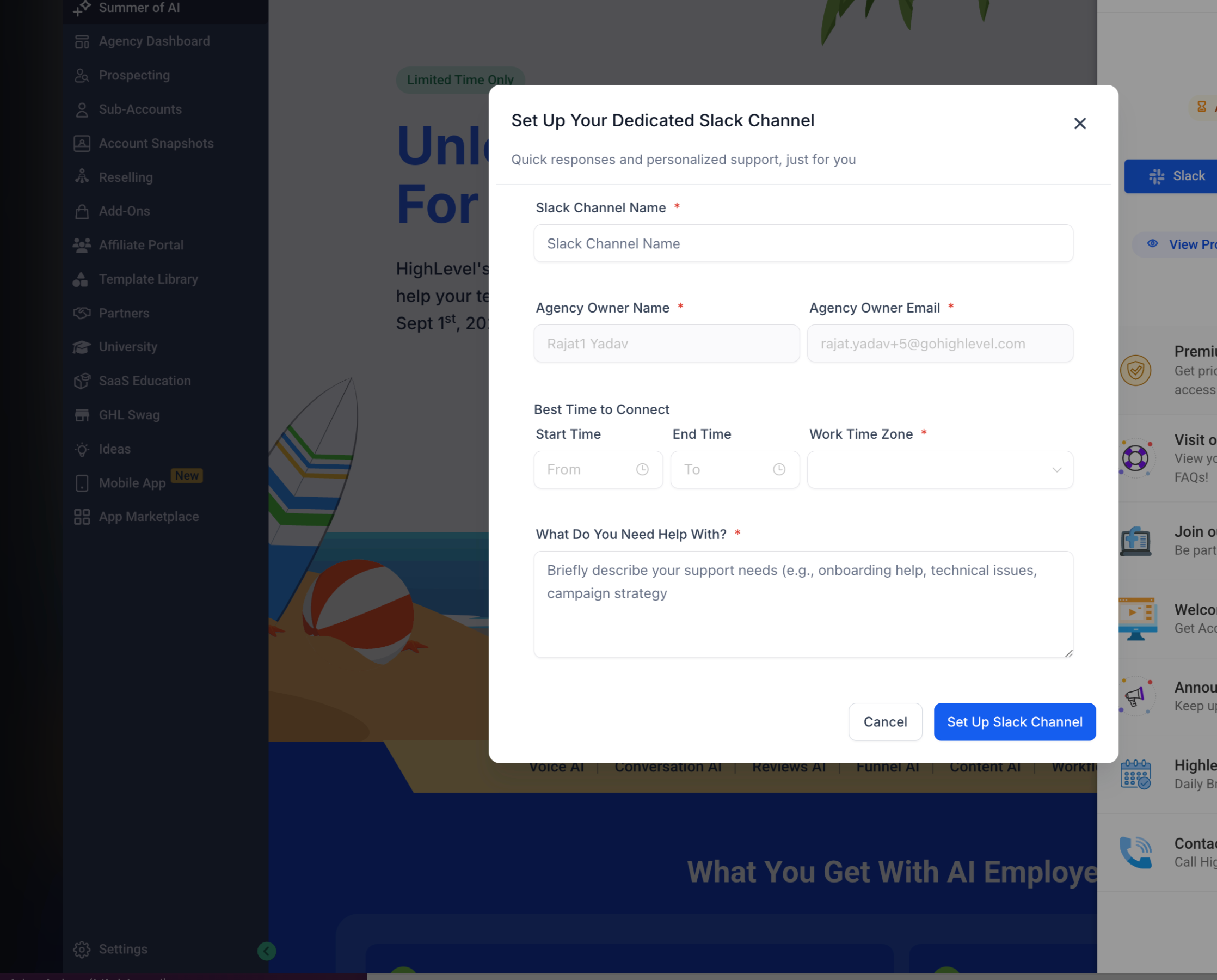
- Enter a channel name that’s easy for your team to recognize (for example,
#gohighlevel-premium-supportor#hl-support-agencyname). - Choose your preferred time to connect and set your time zone, so your Technical Account Manager knows when you’re typically available.
- Add a short note describing how you use GoHighLevel today and your top priorities (for example, "scaling SaaS sub‑accounts" or "consolidating multiple CRMs").
Once submitted, HighLevel will provision a dedicated Slack channel and invite you (and your team, if desired). This becomes your direct line into the Premium Support team and your TAM.
Want a smoother rollout? As you upgrade, you can also spin up a new GoHighLevel account or sub‑account using this free trial link and keep all of your core automations, pipelines, and support in one place.
What You Get With GoHighLevel Premium Customer Support
Here’s what Premium Support typically includes, beyond what you get with Standard Support:
Dedicated Technical Account Manager (TAM)
- One primary point of contact who knows your account history and goals.
- Help designing and troubleshooting advanced workflows, automations, and integrations.
- Strategic input on account structure, sub‑account strategy, and migration plans.
Priority Ticket Routing and Faster Response Times
- Tickets submitted from your Premium Support portal or Slack channel are tagged as priority.
- This usually means shorter wait times for chat, tickets, and Zoom sessions.
- Escalations happen faster because your TAM already understands your setup.
Private Slack Channel for Real‑Time Collaboration
- Chat directly with the Premium Support team and your TAM.
- Share screenshots, videos, and links for clearer troubleshooting.
- Loop in your team so everyone sees the same context and resolutions.
Quarterly Business Reviews (QBRs)
- Structured sessions that review ticket history, incident patterns, and feature usage.
- Identify recurring issues that should be fixed at the process or automation level.
- Align GoHighLevel’s roadmap and new features with your agency’s growth plan.
Proactive, Tailored Guidance
- Recommendations for funnel performance, automations, and reporting based on what they see in your account.
- Best practices for account hygiene—permissions, sub‑account structure, tagging, and more.
- Ideas to reduce manual support work your team is handling today.
Managing and Cancelling Your Premium Support Subscription
You manage Premium Customer Support from the same Billing area where you subscribed.
- To confirm your plan, go to Settings → Billing → Add‑ons and review the Premium Support section.
- To change your plan (for example, from monthly to annual), follow the prompts in the billing interface.
- To cancel Premium Support, use the manage/cancel option in the Billing panel. Your premium benefits will typically remain active until the end of your current billing period.
If in doubt, your TAM or the Premium Support team in Slack can clarify exactly when charges will stop and what changes when you downgrade back to Standard Support.
Premium vs Standard Support: Is the Upgrade Worth It?
Whether Premium Support is "worth it" comes down to risk, complexity, and opportunity cost.
Premium Support is usually a strong fit if:
- You’re losing billable hours chasing down support issues.
- A broken workflow or integration could mean tens of thousands in lost revenue.
- Your team isn’t deeply technical and benefits from having a trusted partner inside GoHighLevel.
Standard Support may be enough if:
- You’re in early implementation with a small number of accounts.
- Most of your work is done with out‑of‑the‑box templates and simple automations.
- You’re comfortable waiting in the regular queue for non‑urgent tickets.
A simple way to think about it:
If a single day of downtime on your key automations would cost more than a month of Premium Support, you’re very likely in the "upgrade" zone.
How Revset Labs Helps You Get the Most From Premium Support
Revset Labs is an AI Automation and Marketing Agency that specializes in helping agencies and businesses build, optimize, and scale their systems on GoHighLevel.
When you upgrade to Premium Customer Support, you unlock HighLevel’s internal experts. Pairing that with Revset Labs gives you:
- Done‑for‑you implementation of the workflows your TAM recommends.
- AI‑powered automations that reduce manual support work and follow‑up.
- Funnel, pipeline, and reporting builds that make it easier to show clients the value of your services.
If you want a partner who can both design the strategy and execute the builds inside your GoHighLevel account, Revset Labs bridges the gap between support advice and on‑the‑ground implementation.
And if you’re still evaluating GoHighLevel, you can start your free trial here and then bring in Revset Labs to design a premium‑ready setup from day one.
Frequently Asked Questions About GoHighLevel Premium Customer Support
What’s the difference between Standard and Premium Support?
Standard Support gives you 24/7 access to help docs, chat, and tickets with standard response times.
Premium Support adds:
- A dedicated Technical Account Manager.
- A private Slack channel for faster, clearer collaboration.
- Priority routing for your tickets and live support sessions.
- Quarterly Business Reviews and proactive guidance.
How much does GoHighLevel Premium Customer Support cost?
Pricing can change over time, but Premium Support is typically offered as:
- A monthly plan (around $500/month), or
- A discounted annual plan, paid once per year.
Check your Settings → Billing → Add‑ons page for the most current pricing in your account.
Who is eligible for Premium Support?
Premium Customer Support is generally designed for established agencies using GoHighLevel in production. Some limitations can apply—for example, certain reseller or special subscription types may not be eligible. If you’re unsure, your Billing page or Standard Support can confirm eligibility.
Can my whole team join the Slack channel?
Yes. Once your Premium Support Slack workspace and channel are created, you can invite team members so everyone sees updates, resolutions, and recommendations in one place.
How do I submit tickets through Slack?
Inside your dedicated Slack channel, you’ll be able to:
- Describe your issue or request.
- Attach screenshots, Loom videos, or links.
- Tag your TAM when something is urgent.
The Premium Support team will convert those conversations into trackable tickets on their side and keep you updated in the channel.
What happens if I cancel Premium Support?
If you cancel from the Billing page, Premium Support features usually remain active until the end of your current billing cycle. After that:
- You’ll return to Standard Support response times.
- Your dedicated Slack channel may be archived or closed.
- You’ll no longer have an assigned TAM or QBRs.
Your GoHighLevel account and automations continue to run; only the support tier changes.
If you’re ready to protect your revenue, de‑risk complex automations, and get a direct line into GoHighLevel’s experts, upgrading to Premium Customer Support is a straightforward next step.
And when you want help turning that extra support into concrete growth, Revset Labs is here to design and implement the systems that make the most of it.