
GoHighLevel’s standard support is solid when you are experimenting, onboarding a few clients, or still learning the platform.

But once you are running real revenue through funnels, calendars, and automations, the cost of a broken workflow, stuck funnel, or unexplained bug can easily dwarf the price of faster, more proactive support.
This is where GoHighLevel Premium Customer Support comes in. In this guide we’ll break down what you actually get, who it’s best for, and how to decide whether now is the right time for your agency to upgrade.
Along the way, we’ll also show you how to connect Premium Support with Revset Labs and a free GoHighLevel trial so you have both the platform and the strategy to back it up.
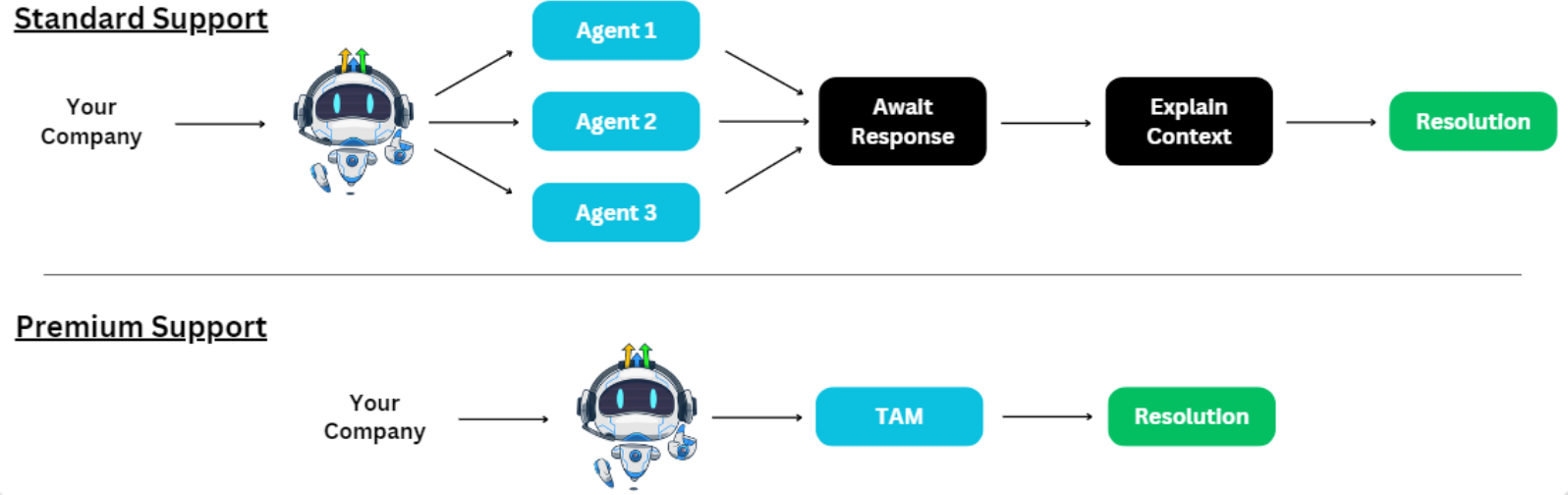
Who GoHighLevel Premium Customer Support Is Really For
Premium Customer Support is not aimed at brand‑new users who are still exploring GoHighLevel.
It is designed for:
- Agencies managing multiple client sub‑accounts in GoHighLevel.
- Teams whose pipelines, calendars, and automations are already driving predictable revenue.
- Power users who can feel every hour of downtime or support delay in their numbers.
- Businesses that want a named, strategic partner on GoHighLevel’s side instead of a generic support inbox.
If you are still testing the platform, standard support is usually enough while you get your foundations in place. But if you are already running serious volume or have clients relying on you to keep campaigns live, Premium Support starts to look like an insurance policy on revenue.
If you have not yet set up GoHighLevel for your agency, you can start a free GoHighLevel trial and build on a solid support plan from day one.
What You Actually Get with GoHighLevel Premium Customer Support
Premium Customer Support is more than faster replies. It gives you a tighter feedback loop and a more strategic relationship with HighLevel’s team.
Core components include:
Dedicated Technical Account Manager (TAM)
Instead of explaining your business from scratch in every ticket, you get a single point of contact who:
- Understands your agency model and client mix.
- Knows which sub‑accounts are most critical.
- Can advise on best practices, not just troubleshoot one issue at a time.
This is especially valuable if you are rolling out standard operating procedures (SOPs) across multiple niches or franchises.
Priority Issue Resolution
With Premium Support, your tickets are moved to the front of the queue:
- Chat and Zoom wait times drop from around 6 minutes (Standard) to roughly 1 minute.
- Email/ticket first‑response time drops from about 10 hours to around 3 hours.
That means bugs get acknowledged quickly, edge‑case questions do not sit for days, and you can keep campaigns moving instead of stalling while you wait.
Dedicated Slack Channel
Premium Support includes a private Slack channel shared with the GoHighLevel Premium Support team.
This gives you:
- Real‑time collaboration instead of back‑and‑forth email threads.
- A single place to track context on recurring issues.
- Faster clarification when you are in the middle of a launch or migration.
Proactive Strategic Support
Premium customers also get structured, proactive help, including:
- Quarterly Business Reviews (QBRs) to review performance and platform usage.
- Recommendations on how to stabilize your setup and remove risky workarounds.
- Guidance on new features that may simplify your stack or save you tools.
Revset Labs can sit alongside your Premium Support team to turn those strategic recommendations into concrete funnels, automations, and dashboards tailored to your agency.
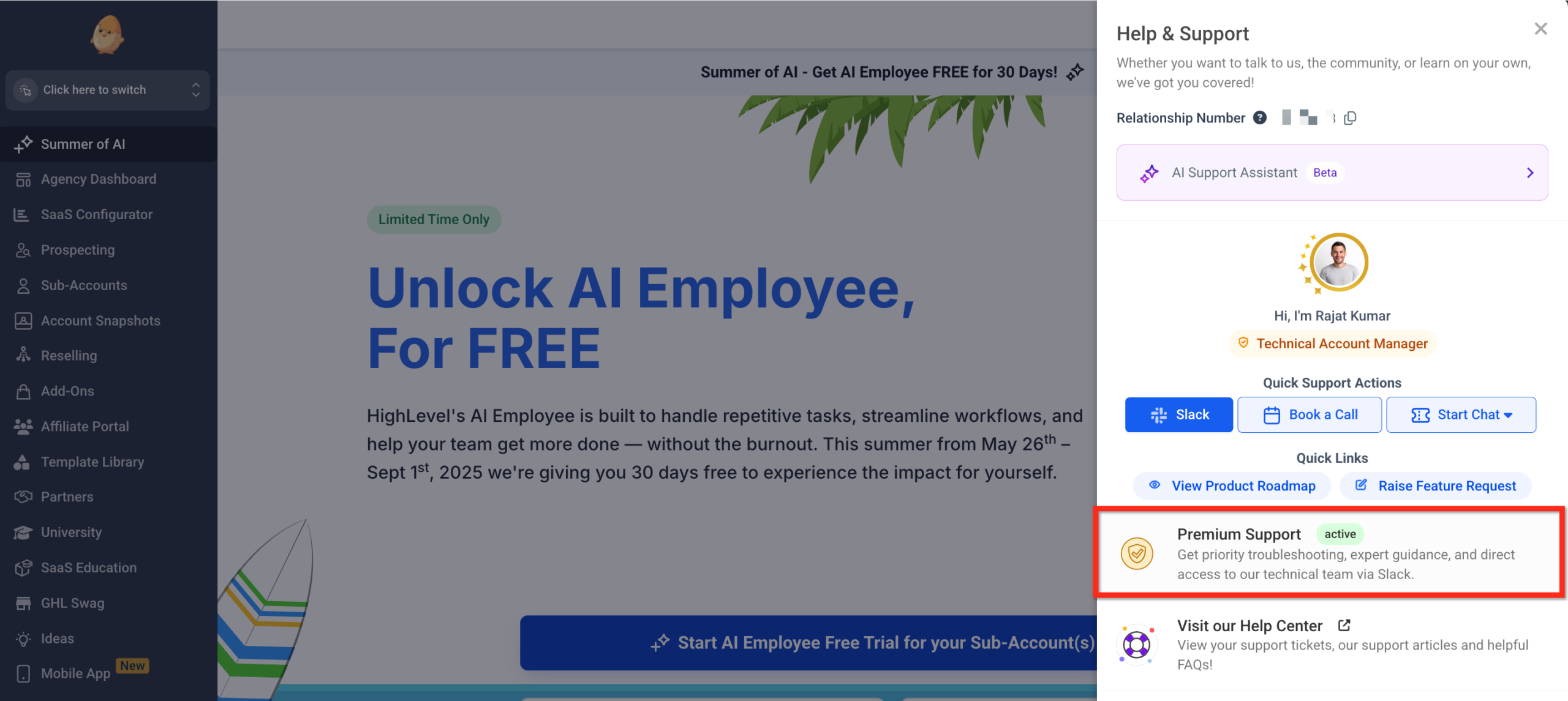
Premium Support Sidebar (In-App Experience)
Premium Support includes a refreshed sidebar inside your HighLevel dashboard so you can reach expert help without leaving your workspace. The Premium Support sidebar acts as your all-in-one hub for high-touch assistance and key resources.
- Use Slack Support to message the Premium Support team directly.
- Book a Call for live troubleshooting with one click.
- Start Chat to begin a real-time support conversation.
Support Channels and Response Times: Standard vs Premium
Here is a simple way to think about the difference between Standard and Premium support in day‑to‑day operations.
Standard Support (included with all plans):
- Chat support with typical wait times around 6 minutes.
- Ticket/email responses that often land within 10 business hours.
- Access to Help Center articles and community resources.
Premium Customer Support (paid add‑on):
- Chat and Zoom wait times targeted around 1 minute.
- Ticket first‑response times targeted around 3 hours.
- Dedicated Slack channel with the Premium Support team.
- Named Technical Account Manager.
- Proactive QBRs and strategic check‑ins.
If your business can absorb a few hours of downtime without meaningful impact, Standard Support is usually fine. If a broken calendar, form, or pipeline can derail a client launch or monthly revenue target, faster SLAs and a named owner start to pay for themselves.
To visualize the decision process, you can reference the flowchart image in this article that walks through when to stay on Standard vs when to upgrade to Premium.
How to Upgrade to GoHighLevel Premium Customer Support
Once you decide Premium Support is the right move, upgrading is straightforward.
Note: Premium Support is typically available after your account has been active for at least 90 days. Check your current eligibility inside your billing settings.
Step 1 – Open your agency billing settings
- Log into your GoHighLevel agency account.
- From the left‑hand menu, go to Settings.
- Click Billing.
Step 2 – Find the Premium Support section
Inside Billing, look for the Premium Support or Premium Customer Support section. This is where GoHighLevel lists the pricing and plan details.
You will typically see two options:
- Monthly plan (around $500/month).
- Annual plan (approximately $5,000/year), which often includes a discount compared to paying month‑to‑month.
Step 3 – Choose your billing cadence
Select the billing option that matches your cash‑flow and commitment preferences:
- Monthly is best if you want flexibility or are still validating Premium Support’s impact.
- Annual is ideal if you know you will rely on Premium Support long‑term and want to lock in savings.
Step 4 – Confirm subscription and payment details
- Click Subscribe or Upgrade.
- Confirm the card or payment method you want to use.
- Review any terms or conditions, then finalize the subscription.
Step 5 – Set up your dedicated Slack channel
After subscribing, you will receive instructions from the Premium Support team on how to:
- Create or connect a Slack workspace.
- Add your core team members.
- Establish expectations (who can open tickets, what belongs in Slack vs formal support tickets, and how to escalate critical issues).
If you prefer not to manage this rollout alone, Revset Labs can help you map out who should have access, how to structure your internal escalation process, and how to tie Premium Support into your client SLAs.
When Paying for Premium Support Makes Sense
Premium Support is an investment. The question is not “Is $500/month expensive?” but “How much does an unresolved issue actually cost us?”
You are a strong candidate for Premium Support if:
- You manage multiple client sub‑accounts and a single platform issue can trigger multiple client escalations.
- You have complex automations tied to revenue‑critical events (launches, bookings, renewals).
- Your internal team is lean, and you cannot afford them burning hours chasing support tickets.
- Your agency offers guarantees or tight SLAs to clients that depend on GoHighLevel staying stable.
You might wait on Premium Support if:
- You are still in the early stages of adopting GoHighLevel.
- Only a few flows are live and there is limited revenue at risk.
- You have in‑house technical operators who can absorb most troubleshooting.
As your GoHighLevel usage grows, revisit this decision. What is “nice to have” at 2–3 sub‑accounts often becomes mission‑critical at 20+.
If you are planning a big migration or rollout, consider pairing that project with both Premium Support and a free GoHighLevel trial in a new workspace so you can build with the right guardrails in place from day one.
How to Get the Most Value from Premium Support
Simply paying for Premium Support is not enough—you want it plugged into how your agency operates.
Here are practical ways to extract real ROI:
Use your TAM like a strategic partner
- Share your roadmap of upcoming launches, migrations, or big client onboardings.
- Ask for best‑practice architecture before you build complex automations.
- Review recent incidents together to identify patterns and preventative fixes.
Treat the Slack channel as your escalation lane
- Keep routine how‑to questions in the Help Center or standard chat when possible.
- Use Slack for high‑impact issues, unclear bugs, or time‑sensitive launches.
- Centralize internal notes so your team is aligned before escalating.
Prepare for QBRs with data
Before each Quarterly Business Review:
- Pull metrics on funnel performance, deliverability, and support tickets.
- List out recurring friction points (e.g. specific integrations, calendar setups).
- Bring 2–3 clear priorities you want Premium Support to help you improve.
This is also a perfect moment to involve Revset Labs to translate those strategic conversations into concrete implementation plans, SOPs, and automation builds.
How Revset Labs Fits In
Revset Labs is an AI automation and marketing agency that specializes in building revenue systems on top of GoHighLevel.
Where Premium Support focuses on keeping the platform healthy and responsive, Revset Labs focuses on:
- Designing funnels, nurture sequences, and automations that actually drive revenue.
- Cleaning up legacy setups so your account is stable before you scale.
- Implementing AI‑powered workflows that reduce manual work for your team.
A simple way to think about the split:
- GoHighLevel Premium Customer Support keeps the engine running smoothly.
- Revset Labs tunes and upgrades the engine so every campaign and client account performs.
If you are considering Premium Support because GoHighLevel has become mission‑critical for your agency, it is also a great time to tighten your strategy and execution. You can start a free GoHighLevel trial here, then work with Revset Labs to architect an automation and support stack that matches your growth goals.
Next Steps
- Evaluate how much revenue and client experience currently depend on GoHighLevel.
- Use the decision‑flow diagram in this article to determine whether Premium Support is the right move today.
- If the answer is yes, upgrade via your Billing settings and set up your dedicated Slack channel.
- In parallel, partner with Revset Labs to refine your funnels, automations, and internal processes so you get full leverage from both GoHighLevel and Premium Support.
Support quality becomes a growth constraint long before most agencies notice it. Addressing it early—with Premium Support on the platform side and Revset Labs on the strategy side—keeps your operations resilient as you scale.